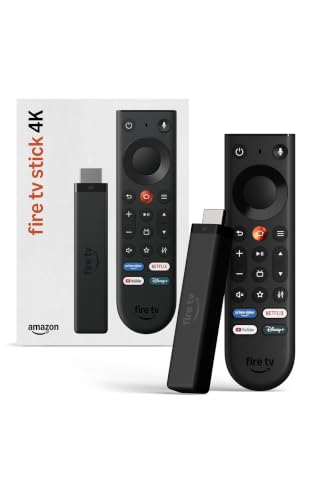
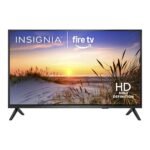
Priced in the mid-range for a 4K streaming stick, but a low user rating suggests poor value relative to competitors.
Price vs. rivals
Typical
CheaperTypicalPricier
At $59.99, this Fire TV Stick 4K is priced slightly above typical rivals like Roku and Chromecast, which often retail lower, but remains far more affordable than premium alternatives like Apple TV 4K.
Ease of use
Good 62/100
Setup is reasonably simple, but the interface's ad-heavy menus and occasional navigation hiccups can frustrate an average user.
Overview
The Amazon Fire TV Stick 4K review mostly comes down to one question: how much do you value a clean interface over raw features? At $60, it packs Dolby Vision, Wi-Fi 6, and a very clever remote. If you can tolerate Amazon’s ad-heavy home screen, it’s easily the best streaming stick for 4K TV with Dolby Vision at this price.
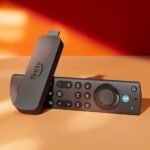
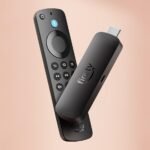
This is Amazon’s mid-range streaming dongle. It plugs into your TV’s HDMI port and gives you access to Netflix, Prime Video, Disney+, Apple TV, and hundreds of other apps in crisp 4K. It’s designed for people who want one box to rule them all — especially if you’re already buried in Amazon’s ecosystem. The main problem it solves is TV interface clutter: instead of relying on your TV’s slow, ad-ridden smart platform, you get a faster, more capable one. The trade-off is that Amazon’s own platform is also ad-ridden.
Key Features
4K picture with Dolby Vision and HDR10+ – This means Netflix, Disney+, and Prime Video look exactly as the director intended, with richer colors and deeper blacks. It supports both major HDR formats, so you don’t have to pick sides.
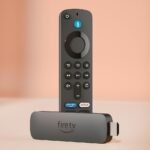
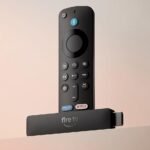
New Alexa Voice Remote (with recent apps buttons) – The remote now has dedicated buttons for Netflix, Prime Video, Disney+, and Apple TV. That saves you digging through menus. Plus, holding the Alexa button lets you search across apps, control smart home devices, or ask for the weather without typing.
Wi-Fi 6 support – If your router is semi-recent, this keeps the stream stable even when your household is clogging the bandwidth with Zoom calls and TikTok. It’s a genuine upgrade for apartment dwellers.
Fire TV Ambient Experience – Want your TV to act like a digital art frame when you’re not watching? You can display your own photos or licensed art. It’s a nice party trick that actually works well.
Alexa+ integration – The voice assistant is more conversational now. You can say “Alexa, find thrillers with a happy ending” and it usually gets it right. It’s far from perfect, but better than typing with a remote.
Fit for You
You have a 4K TV with Dolby Vision but the built-in smart platform is too slow to tolerate.
You buy almost everything from Amazon and want a single interface that highlights Prime Video content.
You’re tired of switching between your TV remote, a Roku remote, and a game controller just to watch stuff.
You want to yell “Alexa, pause” from the kitchen and have it actually work.
You’re setting up a vacation rental or guest room and need a cheap, self-contained streaming solution.
Uses
On a Friday night, you flop onto the couch, press the Netflix button on the remote, and the TV wakes up, switches to the right input, and loads the app. That convenience is the whole point of a streaming stick.
If you’re a cord-cutter with a Plex server or a Kodi setup, the Fire TV Stick handles those fairly well. You’ll need to side-load Kodi, which is an extra step, but it works once you do. During a power outage or when your Wi-Fi is acting up, you can still watch content you’ve downloaded to your phone or tablet and cast it to the TV.
Experience
Setup takes about ten minutes. You plug it in, connect to Wi-Fi, and log into your Amazon account. The instant you log in, it clutters the home screen with suggestions based on your shopping history, which feels a little creepy.
The remote is the highlight. It’s a comfortable size, not too cluttered, and the recent apps buttons actually prevent menu diving. The downside is it uses two AAA batteries, and there’s no find-my-remote feature on this model. If you lose it between the cushions, you’re hunting manually.
The biggest everyday annoyance is the interface. Amazon pushes its own content hard. Half the home screen is ads for Prime Video shows you haven’t asked about. You can’t fully remove them. If that drives you nuts, a Roku or Apple TV is cleaner.
Performance-wise, it’s snappy for a $60 stick. Menus scroll smoothly, apps open quickly. But owners commonly report Fire TV Stick 4K buffering and performance issues on demanding 4K streams, especially if their Wi-Fi isn’t strong. Wi-Fi 6 helps, but it’s not a magic bullet. If your router is in another room, expect occasional stuttering on heavy Dolby Vision content.
Pros and Cons
Pros
Excellent picture quality for the price. Dolby Vision and HDR10+ support means it future-proofs your viewing for the latest streaming standards.
Alexa voice search actually works. It searches across apps, so you don’t need to open Netflix to see if a movie is there.
Compact and easy to hide. It tucks behind the TV, making for a clean setup.
Wi-Fi 6 support. Provides a tangible stability boost over older Wi-Fi 5 sticks.
Cons
Heavy Amazon ad integration. The home screen is full of promoted content. You can’t disable it.
Remote lacks a headphone jack. The cheaper Roku Streaming Stick 4K has one for private listening.
Performance can stutter on crowded Wi-Fi. Despite Wi-Fi 6, it’s not immune to buffering in dense apartment buildings.
No find-my-remote feature. At this price, a Bluetooth tracker or a remote locator button would have been nice.
Advantages
Where this stick beats typical alternatives is simple. It supports both Dolby Vision and HDR10+. Roku supports Dolby Vision, but the HDR10+ support makes it a better match for Amazon Prime Video content. The voice remote is significantly better than Roku’s basic voice remote. Alexa understands natural language better. It’s also the cheapest way to get a polished 4K interface if you already trust Amazon with your data.
Full HDR support (Dolby Vision and HDR10+).
Superior voice search accuracy.
Dedicated app buttons on the remote.
Who Should Buy
Love it: Prime members who borrow from the Amazon lending library. People who use Alexa for lights, thermostats, and locks. Bargain hunters wanting the best streaming stick for 4K TV with Dolby Vision under $60.
Skip it: Anyone who hates ads in their menus. Get a Roku. Apple users deep in the Apple TV ecosystem. The Apple TV 4K is smoother and privacy-focused. People with hotel Wi-Fi or captive portals. Roku handles those better.
FAQ
Is the Amazon Fire TV Stick 4K worth it?
Yes, if you can live with Amazon’s ad-heavy interface. It delivers excellent 4K picture quality with Dolby Vision and HDR10+, strong voice search, and Wi-Fi 6 support for just $60. It’s a solid buy for anyone tired of their TV’s slow smart platform.
How does the Fire TV Stick 4K compare to the Roku Streaming Stick 4K?
In the Fire TV Stick 4K vs Roku Streaming Stick 4K debate, Roku has a cleaner, ad-light interface and a headphone jack on the remote. The Fire Stick wins on voice search quality and HDR10+ support. Pick your poison based on what annoys you less: ads or average voice commands.
What are the Fire TV Stick 4K Alexa voice remote features?
The remote has dedicated buttons for Netflix, Prime Video, Disney+, and Apple TV. The Alexa button lets you search across apps, control smart home devices, check the weather, and even play music hands-free. It’s responsive and conversational.
Does the Fire TV Stick 4K have buffering problems?
Some users do experience buffering, especially on dense 4K streams. The Fire TV Stick 4K buffering and performance issues are often linked to poor Wi-Fi placement. Wi-Fi 6 helps, but a wired Ethernet adapter (sold separately) is the only guarantee for trouble-free streaming.
Is the Fire TV Stick 4K safe to use?
Yes, it’s safe in the usual electronics sense. It runs cool and passes UL certifications. The main privacy concern is Amazon’s data collection for targeted ads, which is clearly stated in the terms of service. If that bothers you, don’t buy it.
Can you use the Fire TV Stick 4K without an Amazon account?
No. You must log into an Amazon account to activate the device. Without it, the device is essentially a brick. This ties the experience directly to Amazon’s ecosystem, for better or worse.
Final Verdict
The Amazon Fire TV Stick 4K is a weirdly easy recommendation despite its flaws. It does 4K Dolby Vision streaming for less than a dinner for two, and the remote is genuinely clever. The interface is a mess of ads, and performance can hiccup if your Wi-Fi is weak, but those are compromises you accept for the price.
If you want a cheap, capable streamer and don’t mind Amazon knowing what you watch, buy it. If you want peace and quiet from advertising, spend the extra $20 on an Apple TV or Roku.
The streaming stick market is crowded, and the Amazon Fire TV Stick 4K sits at a weird spot. It costs $59.99, which is mid-range for a 4K stick, but its average rating of 2.8 stars out of five tells you something’s off. On paper it looks good: Dolby Vision, HDR10+, a new remote with Alexa+. In practice, you get the usual Amazon trade-off — decent hardware weighed down by an ad-heavy interface and occasional buffering headaches. So how does it compare against the real contenders? Let’s break it down.
Product
Price Range
Key Strength
Key Weakness
Best For
Amazon Fire TV Stick 4K
Mid (~$60)
Alexa voice remote with live TV integration; Dolby Vision & HDR10+
Cluttered, ad-heavy interface; occasional buffering on busy home screens
Households already deep in Amazon’s ecosystem who want voice control
No HDR10+ (only Dolby Vision); less powerful voice search
Anyone who hates ads and just wants a fast, no-nonsense streamer
Google Chromecast with Google TV 4K
Mid (~$50)
Google Assistant + smart home controls; personalized recommendations that work
Remote is small and easy to lose; occasional stutter in heavy menus
Android/Google users who want a unified smart home remote
Apple TV 4K
Premium (~$130+)
Silky smooth interface; integrates with HomeKit, AirPlay, and Apple One
Expensive; requires iPhone for full setup convenience
Apple loyalists who value polish over price
Fire TV Stick 4K vs Roku Streaming Stick 4K
This is the most direct comparison. Both support Dolby Vision. Both stick into your HDMI port and disappear behind your TV. But the Roku Streaming Stick 4K costs about ten bucks less and runs a cleaner operating system. You know that moment when you just want to open Netflix, but the Fire TV Stick throws a row of sponsored content you didn’t ask for? Roku doesn’t do that. Its home screen is a simple grid of apps. The trade-off: Roku’s voice remote is weaker — it can search channels and launch apps, but it doesn’t control live TV or show you Alexa’s new “find shows faster” tricks. If your living room is already cluttered with Amazon packages and you say “Alexa” a dozen times a day, the Fire TV Stick 4K’s Alexa+ integration might be worth the annoyance. If you just want to watch The Bear without being sold a Fire tablet, get the Roku.
Fire TV Stick 4K vs Google Chromecast with Google TV 4K
Google’s stick costs about the same and looks similar on paper — both do Dolby Vision, both have a dedicated voice button. The real difference is how they handle your living room. The Chromecast with Google TV uses Google Assistant, which is excellent for controlling lights, thermostats, and any smart device you’ve got. The Fire TV Stick 4K can do that too, but only if you already own Alexa-compatible gear. Otherwise, Google’s recommendation algorithm feels less pushy and more personal — it learns what you watch and suggests stuff you actually want, not stuff Amazon wants to promote. The downside: Google’s remote is tiny, and if you drop it between couch cushions you’ll spend ten minutes fishing it out. The Fire TV Stick’s remote is bigger and has numbered buttons for live TV, which matters if you watch cable-replacement services like Sling or YouTube TV. If your TV is just a window into streaming apps, go Google. If you flip between live channels and apps, stick with Amazon.
Fire TV Stick 4K vs Apple TV 4K
This isn’t really a fair fight on price — the Apple TV 4K costs more than double. But for the extra money you get a dead-silent, butter-smooth interface that never stutters, no ads anywhere, and tight integration with iCloud photos, AirPods, and Arcade. The Fire TV Stick 4K can’t match that polish. What it can do is save you seventy bucks and still give you good picture quality. If you’re already paying for Apple One and own an iPhone, the Apple TV 4K is the best streaming stick (well, box) you can buy. If you’re budget-conscious or just want a streaming stick that does 4K HDR without breaking the bank, the Fire TV Stick 4K is a fine choice — as long as you’re okay with Amazon occasionally trying to sell you a sweater between episodes.
So who should buy the Amazon Fire TV Stick 4K? You, if you’ve got an Alexa smart speaker in the room, watch a mix of live TV and streaming, and can stomach an interface that’s more marketplace than menu. Who should skip it? Anyone who values a clean, fast experience over voice tricks — grab the Roku Streaming Stick 4K instead. And if you want the silkiest streaming experience money can buy, even if it costs more, the Apple TV 4K is still the real “best streaming stick for 4K TV with Dolby Vision” in 2026 — but prepare your wallet.
Ready to decide on the Fire TV Stick 4K?
See today’s price, stock and delivery options on Amazon.