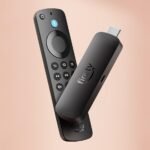
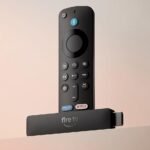
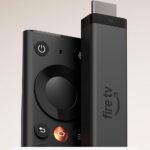
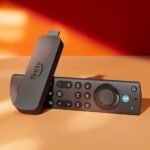
It delivers a strong mix of advanced features, voice search, and streaming variety at a fair price for its category.
Price vs. rivals
Pricier
CheaperTypicalPricier
Priced at the higher end of the mainstream streaming stick range, reflecting the advanced features like Wi-Fi 6 and AI-powered search.
Ease of use
Excellent 85/100
The Fire TV Stick is generally easy to use for an average person due to its simple plug-and-play setup, intuitive remote with Alexa voice search, and a familiar streaming interface, though occasional menu navigation and Wi-Fi setup might require minor effort.
Overview
The Fire TV Stick 4K Plus is Amazon’s latest streaming dongle, built for anyone who wants 4K HDR, Dolby Atmos, and a faster, more voice-driven interface. It solves the problem of a slow, cluttered smart TV by giving you a snappy, dedicated streaming box that puts apps and live TV front and center. If you already live in the Amazon ecosystem – Prime Video, Alexa, Ring doorbells – this thing slides right in. If you don’t, it still works fine, but you might pay for a remote button that does nothing for you.
Key Features
Wi-Fi 6 support – You’ll notice this if your router is Wi-Fi 6 capable. Less buffering when the whole family is streaming, and faster channel switching. In a crowded apartment building, it helps a lot.
Alexa Voice Remote (with the + button) – The new “Alexa+” button fires up an AI-powered search that can find shows by mood, actor, or even a vague description. It’s surprisingly good at “that movie where a woman runs a flower shop in a small town.”
AI-powered Fire TV Search – This isn’t just voice search. It learns your habits and surfaces recommendations across apps. The catch: it works best when you use Amazon services. Outside those, results are more generic.
Dolby Vision, HDR10+, and Dolby Atmos – The picture quality is what you’d expect from a premium streamer. Dark scenes stay dark without crushing blacks, and Atmos audio (if you have a soundbar that supports it) feels more spacious.
Free and live TV built in – Amazon’s free ad-supported channels (like Freevee) and live news are stitched into the home screen. You don’t need a separate app. Handy for catching headlines without digging into a subscription.
Fit for You
You’re tired of your smart TV’s slow menu and want something that boots to Netflix in 3 seconds flat.
You have a Wi-Fi 6 router and a 4K TV in a room far from the router – this stick handles distance better than the old model.
You use Alexa for lights, thermostats, or shopping lists and want the TV remote to do double duty as a smart home controller.
You watch a mix of Prime Video, Netflix, Disney+, and live sports, and you hate scrolling through six apps to find what you actually want to watch.
Uses
Saturday morning: you’re making breakfast and want to catch the news. Press the live TV button on the remote, and you get a grid of free channels – NBC News, Reuters, Pluto TV – without opening a single app. It’s fast enough that you don’t miss the first weather report.
Movie night: you’ve got four people in the house, each streaming something different on their phones. The Fire TV Stick 4K Plus with Wi-Fi 6 keeps your 4K HDR stream steady while the others hog bandwidth. You’ll still get a hiccup if someone’s uploading a huge file, but it’s rare.
Late-night “what was that actor’s name?” moment: hold the Alexa button and say “The guy from Mad Men who was in the John Wick movies.” It pulls up the actor’s filmography and offers you a way to watch. That’s the kind of search that actually feels helpful, not gimmicky.
Experience
Setting it up takes about five minutes: plug into HDMI, attach the power cable (the included USB power adapter is a must – don’t use a TV’s USB port, it won’t supply enough juice), connect to Wi-Fi, and log into your Amazon account. The remote pairs automatically. No fuss.
Daily use is where the little things add up. The remote is grippy and the buttons are clicky – not mushy like some Roku remotes. Volume and mute controls work over IR, so they’ll control most TVs and soundbars, but not all. One annoyance: the remote has a small “free” and “live” button that’s easy to hit by accident when you’re reaching for the directional pad. You’ll get used to it after a week.
The home screen is Amazon-heavy. You’ll see Prime Video rows and ads for Amazon channels before you see your other apps. If you mostly use Netflix and YouTube, you can rearrange the app bar, but the sponsored content stays above it. That’s the price of a $70 stick that has a good processor and Wi-Fi 6.
Noise? The stick itself is silent – no fan. The power adapter can hum faintly if you have sensitive ears, but most people won’t notice. Storage isn’t expandable, so if you download a lot of apps or games, you might hit the 8 GB limit after a dozen or so heavy ones. Casual users won’t care.
Pros and Cons
Pros
Fast performance with Wi-Fi 6 – In real-world use, app launches and navigation are snappy, especially compared to the previous Fire Stick 4K. No lag when scrolling through Disney+.
Alexa+ search actually works – It’s not just voice commands. You can say “Find a thriller with a twist ending I haven’t seen” and get reasonable picks. A nice step up from plain voice search.
Dolby Vision and Atmos support – If your TV and sound system support these, you get the full cinema experience without a $200 box.
Tons of apps and services – You can install pretty much every streaming service, including Apple TV+, HBO Max, and even some niche ones like Kanopy.
Remote finder feature – Lost the remote between the couch cushions? Ask your Echo device to find it. The remote will beep. That’s saved me twenty minutes of frustration.
Cons
Home screen is Amazon-ad heavy – You can’t remove the sponsored rows. If you hate the feeling of being upsold, a Roku interface is cleaner.
Remote button can’t be remapped – The Prime Video and Alexa buttons are stuck. You can’t reassign them to launch YouTube or Plex. Roku lets you do that with the “*” button.
No gigabit Ethernet in the box – You can buy an adapter, but it costs extra. If your Wi-Fi is unreliable, the Roku Streaming Stick 4K also doesn’t have Ethernet built in, but some competitors in this price range do.
Micro-USB power cable – Amazon still uses micro-USB (not USB-C). It’s a small annoyance if you have a bunch of USB-C cables already and want one less cable type lying around.
Privacy concerns – The stick is always listening for the Alexa wake word unless you mute the microphone (which you can do with a physical mute button on the remote). Some folks find that creepy.
Advantages
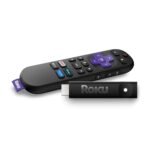
Over the Roku Streaming Stick 4K, the Fire TV Stick 4K Plus offers Wi-Fi 6 (Roku’s stick is Wi-Fi 5). If you have a modern router, that’s a real difference in busy households.
The Alexa voice remote is more powerful than Roku’s voice search. Roku’s voice search finds apps and titles; Amazon’s can answer questions and control smart home devices.
If you’re a cord cutter who uses free ad-supported TV (Pluto, Freevee, Tubi), Amazon pulls them all into a single live TV guide. Roku has a similar feature, but it’s not as tightly integrated.
Price: $69.99 puts it right between the basic Fire Stick 4K (often $49.99) and the Fire TV Cube ($139.99). For the Wi-Fi 6 and improved voice search, the extra $20 over the old 4K stick is worth it for many.
Who Should Buy
Buy it if: You have a Wi-Fi 6 router, you’re deep in the Amazon ecosystem, and you want the fastest streaming stick under $100. Also if you rely on live TV and free channels.
Buy it if: You’re a cord cutter who wants one search box to find shows across Netflix, Hulu, and Prime without opening each app separately.
Skip it if: You hate Amazon’s home screen ads and prefer a neutral, app-grid layout. The Roku Streaming Stick 4K is a cleaner alternative, even if it lacks Wi-Fi 6.
Skip it if: You only watch Netflix and YouTube and don’t need voice search. The $30 Fire TV Stick Lite will do the job for half the price.
Skip it if: You have a TV with a very fast interface already (like an Apple TV or an Nvidia Shield). This stick won’t feel like an upgrade.
FAQ
Is the Fire TV Stick 4K Plus worth it?
If you have a 4K TV and a Wi-Fi 6 router, yes – it’s the smoothest streaming stick Amazon sells at this price, and the new Alexa search is genuinely useful for finding content across services.
How does the Fire TV Stick 4K Plus compare to the Roku Streaming Stick 4K?
The Fire TV Stick 4K Plus has Wi-Fi 6 and a smarter voice assistant, while the Roku has a cleaner interface and more customizable remote buttons. Choose Fire TV for speed and ecosystem; choose Roku for simplicity.
Can I use the Fire TV Stick 4K Plus without an Amazon account?
Technically you can set it up with a guest profile, but you’ll lose Alexa features, app purchases, and most personalization. You really need an Amazon account to get full use out of it.
Does the Fire TV Stick 4K Plus support Dolby Atmos?
Yes, it passes Dolby Atmos through HDMI. You’ll need a soundbar or AV receiver that supports Atmos, but the stick itself handles the signal without issue.
How long does the Fire TV Stick 4K Plus last?
Owners typically get 3–5 years before the interface feels slow or Amazon stops pushing major software updates. The stick itself is reliable, but the processor will eventually age out of new features.
Is the Fire TV Stick 4K Plus good for live sports?
It works great for services like ESPN, YouTube TV, or Sling. The Wi-Fi 6 helps reduce buffering during high-motion streams, but your actual sports experience depends more on your internet speed and the source app.
Final Verdict
The Fire TV Stick 4K Plus is the best streaming stick for anyone who wants Wi-Fi 6 speed and Alexa smarts without spending over $100. It has real quirks – ads on the home screen, a locked remote button – but for the price, you get a fast, future-proof device that handles 4K HDR and Dolby Atmos without drama.
One thing to keep in mind: this stick rewards being in Amazon’s world. If you’re not a Prime member or you hate voice assistants, the standard Fire TV Stick 4K (or a Roku) might be a better fit. But if you want the best Fire TV Stick 4K Plus review verdict short: it’s a solid buy for most cord cutters, especially those who already ask Alexa to turn off the lights.
At $69.99, the Fire TV Stick 4K Plus sits in a weird spot. It’s cheaper than an Apple TV 4K by a long shot, but costs twice what a basic Roku Express asks. You get Wi-Fi 6, a voice remote that actually finds things without you remembering the exact title, and Alexa baked into everything. The Fire TV Stick 4K Plus Alexa voice remote features are the core reason to buy this over a cheaper stick. But Roku has the simpler interface. Google has the search. Apple has the speed. You need to pick your trade-off.
Product
Price Range
Key Strength
Key Weakness
Best For
Fire TV Stick 4K Plus
~$70
Wi-Fi 6, Alexa search, free live TV channels
Ads on the home screen, Amazon ecosystem bias
Prime subscribers, Alexa household
Roku Streaming Stick 4K
~$50
Clean, neutral interface; works with every service
No voice search as capable, slower processor
People who hate platform bias
Chromecast with Google TV 4K
~$50
Google Assistant, cross-service search
Lacks Wi-Fi 6, remote feels cheap
Google household, YouTube users
Apple TV 4K
~$130
Fastest chip, no ads, great for Apple services
Expensive, remote is divisive
Apple One subscribers, performance seekers
Fire TV Stick 4K Plus vs Roku Streaming Stick 4K
If you just want to watch Netflix, Hulu, and Disney+ without anyone pushing their own storefront on you, Roku is still the answer. The Roku Streaming Stick 4K costs about $50 — twenty bucks less than Amazon’s stick — and its home screen is a grid of your apps. No ads. No “you might also like” clutter. But the trade-off is that Roku’s voice search is slower and dumber. You say “find that action movie with the guy from Jurassic Park” and it stares at you. The Fire TV Stick 4K Plus, with its AI-powered search and Alexa, actually gets it. It finds the movie. It opens the app. It’s a genuine time-saver if you watch a lot of stuff across different services. The Roku’s simplicity is real, but the Fire Stick’s search gives you something back for the extra $20.
Fire TV Stick 4K Plus vs Chromecast with Google TV 4K
Google’s Chromecast with Google TV 4K also costs around $50 and also runs an app-based interface. The main difference is the voice assistant — Google Assistant vs Alexa — and the network hardware. The Chromecast uses Wi-Fi 5. The Fire TV Stick 4K Plus has Wi-Fi 6. If your router is newer and your living room is far from it, the Fire Stick wins on Fire TV Stick 4K Plus Wi-Fi 6 performance by a noticeable margin. Buffering drops, streams start faster. The Chromecast’s remote, meanwhile, feels lighter and cheaper in the hand — the Fire Stick’s remote has heft, dedicated app buttons, and a volume rocker that doesn’t wobble. But Google’s search is excellent at pulling results from YouTube and your Google Photos. If you live in Google’s world, the Chromecast is the better fit. For everyone else, the Fire Stick’s hardware edges ahead.
Fire TV Stick 4K Plus vs Apple TV 4K
The Apple TV 4K costs almost twice as much. You get the A15 Bionic chip, which makes everything feel instant. No lag, no waiting for thumbnails to load. The interface has zero advertising. It’s clean, fast, and expensive. The Fire TV Stick 4K Plus is slower — you’ll wait a second here and there for menus to render — but it’s also $60 cheaper. The question is whether you value raw speed and a clean interface over saving money and having Alexa. For most people, the answer is saving money. But if you already use Apple One, buy movies from iTunes, and want the fastest possible experience, the Apple TV 4K is the only real alternative worth the premium. For everyone asking “is Fire TV Stick 4K Plus worth it”, the answer is yes — unless you’re already deep in Apple’s ecosystem.
Pick the Fire TV Stick 4K Plus if you have a Wi-Fi 6 router, say “Alexa” more than “Hey Siri”, and want the best search for cord cutters jumping between Netflix, Hulu, and Prime Video. It’s the best streaming stick for cord cutters who want voice control that actually works across services. Pick the Roku Streaming Stick 4K if you want the simplest interface with no platform pushing. Pick the Apple TV 4K if budget isn’t a concern and you want the fastest, cleanest streaming box available. The Fire Stick wins the middle ground for most people, and the Wi-Fi 6 and Alexa search are the reasons why.
Ready to decide on the Fire TV Stick 4K Plus?
See today’s price, stock and delivery options on Amazon.