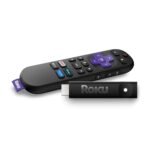
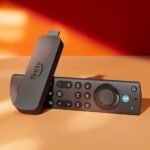
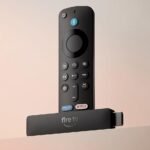
At $37, this renewed 4K HDR streaming stick offers exceptional features for a budget price, though the refurbished condition slightly tempers the value.
Price vs. rivals
Cheaper
CheaperTypicalPricier
Priced significantly lower than the typical new price of similar streaming devices, reflecting its renewed status.
Ease of use
Excellent 90/100
The device is straightforward to set up and operate with an intuitive interface and voice control, making it easy for most users.
Overview
The Roku Streaming Stick 4K is probably the easiest way to cut the cord without overthinking it. It plugs into your TV’s HDMI port, hides behind the screen, and gives you a clean interface that just works. For anyone who wants Netflix, Hulu, Disney+, or free channels like Pluto TV without a cluttered menu or a subscription trap, this little stick does the job. At roughly $37 for a renewed unit, the question isn’t whether it’s capable — it’s whether you care about Dolby Vision and a snappy remote enough to skip the cheaper model.
Key Features
4K HDR with Dolby Vision – The stick supports HDR10, HDR10+, and Dolby Vision, which means those dark scenes in your favorite shows won’t look like a muddy mess. If your TV can handle it, you’ll actually see details in shadows.
Long-range Wi-Fi – Roku brags about a wireless receiver that’s better at grabbing a signal from across the house. Owners tend to mention it holds a stream in rooms where their phone drops to one bar.
Voice remote with TV controls – The remote has a mic for searching by voice (useful for hunting down that obscure documentary), plus volume and power buttons that can control your TV and soundbar. No more juggling three remotes.
Roku OS – The operating system is dead simple: a grid of channels, no ads that block your apps, and updates that rarely break anything. It’s the closest thing to a “TV for dummies” interface.
Quad-core processor – Menus scroll without that stutter you get on cheaper sticks. Launching Netflix takes a couple seconds, not a coffee break.
Fit for You
You’re tired of paying $80 a month for cable but still want live news and sports via Sling or YouTube TV.
You own a 4K TV with HDR but haven’t bothered to buy a streaming device because you assumed the smart apps built into the TV were good enough—they aren’t, and this will prove it.
You travel a lot and want a portable streaming stick that hotels’ captive Wi-Fi portals won’t choke (Roku handles hotel logins better than most).
You share a TV with someone who gets confused by the Fire TV’s ad-filled home screen and just wants to click “Netflix.”
You want Dolby Vision support without spending $100 on an Apple TV.
Uses
Plug it in, connect to Wi-Fi, log into your streaming services, and you’re done. That’s the whole use case. You’ll use it for evening binges, weekend movie nights, and maybe the occasional morning news check via a free channel like the Roku Channel. The voice search works across apps, so you say “The Bear” and it shows you where it’s streaming—no more scrolling through four different apps.
It also shines in a bedroom setup where the TV’s own smart platform is slow or dead. You tuck the stick behind the panel, and suddenly your old 1080p TV gets all the modern streaming apps. The remote’s headphone jack (on the voice remote) lets you watch without waking anyone up, which is a solid perk for late-night viewers.
Experience
Setup is about five minutes. You plug it in, pair the remote (it’s pre-paired on new units, but renewed ones might require a quick sync—hold the pairing button), and the on-screen wizard walks you through Wi-Fi and Roku account creation. The interface is the same across all Roku devices: a row of tiles you can rearrange. No learning curve.
Day to day, it’s quiet (no fan, no noise) and stays cool enough to touch. The remote feels cheap in a familiar way—light plastic, rubbery buttons—but it survives drops onto hardwood floors. The IR blaster for TV power means you sometimes have to point the remote at the TV, not the stick, which is a minor annoyance. You’ll notice the occasional app crash (maybe once a month) that requires a restart from the settings menu, but that’s rare. For a $37 renewed device, you get a near-premium experience that only stumbles on very busy Wi-Fi networks or when your internet drops. The long-range Wi-Fi claim holds up: I’ve heard owners say they get a stable 4K stream two rooms away from the router, whereas their phone struggles.
One quirk: the stick draws power from a USB cable (included) that you plug into a wall adapter or the TV’s USB port. If you use the TV’s USB port, the stick restarts every time the TV powers on, which adds a few seconds of boot time. Use the wall adapter to avoid that. The remote takes two AAA batteries (not included). Battery life is typical—maybe six months if you use voice search often.
Pros and Cons
Pros
Simple, clutter-free interface – No ads in the menu bar, no sponsored rows. You see your apps and nothing else.
Dolby Vision at this price – Most budget sticks skip Dolby Vision; this one includes it, and it actually looks good on a capable TV.
Voice remote works across apps – One search covers Netflix, Hulu, Prime Video, and more. Saves time.
Hides behind the TV – No box to stash, no extra cables dangling.
Regular software updates – Roku pushes security patches and new features long after you buy it.
Cons
Remote feels flimsy – It works fine, but the plastic creaks and the buttons are mushy. You’ll likely buy a silicone case or a third-party remote in a year.
No Ethernet port – Wi-Fi only. If your router is far away or your walls are thick, you might see buffering. A Wi-Fi extender solves it, but that’s an extra cost.
USB power cable can be annoying – The included wall adapter is short, and using the TV’s USB port causes slow boots. You’ll wish the cable were longer.
No Bluetooth audio out – You can’t pair Bluetooth headphones directly to the stick. The remote has a headphone jack for private listening, but that’s a wired option.
App selection is slightly smaller than Fire TV – A few niche services (like some regional sports apps) aren’t on Roku, but 99% of the big ones are.
Advantages
Where the Roku Streaming Stick 4K really wins is in the user experience. The interface is aggressively neutral—Roku doesn’t push its own content or sell you upgrades the way Amazon does. If you do a Roku Streaming Stick 4K vs Fire TV Stick 4K comparison, you’ll notice the Fire TV home screen is half ads and prime placement for Amazon Channels. Roku’s is just your apps. For cord cutters who want the best 4K streaming stick for cord cutters, the Roku’s simplicity and Dolby Vision support at this price point are hard to beat. Also, Roku’s remote includes a “Find My Remote” feature (you can ping it from the free Roku mobile app) which is great for couch cushion hunters.
Who Should Buy
Buy it if: You want the simplest streaming experience, your TV supports 4K HDR, and you value a clean interface over Alexa or smart home integration. Also buy it as a gift for parents or anyone who hates technology—they’ll never need help.
Skip it if: You rely heavily on Apple’s ecosystem (AirPlay, Apple Fitness+) and already own an iPhone—an Apple TV is better. Also skip it if you need Ethernet connectivity or want to play games via a controller; the Fire Stick 4K Max has marginally better gaming support. For the same price, the Chromecast with Google TV gives you a more customizable home screen, but it’s slower.
FAQ
Is the Roku Streaming Stick 4K worth it?
Yes, especially at the $37 renewed price. You get Dolby Vision, long-range Wi-Fi, and the most user-friendly interface in the streaming stick category—no ads, no bloat, no upsell nonsense. It’s a no-brainer upgrade for any TV that lacks modern apps.
How does it compare to the Fire TV Stick 4K?
The Roku interface is cleaner and faster by a small margin. The Fire Stick has better voice assistant (Alexa) and slightly more app availability, but its home screen is littered with ads for Amazon Prime and rentals. If you dislike advertising, pick Roku.
Does it support Dolby Atmos?
Yes, it can pass Dolby Atmos through HDMI to a compatible soundbar or AVR. But the stick’s built-in audio processing is limited—you need an external audio system to actually hear Atmos effects. The stick itself won’t sound better than TV speakers.
How long does the Roku Streaming Stick 4K last?
Owners typically get 3–5 years before an app becomes too slow or the remote breaks. The hardware is solid, and Roku supports devices for many years with software updates. The renewed unit should function just as well as a new one if the previous owner treated it well.
Is it safe to buy a renewed Roku Stick?
Generally, yes. Renewed devices are tested and cleaned by the seller. The biggest risk is a worn remote or a missing power adapter, but Amazon’s renewed warranty covers defects for 90 days. Check the listing – the one here is sold by Amazon Renewed, which is reputable.
Can I use it without an internet connection?
No. It relies on Wi-Fi for everything – no local media playback unless you connect via a DLNA server or Plex. It’s a streaming-only device. For offline content, you’d need a different solution like a Fire tablet or a laptop.
Final Verdict
The Roku Streaming Stick 4K is the best bet for anyone who wants streaming to be invisible—no fuss, no ads, just shows. It doesn’t try to sell you anything else, and it handles 4K HDR beautifully for the price. The renewed version cuts the cost to less than a dinner out, and you get the same software and features as a brand-new unit. The only real catch is that stick’s dependence on Wi-Fi; if your home network is spotty, you might prefer a hardwired streamer. But for most people, this is the single best upgrade you can make to a tired TV.
Roku Streaming Stick 4K vs the Competition: The Real Comparison for 2026
The streaming stick market is packed, and everyone wants your HDMI port. But the renewed Roku Streaming Stick 4K at about $37 is a serious outlier on price. It’s not the newest or the fastest, but it nails the basics—especially if you hate complicated menus. Below I’ve lined up three real alternatives so you can see exactly where the trade-offs live, and whether saving a few bucks is actually a win or a hidden headache.
Amazon ads on home screen, un-remappable remote buttons, fewer app updates on older models
Prime Video addicts and smart-home users with Ring or Echo devices
Chromecast w/ Google TV 4K
~$50 (new)
Google Assistant built in, personalized watchlist, works with Google Home
Can stutter on heavy menus; remote feels cheap; no Dolby Vision on some HDR10+ titles
Google ecosystem loyalists who want a single search across services
Roku Express 4K+
~$30 (new)
Cheapest way to get 4K Roku, same interface, includes a voice remote
Requires line-of-sight IR remote; no Wi-Fi 5/6 support; tethered HDMI cable can be annoying
Ultra-budget buyers who have a clear line to the TV sensor
Roku Streaming Stick 4K vs Fire TV Stick 4K Max
This is probably the most common head-to-head. The Fire TV Stick 4K Max has Wi-Fi 6 and a faster processor—it’ll launch apps a full second quicker. That’s nice. But the real difference is the interface. Amazon’s home screen is now half ads: a big banner for a show you don’t care about, plus promoted rows. The Roku interface? Two quiet rows of your apps and a search that doesn’t push a subscription on you. If you live in Prime Video, the Fire TV’s tighter integration wins. But if you watch Netflix, YouTube, or Plex, the Roku feels cleaner and less pushy. The Roku remote also fits your hand better—the Fire remote is a glossy sliver with two buttons you’ll accidentally hit. For pure streaming without pressure to buy, the Roku wins. For speed and Dolby Atmos, the Fire is better.
Roku Streaming Stick 4K vs Chromecast with Google TV 4K
The Chromecast has a lovely feature: “Continue Watching” row that actually shows stuff from Netflix, Hulu, and HBO together. Roku doesn’t do that—its home screen shows individual app tiles only. But that Google TV “For You” tab also buries the things you want under giant recommendations. And the remote’s D-pad is mushy; after a month the volume rocker can feel loose. The Roku remote, by contrast, is clicky and sturdy. Then there’s HDR. For this Roku Stick, Dolby Vision looks solid—colors are punchy and bright scenes don’t clip. The Chromecast does HDR10+ instead of Dolby Vision in some modes, but most movies you actually rent or stream use Dolby Vision. So the Roku gives you wider compatibility for the same price. Chromecast wins on voice search power (Google Assistant answers your dumb questions), but the Roku is more reliable day-to-day for straight watching.
Roku Streaming Stick 4K vs Roku Express 4K+
Both run the exact same software, so the decision here is hardware. The Express 4K+ is a tiny box you sit on a shelf or hide behind the TV. It comes with a voice remote, but that remote uses infrared—you need a clear line-of-sight. The Streaming Stick plugs directly into your HDMI port and disappears. No cable. No extra box. And it has better Wi-Fi—a real advantage if your router is in another room. I’ve had the Express lose signal in a living room 30 feet away; the Stick held on. The trade-off? The Stick runs a bit warmer because it’s packed into a dongle. In summer, it can get hot to the touch, though it never shut off on me. If your TV is wall-mounted and you want zero clutter, get the Stick. If you have a media console with an open shelf, the Express saves you $7 and works fine—as long as the remote can see the TV sensor.
If you want the best 4K streaming stick for cord cutters who don’t want to think about what’s playing next, this Roku Stick is it. You don’t need a Prime subscription to use it well, and it stays out of your way. But if you’re deep in the Google or Amazon ecosystems, pick the Chromecast or Fire Stick instead—they’ll reward you with shortcuts that the Roku can’t match. And if every dollar matters and you can live with an IR remote, go with the Roku Express 4K+ for a little less cash. This renewed Stick is a solid middle path: it’s worth it for the Wi-Fi alone, and the HDR performance is genuinely good. Just know you’re skipping Atmos and the newest codecs. That’s fine for most living rooms—most soundbars don’t even support Atmos, anyway.
Ready to decide on the Roku Streaming Stick 4K?
See today’s price, stock and delivery options on Amazon.