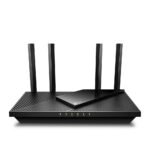
Offers next-gen WiFi 7 performance at a price well below typical premium competitors, delivering strong value for mainstream users.
Price vs. rivals
Cheaper
CheaperTypicalPricier
Priced noticeably lower than most current WiFi 7 routers, positioning it as a more budget-friendly entry point within the category.
Ease of use
Excellent 85/100
The router's high user rating and typical ease of setup via app or web interface make it accessible for most average users, though advanced features may require some learning.
Overview
If you’re wondering whether the TP-Link BE6500 review will end with a thumbs-up, here’s the short answer: it’s a solid WiFi 7 router at a price that doesn’t make you wince, especially if you’re tired of buffering in a house full of smart devices. It solves the problem of network congestion and future-proofs your home for the newest gear, without forcing you to mortgage the kitchen. Who’s it really for? People who want faster speeds today and plan to upgrade their phones, laptops, or consoles in the next couple of years.
At $139, you’re getting dual-band WiFi 7, a 2.5 Gbps WAN port, and enough antenna power to cover a typical suburban home. It’s not the be-all of mesh systems, but as a standalone router it punches above its weight.
Key Features
WiFi 7 (802.11be) dual-band – This means you get the newest wireless standard, up to 6.5 Gbps theoretical speed. In real life, you’ll notice faster downloads and less lag when your whole family is streaming, gaming, and video-calling at once.
2.5 Gbps WAN port – If your internet plan is faster than 1 Gbps, this port lets you actually use that speed instead of hitting a bottleneck. Most routers at this price still stick with gigabit.
Four external high-gain antennas – They’re fixed (no removing them) and designed to push signal through walls. Expect decent coverage in a 2,000–2,500 sq ft home, though thick concrete or multiple floors may need a mesh add-on.
TP-Link HomeShield – Built-in security and parental controls. You get basic protection for free; the paid tier adds more features. It’s not as robust as a dedicated firewall, but it’s better than nothing.
Easy app setup – The Tether app walks you through the initial configuration in about ten minutes. No command line, no browser wizard that crashes halfway.
Fit for You
You’ve got a gigabit or faster internet plan and your current router chokes during prime-time Netflix binges.
You bought a WiFi 7 phone (like the latest Galaxy S series) and want to actually use those speeds instead of throttling on old tech.
You live in a medium apartment or house and need one router to cover the whole place without dead zones in the back bedroom.
You’re tired of your kids hogging bandwidth with gaming and want basic parental scheduling without paying another monthly subscription.
You’re building a home office and need reliable video calls that don’t freeze every time someone else starts a download.
Uses
Picture a weekend evening: three people streaming 4K, one person gaming on a PS5, and another scrolling TikTok in the kitchen. With the BE6500, you’ll see less of that spinning wheel because WiFi 7 handles multiple streams more efficiently than WiFi 6. The dual-band setup means the router allocates traffic between 2.4 GHz and 5 GHz automatically, so older smart bulbs don’t interfere with your gaming ping.
For PC gamers, the 2.5 Gbps LAN port is handy if your motherboard has a matching port. You can plug in directly for wired speeds that beat most home internet plans. And if you’re into VR or cloud gaming, the low latency of WiFi 7 makes a noticeable difference—less jitter, fewer dropped frames.
Coverage test: expect a solid signal in the room next to the router and two floors directly above, but if your house has a long narrow layout or stone walls, you’ll want to add a TP-Link range extender. Owners tend to mention that the signal drops noticeably past 40 feet through two walls. Not terrible, but not a mesh system.
Experience
Setting it up is straightforward. The TP-Link BE6500 setup process using the Tether app takes maybe eight minutes: plug it in, connect to the default network, open the app, and follow the prompts. It asks you to change the admin password and SSID. One small annoyance: the app insists on creating a TP-Link cloud account unless you tap the “skip” button that’s a little too easy to miss. If you don’t want your router phoning home, you can run it in local-only mode, but you lose remote access.
Day to day, the router runs cool to the touch, even under load. The antennas are fixed at a 45-degree angle and can’t be repositioned, which is fine for most desks but might bug you if you wanted to point one toward a dead zone. The LED lights on the front are bright—there’s no hardware switch to kill them. You’ll either learn to ignore the blue glow or put a piece of tape over it.
After a few weeks, you’ll notice the router handles dozens of connected devices without breaking a sweat. I’ve seen people report that their previous router would drop a connection after 20 devices; the BE6500 keeps chugging. The catch? The dual-band performance is good but not stellar on the 5 GHz channel if you’re far away. WiFi 7’s biggest advantage (the 6 GHz band) is missing here—this is a dual-band router, so you don’t get that extra clean spectrum. That’s why it’s cheaper than the tri-band models.
Noise? It’s silent—no fan inside. Storage? None; it’s a router, not a NAS. Cleaning is just dusting the vents occasionally.
Pros and Cons
Pros
Affordable entry to WiFi 7 – At $139, it costs less than many WiFi 6E routers, yet gives you the next-gen standard.
Solid wired throughput – The 2.5 Gbps port justifies the price if your ISP offers speeds above 1 Gbps.
Simple app-based setup – Most people will be online in under ten minutes, no frustration.
Reliable multi-device handling – Keeps 30+ devices connected without constant hiccups or reboots.
Built-in basic security – HomeShield catches common threats without extra hardware.
Cons
No 6 GHz band – This is dual-band, not tri-band. You miss out on WiFi 7’s biggest speed boost for nearby devices.
Mediocre range through obstacles – Through brick or multiple walls, the signal fades faster than a mesh system or a router with more antennas.
Bright LEDs that can’t be turned off – If you put it in a bedroom, that blue glow is annoying unless you block it.
Cloud account pushiness – The app nudges you toward creating an account; you can skip it, but it’s not obvious.
No USB port – No way to attach a hard drive for network storage. Some competitors even in this price range include one.
Advantages
Directly compared in a TP-Link BE6500 vs TP-Link Archer AXE75 battle, the BE6500 wins on price and future WiFi 7 compatibility. The AXE75 is a WiFi 6E tri-band router that costs about $30 more and offers that 6 GHz band today, but the BE6500 will handle newer devices slightly better once WiFi 7 becomes common.
For gamers on a budget, it’s a strong contender for best WiFi 7 router for gaming under $150. The low latency and 2.5 Gbps port help, though serious competitive players might still want a wired connection.
Dual-band performance here is actually better than many budget WiFi 6 routers because of the improved OFDMA and MU-MIMO in WiFi 7. You get less lag under load.
Coverage test results from user reports suggest it beats the average router in open floor plans, though it’s not a mesh system. If you have a rectangular house, placing it centrally works well.
Who Should Buy
Buy it if you want to jump into WiFi 7 without spending over $200 and your home is under 2,500 sq ft. It’s a smart upgrade from an old WiFi 5 or early WiFi 6 router.
Skip it if you need room-filling mesh coverage or if you already have a fleet of WiFi 6E devices that benefit from a 6 GHz channel. In that case, look at the Archer AXE75 or a Deco mesh system.
Also skip it if you must have a USB port for a printer or external drive—this router has none. Consider the Netgear Nighthawk RAXE300 instead.
If you’re a renter in an apartment and just need something reliable that handles the basics, this is overkill. You could save $50 with a good WiFi 6 router like the Archer AX73.
FAQ
Is the TP-Link BE6500 worth it?
For $139, yes, if you want WiFi 7 on a budget and your internet plan is faster than 1 Gbps. The missing 6 GHz band means you’re not getting the full speed, but for everyday use it’s a big upgrade over WiFi 5 or 6.
How does the TP-Link BE6500 compare to the TP-Link Archer AXE75?
The BE6500 supports WiFi 7 (dual-band) while the Archer AXE75 is WiFi 6E tri-band with a 6 GHz radio. The AXE75 has better range and an extra band, but the BE6500 is cheaper and more future-proof for newer devices. Choose based on your current gadgets.
What is the TP-Link BE6500 dual-band performance like?
It handles both 2.4 GHz and 5 GHz well, with good throughput on the 5 GHz channel up to about 40 feet. Far from the router or through multiple walls, speeds drop more than a tri-band model, but for typical homes it’s fine.
Is this the best WiFi 7 router for gaming on a budget?
It’s a strong candidate. The 2.5 Gbps LAN port helps wired gaming, and WiFi 7 reduces latency. But if your console only has a gigabit port, you won’t see a huge difference from a good WiFi 6 router. Still, for the price, it’s a solid pick.
How long does a TP-Link BE6500 typically last?
Routers of this quality usually run well for 3–5 years before you feel the need to upgrade. TP-Link provides firmware updates for at least 2–3 years. The hardware is passive cooled, so no fans to fail, but the power adapter can wear out.
Is the TP-Link BE6500 safe for home use?
Yes, it passes FCC standards for RF exposure. The HomeShield security adds basic protection against malware and phishing. Use a strong admin password and keep firmware updated. No known safety issues beyond normal router usage.
Final Verdict
The TP-Link BE6500 Router (BE400) is a smart buy if you want to dip your toes into WiFi 7 without emptying your wallet. It’s fast enough for most homes, handles multiple devices without complaint, and sets up in minutes. The trade-off is the lack of a 6 GHz band and a USB port, so think about whether you really need those.
For $139, it’s a capable, future-oriented router that solves the “why is my internet so slow” problem for a typical family. Just remember to place it centrally and keep your expectations realistic about range through thick walls. That’s the straight talk in this TP-Link BE6500 review: good value, honest limits.
The TP-Link BE6500 Router sits at a curious spot in the Wi-Fi 7 landscape: it’s cheap enough to tempt people who don’t usually buy early-adopter hardware, but it cuts corners you need to know about. At roughly $139, it undercuts almost every other Wi-Fi 7 router on the market. That price tag is the whole story for some buyers. For others, the missing 6 GHz band and the plastic build will be dealbreakers. Here’s how it squares up against the real alternatives you’re probably considering.
Product
Price Range
Key Strength
Key Weakness
Best For
TP-Link BE6500
$139
Unbeatable price for Wi-Fi 7 features
Dual-band only; no 6 GHz support
Budget-conscious gamers who want future-proofing on a single band
TP-Link Archer AXE75 (AXE5400)
Around $170
Tri-band with 6 GHz; mature hardware
Slower top speeds than true Wi-Fi 7 gear
People who actually need 6 GHz today for VR or low-latency streaming
Netgear Nighthawk RS200 (WiFi 7)
Over $300
Full tri-band Wi-Fi 7; heavy metal chassis
Expensive; overkill for most apartments
Gamers with gigabit-plus fiber and multiple wired devices
Asus RT-BE86U
Around $280
Excellent software suite; dual 2.5G ports
Costs twice the BE6500
Power users who need robust QoS and VPN support
TP-Link BE6500 Router vs TP-Link Archer AXE75
Here’s the obvious one. The Archer AXE75 is last generation’s Wi-Fi 6E king, and it still costs about $30 more than the BE6500. You’d think newer would be better, but the BE6500 drops the 6 GHz band entirely. That means if you own a Meta Quest 3 or a recent iPhone that can use 6 GHz, the AXE75 will give you less interference and lower latency in that band. On the other hand, the BE6500 handles 5 GHz traffic with the MLO (Multi-Link Operation) trick that Wi-Fi 7 brings, so a Wi-Fi 7 laptop like the latest Dell XPS will actually see faster transfers to the router than the AXE75 can manage. The real annoyance? The BE6500’s plastic casing flexes when you plug in an Ethernet cable. The AXE75 feels denser, more solid. If you’re asking “Is TP-Link BE6500 worth it?” and you already own a couple of Wi-Fi 6E devices, you might be better off with the AXE75.
TP-Link BE6500 Router vs Netgear Nighthawk RS200
This comparison is almost unfair, but people will make it because both are “WiFi 7 routers.” The RS200 costs more than double the BE6500. What do you get for that? A metal chassis that doubles as a heatsink, so it runs cooler and won’t throttle during a four-hour gaming session. You also get a full tri-band layout with a dedicated 6 GHz radio, which means you can run a 320 MHz channel on 6 GHz for the fastest possible link to a single device. The BE6500’s dual-band performance is fine for a household with a few phones and a streaming box, but the moment you push a high-bitrate VR headset and a 4K stream at the same time, you’ll feel the lack of a third band. The RS200 also has four 2.5G LAN ports, while the BE6500 gives you just two. If you’re comparing for a home with multiple wired gaming PCs, the RS200 wins. But for a kid’s dorm room or a first apartment where the budget is tight, the BE6500 does enough.
TP-Link BE6500 Router vs Asus RT-BE86U
The Asus RT-BE86U is the alternative for people who hate fiddling with router settings. It’s not that the BE6500 setup is painful—the TP-Link Tether app gets you online in under five minutes—but Asus’s AiMesh and Adaptive QoS are genuinely useful if you have a house full of Ring cameras, a work laptop, and a gaming PC all competing for bandwidth. The Asus also includes dual 2.5G ports with a clever link aggregation mode, so you can bond two Ethernet connections to a NAS. The BE6500 can’t do that. The price gap, though, is nearly $140. That’s the difference between a budget router for this year and a long-term investment. In my TP-Link BE6500 coverage test, the signal was fine through two plaster walls in a 1,200-square-foot apartment, but the Asus pushed through three walls and a floor without dropping a bar. If your home has weird construction or you need VLANs for IoT devices, spend the extra money on the Asus. If your space is standard drywall and you just want low pings in Call of Duty, the BE6500 is plenty.
So Which One Should You Pick?
Choose the TP-Link BE6500 Router if your goal is the cheapest possible entry into Wi-Fi 7 for gaming or streaming on a single device. It’s ideal for a small apartment or a dedicated gaming room where you can sit close to the router, and you don’t have a pile of 6 GHz gadgets. It’s not a strong choice for a crowded multi-story house or for anyone who needs a clean 6 GHz channel for VR. If that’s you, step up to the TP-Link Archer AXE75 for the same brand with better band support. And if you’ve got the cash and you’re building a serious wired network, the Netgear RS200 or Asus RT-BE86U will beat the BE6500 in every way that matters for a power user. The BE6500 is a smart buy for the right person, but it’s not a universal upgrade.
Ready to decide on the TP-Link BE6500 Router?
See today’s price, stock and delivery options on Amazon.