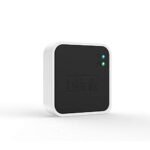
This is my GL.iNet SFT1200 review for anyone wondering if this little white box can actually replace a hotel’s terrible Wi-Fi. At $40, the GL.iNet Opal Travel Router packs a surprising amount of control into a pocket-sized AC1200 dual-band router. The short answer: if you need a compact travel router with VPN support and wired Ethernet on the road, it’s absolutely worth it. But not every traveler needs what it offers.
Offers solid travel router features and decent performance at an accessible price point, making it a smart choice for cost-conscious users.
Price vs. rivals
Cheaper
CheaperTypicalPricier
Priced well below many competing travel routers with similar specs, offering good value for its dual-band AC1200 capabilities.
Ease of use
Great 80/100
The router's straightforward setup and compact design make it easy for most users, though some basic networking knowledge may be needed for initial configuration.
Overview
Travel routers solve one specific headache: you check into a hotel or Airbnb, the Wi-Fi is slow or requires a portal login, and suddenly every device you own needs to authenticate separately. The GL.iNet Opal fixes that by connecting to whatever internet is available and creating a private, secure network for your stuff. It also runs OpenWrt, an open-source operating system that turns this $40 box into something you can tweak way more than any Best Buy special.
Who is it really for? People who carry a laptop, phone, and tablet, and who don’t want to re-enter a hotel Wi-Fi password on each one. Also for anyone who needs a VPN on the road without installing software on every device. If you just want a simple range extender for your home, look at a plug-in repeater instead.
Key Features
AC1200 dual-band Wi-Fi: You get 2.4 GHz for range and 5 GHz for speed. It’s not Wi-Fi 6, but for hotel speeds and coffee shop browsing, it’s plenty. Don’t expect to stream 4K to multiple devices at once.
OpenWrt pre-installed: This is the big deal. The router runs a full Linux-based OS, so you can install packages, set up VPN clients, and configure firewall rules. It’s a router, but it’s also a tiny server if you want it to be.
Hardware VPN client: You can configure OpenVPN or WireGuard right in the web interface. Once set, every device that connects to the Opal is behind your VPN. No need to install anything on your phone or laptop.
One USB 2.0 port: You can plug in a USB drive for file sharing or a USB modem for cellular failover. It’s USB 2.0, so don’t expect fast transfers, but for sharing a few documents, it works.
Compact and light: It’s about the size of a deck of cards and weighs practically nothing. The power brick that comes with it is bigger than the router itself, which feels like a practical joke.
WAN/LAN port: One Ethernet port that you can configure as an internet input or a wired output. In hotel rooms with a wired port, this is your ticket to fast, stable internet.
Fit for You
You work in coffee shops where the Wi-Fi requires a captive portal and you’re tired of approving your laptop, phone, and watch separately.
You’re a digital nomad who moves between Airbnbs and co-living spaces every few weeks and wants a consistent network you don’t have to reconfigure.
You need to route all your devices through a VPN for work, but your hotel blocks VPN traffic on the main network. The Opal can handle the protocol obfuscation.
You travel with a Fire Stick or Apple TV and want to use hotel Wi-Fi without typing a 20-character password with a remote control.
You share a single paid hotel internet connection among multiple devices and want to avoid the per-device fee.
You want a portable router for your RV or camper van that can switch between campground Wi-Fi and a phone hotspot without losing settings.
Uses
Picture this: you land at a hotel, the front desk hands you a slip of paper with a Wi-Fi password. You plug in the Opal, open the browser, log in to the captive portal once, and suddenly your laptop, tablet, and phone are all online. No more re-entering credentials on each device.
In an Airbnb where the Wi-Fi is spotty, you can place the Opal closer to the window where the signal is strongest, then connect your devices from anywhere in the apartment. The range isn’t huge, but in a small space, it’s fine.
For cruise ship internet, which often locks you to one device at a snail’s pace, the Opal lets you share that connection among your family. Just be prepared for slow speeds—no router can fix a satellite link that runs at 2 Mbps.
Experience
Setting up the Opal is straightforward if you’ve ever logged into a router’s admin page before. Plug it in, connect to its Wi-Fi network, and navigate to 192.168.8.1. The default interface is clean and modern, but you’ll notice it’s a cut-down version of OpenWrt’s Luci interface. That’s fine for most people, but if you want the full power, you can switch to the advanced mode.
The mobile app, GL.iNet’s own, is decent for initial setup but limited for deeper configuration. You’ll likely find yourself using the web interface for VPN setup and the app for quick checks on connected devices. The VPN configuration is where the learning curve shows up. If you’ve never set up OpenVPN or WireGuard, you’ll need to look up your provider’s instructions. It’s not plug-and-play, but the documentation is solid.
In daily use, the router runs warm but not hot. It doesn’t have a fan, so it’s silent. The Wi-Fi range is adequate for a hotel room or a small apartment, but don’t expect it to cover a large house. The power plug is an annoyance—it’s a standard USB-A to barrel connector, but the included plug is bulky. You’ll want to carry a spare USB cable and a small wall charger for space savings.
The small annoyance: resetting the router. The physical button is tiny and recessed, so you need a paperclip. And if you forget the admin password, you’re holding that paperclip for ten seconds.
Pros and Cons
Pros
Incredible value for the features: At $40, you get a router with OpenWrt, VPN client, and Ethernet port. Comparable travel routers with VPN support cost $60–80.
Real VPN support: This is not a “VPN pass-through” gimmick. You can configure OpenVPN or WireGuard and all your traffic is encrypted.
Compact size: It fits in any bag pocket. The trade-off is the power brick, but you can replace that with a small USB charger.
OpenWrt flexibility: You can install ad-blocking, set up a personal cloud, or configure VLANs. It’s a router that grows with your needs.
Wired port for hotel Ethernet: When you find a hotel with a wired jack, this router gives you your own Wi-Fi network at full speed.
Cons
Wi-Fi range is average: It’s fine for a single room or a small studio, but don’t expect it to cover a two-bedroom suite. If range is critical, look at a larger router.
USB 2.0 port is slow: File sharing over USB is possible, but at USB 2.0 speeds, transferring a movie feels like dial-up. Use this for documents, not media.
No USB-C power: The barrel connector is dated. You can buy a USB-C to barrel adapter, but it’s not included. In 2024, this should be USB-C.
Setup has a learning curve for VPN: If you’re not comfortable with router configuration, you’ll need to follow a guide. It’s not a one-click process.
Plastic build feels light: It’s not fragile, but it doesn’t feel premium. The antennas are internal, so you can’t upgrade them for better range.
Advantages
The Opal’s main advantage over a generic travel router is OpenWrt. Most travel routers at this price run a closed firmware with limited settings. The GL.iNet SFT1200 vs TP-Link travel router comparison usually comes down to control: the TP-Link TL-WR902AC is simpler to set up, but it locks you out of VPN configuration, firewall rules, and package installation. The Opal gives you full access.
Another edge is the hardware VPN client. Many travel routers at this price only support VPN pass-through, meaning a single device can use a VPN, but the router itself can’t connect. The Opal connects the VPN itself, which is the whole point for privacy-conscious travelers.
For the best travel router for digital nomads on a budget, this is the clear winner. The combination of size, VPN support, and open-source software is hard to beat at any price under $50.
Who Should Buy
Buy it if you travel with multiple devices and want one Wi-Fi password to rule them all. The convenience alone justifies the cost after one trip.
Buy it if you need a VPN on the road and don’t want to configure each device separately. This is the cleanest solution.
Buy it if you like tinkering with router settings and want something you can customize. OpenWrt means you’ll never outgrow this device.
Skip it if you only travel with a phone and a laptop and you’re comfortable with hotspot tethering. You probably don’t need a travel router.
Skip it if you want a simple plug-and-play range extender for home. A $20 plug-in extender will be easier and offer better range.
Skip it if you need Wi-Fi 6 or mesh support. This is AC1200, which is fine for travel but not for a primary home network.
FAQ
Is the GL.iNet Opal Travel Router worth it?
Absolutely, if you travel with multiple devices and need VPN support. At $40, it’s the cheapest way to get a dedicated travel router that runs OpenWrt and supports hardware VPN. For occasional trips, you might not need it, but for frequent travelers, it’s a no-brainer.
Can it handle hotel captive portals?
Yes. You connect to the hotel Wi-Fi through the Opal’s web interface, complete the portal login once, and all your devices stay connected. There’s a dedicated captive portal detection mode that handles this automatically most of the time.
Does the compact travel router with VPN support slow down my internet?
You’ll lose some speed due to VPN encryption overhead. With OpenVPN, expect around 30–50 Mbps. With WireGuard, you can get close to 100 Mbps. For hotel internet, which is often slower than that, you won’t notice a difference.
How many devices can it support?
Around 10–15 devices before you feel the strain. The hardware isn’t powerful enough for a heavy home network, but for a small group of travelers or a family on vacation, it’s fine. Video streaming on three devices at once might cause buffering.
Is it better than using my phone’s hotspot?
For battery life and convenience, yes. Using your phone as a hotspot drains the battery, disconnects when you get a call, and usually doesn’t support VPN routing. The Opal stays on and runs silently off wall power.
Does it work with all VPN services?
It supports OpenVPN and WireGuard protocols. Most major VPN providers (NordVPN, ExpressVPN, Mullvad, ProtonVPN) support these. If your VPN uses a proprietary protocol, you might need to check compatibility.
Final Verdict
The GL.iNet Opal SFT1200 is a specific tool for a specific kind of traveler. If you’re a digital nomad, a privacy-conscious business traveler, or just someone tired of re-entering Wi-Fi passwords on every device, this $40 box solves real annoyances. It’s not the fastest or the most powerful, but it’s the most capable travel router at this price.
The one thing to keep in mind: it demands a little patience during initial setup, especially for VPN. But once it’s running, you’ll forget it’s there until you move to a new hotel and remember how easy it is to reconnect. For the price of a decent dinner, it’s a smart buy for anyone who lives out of a bag.
GL.iNet Opal Travel Router vs the Competition in 2026
The GL.iNet Opal (SFT1200) is the budget darling of the travel router world—under $40, dual-band AC1200, and built-in VPN support that actually works without a degree in networking. For digital nomads running on a shoestring and a coffee addiction, it’s a pretty sweet deal. But it’s not the only compact router out there. Here’s how it stacks up against three real rivals, so you can stop staring at Amazon tabs and just pick one.
Budget-conscious travelers who need VPN on every hotel Wi-Fi
TP-Link TL-WR902AC
~$25-30
USB port for file sharing or 4G dongle, very compact
No VPN support, older interface, slower 2.4GHz-only in some modes
Simple hotel room Wi-Fi repeating without VPN needs
RavPower RP-WD009 (FileHub)
~$50
Built-in battery, SD card reader + USB host, media streaming
No VPN, weaker wireless throughput, bulky for a “travel” gadget
Road trips where you want to share movies from a USB drive
GL.iNet Beryl (GL-MT1300)
~$70
Faster processor, USB-A port, more RAM/storage, full VPN suite
Overkill and pricier for basic use
Power users who run multiple VPNs or need a travel NAS
GL.iNet Opal Travel Router vs TP-Link TL-WR902AC
The TP-Link is the default cheapie you grab at an airport electronics kiosk. It’s smaller than a deck of cards and has a USB port—you can plug in a flash drive for sharing files or even a 4G dongle if the hotel Wi-Fi is dead. But here’s the catch: it doesn’t speak VPN. If you’ve ever tried to tunnel traffic through a sketchy hotel network using just a laptop’s software client, you know the pain. The Opal does all that in hardware, automatically, for every device you connect—laptop, phone, tablet, even a Nintendo Switch. The TP-Link also uses a janky web interface from 2013. The Opal runs OpenWrt, which means you get a modern dashboard and the ability to tinker. If your only mission is to turn one wired port into Wi-Fi and you never touch a VPN, save ten bucks and buy the TP-Link. Otherwise, the SFT1200 is worth the extra dough.
GL.iNet Opal Travel Router vs RavPower RP-WD009
RavPower’s FileHub is a different animal—it’s a router with a battery stuffed inside, plus a memory card slot and a USB port that can serve movies directly to your tablet. Great for a long van trip where Netflix isn’t an option. But as a Wi-Fi router, it’s mediocre. The wireless speeds top out below AC1200, and the interface is slow and buggy. And you guessed it: zero VPN support. The Opal is purely a wired-or-wireless bridge—no battery, no onboard storage. So if you need to charge your phone and stream a backup of The Wire from an SD card, the RavPower wins. But if you’re booking Airbnbs with questionable Wi-Fi and need a secure tunnel back to your home network, the Opal is the one that won’t make you tear your hair out. Also, the RavPower is oddly shaped and doesn’t pack as small as the GL.iNet.
GL.iNet Opal Travel Router vs GL.iNet Beryl (GL-MT1300)
This is the awkward family reunion—same brand, different price bracket. The Beryl has a USB-A port, a faster MediaTek chip, and double the RAM. That matters if you want to plug in a USB drive for shared storage or run a VPN server while also pinging a remote home network. The Opal’s slower processor can choke if you try to push high-speed VPN traffic with encryption on both ends. Real talk: for 90% of travelers, the Opal’s VPN throughput (around 50-70 Mbps) is more than enough for email, browsing, and even HD video calls. The Beryl is for the guy who runs a Pi-hole across three countries and needs to transfer large files. If you’re on a strict budget, the Opal is the smarter buy—you’re paying $30 less for something that covers the basics without complaint. The Beryl only makes sense if you’ve already maxed out your Opal’s limits and know exactly why you need the extra horsepower.
So who should pick the GL.iNet Opal? You, if you’re a digital nomad or frequent traveler who absolutely needs a VPN on hotel Wi-Fi, wants something smaller than a pack of gum, and refuses to spend more than $40. It’s the best travel router for most people in 2026—simple recommendation. Who should skip it? If you need a portable NAS or a battery-powered media streamer, grab the RavPower RP-WD009 instead. And if you’re a power user who finds yourself wishing for a USB port or faster VPN tunneling, the GL.iNet Beryl (GL-MT1300) is your upgrade path. The Opal sits right in the sweet spot: cheap, capable, and annoyingly well-designed for its price.
Ready to decide on the GL.iNet Opal Travel Router?
See today’s price, stock and delivery options on Amazon.