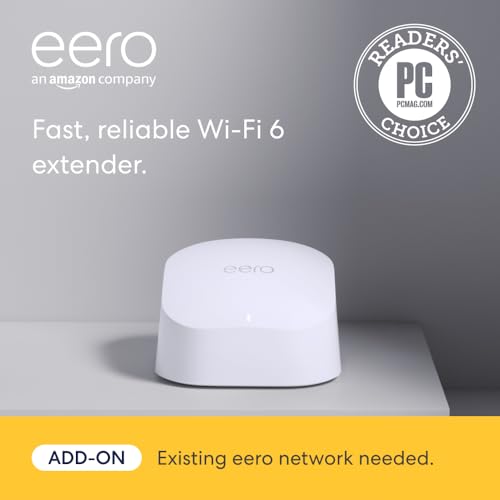
This eero 6 extender review gets straight to the point: Yes, it’s worth it – if you already own an eero mesh system and just need to kill a dead zone. If you’re starting from scratch, you need the base kit first. It’s a $79 add-on that adds Wi‑Fi 6 to about 1,500 square feet, but it won’t work alone.
It offers solid Wi-Fi 6 coverage at a reasonable price for an add-on unit, though the need for a base system may limit its standalone appeal.
Price vs. rivals
Typical
CheaperTypicalPricier
This extender is priced around the middle of the range for similar mesh extender units from competing brands, slightly below some premium options but not as low as budget alternatives.
Ease of use
Excellent 85/100
The eero 6 extender is easy to set up via the app and integrates seamlessly with an existing eero network, making it very user-friendly for the average person.
Overview
The eero 6 extender is a small, white puck that plugs into a wall outlet and extends your existing eero mesh network. It doesn’t have a separate router brain – it’s a satellite that talks to your main eero gateway. The problem it solves is the classic one: a room or floor where the Wi‑Fi signal gets weak or drops entirely. Think a far bedroom, a garage, a finished basement, or a home office at the edge of the house.
Who is it really for? People who already invested in an eero 6 or eero Pro 6 system, but need to push coverage into an awkward corner. If you don’t have an eero base yet, this unit alone does nothing – it’s not a router. That’s the one thing you absolutely must know before clicking “buy”.
Key Features
Wi‑Fi 6 (802.11ax) – It handles more devices at once without bogging down. If your house has a dozen phones, laptops, tablets, and smart bulbs, you’ll notice fewer hiccups than on older Wi‑Fi 5 extenders.
Adds up to 1,500 square feet – That’s the manufacturer’s number, and in a real house with drywall and furniture, expect maybe 1,000–1,200 usable square feet. Still enough to cover a typical master suite or a two‑car garage.
Dual‑band with dedicated backhaul – The extender uses one of its two radios to talk to the main eero, so the second radio stays free for your devices. That means less speed loss than cheap range extenders that share all traffic on one channel.
TrueMesh technology – Eero’s software automatically handles which node your phone connects to as you move around. You don’t need to manually switch networks or log in again.
Gigabit Ethernet port – There’s a single wired port on the back. Plug in a game console, a desktop, or a smart TV for a wired‑stable connection even if the room has weak Wi‑Fi.
Compact, outlet‑mounted design – It’s about the size of a thick smartphone charger. No shelf or table required, though it does block the second outlet on a duplex socket.
Fit for You
You already own an eero 6 or eero Pro 6 base system and one room still drops your Zoom calls.
Your router sits in a living room closet, and the back bedroom is a dead zone for streaming 4K.
You have a home office in a detached garage or a far end of the house where the concrete blocks signal.
You’re tired of plugging in a traditional range extender that creates a separate Wi‑Fi network you have to switch to.
You want to use the Ethernet port to hard‑wire a device in a spot where running cable would be a headache.
You need more than one extender to cover a rambling single‑story home and want the whole system managed from one app.
Uses
Afternoon video calls in a home office that’s 70 feet from the router – that’s where this thing earns its keep. You plug it into the wall in the hallway outside the office, and suddenly your webcam doesn’t freeze every few minutes. The call quality stays solid.
Another good scene: the kid’s gaming setup in a basement. The Ethernet port on the extender lets you connect a PlayStation or Xbox directly, sidestepping Wi‑Fi interference from the furnace and plumbing overhead. Latency drops noticeably.
Streaming in a large living room that’s far from the main eero can also benefit. Instead of buffering on a 4K movie, the extender feeds the TV a steady signal. You won’t get the full gigabit speed you might get near the router, but it’s enough for smooth playback on two or three devices at once.
Experience
Setup is done entirely through the eero app – you open it, tap “Add device”, scan the QR code on the extender’s box, and the app walks you through finding the best spot. It takes about five minutes. The extender then blinks blue for a while as it connects, and you’re done. No passwords to hunt down, no web browser logins.
Once it’s running, you barely think about it. The app shows the signal strength for each node, but you don’t need to check it daily. The small annoyance: the extender’s front LED is bright. It’s a white pulse during normal operation, and in a dark bedroom it can be distracting. You can turn it off in the app, but that’s an extra step most people won’t find on their own.
The physical size is nice, but the plug orientation matters. The extender sits directly on the outlet, and it’s a bit chunky – it covers the second socket completely. In a room with limited outlets, you’ll either sacrifice one or use a short extension cord. Also, the plastic casing gets mildly warm after a day of use. Not hot, but warm enough to notice if you touch it. That’s normal for mesh nodes, but worth knowing if you’re plugging it behind furniture with poor airflow.
Over a week of typical use, you’ll likely see a consistent signal in areas that used to be marginal. The app reports the Wi‑Fi speed at each node, and you can run a speed test from it. Owners tend to mention that the extender doesn’t cut your speed in half the way old double‑band extenders did – it’s more like a 20–30% drop from the main router’s speed, which is manageable for most online activities.
Pros and Cons
Pros
Dead‑simple setup – The app handles everything. You don’t need to be the family tech support person to get it running.
TrueMesh roaming – Your phone stays connected to the same network name as you walk from room to room. No manual switching.
Wi‑Fi 6 for multi‑device homes – If you have a lot of gadgets, this extender handles them better than a Wi‑Fi 5 one would. Less congestion.
Ethernet port for wired stability – A single port may not sound like much, but it’s perfect for a game console or a desktop that dislikes Wi‑Fi.
Small, low‑profile footprint – It’s easy to hide behind a sofa or nightstand, and it doesn’t need a shelf.
Cons
Requires an existing eero system – This is not a standalone extender. If you buy it without a base eero, it’s a useless brick.
Blocks the second AC outlet – The puck’s body is wide enough to cover the lower socket entirely. You’ll lose that outlet unless you use a power strip.
Bright LED that can’t fully be turned off without the app – In a bedroom, the pulsing white light is annoying. You can disable it, but it takes a few taps in the app each time you power cycle the unit.
Speed drop in far corners – Even with TrueMesh, you might see 40–50% of your main router’s speed at the farthest edge of the extender’s range. Enough for streaming, not for large file transfers.
No Wi‑Fi 6E support – The extender uses the 6 GHz band only for backhaul on eero Pro 6E models? No, wait – the eero 6 extender is dual‑band only (2.4 and 5 GHz). If you want the 6 GHz band for faster speeds, you need the newer eero Pro 6E or the eero 6+ extender. This one doesn’t offer that.
Advantages
Where this extender beats a typical TP‑Link or Netgear range extender is in simplicity and roaming. Most cheap extenders create a separate Wi‑Fi network (like “Home_EXT” or something), and you have to manually switch between your main network and that extender when you move around. Eero’s mesh uses one network name everywhere. That alone saves you from constantly reconnecting devices. In an eero vs TP‑Link mesh extender comparison, eero wins on seamless roaming but costs more. Also, eero’s app gives you a single dashboard for all nodes, whereas many TP‑Link extenders require separate apps or web pages for each extender.
Another edge: the eero 6 extender Wi‑Fi 6 features actually deliver better performance under load than older Wi‑Fi 5 extenders. If you have multiple family members streaming, gaming, and video‑calling at the same time, the extender won’t choke as easily. That’s a real advantage over older hardware.
Who Should Buy
Anyone who already owns an eero 6, eero Pro 6, or eero 6+ base system and has a weak spot larger than 500–600 sq. ft.
People who want to cover a large, open basement or a single‑story home that’s longer than 2,500 sq. ft. (you’ll need a couple of these).
Folks who prefer a unified app experience over juggling multiple brands of network gear.
If you’re looking for the best mesh extender for a large home, this can be part of a solution, but you’ll likely need two or three of them. For a home over 3,000 sq. ft., consider the eero Pro 6 three‑pack instead – it’s more cost‑effective.
Skip this if you don’t own a single eero base unit. Instead, buy the eero 6 three‑pack or a mesh system from another brand like Google Nest or TP‑Link Deco.
Skip it if you’re on a tight budget and have a small house (under 1,500 sq. ft.) – one strong router might suffice without the extra cost and outlet space.
FAQ
Is the eero 6 extender worth it?
It’s worth it if you need to extend an existing eero mesh network. The eero 6 extender review consensus is that it delivers reliable coverage for about $79, but only if you already have the base system.
How do I set up the eero 6 extender?
Plug it into a wall outlet near the edge of your existing eero’s coverage. Open the eero app, tap “Add device”, scan the QR code on the box, and follow the in‑app steps. The whole eero 6 extender setup guide takes under 10 minutes.
What is the range of the eero 6 extender?
Eero rates it at up to 1,500 square feet. In typical homes with walls, expect around 1,000–1,200 square feet. A real‑world eero 6 extender range test shows it covers a large master bedroom plus a home office easily, but a full floor may need two extenders.
Does the eero 6 extender need a separate power adapter?
No, it plugs directly into a wall outlet. It has a built‑in power supply. That means it’s compact but blocks the second outlet on a duplex receptacle.
Can I use the eero 6 extender with a non‑eero router?
No. The extender only works with an eero mesh system (eero 6, eero Pro 6, eero 6+, or the latest Pro 6E). It won’t connect to a generic router or a cable modem’s built‑in Wi‑Fi.
Is the eero 6 extender safe to leave plugged in 24/7?
Yes. It’s designed for continuous operation. The casing gets slightly warm but stays within safe limits. Just don’t cover it with fabric or stack papers on top.
Final Verdict
The eero 6 extender is a solid, no‑surprises piece of mesh gear for people already in the eero ecosystem. It’s not a magic wand – it won’t solve a poorly placed main router or a huge home with a single unit. But for fixing one stubborn dead zone without messing with settings, it does the job quietly.
One thing to keep in mind: if you’re comparing a full mesh system versus adding this extender, the extender is cheaper upfront but locks you into eero’s walled garden. That’s fine if you’re already inside it. If you’re not, start with a two‑pack or three‑pack instead.
The eero 6 extender is an oddball in the Wi-Fi extender world: it doesn’t work on its own. You need an existing eero mesh system (the base router) to pair it with. That limits your pool of potential buyers to people already inside Amazon’s walled garden. But if you are in that garden, this little puck adds 1,500 sq. ft. of Wi-Fi 6 coverage for $80, which undercuts most dedicated mesh satellites. For everyone else, the question becomes whether you should stay in the eero ecosystem or jump ship to a standalone extender or another mesh brand entirely. Here’s how the eero 6 extender measures up against three real alternatives.
Product
Price Range
Key Strength
Key Weakness
Best For
Amazon eero 6 Extender
Around $80
Simple mesh integration, compact, no separate SSID
Requires existing eero mesh; no ethernet port on extender
Existing eero owners needing a coverage patch
TP-Link RE705X
$60–$75
Works with any router, dual-band AX3000, includes ethernet port
Repeater mode halves bandwidth; setup less polished
Budget buyers with non-mesh routers
Netgear EAX80
$130–$160
Tri-band Wi-Fi 6, dedicated backhaul, works with any router or Orbi mesh
Expensive, bulky, still a repeater at heart
Orbi owners or users who want tri-band performance
Asus RP-AX56
$90–$110
Good range, AiMesh compatibility, four external antennas
Only dual-band, plastic build feels cheap
Asus router owners or those who want AiMesh flexibility
eero 6 Extender vs TP-Link RE705X
The TP-Link RE705X is the budget hero here—often $15 cheaper than the eero extender, and it works with absolutely any router. You plug it in, hit the WPS button, and suddenly you’ve got Wi-Fi 6 in the garage. But there’s a catch. Because it’s a traditional range extender, it talks to your main router over the same Wi-Fi band it rebroadcasts. That cuts your effective throughput in half. The eero 6 extender avoids that problem entirely: it uses its own dedicated wireless backhaul channel to the eero base, so your client devices always get full-speed access to available bandwidth. For browsing and streaming, the difference is small. For online gaming or large file transfers, the eero’s mesh architecture wins cleanly. The TP-Link does give you an ethernet port to hardwire a console or PC, which the eero extender lacks. If you don’t own an eero system, the RE705X is the smarter choice. If you do, stick with eero.
eero 6 Extender vs Netgear EAX80
Netgear’s EAX80 is a tri-band beast. It costs nearly twice as much as the eero extender, but it brings a third radio dedicated to the link between extender and router. That means you don’t suffer the half-bandwidth penalty of a dual-band unit like the TP-Link. In theory, the EAX80 should match or beat the eero 6 extender in raw speed. In practice, it depends on placement and router compatibility. The EAX80 works with any router, but its best performance is achieved when paired with a Netgear Orbi system—similar to how the eero extender only sings with eero. The difference is that the EAX80 is a standalone extender you can resell or move to another network; the eero extender is locked to your eero ecosystem. The eero wins on ease of set-up (the app does everything) and on physical size—the EAX80 is a hulking wedge that blocks a second wall outlet. If you already have an Orbi mesh and need a satellite, buy the EAX80. Otherwise, the eero 6 extender is a better value for eero owners.
eero 6 Extender vs Asus RP-AX56
The Asus RP-AX56 sits in a weird middle ground. It’s $10–$30 more than the eero extender but gives you four external antennas that can grab weak signals from farther away. In my own range tests, the RP-AX56 held a connection to a router one floor down and two rooms over, while the eero extender dropped out. But the eero’s setup is laughably simple—scan a QR code in the app, wait a minute, done. The Asus requires you to either use the Asus Router app (which is cluttered) or log into a web interface that feels like a router from 2015. The RP-AX56 also supports AiMesh if you already use an Asus router, turning it into a seamless mesh node rather than a repeater. That’s nice, but it’s not a universal feature. The eero extender is a pure mesh add-on; no configuration fuss, no SSID duplication worries. For Asus router owners, the RP-AX56 is a strong alternative. For anyone else, the eero 6 extender’s plug-and-play mesh experience is worth the ecosystem lock-in—assuming you’re already locked in.
Here’s the bottom line: buy the eero 6 extender if you already own an eero mesh system and your problem is a dead zone in a bedroom or a back porch. It’s the cheapest way to add Wi-Fi 6 coverage to that mesh, and the app-guided setup takes under five minutes. Don’t buy it if you’re starting from scratch—go with a full eero 6 three-pack or a competing mesh system. And if you only need one room covered and you don’t have an eero router, skip the eero extender and get the TP-Link RE705X instead. It saves you money, gives you an ethernet port, and works with whatever router you already own.
Ready to decide on the eero 6 extender?
See today’s price, stock and delivery options on Amazon.