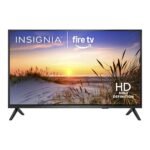
Offers exceptional value for budget-conscious shoppers seeking a large 4K smart TV with voice control.
Price vs. rivals
Cheaper
CheaperTypicalPricier
This Insignia model is priced significantly lower than comparable 50-inch 4K smart TVs from leading brands, making it a clear budget-friendly alternative.
Ease of use
Excellent 88/100
The voice remote with Alexa and the intuitive Fire TV interface make this smart TV very easy for an average person to use.
Overview
This Insignia F50 review starts with a straight answer: yes, the 50-inch F50 Fire TV is worth it if your budget tops out around $180 and you want 4K with a smart system that doesn’t fight you. It’s a no-nonsense TV for streaming, casual gaming, and kicking back. You trade premium picture quality for a price that lets you buy two of these instead of one mid-range set. If that trade-off sounds fine, keep reading.
The Insignia 50-inch F50 solves a simple problem: you want a big 4K screen with built-in streaming and voice control, and you don’t want to spend more than you would on a decent pair of sneakers. It’s for the bedroom, the dorm, the guest room, or the living room where the budget went to the sofa instead. It’s a Fire TV, so the interface is Amazon’s, and the remote has Alexa. That’s the core of it.
Key Features
4K UHD resolution with HDR10 – You get sharp, detailed images for streaming movies and shows. Colors are decent out of the box, but expect to tweak the picture settings a bit for your room’s lighting.
Fire TV smart platform built in – No extra streaming stick needed. The interface is fast enough for Netflix, Prime Video, Hulu, and most apps. Amazon’s content gets top billing, but you can rearrange the home screen.
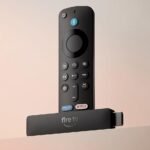
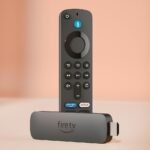
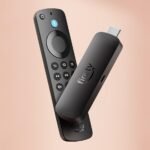
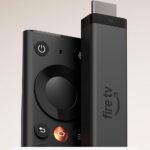
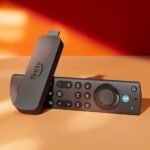
Voice remote with Alexa – Press the button and say “find action movies” or “turn on the TV” – it works reliably. You can also control smart home devices if you’re in the Amazon ecosystem.
Three HDMI inputs (one with eARC) – Enough for a game console, a soundbar, and a streaming box if you want one later. The eARC port makes audio passthrough to a soundbar simple.
60Hz refresh rate – Standard for this price tier. Fine for movies and most TV; for fast sports or competitive gaming, you’ll notice a bit of motion blur. It’s not a gaming monitor, but it plays games.
Slim bezel design – The frame around the screen is narrow enough that it looks modern. It sits on two plastic feet or mounts via the VESA pattern (200x200mm, if you’re checking).
Fit for You
You watch mostly streaming services and want a Fire TV interface without buying a separate dongle.
You’re furnishing a guest room or a kid’s room and need a capable 4K TV under $200.
You already use Alexa at home and want voice control for your TV without fiddling with a phone app.
You’re a casual gamer who plays story-based titles on a PS4 or Xbox One – not competitive shooters at 120 fps.
You need a second TV for the kitchen or home office where image perfection isn’t critical.
You want to cut the cord and stream live TV via Sling, YouTube TV, or a similar service – the Fire TV app store covers that.
Uses
Picture the scene: Friday night, you throw on a 4K nature documentary from Prime Video. The Insignia F50 handles the bright colors of a coral reef fine – no glare issues in a dim room, and the blacks are acceptable for the cost. You notice the built-in speakers are thin, so you plug a cheap soundbar into the eARC port. Suddenly the room fills. That’s the realistic use case – a decent picture paired with a little audio help.
Another spot: you’re into budget gaming. The Insignia F50 review reveals it’s not a high-refresh-rate beast, but for something like Elden Ring or Hades on a console, it’s perfectly playable. The input lag isn’t listed by Insignia, but owners tend to say it feels fine for single-player. Multiplayer twitch games? You’ll feel a delay. Use Game Mode (it’s in the settings) to minimize it.
Streaming live TV without cable – the Fire TV has apps for all the major services. The remote’s channel-up/down buttons can actually control those apps, which is a nice touch. You press “Live” on the remote and see a grid of your subscribed channels. It works better than you’d expect for a $180 TV.
Experience
Setting up the Insignia F50 is mostly painless. You plug it in, the Fire TV wizard walks you through Wi-Fi and Amazon account login, and in about 10 minutes you’re watching something. The packaging is two large foam blocks and a thin cardboard box – typical for this price. The feet attach with two screws each, no tools needed. Annoyance: the power cord is only about 4.5 feet long, so your outlet needs to be close to the TV. That caught me off guard.
Everyday use is snappy enough. The Fire TV interface loads apps quickly; occasional ad banners on the home screen can be an eyesore, but you learn to ignore them. The remote has a nice texture, but the buttons are a little too flush – you’ll sometimes press “Hulu” when you wanted “Netflix”. The voice search understands commands like “show me action movies from the 90s” without a problem.
One small annoyance: the stand is wide – about 39 inches across – so the TV won’t fit on a narrow dresser. You’ll need a table or stand at least that wide. Also, the screen’s viewing angles are okay for a budget VA panel; if you sit more than 30 degrees off-center, colors wash out. That’s typical for the category. For a living room where everyone sits head-on, it’s fine.
Cleaning the screen is just a microfiber cloth and a little water – the finish is matte enough that fingerprints aren’t a magnet. Storage: if you plan to load up on apps, the internal memory is around 8 GB (half taken by the OS), so you’ll want to use only essential apps. Streaming is all cloud-based, so that’s rarely a problem unless you download games or large apps.
Pros and Cons
Pros
Price is ridiculous for a 50-inch 4K TV – At $180, you’re paying less than most people spend on a pair of wireless earbuds. You get a full smart TV with voice control.
Fire TV integration is smooth – If you’re in Amazon’s world (Prime, Alexa, Fire Stick), this TV feels native. The remote controls Fire Stick apps exactly the same way.
Voice remote includes app buttons – Netflix, Prime, Disney+, and Hulu buttons are right there. No hunting for remotes.
eARC port makes soundbar hookup easy – One cable sends audio from all HDMI sources to your soundbar. That’s a feature you don’t always get at this price.
Decent picture for the money after calibration – Out of the box it’s a bit cool (bluish), but a few minutes in the picture settings gets you a natural look.
Cons
Built-in speakers are weak – They max out at a volume that’s okay for a small room, but dialogue can sound muffled. Plan to spend another $40–60 on a soundbar.
Stand is wide and feels cheap – The plastic feet work, but they wobble a little if the table gets bumped. A wall mount solves that.
No local dimming or Dolby Vision – HDR content looks fine, but it’s not true HDR. Blacks are grayish in a dark room. The Toshiba C350 has Dolby Vision, if that’s a deal-breaker.
Fire TV OS shows ads – The home screen has sponsored tiles and banner ads. You can’t disable all of them without a third-party launcher.
Power cord is short – You’ll need an extension cord or a nearby outlet. Minor, but annoying.
Advantages
The Insignia F50 beats other budget 4K TVs in a few specific ways. One: it’s a Fire TV, so if you already use Alexa or own a Fire Stick, the experience is identical and you don’t need an extra dongle. Two: the price undercuts most 50-inch models from TCL, Hisense, and Toshiba by $20–$50 on sale. Three: the voice remote works well even from across the room – you don’t need line of sight.
When you do an Insignia F50 vs Toshiba C350 comparison, the Toshiba offers Dolby Vision and a slightly better contrast, but it costs about $50 more and has a slower smart platform. If you don’t care about Dolby Vision and you value a snappy interface, the Insignia wins on value. For a best 4K TV for budget gaming under $200, the F50 is a solid pick because it has Game Mode and low input lag for the price – though the Hisense A6 might edge it out on motion handling.
Who Should Buy
Buy it if: you want a large 4K TV for streaming, occasional gaming, or as a second set, and your budget is strict. Also buy if you love Alexa and want it built into the TV.
Buy it if: you’re a cord-cutter using Sling or YouTube TV – the Fire TV platform has all the live TV apps and the remote’s “Live” button works.
Skip it if: you’re a home theater purist who wants deep blacks and Dolby Vision – you’ll be happier with the Toshiba C350 or a TCL 5-Series (but expect to pay double).
Skip it if: you need a TV for a bright room with windows – the F50’s screen isn’t very bright, so reflections will bother you. Consider a brighter model or mount it where light doesn’t hit the screen directly.
Skip it if: you plan to use it mainly for competitive gaming on PS5 or Xbox Series X – the 60Hz panel and lack of VRR will hold you back. Look for a 120Hz TV.
FAQ
Is the Insignia 50-inch F50 Fire TV worth it?
Yes, for the price. At $180 you get a 4K TV with a built-in Fire TV and voice remote. The picture is decent after calibration, but you’ll want a soundbar. It’s one of the best values for a 50-inch screen right now.
How does the Insignia F50 compare to the Toshiba C350?
The Toshiba C350 has Dolby Vision and slightly better contrast, while the Insignia F50 is cheaper and its Fire TV platform is faster and more responsive. If Dolby Vision matters, get the Toshiba. If price and interface speed matter, get the Insignia.
Does the Insignia F50 have Bluetooth?
Yes, the TV supports Bluetooth for connecting wireless headphones or speakers. You can pair a Bluetooth soundbar or headphones directly through the settings menu. It also uses Bluetooth for the remote.
Can I mount the Insignia F50 on a wall?
Yes, it uses a standard VESA 200x200mm mount. The screws are usually included with the mount, not the TV. Make sure your wall mount supports at least 20 lbs – the TV itself weighs about 23 lbs without the stand.
Is the Insignia F50 good for gaming?
It’s fine for casual and single-player gaming on consoles like PS4 or Xbox One. Use Game Mode to reduce input lag. For competitive gaming or next-gen consoles, you’ll miss features like 120Hz, VRR, and HDMI 2.1. Expect some motion blur.
Does the Insignia F50 come with a warranty?
Insignia offers a one-year limited warranty from Best Buy. You can buy an extended warranty separately through Best Buy’s Geek Squad. The warranty covers parts and labor for manufacturing defects.
Final Verdict
The Insignia 50-inch F50 Fire TV is a smart buy if you want a big screen for streaming, casual TV, and light gaming without breaking $200. It’s not perfect – the speakers are weak, the stand is wide, and the blacks aren’t deep – but the value is undeniable. The Fire TV platform is fast, the voice remote works well, and you get 4K resolution for the price of a video game.
The one thing to keep in mind: budget an extra $40 for a soundbar. That $220 total still undercuts most comparable TVs, and you’ll actually hear what’s being said. If you’re okay with that small addition, the Insignia F50 is absolutely worth it.
Insignia 50-inch F50 Fire TV vs the Competition: A Real-World Comparison for 2026
For anyone hunting for a budget Fire TV for streaming, the Insignia 50-inch F50 Fire TV is usually the cheapest option on the shelf. It lands at roughly $180, which is absurdly low for a 4K screen with hands-free Alexa baked in. This Insignia F50 review puts it against the three TVs it competes with most directly — the Toshiba C350, the TCL 4-Series, and the Hisense A6. All of them hover in roughly the same price basement, but the differences in what you actually see and hear each night matter more than the $20-50 spread between them.
Product
Price Range
Key Strength
Key Weakness
Best For
Insignia 50-inch F50 Fire TV
Under $200
Hands-free Alexa and Fire TV OS built in
Weak brightness and narrow viewing angles
Budget streaming in a dim room
Toshiba 50-inch C350 Fire TV
$200–250
Dolby Vision support and better color accuracy
Occasional interface lag
Movies and HDR content on a budget
TCL 50-inch 4-Series (S450G) Fire TV
$180–230
Consistent upscaling and a solid build
No Dolby Vision, standard 60Hz panel
General TV with a lot of cable or antenna content
Hisense 50-inch A6 Series
Under $200
Very low price with decent contrast for the money
No local dimming, narrow viewing angles, different OS
Strictly price-driven buyers who don’t need Fire TV
Insignia 50-inch F50 Fire TV vs Toshiba C350
This is the fight most people will actually think about, because both run Fire TV and both land in the same aisle at Best Buy. The Toshiba C350 typically costs $30-50 more. You get Dolby Vision support, which the Insignia simply doesn’t have, and the color accuracy out of the box is noticeably better — skin tones look natural instead of slightly washed out. The Insignia counters with hands-free Alexa built into the TV itself. You can say “Alexa, turn on Netflix” from the kitchen and it just works. The Toshiba only does Alexa through the remote button. If you play any console games that support HDR, the Toshiba is the stronger pick here, which matters for anyone looking for the best 4K TV for budget gaming. But if you strictly stream sitcoms and news at a low volume, the Insignia saves you real money and you won’t miss Dolby Vision.
Insignia 50-inch F50 Fire TV vs TCL 4-Series
The TCL 4-Series is the other Fire TV heavy hitter at this price. Its upscaling handles 720p and 1080p content noticeably better than the Insignia — cable news, older YouTube videos, and live sports look less soft around faces and text. The build quality also feels more substantial; the Insignia’s plastic bezel creaks if you bump the table during a tense scene. That said, the TCL 4-Series doesn’t support Dolby Vision either, so you’re not giving up anything the Insignia lacks. The TCL usually sits $20-40 higher. If you watch a lot of non-4K content — antenna TV, DVD collections, or compressed streaming — the TCL is the safer buy. If your viewing is almost all 4K from Netflix or Prime Video, the Insignia keeps up without issue.
The Hisense A6 is a different kind of alternative
The Hisense A6 doesn’t run Fire TV. It comes with Roku or Google TV depending on which version you grab. That matters if you’re deep in Amazon’s ecosystem — Prime subscriptions, Alexa routines, and the Fire TV home screen with your watchlist front and center. The A6 offers slightly better contrast than the Insignia F50 for the same price, but the smart platform is a completely different experience. If you prefer Roku’s simple grid layout or Google TV’s recommendation engine, the A6 is a strong alternative for a similar cost. But if hands-free voice control and a unified Amazon experience are your priority, the Insignia wins easily. The Insignia 50-inch Fire TV features like “Alexa, find my remote” and live TV integration with Fire TV Recast simply don’t exist on the Hisense.
Is the Insignia F50 worth it? For the right buyer, yes. Pick the Insignia 50-inch F50 Fire TV if you want the absolute cheapest way to get a 4K Fire TV with hands-free voice control, you mostly watch in a dim room, and you’re fine with basic picture quality. Skip it if you watch a lot of HD cable or antenna content — the TCL 4-Series handles that better for not much more. And if you care about movie night quality and can stretch your budget by $40-50, the Toshiba C350 with Dolby Vision is the smarter investment. The F50 is a genuine deal, but it’s built for a specific buyer, not everyone.
Ready to decide on the Insignia 50-inch F50 Fire TV?
See today’s price, stock and delivery options on Amazon.