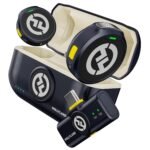
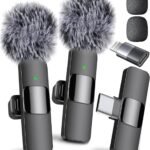
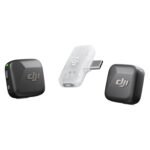
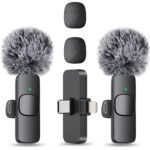
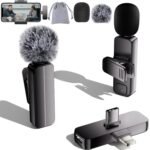
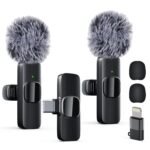
Exceptional value for a wireless mic system with charging case at an entry-level price point.
Price vs. rivals
Cheaper
CheaperTypicalPricier
Priced well below typical dual-person wireless microphone kits, positioning it as a budget-friendly entry option compared with popular alternatives.
Ease of use
Great 78/100
Likely easy for most users due to simple clip-on design and automatic AI limiting, though some may find pairing and case handling slightly finicky.
Overview
The Hollyland LARK A2 wireless mic solves a simple pain: your phone or camera records audio that sounds distant, hollow, or full of room echo. It is a tiny clip-on microphone system, about the size of three finger nails, designed for anyone who talks to a camera for a living or a hobby. At $45, it undercuts almost every competitor with a charging case.
This thing is for you if you make videos on a budget and want audio that does not make viewers reach for the volume knob. It is not for a pro documentary crew. For a solo creator recording in a coffee shop or a quiet bedroom, it does the job with fewer headaches than you would expect at this price.
Key Features
AI Auto-Limit – A smart limiter that catches sudden loud noises (a slammed door, a laugh too close to the mic) before they clip your audio. It works quietly in the background, so you have one less thing to watch on the recorder.
2 TX + 1 RX setup – Two transmitters let you mic two people at once, perfect for interviews or dual-host shows. The receiver is small enough to sit flush on a phone or camera cage without dangling awkwardly.
Charging case – The case recharges all three pieces at once and stores them securely. Total battery life lands around 10 hours with the case, which gets you through a full day of shooting without hunting for a USB cable.
Omnidirectional pickup – The mic captures sound from all directions, so you do not have to position it perfectly every time. You can wear it low on your collar and still get clear voice.
Plug-and-play simplicity – No pairing menus, no apps required. Pull them out of the case, plug the receiver into your phone or camera, and they connect automatically. The whole process takes about 10 seconds.
Form factor – Each transmitter weighs under ten grams and clips onto a shirt with a magnetic backplate. You forget you are wearing them, which helps when you are trying to act natural on camera.
Fit for You
You record cooking or crafting videos and want your voice clear over the sound of sizzling oil or a cutting board.
You shoot interviews at events or trade shows and need to grab clean audio from two people without a big boom pole setup.
You sit in a noisy home office (kids, traffic, a loud AC unit) and want voice isolation that sounds better than a headset mic.
You are tired of your phone’s internal mic making your voice sound like it is coming from another room.
You travel light and refuse to carry a separate audio recorder with XLR cables and batteries.
You are helping a teenager start a YouTube channel and do not want to spend $300 on a setup they may abandon in three months.
Uses
On a shoot at a busy farmers market, the LARK A2 handled ambient chatter and a distant blender mostly fine. Voices stayed forward. Wind noise in a light breeze was present but not ruinous—the included fuzzy windshields help a lot, but do not expect dead-cat performance in a gale.
For live-streaming a cooking demo, the battery life covered a 90-minute session without a low-battery warning. The magnetic clip held onto an apron string easily, and the receiver did not block the phone’s charging port on a standard USB-C dongle.
The two-mic setup shines in a simple sit-down interview. You clip one to your shirt, hand the other to your guest, and get clean stereo tracks that line up in editing without sync drift. No clapperboard needed.
Experience
Out of the box, the case feels light and a little plasticky—not premium, but practical. The magnets in the transmitters are strong enough to hold onto a denim shirt collar without sliding off when you lean forward. The clips themselves are plastic and you can feel they would snap if you sat on them. Be careful.
Pairing is genuinely automatic. I was skeptical, but they synced within two seconds of the case opening. This matters when you are rushing to catch a moment. The receiver has a small screen that shows battery and signal strength. It is not a touchscreen and the UI is basic, but you only look at it to check if you are still recording.
The AI Auto-Limit feature is the surprise here. It does not create an artificial ceiling on your audio. It just shaves off the top of sudden spikes so your recording stays usable. Owners tend to mention that it saves them in outdoor scenes where traffic or a barking dog jumps in unannounced. On the flip side, the noise cancellation is not magic. It reduces room hum and distant chatter, but if you record next to a leaf blower, that leaf blower will still be heard.
One small annoyance: the charging case uses a USB-C port, but the included cable is short. You will probably replace it with a longer one for convenience. Also, the magnets in the transmitters are not strong enough to stick to a thick winter coat. You will need the clip for that.
Pros and Cons
Pros
Price – At $45, it costs about a third of what most dual-mic kits go for, and it still includes a charging case.
Ease of use – No app pairing, no complex menus. You can hand this to someone who has never used a wireless mic and they will figure it out in under a minute.
AI limiter – A rare feature at this price that actually prevents clipped audio without distorting the rest of your take.
Battery life – The case provides enough charge for a full day of on-and-off shooting, and the individual units run about 8 hours per charge.
Size – They are small enough to hide under a collar or behind a lapel, so the mic itself stays invisible on camera.
Cons
Build quality – The plastic body and clips feel light and fragile. You will want to store them in the case when not in use, because a drop on a hard floor could crack a clip.
Wind handling – Even with the included windshields, a moderate breeze creates rumble. For outdoor vloggers, a more expensive mic with better wind protection is worth the extra money.
No headphone monitoring – You cannot listen to live audio while recording. This means you only hear problems (battery dying, wind noise) after you stop, unless you review the footage right away.
Limited range – Advertised range is about 260 feet in open air, but real-world use inside a house with walls drops reliable signal to around 50-60 feet. Not a dealbreaker for talking to camera, but worth knowing if you plan to roam far from the receiver.
Advantages
If you are comparing the Hollyland LARK A2 vs Rode Wireless Go II, the Rode costs roughly three times more. The LARK A2 gives you the same dual-mic format, a charging case (which the Rode lacks in its base kit), and a simpler setup. The Rode has better build quality, longer range, and on-board recording backup. The LARK A2 is the smarter choice if you are on a strict budget and do not need professional durability.
As a LARK A2 alternative to DJI Mic 2, it loses on recording quality and included accessories but wins on price. The DJI sounds better in noisy environments and has internal recording. The LARK A2 is fine for quiet indoor use and saves you $200.
It is easily the best wireless microphone for vlogging under $50 and a strong contender for best budget wireless mic for creators overall. Only the Rode Wireless Me competes in the same price range, and the LARK A2 beats it with a proper charging case and a two-mic setup.
Who Should Buy
Buy it if: You are a solo YouTuber, a TikTok creator, or a beginner podcaster who records indoors and needs clean voice audio without spending a lot.
Buy it if: You want a simple interview mic for quick videos with a friend or a colleague, and you do not want to mess with extra cables or software.
Skip it if: You shoot outdoors often, especially near wind or traffic. The noise handling is adequate, not excellent, and you would be better served by the Rode Wireless Go II or the DJI Mic 2 with higher wind resistance.
Skip it if: You need internal recording as a safety backup. The LARK A2 does not record on the transmitters themselves, so a dropped connection means lost audio.
Skip it if: You treat your gear roughly. The plastic body and clips are fine for careful use, but a daily toss into a camera bag will wear them down fast.
FAQ
Is the Hollyland LARK A2 wireless mic worth it?
Yes, at $45 it is worth it for anyone who needs a simple, no-fuss wireless mic for indoor recording, especially if you interview people or want two clean tracks without spending hundreds.
How long does the Hollyland LARK A2 battery last?
The transmitters each run about 8 hours on a full charge. The charging case adds several more charges, giving you roughly 10 hours total before you need to plug into USB-C.
Does the Hollyland LARK A2 work with an iPhone or Android?
It works with any phone that accepts a USB-C or Lightning input via an adapter (sold separately for Lightning). The receiver has a standard 3.5mm TRS output and a USB-C digital output that works with most modern phones.
Is the Hollyland LARK A2 noise cancellation good?
The Hollyland LARK A2 noise cancellation reduces low-level room noise and fan hum, but it does not eliminate sudden loud sounds. It is fine for a quiet indoor space but not suitable for a busy street or construction site.
What is the range of the Hollyland LARK A2?
Advertised range is 260 feet in open air. Inside a home with walls, expect a reliable connection up to about 50-60 feet before dropouts become noticeable.
Does the Hollyland LARK A2 work with a DSLR or mirrorless camera?
Yes, the receiver includes a 3.5mm TRS cable that plugs into the microphone input on most cameras. You may need to adjust the camera’s input gain, but it works without any adapter.
Final Verdict
The Hollyland LARK A2 review comes down to a simple calculation: if you need clean, reliable wireless audio on a tight budget and you work in a quiet environment, buy it. It is the best value in the category right now, plain and simple. The trade-offs—plastic build, no headphone monitoring, limited wind protection—are real, but they are fair at this price. You do not get professional ruggedness, but you do get audio that sounds like you put in the effort.
One thing to keep in mind: treat the case gently and always use the included windshields outdoors. Do that, and this little kit will serve you well for a long time.
Hollyland LARK A2 wireless mic vs the Competition in 2026
The wireless mic market right now is a gold rush, and the Hollyland LARK A2 is swinging hard at the budget end of that claim. At roughly $45, this dual-transmitter kit undercuts nearly everything from Rode and DJI by a mile, which immediately answers “is Hollyland LARK A2 worth it” for anyone who can’t justify a $300 expense on a side project. It’s not going to embarrass the premium players, but it makes you question why they cost five times as much for features you might not actually need. Consider this your best budget wireless mic for creators who want two mics, a charging case, and reasonable audio without selling a kidney.
Product
Price Range
Key Strength
Key Weakness
Best For
Hollyland LARK A2 (2TX+1RX+Charging Case)
Budget (~$45)
AI Auto-Limit prevents audio clipping
Plastic build, no internal recording
Beginners and budget vloggers
Rode Wireless Go II
Premium ($239–$299)
32-bit float recording, timecode
Pricey, bulky transmitter for some
Professionals needing backup audio
DJI Mic 2
Premium ($299–$349)
Touchscreen receiver, 14-hour case battery
Overkill for casual use
Solo creators with a bigger budget
Comica Vimo S
Budget–Mid ($99–$129)
Built-in noise cancellation switch
Less intuitive case design, older chip
Interviewers on a mid-range budget
Hollyland LARK A2 wireless mic vs Rode Wireless Go II
These are two different instruments for different orchestras. The Rode Wireless Go II is the Swiss Army knife for people who charge clients: you get 32-bit float recording, which literally saves you if someone clips their audio during a once-in-a-lifetime interview, plus timecode sync for multi-cam shoots. The Hollyland LARK A2 wireless mic vs Rode Wireless Go II comparison really boils down to this: do you need a safety net for your audio, or do you just need clean sound right now? The A2’s AI Auto-Limit is a clever bit of logic that catches sudden spikes—someone yelling, a door slam—and levels them automatically. It won’t rescue a badly placed mic, but it does more than any other mic at this price.
Build quality tells the story quickly. Rode’s transmitters feel like they’d survive being run over by a van; the LARK A2 feels like it would get a scratch from being in your pocket with keys. That’s the trade-off you accept at $45. But the Rode’s receiver is clunky, and the charging case isn’t standard—you’ll need to carry a cradle or separate cables. The Hollyland case is compact and magnetic, which means you’re more likely to actually keep it charged. If you’re a solo YouTuber who just moved up from a wired lapel, the A2’s simplicity wins. If you’re a documentary shooter, go Rode without blinking.
Hollyland LARK A2 wireless mic vs DJI Mic 2
DJI’s Mic 2 is the prettier, more expensive sibling in this lineup, and it does a lot right: a touchscreen on the receiver that’s genuinely fun to use, a battery case that outlasts your day, and excellent audio quality. But here’s the thing—when you’re comparing a $45 product to a $300 one, the question isn’t “is DJI better?” It’s “is DJI better enough?” For most vloggers, the LARK A2’s sound is 85% of what the Mic 2 delivers, particularly with its noise cancellation engaged. The A2’s noise cancellation isn’t magic—it cuts room tone aggressively in windy or busy environments—but it’s honestly solid for the price, and it handles the AI Auto-Limit feature that DJI simply doesn’t have at any price.
What you lose with the Hollyland is the receiver screen, which means you can’t visually check levels without an app or your camera’s display. That’s a minor annoyance, not a dealbreaker. You also lose the DJI’s 14-hour case, which is a marathon runner’s dream; the LARK A2’s case gives you around 20 hours total, which is still more than enough for a full shoot day. The real decision here is whether you want to spend that extra $250 on polish or put it toward a lens or a tripod. I’d take the lens.
Hollyland LARK A2 alternatives: What about the Comica Vimo S?
If you’re specifically searching for Hollyland LARK A2 alternatives because you want something between budget and mid-tier, the Comica Vimo S is a worthy talking point. It’s roughly triple the price, but it gives you a physical noise cancellation button on the transmitter and a more traditional receiver that clips onto your camera shoe. Some shooters prefer that over the A2’s dongle-style receiver, which can get in the way of a tripod mount. The Comica also feels sturdier in hand—less creaky plastic, more deliberate design.
But here’s the catch: the Comica’s audio is fine, not fantastic, and its case is a bit of a puzzle to open with gloved hands in winter. The LARK A2’s magnetic connection is just faster, and honestly, the A2’s sound quality holds up surprisingly well against a mic that costs three times more, especially when you factor in the AI Auto-Limit. The Comica wins if you need robust physical toggles for noise cancellation or if you’re shooting interviews where you’ll use the same kit daily. It loses if you want maximum value and don’t mind a more minimal interface.
At the end of the day, the Hollyland LARK A2 wireless mic is the pick for anyone starting out, anyone on a hard budget, or anyone who wants a backup pair of mics without crying about the purchase. It’s not the pro tool—if you charge $1,000+ per shoot, get the DJI Mic 2 or stay with Rode Wireless Go II because they bring recording redundancy and better build quality that survives a rental-circuit life. But for a vlogger, a podcast tester, or a student filmmaker, this is the mic that gets the job done with zero hassle and a smile. Choose the LARK A2 if you want a friendly, cheap, effective kit that rarely lets you down. Choose the Rode if your reputation depends on never losing a take.
Ready to decide on the Hollyland LARK A2 wireless mic?
See today’s price, stock and delivery options on Amazon.