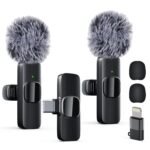
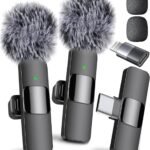
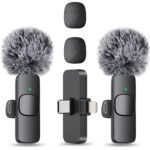
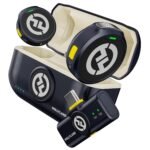
This Bulatry wireless lavalier review has a short answer: yes, it’s worth $24.99. You get a two-pack of clip-on mics, noise reduction, and a 65-foot range, which beats most single mics at this price. Just know it’s built for phone video, not serious film gear.
For a sub-$25 dual-pack lavalier set, it offers a reasonable balance of features and performance, though not exceptional build or sound quality.
Price vs. rivals
Cheaper
CheaperTypicalPricier
Priced noticeably lower than most comparable two-pack wireless lavalier microphone sets, making it an entry-level/budget choice. It sits at the affordable end of the spectrum, appealing to cost-conscious buyers rather than professionals.
Ease of use
Excellent 85/100
Simple to set up with any smartphone via plug-and-play receiver, and the clip-on design makes it convenient for hands-free use, though initial charging or pairing may require minimal effort.
Overview: Bulatry Wireless Lavalier Review — What It Is
The Bulatry wireless lavalier microphone is a two-pack of clip-on mics that send audio to your phone through a small receiver plugged into the charging port. It solves one specific problem: your phone’s built-in mic picks up room echo, handling noise, and whatever trucks are passing outside, while a lapel mic captures your voice close to the source.
This Bulatry wireless lavalier review keeps coming back to a simple point: it’s for people making short videos, interviews, TikToks, product demos, or online lessons with a phone. It won’t replace a professional wireless system for a paid film shoot, but it’s not trying to. At $24.99, the category is “cheap enough to throw in your bag and use without stress.”
Key Features: What $24.99 Gets You
Two complete microphones in the box That’s the headline feature. You can use one while the other charges, leave one at the office, or hand the second to a friend without buying another set.
65-foot wireless range In a room, you can walk over to a whiteboard, turn around, and keep talking without dragging your phone along. Walls and interference shorten that, but for ordinary indoor video, the range is plenty.
Bulatry wireless microphone noise reduction The filter here is tuned for speech. It takes some room tone and rustle off the top and leaves your voice sounding more focused, which is exactly what you want from a clip-on mic.
6-hour working time That’s around a full day of short takes. You’ll still want to charge it overnight, but you won’t be hunting for a charger between clips.
Plug-and-play connection No app to install and no pairing menu. The receiver uses your phone’s port, so the camera app picks it up as a microphone right away.
Clip-on form factor The mic clips to your collar, lapel, or even a pocket edge. It’s small enough to hide under a collar with the wire tucked in.
Fit for You: Where This Mic Makes Sense
If you’ve been searching for a Bulatry clip on microphone for iPhone Android, here’s the short version of where it fits.
You post weekly videos to TikTok or YouTube Shorts and want your voice to sound closer without holding a mic in frame.
You record interviews or Q&As on your phone and need the other person to sound clear, not muffled and far away.
You teach a class or host a webinar from a living room, and you like being able to move around while you talk.
You shoot product demos and unboxings, where one hand is holding the item and the other hand is not available for a microphone.
You travel light and don’t want to carry a bag of audio interfaces, cables, and clamps just to get a clean voice.
You want a cheap backup mic for a wedding toast or family celebration, and losing it doesn’t hurt.
Uses: Where It Earns Its Keep
Sit-down interviews in a cafe: clip the mic to the guest’s collar, plug the receiver into your phone, and the background clatter drops away. You don’t need a quiet room to get a usable track.
Cooking or crafting videos: your hands are busy, and the mic is clipped to your shirt. You can face the counter, talk through the steps, and never worry that your voice is fading because you turned your head.
Walking videos and outdoor chats: expect wind to be the real test. Put the foam windscreen on, and the Bulatry wireless microphone noise reduction helps keep the voice steady, though strong gusts will still thump.
Phone calls or quick voice memos: plug it in, clip it on, and the person on the other end hears your voice rather than the street around you.
Experience: The Everyday Reality
Setup is genuinely simple. You connect the receiver to your phone’s port, long-press the button on the mic, and the pairing happens on its own. You won’t spend ten minutes in a Bluetooth menu.
The first thing you’ll notice is the difference in presence. Your voice sounds closer, more solid, and less like it’s coming from across the room. For a $24.99 system, that’s the moment that makes sense of the whole product.
The catch is the receiver. It sticks out from the bottom of your phone, which means you can’t lay the phone flat on a table without propping it up. It also occupies the charging port, so you’ll need a splitter if you plan to record for a long time and need to keep the battery alive.
Don’t expect a headphone jack for monitoring at this price. If you absolutely need to hear exactly what the mic is picking up, you’d move to a pricier wireless kit.
Storage and cleaning are no fuss. The foam windscreens pop on and off; keep them with the mics so you have them when you go outside. And get into the habit of turning the mics off when you’re done, because a clip-on mic left on in a camera bag will quietly drain.
Pros and Cons: Bulatry Wireless Lavalier Review
Pros
Two mics for a low price At $24.99, you’re not being stingy with a backup. That’s a real advantage over many single-mic competitors.
Clear voice for phone video The noise reduction and the clip-on placement do their job: you sound closer and cleaner than the phone’s built-in mic.
No app or special software It works with your phone’s default camera. That is rare and worth appreciating.
65-foot range for movement You can frame a wide shot and still have freedom to move, point, or write on a whiteboard.
Light and tiny You’ll forget it’s clipped to your shirt until you go to pack up.
Cons
Receiver occupies the charging port To charge and record simultaneously, you need a splitter or a different setup.
No headphone monitoring You’ll be recording without hearing exactly what the mic picks up, which is common at this price. If live monitoring matters, you’ll need to spend more.
Wind protection is limited The foam cap helps in light breeze, but a windy outdoor scene will still show up as rumble.
Plastic build feels budget The shell and thin cables require a gentle touch. Price and premium feel rarely go together.
Two mics won’t feed one phone If you want to record a two-person conversation, you’ll need to swap or record to two phones.
Advantages: Bulatry vs Boya Wireless Lavalier
In the Bulatry vs Boya wireless lavalier comparison, Bulatry’s edge is the two-pack price and the no-app setup. Boya has a longer track record and more professional models, but those cost more and target camera users. For phone video, the Bulatry stays focused on what matters: a clean voice with no extra gear.
Value beats brand history You’re buying two working sets, not paying for a name. That’s hard to argue with at this price.
No-app workflow Everything stays in the stock camera app, so you don’t add another step to your recording routine.
It earns the “best budget wireless microphone for video recording” label Noise reduction, range, battery life, and a price that doesn’t make you think twice.
Separate iPhone and Android versions Pick the one that matches your phone and the receiver plugs straight in.
Who Should Buy This (And Who Should Skip It)
If you’re on the hunt for the best budget wireless microphone for video recording, this deserves a serious look. The Bulatry is built around the needs of phone creators, and it does that well.
Buy it if you post short videos to social platforms and want to sound clearer without buying an expensive audio rig.
Buy it if you interview people on your phone and need a mic that’s quick to clip on and trust.
Buy it if you want a reliable travel backup mic for presentations, toasts, or family events.
Skip it if you produce paid client work and need dependable audio monitoring or a receiver that mounts on a camera. Look for a wireless set with a headphone output.
Skip it if you’re recording a two-person conversation with one phone; you’ll need a different system for that.
FAQ: Quick Answers Before You Buy
Is the Bulatry wireless microphone worth it?
Yes, for phone video it is. The $24.99 price gives you two mics, noise reduction, and enough battery for a typical day of shooting. The big catches are no audio monitoring and the occupied charging port, but those are reasonable trade-offs at this price.
How do Bulatry and Boya compare?
In the Bulatry vs Boya wireless lavalier comparison, Bulatry wins on value because you get two mics for a low price, while Boya has more professional options with camera mounts and higher price tags. For phone-only creators, Bulatry is the simpler, cheaper choice.
Does the Bulatry clip on microphone for iPhone Android work with both?
You’ll need to choose the version that matches your phone’s port. Bulatry sells the clip on microphone for iPhone Android separately, so a Lightning receiver won’t fit a USB-C Android phone and the other way around. The receiver is the part that determines compatibility.
How does the Bulatry wireless microphone noise reduction sound?
The Bulatry wireless microphone noise reduction makes your voice the dominant sound in the recording. It cuts some room tone, handling rustle, and background rumble. It doesn’t remove loud or sudden sounds like a barking dog or a slammed door, so keep expectations realistic indoors and out.
How long does the Bulatry wireless lavalier last on a charge?
The working time is rated at 6 hours, which is normal for a clip-on wireless mic at this price. For short videos and interviews, that’s plenty. You should turn the mic off after each use, because the button is easy to leave on and the battery will drain overnight.
Can you use both mics at the same time?
Not with one phone. The Bulatry two-pack includes two separate sets, each with its own receiver, and a phone has one charging port. You can use one mic and keep the other charged, or use both with two phones. For a two-person interview into one phone, look elsewhere.
Final Verdict: Bulatry Wireless Lavalier Review
At $24.99, the Bulatry wireless lavalier microphone is one of the easiest ways to improve phone audio. This Bulatry wireless lavalier review isn’t going to oversell it as a portable studio; it’s a simple, inexpensive tool that puts a clean voice in your video.
The one thing to keep in mind is the trade-off: no monitoring and a blocked charging port. If you can live with that, it’s a strong candidate for the best budget wireless microphone for video recording.
Bulatry Wireless Lavalier Microphone vs the Competition in 2026
You’re staring at a wall of wireless clip-on mics, and most of them cost more than a decent dinner. The Bulatry wireless lavalier microphone sits at the budget end of that wall, promising a lot for $24.99. It’s a two-pack of tiny transmitters with a dual receiver that plugs straight into your phone or tablet. For the price, it’s genuinely hard to argue with, but it’s not the only option, and it’s not right for everyone. The category splits into three camps: ultra-cheap single mics, this kind of value-pack, and professional kits that cost ten times as much and are worth every extra dollar if your income depends on the sound. In 2026, the Bulatry is the default pick for the casual creator, but the serious ones will need to look further up the shelf.
Product
Price Range
Key Strength
Key Weakness
Best For
Bulatry Wireless Lavalier (2-Pack)
Budget (under $30)
Two mics, noise reduction, 65ft range for a silly low price
Plastic build, receiver can feel flimsy, battery life is 6 hours, not more
Beginners, phone-first creators, anyone who needs two clean tracks on a shoestring
Boya BY-M1 (Wired)
Budget ($15–$25)
Reliable, no battery anxiety, decent sound for the price
It’s a cable. You are physically tethered to your camera or phone.
Students, podcasters who sit at a desk, anyone who hates charging gear
Hollyland Lark M1
Mid-range ($100–$150)
Better noise processing, more stable connection, metal construction
Costs four times more than the Bulatry; you pay for the brand and reliability
Wedding videographers, run-and-gun shooters who need to trust the link
Expensive, overkill for a vlog about your morning routine
Filmmakers, journalists, pros who can’t afford a dropout or a clipped word
Bulatry wireless lavalier microphone vs Boya BY-M1
The Boya BY-M1 is the old guard. It’s a wired lav, which means it plugs into your phone and you’re stuck within arm’s reach of it for the whole take. You’ll never drop a signal, and it costs less than a pizza, but it anchors you in place. The Bulatry cuts that cord and lets you walk around a room or a shop floor while you talk. It also does the noise reduction thing—more on that later—which the Boya doesn’t offer at all. But the Boya has one huge advantage beyond price: it has no batteries to die mid-interview. If you’re shooting a three-hour lecture, the Bulatry’s 6-hour limit is a hard wall. You’ll get a full charge overnight and it’ll last the day, but it’s a thing you have to think about. The Boya doesn’t ask you to think about anything, because it’s just a wire. That’s the trade-off. The Bulatry wireless lavalier microphone vs Boya BY-M1 boils down to mobility versus absolute simplicity. If you bounce around on camera, pick the Bulatry. If you park yourself at a desk and just talk, the Boya saves you money and hassle.
Bulatry wireless lavalier microphone vs Hollyland Lark M1
This is the comparison that matters if you’re upgrading. The Hollyland Lark M1 is the best-selling mid-range option, usually around $100 to $150, and it’s what I’d call the first “real” wireless mic. The Bulatry gets you in the door, but the Lark M1 feels like an actual tool rather than a gadget. The case is metal, the charging case holds multiple charges, and its noise reduction is a smarter, more aggressive filter that doesn’t mangle your voice. The Bulatry’s noise reduction works—you can hear it kicking in when a fan hums in the background—but it’s a blunt instrument. It can make you sound slightly hollow in a quiet room because it’s cutting nothing, and the algorithm is working hard. The Hollyland leaves your voice more natural. The range difference is also real; the Hollyland claims 650 feet, while the Bulatry claims 65. In practice, the Bulatry is more like 30–40 feet indoors before it starts stuttering. That’s fine for most phone shots, but if you’re recording a ceremony or a speaker crossing a wide stage, that extra range is why you pay the premium. For the money, the Bulatry is a steal, but you are getting a toy-like plastic build. The Lark M1 is the minimum entry point for someone who needs to look professional on a shoot.
Bulatry wireless lavalier microphone vs RODE Wireless Go II
Let’s be honest about why the RODE Wireless Go II costs $300 and the Bulatry costs $24.99. The RODE records audio internally with 32-bit float, which is a safety net that catches distorted audio before it ruins a take. No matter how loud the source, you can recover it in post. That’s a feature you don’t know you need until someone screams into the mic and your recording clips out. The Bulatry has no such failsafe. It doesn’t record on-board at all; it just transmits, and if the audio clips, it’s gone. The build is night and day too. The RODE is a tank. It’s survived being dropped on concrete, kicked across a room, and stuffed into a camera bag for a year without blinking. The Bulatry is plastic that would crack if you sat on it. For beginners, the RODE is overkill, and you shouldn’t spend that money until you know you need it. But if you’re getting paid to shoot, buying the Bulatry to save money is a false economy. It’s a backup mic, not a workhorse. The Bulatry is perfectly fine for a TikTok video; it is not fine for a client’s wedding film.
Is the Bulatry worth it, and who should buy it?
The Bulatry wireless lavalier microphone is worth it if your earnings don’t depend on it. It’s the best budget wireless microphone for video recording for a phone-based creator who wants two mics for interviews, cooking demos, or product reviews, and it costs less than a pair of cinema tickets. The noise reduction is passable, the range is honest for close-range work, and the 6-hour battery covers a day of on-and-off shooting. The sound quality for the price is surprisingly clear; you’ll notice the plastic housing and the cheap receiver, but on camera, nobody hears plastic. Choose it if you’re starting out, if you need a second mic for a guest spot, or if you’d rather spend the $100 you saved on a light or a tripod. Skip it if you’re a working professional or if your audio is the product. For that, step up to the Hollyland Lark M1 or the RODE Wireless Go II you’ll be apologizing for your first six months of audio otherwise.
Ready to decide on the Bulatry wireless lavalier microphone?
See today’s price, stock and delivery options on Amazon.