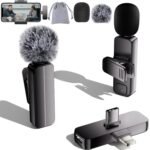
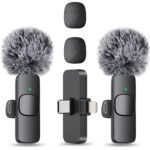
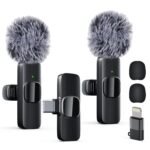
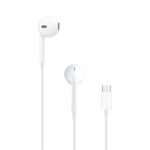
The Hollyland Lark M2 review, in short: at $76, it’s worth it for anyone who records talking videos on a phone. The size is the selling point, but the convenience of a plug-in USB-C receiver is what seals the deal. You’ll get clean, reliable voice audio without a bag of cables.
Positioned as a feature-rich wireless microphone system with high reliability and battery life, it offers strong value without reaching premium tiers.
Price vs. rivals
Cheaper
CheaperTypicalPricier
Positioned below typical mid-range competitors, offering strong value with competitive features at a notably lower price point.
Ease of use
Excellent 85/100
Plug-and-play USB-C connection and compact lapel design make it straightforward for everyday recording, though wireless pairing and settings may take a moment to learn.
Hollyland Lark M2 Review: Overview
The Lark M2 is a two-part wireless lapel mic system: two tiny transmitters that clip onto your clothing and one receiver that plugs into your phone’s USB-C port. No bodypacks, no clunky receivers hanging from a lanyard, no pairing menus.
It’s made for people who want broadcast-ish audio without broadcast-ish gear. You record an interview, a cooking video, a podcast, a vlog, and you spend ten seconds setting up instead of ten minutes. That ease is the reason the Hollyland Lark M2 review is usually positive.
Hollyland Lark M2 Review: Key Features
Here are the features that matter when you’re actually using the thing, not just reading the box.
Plug-and-play USB-C receiver – Slide it into an iPhone 15 or newer, or a USB-C Android phone, and the camera app sees it instantly. No adapters, no batteries in the receiver, no fiddly pairing.
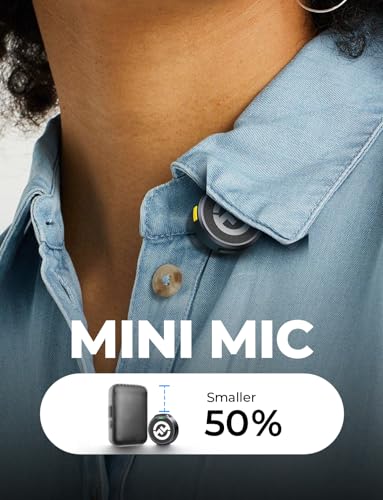
Tiny clipped-on transmitters – Each one is small enough to hide under a collar. Your subject will forget they’re wearing it, which makes for better interviews.
30-hour charging case – The case recharges the transmitters while you carry it, so a full battery day is a non-issue. You charge the case, not the individual mics.
One-touch noise cancellation – A button on the transmitter toggles a filter that trims constant background hum. It helps in cafés, streets, and anywhere with AC noise.
Hi-Fi audio capture – Your voice comes through clear and warm, with far more body than a phone’s built-in mic. It won’t rival a studio condenser, but it’s more than good enough for video.
Long-range wireless – Hollyland rates it at 1000ft line-of-sight. Indoors with walls, expect less, but still enough to move around a room freely.
Fit for You
A quick checklist of who gets the most out of this mic.
You film talking-head videos for social media and your phone’s built-in mic makes you sound like you’re in the next room.
You livestream from an iPhone or Android and want a mic that works before the live countdown ends.
You interview people for a podcast or a news piece and want small clips that don’t scare the guest.
You’re a maker or educator recording videos over a noisy fan, with a transmitter clipped to an apron or a collar.
You travel light and want a single small case instead of a pouch of cables, adapters, and dead AA batteries.
Uses
Set one transmitter on the person you’re interviewing and keep the other on yourself. Both get recorded to your phone at once, which makes a two-person conversation easy to edit later.
Cover a live event with the transmitter on the speaker and your phone in your hand. You can move around the stage area without dragging a cable across the room, and the range won’t be your limiting factor.
Film a quiet cooking video at home. The clip hides in your collar, the noise cancellation tames the extractor fan in the background, and your voice stays the loudest thing in the track.
Experience
Setup is the headline. You open the case, pull out the receiver, and plug it into your phone. There’s no Bluetooth pairing and no app to hunt for in the app store. The first time you do it, you’ll check the little status lights to confirm the link, and then you’ll stop thinking about it.
The case is where everything lives. It’s about the size of a glasses case and slides into a pocket. The transmitters slot inside for charging, which is satisfying until the glossy top picks up every fingerprint in your pocket. A quick wipe with a microfiber cloth takes care of it, but you’ll be doing that more often than you’d like.
The small annoyances in an otherwise positive Hollyland Lark M2 review are always the same. The transmitters are easy to lose, the clips need a gentle pinch when you swap them between people, and you’ll develop a habit of patting your pocket to make sure the case is there.
Noise cancellation is a tool, not a promise. The Hollyland Lark M2 noise cancellation test results people share online vary because the filter is conservative. It trims the air conditioner hum and the street drone. It does not single out your voice in a shouting match.
Pros and Cons
Pros
Plugs straight into modern phones – The USB-C receiver is simple and reliable, and it means one fewer cable to keep in your pocket.
Transmitters are genuinely small – They hide under clothing well, so your subject’s face, not the gear, fills the frame.
Strong battery life with the case – A full day of filming is realistic, and the case tops up the mics between scenes.
Clear voice for the price – The audio is a huge step up from a phone’s internal mic, and it’s good enough for professional-looking video.
Simple noise-cancellation toggle – You can turn it on or off per scene, which is more control than some pricier systems offer.
Cons
No Lightning support in this version – This is the USB-C model, so older iPhones won’t work with it. Look for the Lightning version of the Lark M2 if that’s what you have.
No internal recording – If the wireless signal drops, the audio is gone. Dropouts are rare, but some recorders give you a safety net for important shoots.
Tiny parts are easy to lose – The transmitters are impressively small, but that’s a trade-off. Give them a home in the case when you’re not using them.
Noise cancellation isn’t magic – It helps with steady noise like air conditioners, but it won’t remove a loud person next to you. Set your expectations accordingly.
The glossy case shows wear – It looks nice out of the box, but it picks up fingerprints and minor scratches with daily use. Cosmetic, not functional.
Advantages
The easiest way to understand the Lark M2 is to look at the Hollyland Lark M2 vs DJI Mic Mini question that comes up in every forum. The M2 wins on price, and its transmitters are smaller, so they’re easier to hide in a shot. The DJI has a more polished feel and a recognizable name, but the M2 matches it on the essentials for less money.
If you’ve spent any time searching for the best wireless microphone for iPhone video recording, you’ll notice the Lark M2 keeps showing up in the conversation. The direct USB-C connection is why. No dongle, no separate recorder, no delay between deciding to record and actually recording.
Who Should Buy
Buy it if you record video on a USB-C iPhone or an Android phone and want to sound clear without thinking about gear.
Buy it if you’re starting a YouTube channel or a podcast and your mic budget is around $76.
Skip it if you’re connecting to a mirrorless camera or an audio recorder with a 3.5mm or XLR input; this USB-C version only plugs into phones and tablets, so you’d need the 3.5mm variant instead.
Skip it if you do high-stakes interview shoots where a lost signal would be a disaster; pick a mic with internal recording as a backup.
FAQ
Is the Hollyland Lark M2 worth it?
Yes, for most phone creators it’s worth the $76, because it solves the two biggest annoyances with affordable wireless mics: setup and size. The audio is clear, the case keeps everything charged, and the plug-in receiver means no pairing menus. Just confirm your phone has USB-C before you order.
How long does the battery last?
Expect around 30 hours of total use from the case and the transmitters combined, which covers a long shooting day without worrying about the charger. The transmitters charge whenever they’re in the case, so the habit of putting them away between scenes keeps everything topped up.
Does the Hollyland Lark M2 work with an iPhone?
It works with iPhone 15, 16, and 17 because those models have USB-C ports. For an older iPhone with a Lightning port, this USB-C version won’t plug in, so you’d need a Lightning-compatible version of the Lark M2 instead. Either way, it’s a direct plug-in with no adapters.
Can you use the Lark M2 for streaming?
Yes. As a USB C mini lapel microphone for streaming, the receiver plugs straight into a phone and works with apps like TikTok, Instagram, and YouTube. No additional setup screens or drivers. You’ll see the mic level jump the moment you plug it in, which is the kind of reliability you want before a live show.
Does the Lark M2 have noise cancellation?
It has a noise-cancellation mode, toggled by a button on the transmitter, that trims steady background noise like air conditioners or traffic. The Hollyland Lark M2 noise cancellation test searches tend to show mixed results because the filter is conservative. It makes your voice clearer, but it won’t isolate you in a loud room.
How is the range in real life?
The 1000ft range wireless mic for Android spec is a line-of-sight number. With walls or other obstacles, you’ll get far less, but still enough for a small room, a stage, or a back yard. Range is rarely the limiting factor once the receiver is in your hand and the transmitter is on the speaker.
Hollyland Lark M2 Review: Final Verdict
So the bottom line on this Hollyland Lark M2 review is short: buy it if you record with your phone and you don’t want mic gear to become a hobby. It’s not the last word in wireless audio, but it’s the first one that gets out of your way. Keep the noise-cancellation expectations in check, remember it’s USB-C only, and you’ll get everything you need for $76.
Hollyland Lark M2 Review: vs the Competition in 2026
This Hollyland Lark M2 review comparison has one job: help you choose between the Lark M2 and the wireless mics you’ll actually see in 2026. The Hollyland Lark M2 alternatives that deserve your attention are the DJI Mic Mini, the Rode Wireless Micro, and the Rode Wireless GO II. At $76, the Lark M2 sits in the budget-to-mid range, and it’s the smallest thing here by a noticeable margin. That alone keeps it near the top of a best wireless microphone 2026 shortlist, especially for people filming on a USB-C iPhone or an Android phone.
Product
Price Range
Key Strength
Key Weakness
Best For
Hollyland Lark M2
$76
Smallest transmitter in the group; advertised 1000ft range; 30H battery with case
Single-channel; USB-C receiver won’t work with older Lightning iPhones
Solo video recording, phone streaming, run-and-gun content
DJI Mic Mini
Slightly above $76
Magnetic accessories, nicer receiver body, optional two-mic kit
Shorter advertised range than the Lark M2; no on-board recording
Creators who want a polished kit with room to grow
Rode Wireless Micro
Near $100
Plug-in receiver, simple setup, warm voice tone, Rode’s gain assist
Shorter range; no recording backup; camera use is limited
Interviews, multi-person shoots, hybrid camera setups
Hollyland Lark M2 vs DJI Mic Mini
Lay the Hollyland Lark M2 vs DJI Mic Mini side by side and the first thing you notice is size. The Lark M2 transmitter is genuinely tiny, so it hides better under a collared shirt or behind a jacket lapel. The DJI feels more solid, with a better charging case and magnetic mounting bits, but it costs more and its advertised 820ft range trails the Lark M2’s 1000ft claim. In real rooms, both will drop out if you walk through too many walls, so don’t buy on range alone. Noise cancellation is where the split shows up: a common Hollyland Lark M2 noise cancellation test with an AC unit running will show the ENC smoothing out the hum, while the DJI’s noise canceling sounds more aggressive and can leave the voice a little thin. For a single creator, the Lark M2 is the smarter buy. If you know you’ll need two mics later, the DJI’s dual kit is worth the extra money.
Hollyland Lark M2 vs Rode Wireless Micro
The Rode Wireless Micro is the closest rival in spirit: tiny transmitter, receiver that plugs straight into USB-C, no cable spaghetti. Rode’s sound is slightly warmer and safer on harsh voices, while the Lark M2 sounds more open but will happily pick up a computer fan if you record at a desk. As a USB C mini lapel microphone for streaming, the Lark M2 gets you 30 hours of total battery against Rode’s 24, and the advertised 1000ft range wireless mic for Android use gives you more room to wander. Rode’s gain assist is genuinely helpful if you speak quietly one minute and shout the next. The practical annoyance with the Lark M2 is the receiver: it sticks out from the phone’s USB-C port, and a thick case can stop it from seating fully. If your case is chunky, grab a short USB-C extension cable and move on.
Hollyland Lark M2 vs Rode Wireless GO II
This one isn’t a feature fight; it’s a weight-class difference. The Rode Wireless GO II is the system you’d buy for dual-person interviews, camera-mounted receivers, or on-board recording as a safety net. It does all of that well. It also costs three to four times as much, and the receiver is a box you’ll have to clip somewhere or stuff in a pocket. The Lark M2 is a phone accessory. The Wireless GO II is a production tool. If you record Reels and talking-head videos on your iPhone, the GO II is overkill. Get the Lark M2. If you’re shooting a two-person podcast or wedding audio, the GO II is a safer investment because it gives you redundancy that a $76 mic can’t offer.
The question “is Hollyland Lark M2 worth it” answers itself once you line up the specs and the price. For a solo creator with a USB-C iPhone or Android, the Lark M2 is the best wireless microphone for iPhone video recording in 2026 under $100. It has the longest advertised range in this group, battery life that outlasts a full shooting day, and a transmitter small enough to stay out of the shot. Pick the DJI Mic Mini instead if you want a better case and a possible second mic down the road. Pick the Rode Wireless GO II if you need dual-channel audio, camera support, and on-board recording. Otherwise, the Lark M2 is the right amount of microphone for the phone you already own.
Ready to decide on the Hollyland Lark M2?
See today’s price, stock and delivery options on Amazon.