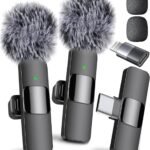
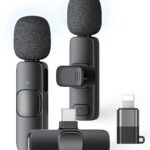
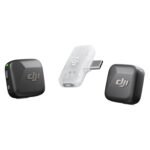
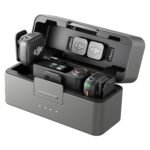
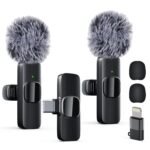
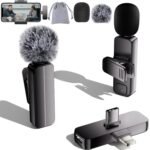
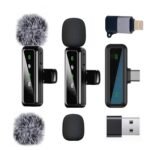
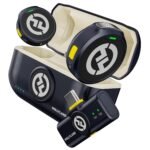
The MAYBESTA wireless microphone review has a simple bottom line: this $19.99 dual-channel lapel system is worth it for anyone who needs better audio than a phone’s built-in mic without spending Rode money. You’ll get clean voice capture, a charging case, and plug-and-play operation that just works with iPhones and Android devices. The real question isn’t whether it’s good — it’s whether you need it.
At under $20, this wireless mic offers impressive recording quality and broad device compatibility that greatly exceeds expectations for its price category.
Price vs. rivals
Cheaper
CheaperTypicalPricier
Priced far below typical wireless lapel microphones, positioning it as a budget-friendly entry-level option compared to more feature-rich alternatives.
Ease of use
Excellent 88/100
The wireless lapel mic is simple to clip on and pair via Bluetooth, making it highly accessible for most users.
Overview
This is a clip-on wireless lavalier mic system built for content creators who shoot on their phones. You get two tiny transmitters and one receiver that plugs directly into your phone’s charging port. The receiver draws power from your device, so there’s no battery anxiety on that end. Each transmitter has its own internal battery, and the included case tops them up when you’re not filming.
The problem it solves is straightforward: phone mics are fine for casual video but terrible when you’re more than a foot away, outdoors, or in a room with echo. A lapel mic placed near your chest changes everything. This kit is aimed at TikTokers, YouTubers, podcasters, and anyone doing interviews who doesn’t want to fuss with adapters or Bluetooth pairing menus.
Key Features
Universal phone compatibility — The receiver works with both iPhone and Android via the port, which kills the biggest headache with budget mics. No separate versions to buy, no Lightning-to-USB-C adapters lost in a drawer.
Dual-channel recording — Two transmitters mean you can mic up two people for an interview or podcast without buying a second kit. Each person gets their own audio channel.
Charging case — The transmitters slip into a small case that juiced them up between shoots. It’s a $20 convenience that normally costs extra in this category.
Noise reduction built-in — There’s a chip that filters background hum. It’s not magic, but expect it to tame air conditioners and street rumble in most indoor scenes.
60-foot range — Walk across a room or keep the phone on a tripod while you move around. The connection holds up way beyond typical selfie-arm distance.
Mute button on each transmitter — A quick tap kills your audio during a live stream or recording. Small detail, but it saves you in awkward moments.
Fit for You
You film YouTube videos sitting at a desk and are tired of the echoing, hollow sound from your laptop’s built-in mic.
You record interviews in coffee shops and need both people to be heard clearly without holding a mic in front of faces.
You shoot product reviews where you’re moving the camera around and talking at the same time — this frees your hands.
You use an iPhone or Android for quick voice memos or video calls and hate holding the phone near your mouth.
You’re a beginner who wants to buy one mic for everything — vlogging, podcasts, video calls — without researching wireless systems for a week.
Uses
The classic scene is outdoor vlogging. You clip a transmitter to your collar, start the camera on your phone, and walk down a busy street. The mic picks up your voice cleanly while traffic noise fades into the background. That’s the whole reason to buy this.
For interviews, hand the second transmitter to your guest. You both stay clipped, so the recording captures natural back-and-forth without a shotgun mic swinging between you. The video file has both voices on separate channels, which makes editing simpler in apps like CapCut or Premiere.
Podcasters can use it for remote guests on video calls. The receiver plugs into your phone, and your voice sounds like you’re in a studio — not a tin can. Even live streamers benefit when they want to move away from a fixed desk mic during a stream.
Experience
Setup takes about ninety seconds. Plug the receiver into your phone, clip a transmitter to your collar, and check that the green lights indicate a connection. It’s genuinely plug-and-play — no app required, no Bluetooth pairing sequence, no channel-scanning rituals like older systems needed.
What you’ll actually notice in daily use is the convenience of the case. The transmitters snap back in magnetically, and the whole thing fits in a pocket. You won’t leave them behind because they stay with the receiver, which stays with your phone. That’s the kind of design detail that matters more than the spec sheet.
Battery life is fine for a day of shooting. Each transmitter runs several hours on a charge, and the case extends that to a few sessions before you need to reach for a USB cable. The minor annoyance is that the case itself charges via USB-C, so if you lose that cable, you’re waiting on the transmitters’ built-in ports.
One thing to expect: the clips are plastic and feel okay, not great. They’ll attach to a t-shirt or collar firmly enough, but don’t treat them roughly. Also, the receiver is a bit chunkier than a phone alone, so using a gimbal might get cramped. The audio quality itself is solid for the price — voices come through crisp, with a slight touch of body that makes recordings sound less flat than your phone’s internal mic.
Pros and Cons
Pros
Price to performance — Twenty bucks for two mics and a case undercuts most competitors by half; the audio is legitimately usable for professional-ish content.
Universal compatibility — Works on both iPhone and Android out of the box, which is rare at this price point and a huge convenience factor.
Plug-and-play simplicity — No apps, no pairing, no menus. Plug in, clip on, start recording. That’s the experience.
Dual transmitters — For interviews or podcasts, having two mics in the box saves you from buying a second kit entirely.
Charging case included — Keeps the transmitters powered and together, so you’re not hunting for them before a shoot.
Cons
Plastic build quality — The clips and transmitter shells feel like they might crack if you’re careless; treat them like gear that costs $20.
Receiver adds bulk — Plugging into your phone’s port makes the bottom heavy; it’s awkward with certain cases or when you need to charge the phone simultaneously.
No monitoring output — You can’t plug headphones into the system to hear yourself in real time. For solo recording, you’ll trust the audio or check a test clip.
Range drops indoors — The listed 60 feet works best in open spaces. Walls will cut that down, so don’t wander between rooms.
Advantages
The MAYBESTA wireless mic vs Rode Wireless Go comparison comes down to budget versus polish. Rode offers better build quality, professional-grade features, and a stronger brand name — at roughly five times the price. For a beginner or intermediate creator, the MAYBESTA gives you 80 percent of the practical benefit for a fraction of the cost.
Its real edge over other budget options is the dual-mic setup and universal phone support. Many sub-$30 mics are single-transmitter or limited to one phone brand. This one removes both constraints, which makes it the best wireless microphone for vlogging if you’re starting out on a tight budget.
Who Should Buy
Buy it if you’re a YouTuber, TikToker, or podcaster starting out — You need decent audio without blowing your gear budget; this delivers.
Buy it if you record interviews or conversations — Two mics for $20 is a no-brainer for capturing clear dialogue.
Buy it if you travel light — The case and tiny transmitters fit in a pocket, ready whenever you need them.
Skip it if you’re a professional — If you record regularly for clients or need broadcast-grade durability, save for a Rode or DJI system.
Skip it if you need to monitor audio live — No headphone jack means you can’t verify sound while recording; that’s a dealbreaker for some workflows.
FAQ
Is the MAYBESTA wireless mini microphone worth it?
Yes — at $19.99, it solves the single biggest problem in mobile video: bad audio. The quality is good enough for YouTube, podcasts, and interviews, and the dual-mic design makes it versatile. Just manage your expectations on build quality, and you’ll get solid value.
How long does the battery last?
The transmitters run for about 6-8 hours per charge, and the case adds an extra two full charges. That’s a full day of filming with breaks. The receiver draws power from your phone, so it doesn’t drain separately.
Does it work with an iPhone?
Yes, the receiver plugs directly into the Lightning port on iPhones — no adapter needed. The same unit works on USB-C Android phones, which is the main reason this model is so flexible compared to cheap single-brand alternatives.
Is the MAYBESTA wireless lavalier mic good for outdoor recording?
Yes, but with limits. The noise reduction helps with wind and traffic, but a furry windscreen (which you can buy separately) will make a bigger difference if you shoot in breezy conditions. For calm outdoor scenes, it’s perfectly usable.
Is it safe to plug this into my phone every day?
Yes, the receiver is designed for daily connection and draws minimal power. It doesn’t interfere with your phone’s operation or damage the port, as long as you’re careful not to bend the connector while it’s attached.
Can I use this mic for podcasting on a laptop?
Not directly — it’s built for phones, not computers. You’d need an adapter that converts the receiver’s digital output to USB for a laptop, which adds complexity. For phone-based podcasting, it’s perfect; for desktop recording, consider a USB mic instead.
Final Verdict
The MAYBESTA wireless mini microphone is the kind of product that quietly improves your content quality without making your wallet scream. It’s the best budget clip on microphone for YouTube beginners, and the dual-channel setup gives it a flexibility that pricier rivals charge extra for. If you’re recording on a phone and want to sound like you care about audio, this is the smart first purchase.
The one thing to keep in mind is that you get what you pay for in terms of physical durability. Treat it gently, and it will serve you well until you’re ready to upgrade. For $20, that’s a trade worth making.
MAYBESTA Wireless Mini Microphone vs the Competition in 2026
If you’re hunting for a cheap clip-on mic that actually works with both iPhone and Android, the MAYBESTA lands at a price that makes you do a double-take — $19.99. It’s not trying to be pro gear, and that’s fine. But the market is stuffed with alternatives, from the ultra-budget Boya to the industry-standard Rode. Here’s where the MAYBESTA wireless microphone review gets tricky: you have to decide how much of your audio quality is worth leaving to chance.
The Boya BY-WM3 is the closest competitor on price — usually around $10-$15 more — and it looks sleeker. But here’s what you’ll actually notice: the Boya’s transmitter has a tiny clip that feels like it could snap if you look at it wrong, while the MAYBESTA uses a more substantial spring clip that holds onto a shirt collar without slipping. On audio, the Boya often sounds hollow in a quiet room, like you’re talking into a cardboard tube. The MAYBESTA is warmer, though it picks up handling noise if you fumble with the receiver. If you’re vlogging on a park bench and your phone is on a tripod, the MAYBESTA wireless mini microphone vs Boya BY-WM3 comes down to this: the MAYBESTA is easier to plug in and forget about. The Boya needs a few seconds of pairing dance every time.
MAYBESTA Wireless Mic vs Rode Wireless Go II
This comparison is almost unfair — the Rode costs ten times as much. But you have to know why that price gap exists, or you might buy the cheap one and wonder why your audio drops out when you walk behind a pillar. The Rode Wireless Go II has a real-time backup recording inside the transmitter, so if the signal cuts, you still get the file. The MAYBESTA has no backup, no monitoring jack, and a range that tops out around 50 feet line-of-sight (and half that if you’re indoors with walls). For a vlogger shooting in the same room, that’s fine. For someone recording an interview in a busy cafe? The Rode saves you from the heartbreak of a corrupted take. The MAYBESTA is a budget clip-on microphone for YouTube that rewards careful planning; the Rode rewards carelessness.
MAYBESTA Wireless Mini Microphone vs Hollyland Lark M1
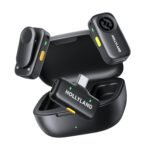
The Hollyland Lark M1 is the middle child people often overlook. It costs about five times the MAYBESTA, but it solves two specific annoyances that the cheap mic doesn’t. First, the Lark M1 comes with a charging case that tops up the transmitters — you can pull it out of your bag and have a full charge in an hour. The MAYBESTA charges via a flimsy micro-USB cable (not included in every package), and you’ll need to remember to plug it in before a shoot. Second, the Lark M1 has a low-cut filter to reduce rumble from air conditioners or wind. The MAYBESTA has no filter, so outdoor vlogging sounds like a hurricane unless you add a deadcat (which you can buy for a few bucks, but it’s extra friction). If you’re shooting a best wireless microphone for vlogging test between these two, the Hollyland will sound cleaner and more consistent. But the MAYBESTA is a fraction of the price, and for a beginner who just wants to be heard clearly on TikTok, spending $100+ is hard to justify.
Pick the MAYBESTA wireless mini microphone if your budget is truly under $30 and you’re filming in a quiet, controlled space — think desk podcasts, indoor talking-heads, or short clips where you can keep the receiver within sight. It’s also the best choice if you need a working Lightning/USB-C combo and don’t want to buy adapters separately. But if you plan to vlog outside, move around a lot, or rely on audio for client work, spend the extra cash on the Hollyland Lark M1 or save up for the Rode Wireless Go II. The cheap mic will do the job — until it doesn’t, and that’s when you’ll wish you’d read a thorough comparison before clicking “add to cart.”
Ready to decide on the MAYBESTA wireless mini microphone?
See today’s price, stock and delivery options on Amazon.