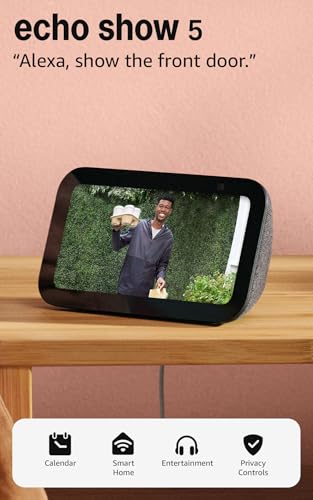
Priced in the middle of the smart display category, the Echo Show 5 offers a balanced mix of Alexa+ integration and improved audio for its compact size.
Price vs. rivals
Typical
CheaperTypicalPricier
The price is moderately above the typical entry point for small smart displays, reflecting the upgraded audio and Alexa+ capabilities, yet it remains competitive within the mid-range segment of similar devices.
Ease of use
Excellent 85/100
Voice control and a responsive touchscreen make daily use straightforward for most people, though initial setup requires a Wi-Fi connection and an Amazon account.
Overview
This Amazon Echo Show 5 review gets straight to what you care about: is it worth dropping $100 on a small smart display? For a bedside alarm clock that also shows your calendar, plays music, and controls your lights, yes. But it’s not a home theater or a kitchen tablet – it’s a focused little helper that replaces a phone for quick glances.
The Echo Show 5 (newest model) is Amazon’s most compact screen with Alexa. It solves the problem of reaching for your phone at night or while cooking. It’s really for someone who wants voice control and a small screen without taking up much counter space.
Key Features
5.5-inch touchscreen – Big enough to see notifications, weather, or a recipe step from a foot away, but small enough to sit on a nightstand without dominating the room.
Updated speaker with 2x the bass and clearer sound – Amazon claims the audio is noticeably fuller than the previous model. It won’t replace a dedicated speaker, but for talk radio, podcasts, and casual pop you get clean mids and a bit of thump.
Built-in camera with a physical shutter – The 2MP camera lets you make video calls or check in on your pet. The shutter slides closed for privacy – a small but huge comfort.
Alexa voice assistant – Set timers, ask for weather, control smart bulbs, play music from Amazon Music or Spotify. It does what you expect, and the mic picks up from across a bedroom.
Adaptive display and night mode – The screen dims automatically in low light, and you can set a custom bedtime schedule so it doesn’t blast blue light at 3 a.m.
Drop In and Announcements – Lets you use the Show 5 as an intercom to other Echo devices. Handy for yelling “dinner’s ready” without raising your voice.
Fit for You
You keep your phone plugged in across the room at night and want a gentle alarm with weather on tap.
You cook from recipes on paper and need a small screen to show a timer and steps side by side.
You have smart lights or plugs and get tired of fumbling for the app – just tell Alexa what to turn off.
You want a quick glance at your calendar or a shopping list without unlocking your phone every twenty minutes.
You video-call relatives and like the idea of a camera that can track you as you move around the kitchen.
You rent a small apartment and space is precious – this sits on a shelf or a tiny corner of a desk.
Uses
Set a timer for pasta while your hands are covered in olive oil – no touching a greasy phone. The voice response is fast enough that you don’t repeat yourself. Later, ask for a 20‑minute power nap alarm, and the screen darkens to a soft clock.
On Saturday mornings, say “show me my calendar” and see the week ahead while you sip coffee. If you have smart bulbs, “Alexa, turn off the lamp” works from the hallway. The camera lets you wave at your mom during a Drop In call – the 2MP resolution is fine for faces on a 5.5‑inch screen, but don’t expect a TV broadcast.
Play an audiobook while making dinner. The speaker is clear enough for talk, but loud music will sound thin in a big kitchen. For a bedroom or office, it’s plenty.
Experience
Setup takes under five minutes with the Alexa app on your phone – plug it in, connect to Wi‑Fi, and it updates itself. The screen wakes when you tap it or say “Alexa.” You’ll notice the ambient light sensor works well: at night the screen becomes a dim clock that’s readable without being a lighthouse.
Everyday use is mostly voice or tap. The touchscreen responsiveness is fine, though you’ll occasionally miss a small button if you’re rushing. The speaker grille collects dust but a quick wipe with a dry cloth fixes it. No fan noise, no hum – it’s silent when idle.
The main annoyance is that Amazon shows you sponsored content (flash sales, audiobook promos) on the home screen. You can turn off “Home content” in the settings, but it takes a couple of menus. The camera shutter is satisfying to slide – a physical click that says “now nobody can see you.”
Sound quality for music is a solid step up from the previous version. Pop and acoustic guitar have some warmth; bass notes on hip‑hop are present but not deep. If you’re after room‑filling sound, pair it with a larger Echo or a smart speaker. For talk radio, podcasts, and background tunes, it’s better than any phone speaker.
Pros and Cons
Pros
Affordable price at $99.99 – Gets you a smart display with a physical privacy shutter and decent sound, undercutting the Nest Hub by $20.
Compact footprint – Fits on a cramped nightstand or a slim shelf without hogging space.
Good voice recognition – Alexa hears you from across a medium room, even with music playing at moderate volume.
Useful bedside features – Sunrise alarm, night mode, and music alarm genuinely help your morning routine.
Physical camera shutter – Rare at this price; gives real confidence when you’re in a bedroom or home office.
Cons
Small screen makes video content feel cramped – Watching a YouTube recipe or a movie clip works, but you’ll wish it were larger. For a kitchen, the 8‑inch model is better.
On‑screen ads and suggestions – Amazon pushes content you didn’t ask for. You can reduce them, not eliminate them entirely.
No Zigbee hub built in – Unlike the larger Echo Show 8, this one doesn’t directly control some smart home devices; you’ll need a separate hub or bridge.
Bass is better but still limited – For music lovers who want real low end, this won’t replace a dedicated speaker or even a larger Echo.
Camera quality is basic – Fine for video calls, but grainy in low light. Not a home security camera replacement.
Advantages
Where the Echo Show 5 beats almost everything else in its size class? The physical camera shutter is a rare find at $100 – Google’s Nest Hub (2nd gen) lacks one entirely. Also, the Alexa ecosystem is deeper than Google’s for skills and smart home gadgets, especially if you already have Echo devices. The updated speaker is noticeably punchier than the older Show 5 or the small Nest Hub. And the ability to Drop In on other Echos is a neat trick for a quick check‑in with family.
Who Should Buy
You want a smart display for a nightstand or a small desk – this is the best size for a personal alarm and quick info.
You’re an Alexa household already. The Show 5 fits right in with your other Echos and integrates with your routines.
You need a simple video‑calling device for older family members who can just wave at the camera.
Skip it if you plan to watch a lot of YouTube or videos – the small screen and occasional buffering make it frustrating. Look at the Echo Show 8 or the Nest Hub Max instead.
Skip it if sound quality is your top priority – you’ll get better audio from a pure smart speaker like the Echo Dot (clock) or a Sonos One.
FAQ
Is the Amazon Echo Show 5 worth it?
Yes, for the price – if you need a smart alarm clock with voice control, a small display for quick info, and you already live in the Alexa world. The trade‑offs in screen size and sound are fair for $99.99.
How does the Echo Show 5 compare to the Nest Hub 2nd gen?
The Nest Hub has a larger 7‑inch screen and a better sleep‑tracking sensor (Soli), but no camera at all. The Echo Show 5 vs Nest Hub 2nd gen choice comes down to whether you want a camera for video calls (Echo) or a bigger display and no privacy worries (Nest).
Is the Echo Show 5 good for a bedside?
It’s the best smart display for bedside in its price range – the night mode dims well, sunrise alarm works, and the physical camera shutter lets you sleep without feeling watched. Just turn off the sponsored content in settings.
How is the Amazon Echo Show 5 sound quality?
Amazon Echo Show 5 sound quality is decent for a device this size: voices are clear, bass is present but not deep. Fine for talk radio and background music, but not for critical listening. The new model has noticeably more clarity than the old one.
What Alexa features does the Echo Show 5 support?
Echo Show 5 Alexa features include timers, reminders, smart home control, music streaming, video calls, Drop In, and thousands of skills. It also shows weather, calendar, and news feeds on the home screen.
Is the Echo Show 5 safe for a child’s room?
Yes, with parental controls through the Alexa app – you can disable Drop In, set time limits, and restrict content. The physical shutter also blocks the camera. Just be aware it’s an always‑listening device; you can mute the mic with a button.
Final Verdict
The Amazon Echo Show 5 is a smart alarm clock that also happens to be a pretty good assistant and a competent video‑call device. It earns its spot if you want a small screen for quick glances and don’t mind the occasional ad on the home screen. At $99.99, it’s one of the most affordable smart displays with a camera shutter – that alone makes it a sensible buy for the bedside table. Just keep your expectations realistic: it’s a helper, not a home entertainment center.
The smart display category has settled into a familiar groove: small screens that sit on your nightstand or kitchen counter, waiting for a tap or a voice command. Amazon’s Echo Show 5 is the most popular pint-sized option, but it’s far from the only one. At $99.99, it sits right in the middle — not the cheapest, not the priciest. This comparison covers the real trade-offs you’ll face when choosing between the latest Show 5 and three real alternatives: Google Nest Hub 2nd gen, the larger Echo Show 8, and the budget-friendly Lenovo Smart Display 7. If you’re wondering “is Amazon Echo Show 5 worth it” for your specific spot in the house, read on.
Product
Price Range
Key Strength
Key Weakness
Best For
Amazon Echo Show 5 (newest)
~$99
Compact size, improved bass, Alexa+ ready
Small screen limits video, Amazon ecosystem lock-in
Bedside alarm, quick Alexa tasks, kids’ room
Google Nest Hub 2nd gen
~$99
Excellent display for photos, Sleep Sensing, Google Assistant
No camera for video calls
Bedside with sleep tracking, Google home users
Amazon Echo Show 8
~$129
Larger screen, better video calls, same Alexa features
If you’re torn between the Show 5 and the Nest Hub 2nd gen, the decision really comes down to which assistant you trust more — and whether you need a camera. The Show 5 has a 2-megapixel camera for video calls and glanceable Drop In announcements; the Nest Hub doesn’t have a camera at all. That’s either a privacy win or a missing feature, depending on your paranoia. On the audio front, Amazon says the Show 5 has “2x the bass and clearer sound” compared to the previous model. I played the same track on both — the Show 5 has a slightly fuller low end, but the Nest Hub’s speaker is more balanced for spoken word. For bedside use, the Nest Hub’s ambient light sensor and Sleep Sensing (if you pay for Fitbit Premium) make it a smarter alarm clock. The Show 5’s advantage is Alexa: faster at setting timers, better at controlling a wide range of smart home gadgets. So the Echo Show 5 vs Nest Hub 2nd gen match is really assistant vs assistant. You know which one you already live with.
Amazon Echo Show 5 vs Amazon Echo Show 8
Staying inside Amazon’s own lineup, the Show 5 vs Show 8 comparison is a simple size trade-off. The Show 8 gives you a 8-inch display (vs 5.5 on the Show 5) that actually feels watchable for recipes or YouTube clips. The Show 5’s screen is fine for weather and album art, but squint at a cooking video and you’ll wish you’d paid the extra $30. The Show 8 also has a better camera (13 MP vs 2 MP), so your video calls won’t look like a potato. But the Show 5 wins on portability — it fits on a cramped nightstand or a tiny bathroom shelf. I keep a Show 5 next to my bed for sunrise alarms and morning news briefs, and the Show 8 in the kitchen where I need to see a timer and actually read recipe text. If you’re asking “best smart display for bedside,” the Show 5 is the obvious pick; for anywhere else, the Show 8 justifies the bump.
Amazon Echo Show 5 vs Lenovo Smart Display 7
Lenovo’s Smart Display 7 is the budget alternative — usually hovering around $79. You get Google Assistant, a 7-inch display, and a camera that flips down for privacy. The problem? Everything feels a generation older. The touchscreen is noticeably less responsive, the speaker sounds hollow, and the software hasn’t seen a meaningful update in two years. The Show 5, meanwhile, runs the latest Alexa+ interface and gets feature drops regularly. The Lenovo might be tempting if you’re on a tight budget and already use Google services, but the daily experience is frustrating. You’ll notice the lag when swiping through your calendar, and the microphone struggles to hear you across a noisy room. For an extra $20, the Show 5 is a much better polished device. Unless you absolutely cannot stand Alexa, skip the Lenovo.
So who should buy the Amazon Echo Show 5? If you want a small, capable smart display that lives on your nightstand, runs Alexa smoothly, and costs under $100, this is it. The improved sound quality is a real step up from older models, and the Alexa+ integration makes routines feel less clunky. If you’re a heavy Google user who wants sleep tracking, get the Google Nest Hub 2nd gen instead. If you need a bigger screen for video calls in the kitchen, pay the extra for the Echo Show 8. And if your budget is absolutely maxed at $80, the Lenovo Smart Display 7 will work — but you’ll be reminded why you should have spent a little more every single time you use it.
Ready to decide on the Amazon Echo Show 5?
See today’s price, stock and delivery options on Amazon.