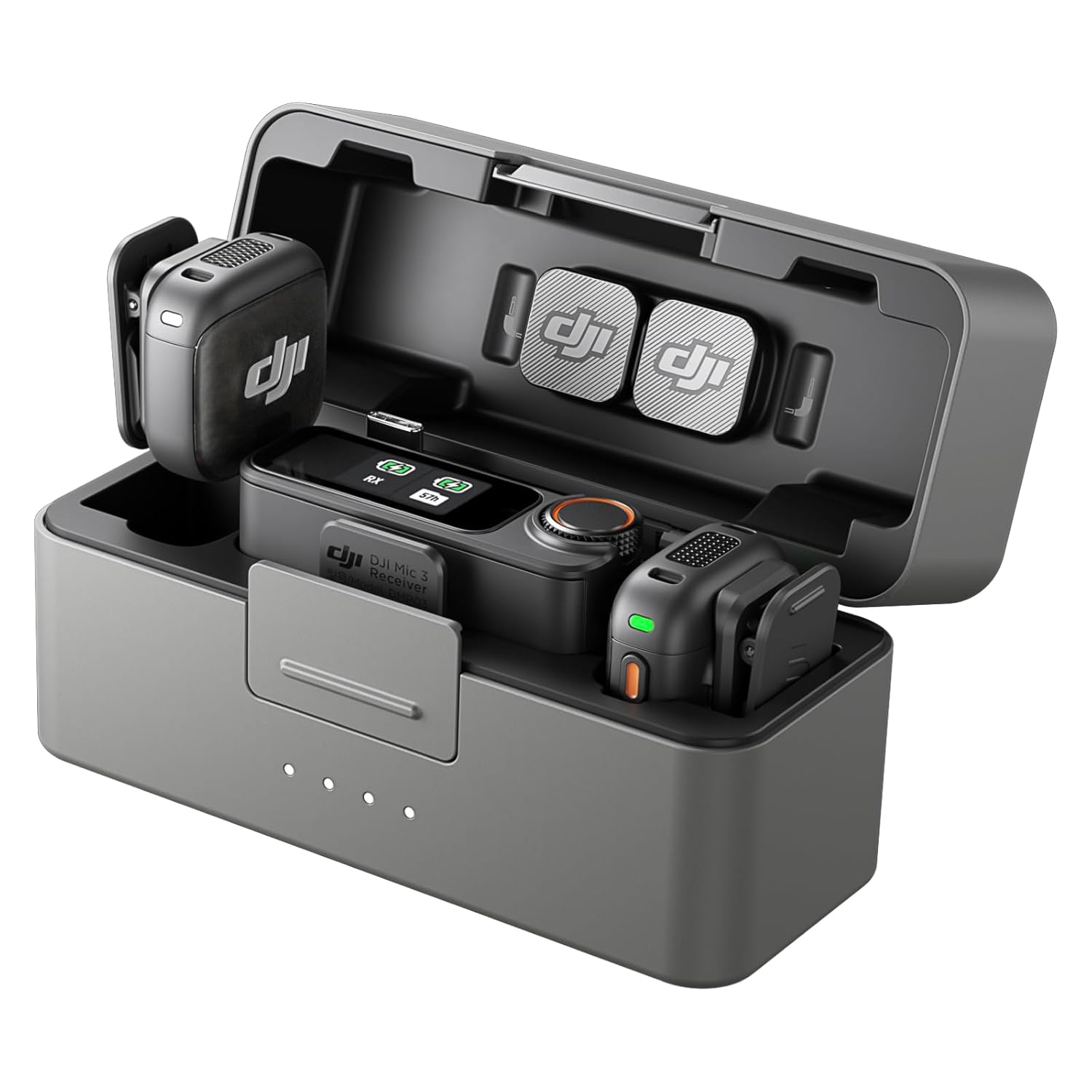
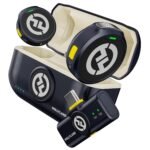
In this DJI Mic 3 review, the short answer is yes: it’s worth it for most creators. At $259 you get two transmitters, a receiver, and a charging case that makes daylong shoots practical. You don’t get every pro feature, and some rivals go louder and further. But for a lot of vloggers and interviewers, this is the one.
Combines professional-grade audio quality and convenience features at a price significantly lower than key competitors, offering exceptional perceived value.
Price vs. rivals
Cheaper
CheaperTypicalPricier
Priced below many comparable two-channel wireless microphone kits from leading brands, positioning it as a more affordable yet feature-rich alternative.
Ease of use
Excellent 85/100
The DJI Mic 3 is easy for an average person to use due to its simple clip-on design, automatic pairing, and clear LED indicators, though the initial setup of pairing two transmitters may briefly confuse some users.
DJI Mic 3 review: Overview
DJI Mic 3 for content creation is a grab-and-go wireless mic kit. Two transmitters clip to people, the receiver plugs into a camera or phone, and the case stores and charges everything. It solves the most common video mistake: audio recorded from too far away.
The 2 TX + 1 RX case version in this DJI Mic 3 review is the one to get if you want two-person interviews without a bag of cables. The transmitters feel solid, the case is small, and the whole setup fits in an outer pocket.
Key Features
Here are the bits that matter day to day.
Two transmitters, one receiver: You can record a guest and yourself at the same time, which is the main reason to buy this instead of a single-mic kit.
Charging case: The case tops up the transmitters and receiver between takes, so you don’t need to carry chargers.
DJI Mic 3 battery life: With the case, it lasts through a full day of field work; the transmitters charge whenever they’re seated inside.
On-board backup recording: Each transmitter saves its own audio file, so a wireless drop is an annoyance, not a lost take.
Magnetic clips: The transmitters snap onto a collar or bag strap in seconds, which makes you more likely to use them.
Receiver screen: You can see volume levels and battery status at a glance instead of guessing.
Fit for You
If you’re searching for the best wireless microphone for vlogging, this kit belongs on the shortlist.
You shoot talking heads in your office and your voice sounds like it’s coming from another room with laptop mics.
You record two-person conversations and don’t want to hand a cable around.
You film outdoors and need the mic close to the person, not on the camera.
You travel for shoots and want one case with everything inside.
You edit your own videos and don’t want to spend an hour cleaning up room tone.
Uses
Walk-and-talk vlog through a crowded area: clip a transmitter to your collar, keep the receiver in hand, and the audio stays with you. The foam windshields knock down light breeze, and the receiver screen tells you levels are okay before you start moving.
Guest interview at a convention: hand one transmitter to the other person, keep one on yourself. It removes the biggest panic of any interview, hoping the audio is there. You get both voices, and if your guest talks quietly, you can adjust it in the edit.
Event coverage is another natural fit. The case holds the spares and windscreens, so you aren’t carrying a separate bag of cables before each speaker.
DJI Mic 3 review: Experience
Setup is a welcome surprise. Plug the receiver into a USB-C phone or camera, turn everything on, and the transmitters pair automatically. You’ll spend less time configuring this mic than you would choosing a preset on some portable recorders.
The everyday annoyances are small. The magnetic clips are strong enough for a shirt but not for a thick jacket, so the backup clip is useful. Those clips and windscreens are tiny, and tiny things roll away. Put them back in the case every time.
Wind handling is fine at walking pace. For actual wind, the furry covers do a better job but take a little patience, especially if you have to swap them on and off all day.
Storage is simple: everything lives in the case, and the case keeps the transmitters charged. Just wipe the mic grilles when they’ve collected dust, and check that the charging contacts are clean. That’s basically the whole maintenance routine.
Pros and Cons
Pros
Dual-channel flexibility: Two transmitters let you record conversations without swapping mics.
Battery with the case: You can work all day and charge between takes.
Backup recordings: A brief wireless dropout won’t ruin a take.
Quick setup: Pairing is automatic and the screen shows what you need.
Price: At $259, it undercuts most comparable dual-channel kits.
Cons
Close-range mic concept: It needs to be clipped near the speaker; it won’t capture a person from across the room like a boom.
Small accessories: The clips and windscreens are easy to lose, especially outdoors in a hurry.
Pro post-production gap: Advanced timecode and 32-bit float options on some rivals don’t show up here, for audio purists.
Proprietary charging: The charging contacts mean you’ll want to keep the case around; you can’t just plug a random cable into each transmitter.
Advantages
Put the DJI Mic 3 vs Rode Wireless Pro side by side and you’ll see two different philosophies. The Rode leans into post-production flexibility, while the DJI is built to make the daily recording moment as simple as possible. For most vloggers and interviewers, the DJI is the easier pick.
Less menu time: The receiver shows levels and battery clearly, so you spend more time shooting.
Compact case: The whole kit slips into a small pouch or jacket pocket, which the bigger Rode setup doesn’t.
Backup recording without the fuss: You get a safety file on each transmitter without extra steps.
Price advantage: $259 is a meaningful saving for two-person wireless audio.
Who Should Buy
Get it for solo vlogging: You’ll get clean audio without making the viewer listen to a roomy, distant mic.
Get it for two-person interviews: The second transmitter is always there when you need it.
Get it for event-style shoots: The case keeps everything charged and organized.
Skip it if you need hidden lavs: The transmitters are too large to disappear under clothing, so look at a dedicated Lavalier kit.
Skip it if you work on controlled film sets: A boom and a portable recorder are still better for dialogue and sound design.
DJI Mic 3 review: FAQ
Is the DJI Mic 3 worth it?
Yes, for most creators, because you’re getting a two-transmitter system and a charging case at a price that undercuts rivals. The backup recording and quick setup remove the most common audio headaches. If you only record yourself in a quiet room, you could spend less. For interviews, it earns its keep.
What is the DJI Mic 3 battery life?
With the charging case, you can shoot through a full day without hunting for power. The transmitters charge whenever they sit in the case, so the battery becomes a non-issue between takes. The receiver reports battery status on screen, and you’ll get a warning before things get critical.
Can the DJI Mic 3 connect to a phone?
Yes. The receiver plugs into a phone with USB-C and is recognised as an external microphone in most camera apps. For older iPhones with Lightning, pick up a USB-C to Lightning adapter. The same receiver works with mirrorless cameras and DSLRs through its audio jack.
Does the DJI Mic 3 record backup audio?
Yes, each transmitter records a local audio file while it is also sending audio wirelessly. If the link drops or a cable gets yanked, you can pull that local file from the transmitter later. That safety net is why many people choose this over cheaper wireless mics.
Is the DJI Mic 3 good for vlogging?
This is close to the best wireless microphone for vlogging if you value setup speed and clean speech. The receiver tells you levels before you start, the transmitters stay attached, and the case keeps everything powered. You still need to clip the mic near your mouth for the sound to feel close.
DJI Mic 3 vs Rode Wireless Pro: which should you buy?
For most content work, the DJI Mic 3 is the better buy because it is cheaper, simpler, and easier to carry. The Rode Wireless Pro makes more sense if you work in multi-cam production and need advanced synchronisation and extended recording options. For a solo creator, that extra power goes unused.
Final Verdict
Bottom line: the DJI Mic 3 review ends with a yes. For $259, you get a two-person wireless system that charges in its own case, records a backup locally, and sets up faster than most portable recorders. Creators who shoot interviews, talk to camera, or make content on the move will feel the difference immediately.
The one thing to keep in mind is that these are close-range mics. Clip one near a collar and let it do its job. This isn’t a boom replacement or a secret lav, but it never claims to be. For its lane, it’s an easy recommendation.
DJI’s third-generation wireless mic lands at a tricky spot. It’s not the cheapest, not the most feature-packed, and it faces stiff rivals from Rode, Hollyland, and its own predecessor. But it nails the things that actually annoy you during a shoot: pairing that just works, a case that charges everything together, and a sound profile that doesn’t make you reach for EQ. The question isn’t whether it’s good—it’s whether it’s the right fit for your bag. Here’s how it stacks up.
This is the big one. Rode’s Wireless Pro is the only direct premium alternative with 32-bit float recording, and it costs about $140 more. That difference buys you two things DJI doesn’t have: built-in timecode (handy for multi-cam edits) and a proper lav input on each transmitter so you can clip a tiny mic to a tie without the TX flopping around. But here’s the trade-off most people miss: the Rode’s charging case is huge—like, “where do I put this in my sling bag” huge. The DJI Mic 3 case is noticeably smaller and lighter, and the magnets click into place with a satisfying snap. For the solo YouTuber or roving interviewer who just needs good audio and fast recharging, the DJI Mic 3 is the better day-to-day companion. The Rode Pro makes sense if you’re part of a crew that needs timecode sync, or if you regularly need to bury a lav under clothing.
DJI Mic 3 vs Hollyland Lark M2
Hollyland’s Lark M2 is the budget wildcard—it’s tiny, costs almost a hundred bucks less, and the transmitters are so small they can clip to a collar without being noticed. Sounds great, right? The catch is that the Lark M2 doesn’t have internal recording at all. If your receiver drops signal at a wedding or during an outdoor interview, you’ve got nothing. The DJI Mic 3 stores a 32-bit float backup on each transmitter, which means you can clip levels later without distortion. For the “best wireless microphone for vlogging” search specifically, that safety net is worth the extra cash. Also, the DJI Mic 3’s battery life per charge is a bit lower than the Lark M2’s, but the case keeps recharging them—so unless you’re shooting 10-hour days without a break, it’s a non-issue. I’d send budget buyers to the Lark M2 only if they never, ever lose signal and don’t mind missing a take now and then.
DJI Mic 3 vs DJI Mic 2 (the upgrade question)
If you already own a DJI Mic 2, the upgrade call is simple: do you absolutely need 32-bit float backups? The Mic 2 is still a solid unit—better battery life per transmitter, actually (about 6 hours vs the Mic 3’s 5.5), and it pairs with the same receivers. The Mic 3’s main party trick is that it records a separate 32-bit float track to the TX’s internal storage, which is a lifesaver when your subject suddenly shouts and you’ve pegged the analog limiter. But for casual talking-head videos, the Mic 2 does just fine. If you’re moving from another brand, the Mic 3 is a better first purchase than the Mic 2 because you get the float safety, the updated case, and a few extra features (like wireless camera control on some Sony models). The “is DJI Mic 3 worth it” question comes down to this: if you’ve ever been burned by clipped audio, yes. If you haven’t, you can save $40 with the Mic 2 and be happy.
So who should actually buy the DJI Mic 3? If you’re a solo creator, a vlogger, or a small production run-and-gunner who values a compact case and doesn’t want to fuss with settings, this is your mic. The “DJI Mic 3 battery life” is fine (the case tops you up quickly), the build feels solid, and the audio quality is clean with no weird noise floor. Skip it if you need timecode for multi-cam edits—grab the Rode Wireless Pro instead. And if you’re on a tight budget and willing to gamble on signal dropouts, the Hollyland Lark M2 saves you real money. But for most people hunting for the best wireless microphone for vlogging in 2026, the DJI Mic 3 is the sweet spot between cost and peace of mind.
Ready to decide on the DJI Mic 3?
See today’s price, stock and delivery options on Amazon.