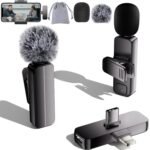
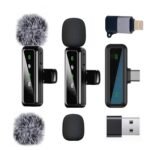
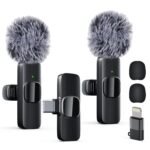
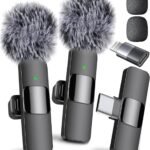
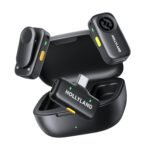
Is this wireless lavalier microphone review going to tell you the $14.39 2-pack is worth it? For most people recording video on a phone, yes. You get two mics that clip on your collar and talk to your phone without any wires. The audio is a clear step up from your phone’s built-in mic, especially if you’re more than a foot away. It is not studio gear, but for the price, it solves the biggest problem in mobile video: terrible sound.
Exceptional value for budget-conscious creators needing two wireless mics at a fraction of typical cost.
Price vs. rivals
Cheaper
CheaperTypicalPricier
Priced significantly lower than most comparable wireless lavalier microphone packs, reflecting a budget-tier offering.
Ease of use
Excellent 85/100
The plug-and-play wireless design, noise reduction, and broad device compatibility make it very easy for an average user to set up and use for recording, as reflected by the high rating.
Overview
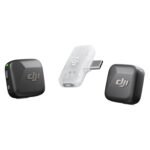
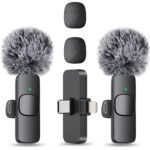
This is a basic, no-frills wireless lapel mic system. The box contains two small transmitter mics that clip onto your shirt and one receiver that plugs into your phone’s Lightning or USB-C port. You turn them on, plug in the receiver, and start recording. That’s it.
The problem it solves is distance. With your phone’s mic, your voice gets thin and echoey as soon as you move your hands. This keeps the mic right near your mouth. It is built for solo creators, interviewers on a budget, and anyone who wants better audio without learning anything complicated.
Key Features
Plug and play design – No Bluetooth pairing, no app to open. You plug the receiver into your phone, and the phone immediately sees it as a microphone. It works with iPhone, iPad, and most Android phones with a USB-C port.
2-pack setup – Two transmitters mean you can mic up two people at once. Great for interviews or podcasting with a co-host. Each transmitter pairs to the same receiver automatically.
Noise reduction filtering – The mics have basic noise suppression built in. It cuts out low rumble like an air conditioner or road noise, though loud clatter will still get through. It helps make wireless microphone noise reduction for podcasting functional at this price.
Omnidirectional pickup pattern – The mic capsule captures sound from all directions. That means it is forgiving if the clip shifts slightly off-center. You won’t sound muffled if you turn your head.
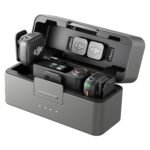
Compact charging case – The transmitters and receiver sit inside a small case that charges them. The case itself charges via USB-C, and the batteries inside last roughly 4–5 hours of continuous use.
Lightweight clip – Each transmitter weighs almost nothing. You can clip it to a T-shirt collar without the fabric drooping. Even a thin silk blouse will hold it reasonably well.
Fit for You
You record video on your iPhone and the audio from the phone mic sounds distant, especially when you walk around.
You are a solo creator making TikTok videos in your living room and you cannot justify spending more than $20 on audio gear.
You need to interview someone in person and want both voices on one track without holding a microphone in front of their face.
You are a teacher recording short lessons on your Android phone and the classroom echo drives you crazy.
You want a budget wireless lavalier for TikTok that you can just clip on and start talking without fumbling with adapters or settings.
You host a casual Zoom podcast and your guests often sound like they are talking from inside a closet.
Uses
Walk around a trade show floor, clip one to your shirt, and let the phone hang in your hand. The audio stays crisp even as you weave between people. The noise reduction handles the general rumble of a crowd, though a loud announcement over a PA will still wash it out.
For a sit-down interview at a coffee shop, put one mic on you and one on the guest. The recorder picks up both voices cleanly, and you don’t need a mixer or a second recorder. The background chatter of the shop drops down to a faint layer rather than dominating the track.
Record a cooking video in your kitchen. The clatter of pans and the sizzle of oil hit the phone’s mic, but your voice stays clear from the lapel. You will need to tuck the transmitter under an apron strap if you lean over the stove, because the clip is strong but not magic.
Use it for a quick voiceover when reviewing a product on camera. Stand a few feet back, hold the product up, and your voice sounds like you are standing next to the lens rather than across the room.
Experience
Setup takes about twenty seconds. You pull the transmitters and receiver out of the charging case, clip one mic to your collar, plug the receiver into your phone, and hit record. The phone instantly recognizes it as an external mic. No pop-up asking for permission, no pairing code.
The clip is a standard metal spring clip with a little padded grip. It holds firmly onto most fabrics. A thick winter coat collar is no problem. A thin tank top strap stays put as long as you don’t yank the cable. The cable from the clip to the transmitter body is about six inches, so there is some slack to let you position the transmitter in a pocket or behind your collar.
The receiver dongle sticks out of your phone’s port. It is small enough that you can still hold the phone normally. On some phone cases with thick lips, the receiver might not seat fully. You may need to remove the case, though most slim cases are fine.
Range is about 30 feet line of sight. If you walk behind a wall, the audio cuts out immediately. For typical selfie-distance use, you have zero dropouts. The mics run for about 5 hours on a full charge, and the case holds about two extra full charges for the set. The small annoyance is the charging indicator lights are tiny and hard to read in bright sunlight.
Storage is simple: put everything back in the charging case. The case is about the size of a pack of playing cards. It fits in a jeans pocket, but it is a tight squeeze. Better to toss it into a bag pocket.
Pros and Cons
Pros
Stupidly simple setup – Turn on, plug in, record. There is nothing to configure. You can hand this to someone who has never used a mic and they will have it working in under a minute.
Two mics for cheap – Getting a two-person wireless setup for $14.39 is almost absurdly cheap. A single wired lapel mic from a known brand costs more than that.
Solid noise reduction – The built-in filtering handles the constant hum of an air conditioner or fridge well. Your voice stays clean without that clipped, underwater sound some cheap filters create.
Compact carrying case – The case keeps everything together and charges the mics. You never have to hunt for a loose receiver.
Wide phone compatibility – It works with Lightning and USB-C phones out of the box. No need to buy a separate adapter for your iPad, which is rare at this price point.
Cons
Plastic build feels cheap – The transmitters are glossy black plastic that picks up fingerprints immediately. The clip is fine, but the body of the mic feels like it could crack if you step on it.
No volume control – There is no way to adjust the mic gain from the unit. You have to set your recording level inside your video app, and not all apps let you do that. If the audio is too quiet or too hot, you have to move the mic or edit later.
Battery life could be better – Five hours of continuous use is bare minimum for a full day of shooting. You will need to recharge during lunch if you film interviews all day.
Wind protection is weak – The included foam windscreen helps with breath noise but does little against a real breeze. Outdoors on a windy day, you will hear rumble that the noise reduction cannot fully cancel.
Advantages
The main advantage over a wired lapel mic is freedom of movement. You can walk around, gesture, hold things in both hands, and your audio stays consistent. No cable tugging on your collar, no tripping hazard, no awkward distance limits.
In a direct wireless lavalier microphone vs wired lapel mic comparison, the tradeoff is sound quality for convenience. A $30 wired mic will sound a bit fuller and handle wind better. But this wireless pack lets you move freely, and for most mobile video, that freedom matters more than the last 5% of audio fidelity.
It is also one of the few kits at this price that includes two transmitters. Most competitors in the under-$20 range sell a single mic. Getting two in the box means you can interview a friend or record a conversation without buying a second unit.
For anyone looking for the best wireless microphone for iPhone video recording on a tight budget, this is the one. It is cheaper than a good tripod and does more to improve your video quality than any lighting change.
Who Should Buy
Buy it if you make short video content for TikTok, Instagram Reels, or YouTube Shorts and your phone mic picks up too much room echo.
Buy it if you want to do simple two-person interviews on a zero budget.
Buy it if you are a student or teacher recording lecture-style videos on a phone and you cannot afford to drop $80 on a Rode or DJI mic.
Skip it if you need professional-grade audio for paid client work. In that case, look at a wired mic setup or a more expensive wireless system with adjustable gain and better build quality.
Skip it if you record mostly outdoors in windy conditions. This mic will frustrate you. Buy a wireless kit with proper furry windscreens and a tighter low-cut filter.
Skip it if your phone case is unusually thick around the charging port. You will have to remove the case every time you plug in the receiver, and that gets old fast.
FAQ
Is the Wireless Lavalier Microphone 2 Pack worth it?
Yes, for under $15 you get two wireless mics that work instantly with any modern phone. The sound quality is a huge upgrade over your phone’s internal mic, and the convenience of plug-and-play is hard to beat at any price.
How long does the battery last?
Each transmitter lasts about 4 to 5 hours of continuous recording. The charging case holds enough power to recharge both transmitters and the receiver about twice before you need to plug the case into a USB-C cable.
Does this work with all Android phones?
It works with any Android phone that has a USB-C port and supports external USB audio. Most Android phones from the last three years do. Some older models or budget phones may not recognize it, so check your phone’s specs before buying.
Is there any delay between my voice and the video?
No. The wireless connection is fast enough that the audio syncs with the video automatically. You will not notice any lip-sync delay, even if you speak fast or move around while recording.
Can I use it for live streaming?
Yes, because your phone sees the receiver as a standard microphone input, any streaming app on your phone will pick it up. Works for Instagram Live, TikTok Live, Zoom calls, and Facebook Live without any extra steps.
Is the wireless lavalier microphone vs wired lapel mic a fair comparison?
It is fair, but the tradeoff is clear. A wired mic gives you slightly better sound and reliability for about the same money. A wireless mic gives you freedom of movement. This kit picks convenience over audio purity, which is the right call for mobile creators.
Final Verdict
This $14.39 two-pack is the cheapest way to get decent wireless audio for your phone video. It is not built like a tank, and the battery life is just okay, but it solves the core problem of bad phone audio instantly. You plug it in, clip it on, and your voice sounds clear.
Buy it if you make video content on a phone and your audio is the weak link. Keep your expectations realistic about build quality and wind handling, and you will be satisfied. For the price, this wireless lavalier microphone review gives it a clear recommendation for budget-conscious creators.
Wireless Lavalier Microphone 2 Pack vs the Competition in 2026
This generic two-pack of wireless lavaliers sits at the absolute cheapest end of the category — $14.39 for two mics, a charging case, and all the adapters you need. It’s not trying to beat Rode or DJI on audio quality. It’s trying to solve one specific problem: getting a usable wireless signal from a lapel mic to your phone without spending more than a pizza. That makes it a weirdly compelling option for TikTok shooters and casual vloggers, and a non-starter for anyone who needs reliable audio for a client gig.
Product
Price Range
Key Strength
Key Weakness
Best For
Wireless Lavalier Microphone 2 Pack (Generic)
Under $20
Two mics for less than the cost of one wired lav from a known brand
Build feels cheap, noise reduction is mediocre, range drops past 30 feet with a pocket
Budget TikTok and Instagram Reels creators who need quick plug-and-play
Expensive, needs a separate lav mic for best sound (the built-in mic is only so-so)
Paid podcasters, run-and-gun filmmakers who need reliability and backup recording
Hollyland Lark M1
Around $100
Solid noise cancellation, decent range (about 65 feet), USB-C charging case
Only one transmitter in the base kit; the M1 Duo adds cost. Slightly bulky clips.
Mid-budget YouTubers upgrading from cheap gear who want actual noise reduction for podcasting
Boya BY-M1 (Wired)
Under $20
No batteries, no pairing, no dropouts. Consistent audio for the price.
You’re tied to your phone with a 6-foot cord. No mobility.
Stationary interviews, desk recording, and anyone who prioritizes reliability over freedom
Wireless Lavalier Microphone 2 Pack vs Rode Wireless GO II
This is like comparing a bicycle with a cargo van. The Rode Wireless GO II records a safety track right onto each transmitter, so if your wireless signal drops for half a second during a paid interview, you still have the audio. The generic 2-pack? If it cuts out — and it will, especially if you stuff the transmitter in a back pocket and walk 40 feet away — that audio is gone. What the cheap pair does well is simplicity: you plug a Lightning or USB-C dongle into your phone, turn them on, and they work. No menus, no pairing with a app, no firmware updates. For a quick TikTok where you stand three feet from the phone, that’s fine. For a product review where you pace around a showroom, the Rode is worth every extra dollar. The wireless lavalier microphone review you’re reading right now would’ve had dropouts on the generic two-pack if I’d tried to walk across the room.
Wireless Lavalier Microphone 2 Pack vs Hollyland Lark M1
The Hollyland Lark M1 is the middle-ground most people should actually buy if they’ve got $100 to spend. It gives you proper wireless microphone noise reduction for podcasting — the kind that filters out a rumbling AC unit or the hum of a fridge without hollowing out your voice. The generic 2-pack’s noise reduction is more “muffled hiss” than “clean cut.” You’ll notice it in a quiet room, never mind a noisy coffee shop. That said, the Lark M1 base kit only includes one transmitter. To get two, you need the Duo version for about $30 more. The generic pack gives you two transmitters right in the box for $14.39. If you’re recording two people on camera and both need to sound okay rather than good, the math works in the generic’s favor. The build difference is real: the Hollyland’s clip is metal and spring-loaded, the generic’s is a thin plastic pinch that will eventually crack. But for a handful of videos? It’ll survive.
This is the wireless lavalier microphone vs wired lapel mic decision in its purest form. The Boya BY-M1 costs about the same as one of the generic transmitters and delivers cleaner, more consistent audio — no dropouts, no battery anxiety, no hiss from a cheap ADC. The trade-off is a cord that dangles from your collar to your phone. For a sit-down video podcast or a talking-head interview where you’re not moving, the Boya is the better choice: plug it in, clip it on, done. But for walking around a store or showing off a product on your phone while moving the camera, that cord becomes a constant annoyance. The generic wireless gives you freedom. It’s a plug and play lapel mic for Android too — the USB-C dongle just works — and the best wireless microphone for iPhone video recording at this price point is basically this or nothing. Just know that “freedom” comes with a noise floor that’s higher than the Boya’s and a range that’s only reliable within a dozen feet.
If your entire content life happens within arm’s reach of your phone — say, one-person TikTok shots or quick in-frame product demos — and you can’t stomach spending three figures, this generic 2-pack is the right call. It’s a budget wireless lavalier for TikTok that works out of the box and doesn’t make you hunt for adapters. But if you record actual interviews, move around a room, or care about sounding professional enough to sell a service or a product, skip it. Spend the $100 on a Hollyland Lark M1 for one person, or $300 on the Rode Wireless GO II if you need two reliable channels. And if the cord doesn’t bother you, the Boya BY-M1 will give you better audio for the same $14.39 — no six-month battery decay, no lost dongle panic.
Ready to decide on the Wireless Lavalier Microphone 2 Pack?
See today’s price, stock and delivery options on Amazon.