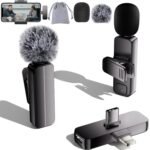
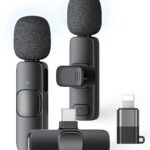
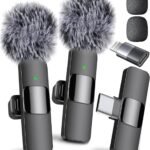
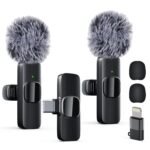
If you’re wondering whether a wireless lavalier mic is worth it for under ten bucks, the short answer is yes—with a catch. This wireless lavalier mic review will tell you exactly what you’re getting for $8.99, where it shines, and where it’ll frustrate you, so you can decide if saving the cash is smarter than spending more.
Offers surprising functionality and convenience at an entry-level price point, making it a compelling pick for casual creators despite likely trade-offs in build and audio fidelity.
Price vs. rivals
Cheaper
CheaperTypicalPricier
Priced near the budget end of the wireless lavalier category, making it significantly cheaper than most mainstream alternatives. Positioned as an entry-level, value-oriented choice rather than a mid-range or premium option.
Ease of use
Excellent 85/100
The wireless lavalier mic is generally easy to use for an average person due to its simple plug-and-play setup and wide compatibility, though minor pairing or software adjustments may be needed for some devices.
Overview
This is a budget-friendly, clip-on wireless microphone system that plugs into your phone, computer, or camera via a USB-C or Lightning receiver. It’s meant to solve one specific problem: making your voice sound clear when you’re recording video or streaming, without being tied to a cable.
Who’s it really for? Someone who needs better audio than their phone’s built-in mic but isn’t ready to drop fifty bucks on a name-brand setup. Think vloggers on a shoestring, live streamers just starting out, or anyone doing remote interviews on Zoom who’s tired of sounding like they’re in a tunnel.
Key Features
Plug-and-play receiver – The little dongle connects to your device’s charging port, and the transmitter syncs automatically. You don’t need Bluetooth pairing or an app. It just works, which is rare at this price.
Two transmitters included – You get two clip-on mics and one receiver with two inputs. That means you can record two people at once—perfect for interviews or dual-host podcasts.
Omnidirectional pickup – The mic captures sound from all directions, so you don’t have to speak directly into it. It’s forgiving if you turn your head or move around.
50-foot range (claimed) – In open spaces, you can walk across a room and the audio stays connected. Walls will cut that down dramatically, but for typical use it’s fine.
Noise reduction filter – There’s a basic filter that cuts background hum and fan noise. It’s not miraculous, but it’s better than nothing.
Works with iPhone, Android, PC, and Mac – The receiver has both USB-C and Lightning adapters, so you can switch between devices without buying extra cables.
Fit for You
You film short videos for TikTok or Instagram and your phone’s mic picks up every echo in your room.
You host a weekly live stream where you move around a bit and don’t want to be glued to a desk mic.
You’re doing a two-person interview on a budget and don’t want to buy two separate mics.
You teach online classes and need your voice to be clearer than “can you repeat that?” without spending a fortune.
You record quick voiceovers for YouTube and hate dealing with tangled cables.
You want a backup mic that lives in your bag for unexpected recording situations.
Uses
Imagine you’re recording a cooking tutorial in your kitchen. The stove fan is humming, the fridge is buzzing, and your phone is propped on a counter three feet away. Clip this mic to your apron, plug the receiver into your phone, and your voice cuts through the background noise. That’s the main use case: making your voice the star of the show in a less-than-ideal environment.
For live streaming, it’s a game-changer in the sense that you can stand up, gesture, even walk to a whiteboard without losing audio quality. Viewers notice the difference immediately—less “what did she say?” and more engagement.
And yes, it works for outdoor vlogging. Wind noise is still an issue (the included foam windscreen is okay but not great), but you’ll get far better sound than your phone’s built-in mic on a breezy day.
Experience
Setting it up is almost too easy. Plug the receiver into your phone, turn on the transmitter, and within a second the blue light stops blinking. No pairing menu, no passwords. The first time you do it, you’ll double-check if it’s actually working because it’s so simple.
Everyday use is mostly smooth. The battery in the transmitter lasts about four to five hours of continuous recording—enough for a full afternoon of shooting. The receiver draws power from your device, so your phone’s battery will drain a little faster. Expect maybe 15-20% more drain per hour of video recording.
Where it gets annoying: the clip is plastic and feels like it could snap if you’re too rough. Also, the foam windscreen tends to fall off if you brush against something. You’ll want to keep an eye on it. And there’s a tiny hiss if you listen closely in a quiet room. It’s not noticeable once you add background music or normal room tone, but if you record silent pauses, you’ll hear it.
Storage is simple—the whole kit fits in a small pouch or a jacket pocket. No bulky cases. One less thing to forget at home.
Pros and Cons
Pros
Insane value for the price – For $8.99, you get two mics and a receiver that actually work. Comparable name-brand kits cost 10x more.
Two-person recording out of the box – Most budget mics only give you one transmitter. This one lets you interview someone without buying a second unit.
Truly plug-and-play – No Bluetooth pairing, no dongles for audio jacks. Plug it in and go. That’s rare even on expensive mics.
Good range for indoor use – You can move around a living room or classroom without dropping signal.
Works with both iPhone and Android – The included Lightning and USB-C adapters make it a safe gift or a versatile backup.
Cons
Battery life is just okay – Four to five hours is enough for most sessions, but if you’re recording all day you’ll need to recharge the transmitter between shoots.
Build quality feels cheap – The plastic clip and thin cable on the transmitter won’t survive rough handling. Treat it gently.
No on-board recording – If your connection drops, you lose audio. More expensive mics record internally as a backup. Here, you’re betting on constant connection.
Background hiss is audible in silent moments – Not a dealbreaker for most content, but if you record quiet podcasts or ASMR, look elsewhere.
Windscreen is flimsy – It works for light wind, but it’ll pop off if you bump it. Outdoor vloggers might want to buy a better one separately.
Advantages
The biggest win here is price, obviously. But beyond that, the two-mic setup is a killer feature. Most budget wireless lavalier mics offer one transmitter; this one gives you two for the same money. That alone makes it the best wireless lavalier mic for vlogging if you do interviews or co-hosting.
Another advantage: compatibility. It’s a wireless lavalier mic for iPhone and Android without needing a separate adapter for each. Some cheap mics only work with one ecosystem. This one covers both.
Compared to a wireless lavalier mic vs wired lapel mic debate: the wireless gives you freedom of movement, and at this price, you’re not paying a premium for it. The trade-off is battery life and a slight hiss, but the convenience trumps the cable tangles for most people.
Who Should Buy
Buy it if: you’re a beginner content creator, a teacher, or a remote worker who wants noticeably better audio without spending more than ten dollars.
Buy it if: you need a cheap second mic for a guest on your stream or podcast.
Skip it if: you’re a professional who records in critical listening environments—like podcasts with silent gaps—because that hiss will bug you. Look at the Rode Wireless GO II instead.
Skip it if: you need all-day battery life or rugged build for outdoor field reporting. Get a Sennheiser or DJI Mic 2.
FAQ
Is the wireless lavalier mic worth it?
Yes, for the price it’s absolutely worth it—you get functional wireless audio for less than the cost of a sandwich, and it solves the biggest problem of phone recording: muffled distant sound.
How long does it last on a full charge?
The transmitter runs about four to five hours of continuous use. The receiver doesn’t have its own battery—it draws power from your phone or computer.
Is it safe for iPhone and Android?
Yes, it’s safe. It draws standard power from the charging port, same as any USB-C or Lightning accessory. No risk to your device as long as you handle the connectors carefully.
Can I use it for live streaming on OBS?
Absolutely. Plug the USB-C receiver into your PC or Mac, and OBS detects it as an audio input. Works for Zoom, Teams, and any streaming software too.
Is this a good budget wireless lavalier microphone?
It’s the best in its price class. There’s nothing else at $8.99 that gives you two transmitters and cross-platform compatibility. Just keep expectations realistic about build and noise floor.
Does it work with a camera that has a 3.5mm jack?
The receiver outputs via USB-C/Lightning only, not a 3.5mm jack. You’d need a separate adapter or a different mic for DSLRs with TRS inputs. It’s designed for phones and computers.
Final Verdict
This wireless lavalier mic is a no-brainer if you need better audio on a tight budget. It’s not perfect—the hiss and cheap plastic are real—but for $8.99, you get a two-person wireless system that works out of the box with any modern phone or computer. The one thing to keep in mind: treat it gently and don’t expect studio quality. It’s a fantastic stopgap, a great starter kit, and a useful backup. For the price, you’d be hard-pressed to find a better wireless lavalier mic review that ends with “just buy it.” But here we are.
There is a massive gap between a $9 wireless mic and a $300 one, and that gap isn’t just about audio quality. The budget end of the market has exploded, which makes it tougher than ever to sort the genuinely useful gadgets from the absolute junk. This particular wireless lavalier mic for iPhone, Android, and PC sits right at the bottom of the price scale, promising a lot for very little. Here’s how it stacks up against the usual suspects you’re probably also considering.
You’ll notice the price difference between these isn’t a small jump—it’s a chasm. The $8.99 wireless lavalier mic is an impulse buy, whereas the Rode and DJI options are investments. In a wireless lavalier mic vs wired lapel mic situation, the wireless convenience is obvious, but when you pit this cheap unit against high-end rivals, the trade-offs become stark.
wireless lavalier mic vs Ulanzi J12: The Budget Battle
If you’re hunting for the best wireless lavalier mic for vlogging on a strict budget, you’ve likely scrolled past both of these. The Ulanzi J12 costs roughly three to four times more than this generic unit, but it earns that premium. The J12 packs better DSP (digital signal processing). That means when you’re filming in a bustling coffee shop, the Ulanzi filters out the background chatter more aggressively. The cheap mic here just captures everything in a flat, unforgiving way. There’s a constant hiss in the quiet parts with the cheap one—not a dealbreaker, but it’s there. You choose the Ulanzi if you need a cleaner track. You choose the $9 mic if you’re doing casual videos where you can accept a bit of room tone. The build quality difference is tangible too; the J12 feels denser, less likely to snap in a bag pocket.
wireless lavalier mic vs Rode Wireless Go: The Pro Reality Check
Let’s be blunt about why this comparison is almost unfair. The Rode Wireless Go Gen 2 is a workhorse. It has a real metal chassis, it survives drops, and the transmission range is famously solid—you can walk across a room and lose connection, whereas the cheap dongle starts crackling if you put your phone in your back pocket and turn around. However, do you need that? For live streaming from a static desk, this $8.99 wireless lavalier mic for live streaming is perfectly adequate. It sits on a table, you clip the mic to your collar, and you talk to the camera. The Rode doesn’t make your stream more interesting; it just makes the audio slightly warmer. If you are weighing up the price, ask yourself if you’re doing complex shoots or just talking to a screen. If it’s the latter, the Rode is overkill, but the wireless lavalier mic review verdict here is simple: professionals get the Rode for its unshakeable reliability.
wireless lavalier mic vs DJI Mic 2: The Backup Advantage
The DJI Mic 2 is the wildcard in this wireless lavalier mic alternatives discussion because it solves a problem you didn’t know you had. It records audio internally onto the transmitter, not just to your phone or camera. If your device locks up mid-interview or a cable gets yanked, you don’t lose the take. That’s a huge deal for one-time event recordings, like a wedding toast. This $8.99 unit? If the Bluetooth or 2.4GHz connection drops, the audio is gone. Period. No backup, no recovery. But again, the cost difference is astronomical. For a vlogger doing casual clips, the DJI’s screen and gain knobs are unnecessary complexity. The cheap mic is arguably better for absolute simplicity: plug the receiver in, clip the mic on, hit record. Just know that an old USB-C port might reject the dongle if you have a thick phone case on—a common annoyance with these budget units.
Who Should Buy What
Pick up this wireless lavalier mic for iPhone and Android if you’re a student, a casual TikToker, or someone hosting a weekly podcast with a friend. It’s the cheapest safe way to get your voice off the internal camera mic, and it works surprisingly well for Zoom meetings. You won’t cry if it gets lost or stepped on. But if you’re a contractor, a journalist, or someone who records clients, skip it. The Ulanzi J12 is a safer bet for clean audio without spending $300. If your livelihood depends on the recording, save for the DJI Mic 2 or the Rode Wireless Go. The plastic build and lack of range on this budget mic is the reason it costs $8.99. For occasional use, it’s a bargain. For daily professional use? You’ll be shopping for a replacement sooner than you think, and that makes it a false economy.
Ready to decide on the wireless lavalier mic?
See today’s price, stock and delivery options on Amazon.