Low price combined with high user rating and essential streaming features make this a strong value in the entry-level segment.
Price vs. rivals
Pricier
CheaperTypicalPricier
Priced above many basic HD streaming sticks, reflecting its strong brand and voice remote feature.
Ease of use
Excellent 92/100
The high rating of 4.6 stars and the intuitive voice remote make the Roku Streaming Stick very easy for an average person to set up and navigate.
Overview
The Roku Streaming Stick HD is a small dongle that plugs straight into your TV’s HDMI port and turns any screen into a smart one. It solves the problem of a slow, outdated smart TV interface or a dumb TV that needs internet content. This thing is for people who want a dead-simple streaming experience without paying for 4K they don’t need.
It’s built around the idea that most households still watch 1080p content—Netflix, YouTube, Hulu, live news—and don’t need to spend extra for pixels they can’t see. The remote is included, the software is famously clean, and it costs $38.95. That’s the whole pitch. And honestly, it nails it.
Key Features
1080p HD streaming – Crisp enough for the vast majority of TVs under 50 inches. No 4K, but you’re not paying for it either. If your TV is older or you sit more than six feet away, you’ll never notice the difference.
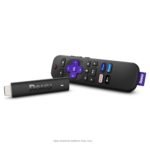
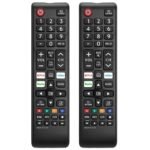
Roku voice remote – A simple remote with a mic button. You hold it, say “Find free comedies” or “Open Netflix,” and it works. No Bluetooth pairing fuss—it uses infrared and Wi-Fi direct. The rubbery texture feels good, and it has dedicated buttons for Netflix, Disney+, Apple TV+, and Prime Video.
Wi-Fi 5 (dual-band) – Plenty fast for 1080p. You’ll get smooth playback even in a bedroom with a router two rooms away. If your Wi-Fi is ancient or overloaded, that’s a different problem.
Roku OS – The interface is a grid of channels. No bloatware, no ads that interrupt your show. Roku makes money from the home screen banner and a few sponsored rows, but it’s not obnoxious. You can hide channels you don’t want.
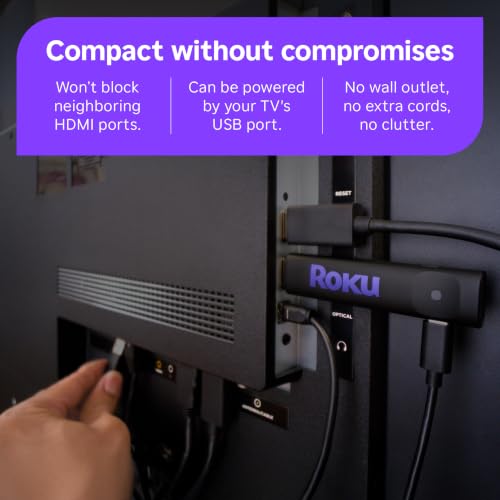
Portable size – The entire unit is about the length of a stick of gum, plus the attached HDMI plug. It hangs off the back of your TV. If you travel, you can toss it in a bag and plug into a hotel TV’s HDMI port (bring a power cube if the TV’s USB port doesn’t deliver enough juice).
Works with any TV with HDMI – As long as your TV has an HDMI port and you have a power source (USB on the TV or the included wall adapter), you’re good. Even a monitor with speakers will work.
Fit for You
You have a bedroom TV that’s four years old and the “smart” apps are so slow you’ve given up on them.
You’re a cord cutter who uses YouTube TV, Sling, or Philo and wants a box that doesn’t decide to restart in the middle of a game.
You’re outfitting a guest room or a kids’ playroom and don’t want to spend more than $40.
You have a second home or an RV with a dumb TV and want a cheap way to watch the same stuff you watch at home.
You’re tired of Amazon’s interface pushing you to buy stuff and just want to find your show and press play.
You’re buying for a parent who gets confused by complicated remotes. The Roku remote is idiot-proof.
Uses
You’re in bed on a Tuesday. You grab the remote, press the Netflix button (it’s a physical button, not a touchpad—thankfully), and the home screen loads in about eight seconds. You scroll to your show. No lag. No spinning wheel. The Roku OS is famously light.
You’re on a trip. You pull the stick out of your TV at home, slip it into your laptop bag. At the hotel, you plug it into the HDMI port on the side of the TV, plug the USB power into a wall cube (the hotel TV’s USB port might not have enough power), connect to the lobby Wi-Fi through the on-screen keyboard (the one annoyance—typing a long password with a D-pad is tedious), and you’re watching your own accounts within two minutes.
You’re a parent. You set up a kids’ profile (Roku calls them “kid profiles” on some channels, but the OS itself doesn’t have full parental controls). You hand the remote to your five-year-old. They can’t accidentally buy a movie because you’ve set a PIN for purchases. The remote is simple enough they can navigate by pressing the big play button.
Experience
Setup is straightforward. Plug it into an HDMI port on your TV. Connect the micro-USB power cable (included) into the stick and the other end into a power source. I’d recommend using the wall adapter over the TV’s USB port—some TVs cut USB power when they’re off, which can cause the stick to reboot every time you turn the TV on. That’s a small headache you can avoid.
The remote pairs automatically. You’ll get a fresh battery already inside, with a pull tab. The first boot walks you through language, Wi-Fi, and a software update. Expect five to ten minutes. After that, the home screen shows your recently used channels. You can arrange them in any order. The remote’s buttons are clicky but not loud. The voice search works better than you’d expect for $38—it understood “Show me action movies” and pulled up a row from several services.
One annoyance: the remote is infrared, so you need line of sight. If you hide the stick behind your TV or in a cabinet, the remote might not reach. The stick itself also gets a bit warm during long sessions—normal for a device this small, but don’t bury it behind a thick TV stand.
The interface is fast for a budget device. Switching between apps takes about two seconds. Loading a channel for the first time can take a few seconds, but after that it’s snappy. The biggest letdown? No ethernet port. You’re stuck with Wi-Fi. If your home Wi-Fi is spotty, you’ll want to move the router closer or buy a Wi-Fi extender. The stick doesn’t support Bluetooth for peripherals either—no wireless headphones without a separate adapter.
Storage space is also limited. You can install about 30 to 40 channels depending on their sizes. Large apps like Sling or YouTube TV are fine, but games? Forget it. This isn’t for gaming. The processor is basic—fine for video, choppy for anything 3D.
Pros and Cons
Pros
Price – $38.95 for a reliable streaming device is hard to beat. You get the same Roku OS found on $100+ boxes.
Simple remote – Physical buttons, dedicated app shortcuts, voice search that works. No touchpad, no trackpad, no learning curve.
Clean interface – Roku is the least cluttered streaming OS. No auto-playing trailers, no shopping suggestions based on your viewing.
Portability – Small enough to take anywhere. Ideal for travelers with a dumb hotel TV.
Reliability – Owners tend to report years of use without slowdowns or crashes. Software updates happen regularly.
Channel selection – Every major service is available, plus a huge library of free ad-supported channels like Pluto TV, Tubi, and The Roku Channel itself.
Cons
1080p only – If you have a 4K TV and sit close, you’ll see the difference. Pay $10 more for the Roku Streaming Stick 4K if you want sharper picture.
No ethernet – You’re at the mercy of your Wi-Fi signal. Streaming in a room far from the router can be frustrating.
No Bluetooth audio – Can’t pair wireless earbuds directly. You’ll need a separate Bluetooth transmitter or a wired connection.
Remote is infrared – Must point at the stick. If it’s behind a TV or inside a cabinet, the remote won’t work. Some competitors use RF or Bluetooth remotes.
Limited storage – Can’t install many apps if you also want games. Not a big deal for most, but power users take note.
No headphone jack on remote – The Roku Voice Remote Pro does have one, but the standard remote doesn’t. Private listening requires the mobile app.
Advantages
When comparing the Roku Streaming Stick HD vs Fire Stick, the main difference is the interface. Fire Stick pushes Amazon content hard. Roku stays neutral. If you hate seeing “You might also like this show you didn’t ask about,” pick Roku.
The remote’s voice button searches across multiple services, not just one. Say “Stranger Things” and it will show you Netflix, then other options if available. Fire Stick’s voice search leans toward Amazon Prime.
Roku gets new channels faster than most competitors. It’s the first to adopt things like YouTube TV integration or new free streaming apps.
Software updates don’t slow the device down. Plenty of people are still using 2016 Roku sticks that work fine for 1080p. The OS is lightweight.
Who Should Buy
Buy it if you want a cheap, reliable streamer for a 1080p TV. This is the best streaming stick for budget buyers who prioritize simplicity over horsepower.
Buy it if you’re a cord cutter who uses multiple services and doesn’t want a locked ecosystem (no Apple TV+, no Amazon-only interface).
Buy it if you’re buying for someone who struggles with tech. The Roku remote and interface are the closest thing to a TV channel guide in the streaming world.
Skip it if you have a 4K TV and want to take full advantage of it. Get the 4K version ($10 more).
Skip it if your home Wi-Fi is unreliable. Without ethernet, you’ll get buffering. Consider a wired streaming box instead.
Skip it if you need Bluetooth headphone support out of the box. Fire Stick 4K Max or Chromecast with Google TV are better choices for that.
FAQ
Is the Roku Streaming Stick HD worth it?
Yes, at $38.95 it’s one of the best values in streaming. You get a fast, clean interface and a voice remote for minimal money. The only catch is the 1080p limit, so if you have a 4K TV, spend the extra $10 for the 4K model.
How long does the Roku Streaming Stick HD last?
Owners often report three to five years of regular use. The hardware is simple and Roku supports its operating system for many years. The remote might need new batteries every six months or so, but the stick itself holds up.
Does the Roku Streaming Stick HD work without Wi-Fi?
No. It needs an active internet connection via Wi-Fi. You cannot plug in an ethernet cable. If your TV is in a dead zone for Wi-Fi, this stick won’t work. Some Roku models have ethernet on the power adapter, but not this one.
Can I use the Roku Streaming Stick HD with a hotel or dorm Wi-Fi?
Yes, but it’s not automatic. You’ll need to use the on-screen keyboard to accept terms or enter a room number. Roku supports captive portals (the login screens hotels use). It’s a bit tedious with the D-pad, but it works.
Is the Roku voice remote worth it compared to a basic remote?
Yes, if you search for content often. The voice button lets you say “Open Hulu” or “Find action movies” and it works well. The basic remote costs about $10 less but lacks the mic and the TV power/volume buttons. For most people, the voice remote is worth the slight premium.
Does the Roku Streaming Stick HD support Dolby Vision or HDR?
No. It supports HDR10 (a basic HDR format) but not Dolby Vision. At 1080p, HDR is less impactful anyway, but if you care about high dynamic range on a 4K TV, get the 4K stick. For a 1080p set, HDR is negligible.
Final Verdict
The Roku Streaming Stick HD is exactly what it says on the tin: a cheap, cheerful way to make any TV smart. It does one thing—stream up to 1080p video with a simple remote—and it does it well. The price is right, the interface stays out of your way, and it’s portable enough to take on a trip. If your TV is 1080p and you want a no-drama streaming experience, this is the one.
One thing to keep in mind: if you ever upgrade to a 4K TV, this stick will still work, but you’ll be leaving resolution on the table. For now, though, it’s a smart buy that won’t make you regret the $38.95.
Roku Streaming Stick HD vs the Competition in 2026
The Roku Streaming Stick HD is that rare thing in streaming hardware: a device that does exactly what it promises and then gets out of your way. At around $38, it’s not the absolute cheapest stick you can buy, but it might be the best streaming stick for budget buyers who value sanity over saving an extra ten bucks. The Roku HD streaming stick features a no-nonsense interface that puts your apps front and center, and the included voice remote is easily the best in its class. For cord cutters tired of fighting through ad-laden menus just to find the play button, this Roku offers a cleaner path to your shows. The question is whether its simplicity justifies choosing it over rivals with more raw specs or tighter ecosystem hooks.
Product
Price Range
Key Strength
Key Weakness
Best For
Roku Streaming Stick HD
Around $38
Clean, fast interface and excellent voice remote
HD only, no Dolby Vision or HDR10+
Cord cutters who want simplicity over specs
Amazon Fire TV Stick Lite
Under $30
Lowest price for a name-brand streamer
Ads on home screen, no TV controls on remote
Budget shoppers already in Amazon’s ecosystem
Amazon Fire TV Stick 4K
Around $50
4K and Dolby Vision at a reasonable price
UI can lag, Amazon pushes its own content hard
4K TV owners who don’t mind a busy interface
Chromecast with Google TV HD
$30–$40
Google’s clean UI and excellent voice search
Remote feels cheap, no headphone jack on remote
Google Assistant users and Play Store fans
Roku Streaming Stick HD vs Fire TV Stick Lite
This is the budget showdown, and the right call depends entirely on what annoys you. The Fire TV Stick Lite costs about a tenner less and gives you access to the same core apps. But you pay for that saving in interface fatigue. Amazon’s home screen is a storefront first and a streaming device second — you’ll scroll past rows of promoted content before you reach “Your Apps.” The Roku, by contrast, lets you arrange your channels in a simple grid. Nothing flashy, nothing trying to sell you something. The Roku voice remote also includes TV power and volume controls, which the Lite’s remote lacks. Any Roku voice remote review will mention the satisfying clicky D-pad and thoughtful button layout — it simply feels better in your hand than Amazon’s budget offering. If your budget is absolutely maxed at $30, the Lite works. But if you can stretch the extra eight or nine bucks, you get a far less annoying experience for not much more money.
Roku Streaming Stick HD vs Fire TV Stick 4K
This comparison looks like a spec mismatch on paper — one does 4K, the other doesn’t. But here’s the thing: if you don’t own a 4K TV, the Fire TV Stick 4K’s extra resolution is irrelevant. And even if you do have a 4K set, ask yourself honestly how much 4K content you actually watch. Most streaming still happens in HD, and the Roku handles it perfectly. What you trade for 4K is interface speed and simplicity. The Fire TV Stick 4K can feel sluggish navigating its ad-heavy menus, while the Roku stays snappy. The Roku voice remote is also better built, with a satisfying clicky D-pad and a headphone jack for private listening — the Fire Stick 4K’s remote has the headphone jack too, but its build feels cheaper. If you watch a lot of 4K content and want Dolby Vision, get the Fire Stick 4K. If you mostly watch HD and value a responsive remote and a clean screen, the Roku Streaming Stick HD is the better everyday choice.
Roku Streaming Stick HD vs Chromecast with Google TV HD
Google’s Chromecast with Google TV HD is the closest rival in philosophy — both prioritize a clean interface over ecosystem clutter. The Google TV home screen is polished, with personalized recommendations that actually feel useful rather than pushy. Its voice search is excellent, often faster than Roku’s. But the remote is where the Chromecast stumbles. It’s thin, plasticky, and the volume rocker on the side is easy to hit by accident. The Roku voice remote, by comparison, feels substantial in your hand, with better button placement and the headphone jack on the left edge where it belongs. For Google Play Store users who rent or buy movies from Google, the Chromecast makes sense. But for anyone who just wants to open Netflix and press play, the Roku is the more complete hardware package.
So, is Roku Streaming Stick HD worth it in 2026? If you value a fast, simple interface and a well-made remote over the promise of 4K you may not use, yes. Pick this Roku if you’re a cord cutter who wants the least annoying path to your streaming apps. Consider the Fire TV Stick 4K if you have a 4K TV and watch a lot of Dolby Vision content. Grab the Fire TV Stick Lite only if your budget is truly tight — but know you’ll be putting up with ads. And choose the Chromecast with Google TV HD if you’re deep in Google’s ecosystem and prefer its recommendation engine. For everyone else, the Roku Streaming Stick HD remains the best streaming stick for budget-minded cord cutters who just want their shows to work.
Ready to decide on the Roku Streaming Stick HD?
See today’s price, stock and delivery options on Amazon.