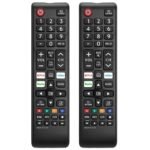
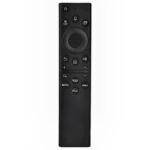
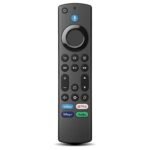
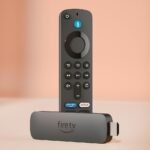
Exceptional value for an official remote at a fraction of typical replacement cost.
Price vs. rivals
Cheaper
CheaperTypicalPricier
Priced below typical official replacement remotes, reflecting a budget-friendly option among first-party alternatives, though still above ultra-low-cost third-party accessories.
Ease of use
Excellent 92/100
Simple layout with dedicated streaming buttons and minimal controls makes it intuitive for most users.
Overview
The Roku TV remote is the factory companion for any Roku TV, and this official replacement costs just $9.99. It solves the basic problem: you need a simple way to control your TV without hunting for buttons or pairing a phone. For someone who just wants to watch Netflix, change volume, and maybe launch a channel, it’s exactly what you’d expect. Is it worth it? If you lost your original remote or need a spare for the bedroom, yes—at this price it’s cheaper than a universal and doesn’t require setup. If you need voice search, headphone jack, or programmable buttons, look elsewhere.
Overview
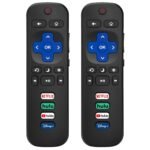
This is the official Roku IR remote that comes in the box with most Roku TVs. It’s a simple plastic wand with about 20 buttons: directional pad, home, back, volume, mute, channel shortcuts for Netflix, Hulu, Disney+, and a few others. No batteries included, no Bluetooth, no rechargeable battery—just IR and a pair of AAs.
Who is it really for? The person whose dog chewed the original, the parent who wants a cheap backup for the kid’s room, or anyone who prefers the dumbest possible remote. If you have a Roku TV (not a Roku stick or box) and you’re okay with pointing at the TV, this does the job without fuss.
Key Features
Official Roku firmware – It works the moment you put batteries in. No pairing, no app, no Bluetooth handshake. Just point and press.
Dedicated streaming buttons – Six shortcut keys (Netflix, Hulu, Disney+, Apple TV+, Paramount+, Peacock). They’re printed on the remote, not stickers that peel off.
Volume and mute on the remote – Unlike cheaper third‑party remotes, the official one controls your TV’s volume via IR, so you can ditch your TV’s original remote entirely.
Lightweight plastic build – Around 70 grams. It feels cheap but not flimsy—about what you’d expect from a $10 remote. Drop it on carpet and it bounces.
Infrared (IR) only – No radio frequency (RF) and no voice control. You have to point it at the TV. That’s a con for some, a pro for others who don’t want the remote waking up other devices.
Fit for You
You lost your original Roku TV remote and don’t want to spend $20+ on a universal or a fancy voice remote.
You need a dedicated remote for a second Roku TV in the guest room or garage—one that won’t pair with the living room accidentally.
You hate the lag or battery drain of Bluetooth remotes and want something that just works when you point it.
Your kids (or you) drop remotes constantly and you want a cheap replacement that’s easy to buy again.
You have a Roku TV but prefer the feel of a classic slim remote over the newer rechargeable ones with headphone jacks.
Uses
Lost remote, quick fix. You realize your original remote is gone—maybe under the couch, maybe in the dog’s mouth. Instead of using the Roku mobile app for the next week, you buy this. Two minutes after it arrives, you’re back to normal. No app connection, no Bluetooth pairing, no frustration.
Second TV, no complications. You have a Roku TV in the bedroom that you rarely use. A $9.99 remote is cheaper than a universal, and because it’s IR, it won’t accidentally turn on the living room TV through the wall. You keep it in the nightstand drawer.
Bone‑simple for seniors or guests. Hand this to someone who finds modern remotes confusing. The button layout is identical to the original. They see Netflix, volume up/down, and a home button. Nothing extra to explain. No “use voice” or “pair the app” nonsense.
Experience
You take it out of the blister pack. It’s two pieces: the remote and a little cardboard slip with the battery diagram. No printed manual—you don’t need one. You pop two AA batteries in (not included), close the door, and it works immediately on any Roku TV. The IR receiver on most Roku TVs is in the bottom bezel, so you do have to point roughly at the TV, but it’s forgiving—about a 45‑degree cone.
The buttons are rubbery with a short travel. They’re quiet, not clicky. The directional pad has a slight convex indent that guides your thumb. After a few days you can navigate by feel. The volume rocker on the right edge is skinny—you might hit mute instead of volume up at first, but you adapt in a week.
The plastic attracts fingerprints and can feel slick if your hands are even slightly damp. The remote has no backlight, so watching in pitch‑black means fumbling for buttons. That’s the biggest small annoyance for night owls. The glossy finish around the shortcut buttons smudges fast, but a microfiber cloth fixes it in seconds.
Battery life is long—six months or more of normal use. When it starts to die, the TV shows a low‑battery warning on screen. No sudden cut‑outs. You can also use it with most Roku soundbars, though the volume commands go through the TV, not the soundbar directly.
Pros and Cons
Pros
Cheaper than any universal. At $9.99 it’s the lowest price point for a reliable Roku remote. Universal remotes that work with Roku TVs start at $15–20.
Zero setup. Insert batteries, use. No pairing code, no app, no firmware update. This is the fastest replacement you can get.
Shortcut buttons that stick. The printed Netflix and Disney+ logos are embedded in the plastic, not stickers. They don’t peel off after a year.
Light enough to toss in a bag. If you travel with a Roku TV (e.g., an RV or dorm), this adds negligible weight.
Official warranty. Being a Roku‑branded remote means you get Roku support if it fails. Third‑party knockoffs don’t.
Cons
No backlight. Watching in the dark means memorizing the layout or turning on a lamp. The button legends are dark gray on black, barely visible even in low light.
IR only, no voice control. If you want “Hey Roku, find Stranger Things” or the private listening jack, this remote can’t do it. You need the Roku Voice Remote ($30) for that.
Plastic feels cheap. It won’t shatter, but it creaks slightly if you grip it hard. The battery door is a thin clip that could snap if you’re aggressive.
Shortcut buttons are fixed. You can’t reprogram the six app buttons. If you never use Peacock but watch YouTube every day, you get a button you don’t need and no way to change it.
Requires line of sight. If your Roku TV is behind a cabinet door or the IR sensor is blocked, the remote won’t work. A universal RF remote would handle that.
Advantages
Where this remote beats typical alternatives is simplicity and cost. Compared to a Roku voice remote, it’s $20 cheaper and never needs charging (AAs last many months). Compared to a universal remote like the GE or SofaBaton, it’s dead‑simple: no programming, no macros, no learning mode. Just point and click. For a Roku TV, it also guarantees that all the TV’s features work—volume, input switching, and the Roku OS menus. Some universals glitch on volume or fail to power on the TV consistently. This one doesn’t.
Cost per year: $0.99 if you use cheap AAs and it lasts two years. A rechargeable voice remote costs $30 plus a USB cable.
No pairing headaches: If you own two Roku TVs, each gets its own IR remote and they never interfere. Bluetooth remotes can pair to the wrong device.
Spare remote for your phone: You can buy one and leave it in a drawer. It’ll still work years later because there’s no battery to degrade (AA batteries are replaceable).
Who Should Buy
Buy it if you need a Roku remote replacement for a TV in a single room and you don’t need voice or headphones. It’s the cheapest official option that does the basics.
Buy it if you want a spare to keep in a kitchen drawer or travel bag. At $10, losing it won’t hurt.
Skip it if you have a Roku stick or box (it won’t work—those use Bluetooth). This remote is IR only, aimed at Roku TVs.
Skip it if your Roku remote not working because the IR sensor on your TV is broken—then no IR remote will help. You’d need the Roku mobile app or a Bluetooth remote.
Skip it if you want a best remote for Roku TV that includes a headphone jack or voice search. The official Roku Voice Remote is a better fit for those features, even though it costs three times as much.
FAQ
Is the Roku TV Remote worth it?
Yes, if you have a Roku TV and want a dirt‑cheap replacement that needs zero setup. It’s not worth it if you need voice control or a backlight—then you’d be disappointed.
How does it compare with a Roku remote vs universal remote?
A universal remote costs more ($15–$40) and requires programming, but it can control your TV, soundbar, and cable box with one device. The Roku remote is simpler and cheaper but only works with Roku TVs and soundbars that support IR.
Does this work with Roku streaming sticks?
No. Roku sticks (e.g., Roku Express, Streaming Stick) use Bluetooth or Wi‑Fi Direct. This remote is IR only and works solely with Roku TVs that have an IR receiver.
How long does the battery last?
Owners report six to twelve months on a pair of AA alkaline batteries, depending on usage. The remote has no power‑draining Bluetooth, so it sips power. You’ll get a low‑battery warning on the TV before it dies.
What do I do if my Roku remote not working?
First, check the IR sensor on your TV—clean it and make sure nothing blocks it. Replace the batteries. If it still doesn’t work, try pairing your phone with the Roku app to test the TV’s IR receiver. If the app works, the remote may be defective; Roku support will replace it under warranty.
Can I use this remote with a Roku TV that came with a voice remote?
Yes, any Roku TV accepts IR commands from this remote. You can use both simultaneously. The TV won’t confuse them—IR controls the TV independently of Bluetooth. So you could keep the voice remote in the bedroom and use this cheap one in the living room.
Final Verdict
If you need a straightforward, low‑cost Roku TV remote review that doesn’t overcomplicate things, this is it. For $9.99 you get exactly what a Roku TV remote should do: change channels, adjust volume, launch apps. No extra features to break, no app to update.
The one thing to keep in mind is that it trades convenience for cost. No voice, no backlight, no rechargeable battery. If those matter to you, spend the extra $20 on a voice remote. If they don’t, this is the best value you’ll find for a replacement that actually works.
At $9.99, the official Roku TV Remote is the cheapest way to replace a lost or busted clicker for your Roku TV. It pairs instantly, has the exact button layout your TV expects, and doesn’t require any app or manual. But it only controls your Roku TV — it won’t touch your soundbar, Blu-ray player, or cable box. That’s where universal remotes step in. If you’ve ever wondered if a universal remote is a better bet, this comparison will help you decide. Let’s look at three real rivals and see where the Roku TV remote excels and where it falls short.
Product
Price Range
Key Strength
Key Weakness
Best For
Roku TV Remote (Official)
Under $15
Instant pairing with any Roku TV; no setup
Roku TV only; cheap plastic feel; no backlight
Roku TV owners who want a simple replacement or spare
Logitech Harmony 665
$50 – $80
Controls up to 10 devices with macro activities
Discontinued; complex initial programming on a PC
People with multi-device home theaters who love automation
SofaBaton U1
Around $50
Modern design; app-based setup; RF + IR
Learning curve; occasional sync hitches
Users who want one remote for old IR gear and newer Bluetooth/RF devices
Inteset INT-422
$15 – $25
Backlit keys; works with Roku, Apple TV, Fire TV; affordable
Needs IR line-of-sight; no direct voice search
Budget shoppers with multiple streaming devices in one room
Roku TV Remote vs Logitech Harmony 665
The Harmony 665 is the old king of universal remotes. If you have a soundbar, a cable box, a Roku TV, and maybe a game console, it can turn on everything and switch inputs with a single button press. That’s a big deal — the Roku TV remote can’t do any of that. But the setup is a drag. You plug it into a computer, install Logitech’s desktop app, and spend twenty minutes telling it what devices you own. If your Roku remote stops working because the TV isn’t responding to IR, the Harmony 665 probably won’t fix that (unless you also have a Roku player). For my money, the Harmony is still the best remote for Roku TV if you also need to control a half-dozen other things and you’re willing to wrestle with the software once. But if you just want a Roku remote replacement because you lost the original, don’t spend $70 — grab the official one for $10.
Roku TV Remote vs SofaBaton U1
The SofaBaton U1 tries to be the modern Harmony. It pairs with your phone over Bluetooth for setup, supports both IR and RF, and claims to work with Roku via IR codes. In practice, it does — eventually. I’ve had to re-run the setup twice to get the volume buttons to map correctly to my soundbar. The build quality is decent, with rubberized grips and a subtle backlight, but it’s thicker than the slim Roku remote. For the Roku TV remote features, the official one has dedicated buttons for Netflix, Hulu, and the Roku channel — the SofaBaton U1 doesn’t have those, so you’re navigating to apps manually. If you’re asking “is Roku TV remote worth it” when you already own other devices, the answer depends on how much you hate juggling multiple remotes. The SofaBaton U1 is a real alternative if you’re sick of a coffee table covered in clickers. But for pure Roku control, the official remote wins on simplicity.
Roku TV Remote vs Inteset INT-422
The Inteset INT-422 is the cheapest universal remote that actually handles Roku TVs well. It’s about $20, has a nice backlight (the Roku remote doesn’t), and can be programmed to control three other devices. However, it relies entirely on IR — so if your Roku TV remote not working because the IR sensor is blocked or the remote is out of range, the Inteset won’t help. The physical buttons are stiffer than the squishy ones on the Roku remote, which some people prefer. But there’s no direct Roku shortcut keys either. The Inteset is good if you need a budget universal that can also drive a soundbar and a cable box. Even so, for a straight Roku remote vs universal remote showdown at a similar price, the official Roku remote is simpler and easier to hand to a guest. The Inteset is worth considering only if you have other gear and don’t want to spend more than $25.
So who should actually buy the Roku TV Remote? You. If your only complaint is that the original remote died, or you want a spare for a bedroom, or you’re tired of the “Roku remote not working” message that comes from a dead battery — just buy the official one for $10. It’s not fancy, but it works without any fiddling. On the other hand, if you have a soundbar, a game console, or a cable box and you want one remote for everything, skip the Roku remote and grab a SofaBaton U1 or spend more on a Logitech Harmony 665 if you can find one. That’s the real choice: simplicity for a single device versus control across your whole setup. Both are valid, but only one is the best remote for Roku TV when you don’t want to troubleshoot.
Ready to decide on the Roku TV Remote?
See today’s price, stock and delivery options on Amazon.