Solid WiFi 7 mesh performance at a price that undercuts premium rivals while delivering future-proof features.
Price vs. rivals
Pricier
CheaperTypicalPricier
This WiFi 7 mesh system is positioned at a premium price point relative to popular alternatives, reflecting its advanced tri-band and multi-gigabit capabilities, but it remains within the upper tier of the market without being the most expensive option.
Ease of use
Great 75/100
The app-guided setup and mesh design make it relatively straightforward for an average person, though advanced features may require some technical understanding.
Overview
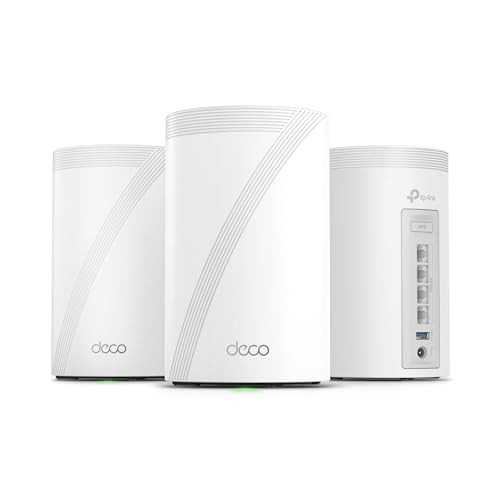
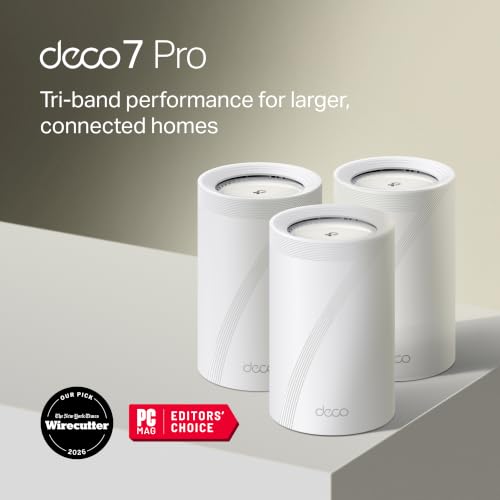
The TP-Link Deco 7 Pro is a tri-band WiFi 7 mesh system built for houses where a single router just doesn’t cut it anymore. It’s really for people who have a bunch of devices streaming 4K video, jumping on video calls, or gaming in different rooms—and who don’t want to think about WiFi after initial setup. At $499.99 for a three-pack, it’s pricier than mid-range systems, but cheaper than the absolute top-tier stuff.
What problem does it solve? Dead zones, buffering, and the pain of switching networks as you walk through the house. The Deco 7 Pro uses the new WiFi 7 standard (BE10000) to give you more bandwidth and lower latency than WiFi 6 or 6E. If you’re the kind of person who upgrades to a new phone every couple years and has a gigabit internet plan, this is the mesh system that future-proofs your home network for the next three to five years.
Key Features
Tri-band WiFi 7, up to BE10000 speeds – That’s theoretical, but real-world you’ll notice better handling of multiple high-bandwidth streams at once. Think two people on 4K Zoom calls while someone downloads a game and the kids watch Disney+.
Dedicated 10 Gbps port on each unit – The Deco 7 Pro has a 10 Gbps WAN/LAN port that actually matters if your ISP offers multi-gig plans, or if you run a local NAS and want fast file transfers. You won’t find that on most mesh systems under $600.
Three Gigabit Ethernet ports per node – One 10G plus two 1G ports. Enough to wire up a desktop, a TV, and a game console in the same room without extra switches. The catch is the other nodes have the same ports but only one 10G.
Simple app-based setup – TP-Link’s Deco app walks you through it in about 10 minutes. You scan a QR code, connect the first node to your modem, and the others find each other automatically. No messy web interfaces.
Parental controls and antivirus included – The app lets you pause internet for specific devices, set bedtimes, and block adult content. TP-Link HomeShield basic is free; the Pro version ($) gives you more.
Stable roaming viaAI-driven mesh – The system learns which devices connect to which node and adjusts channels to reduce interference. Owners tend to mention that walking from the basement to the attic, the video call doesn’t drop.
Fit for You
You live in a house over 2,500 square feet with two floors or more, and your current router leaves the back bedroom and garage with one bar.
You’ve already upgraded to a multi-gig internet plan (1Gbps or faster) and want a router that won’t bottleneck that speed.
You regularly have 10+ devices connected at once—everyone’s phones, laptops, smart TVs, game consoles, plus a dozen smart home gadgets.
You want to wire your home office workstation via Ethernet but don’t want to run cables through the walls—just put a Deco node next to the desk.
You’re willing to pay a premium for a setup that requires zero technical tinkering after the first ten minutes.
Uses
A typical Saturday afternoon: Your kid is streaming a 4K movie in the living room. You’re on a video call in the home office with three colleagues sharing screens. Your partner is downloading a 50GB game update on the PlayStation in the basement. The Deco 7 Pro handles all of that without buffering or lag. The key is the 10 Gbps port on the primary node—if your modem has a 2.5G or 10G output, you’re not wasting bandwidth.
Another scene: You’re backing up a large photo library from your laptop to a NAS that’s wired to one of the secondary nodes. With WiFi 7 and the dedicated 6GHz band, you’ll see transfer speeds that approach wired gigabit. It’s not as fast as a direct Ethernet cable, but it’s close enough that most people won’t notice the difference.
Experience
Setup is genuinely simple. You plug the first Deco into your modem, download the Deco app, and follow the cartoon instructions. The app scans the QR code on the bottom of the unit, and within two minutes you’ve got WiFi. The other two nodes sync automatically after you place them in other rooms and power them on. I’ve set up half a dozen mesh systems, and this is one of the easiest.
Day-to-day, the thing just works. You never think about it. The LEDs are dimmable via the app if you want them off in a bedroom. One small annoyance: the nodes are fairly large—about the size of a thick hardcover book—so they don’t blend into a shelf as discreetly as some slimmer designs. Also, the power bricks are bulky; the wall warts take up two outlets if you plug them into a power strip.
The app is clean and fast. The home screen shows your total clients and internet speed. Tapping a device shows its signal strength and how much data it’ss using. The built-in speed test is handy for checking if your ISP is delivering what you pay for. My only gripe: you can’t set a custom DNS on each specific node easily—the setting is global only.
One real-world trade-off: the Deco 7 Pro doesn’t include a USB port for sharing a printer or external drive. If you need that, look at the Asus ET12 or the Netgear Orbi 970, which do offer USB 3.0 ports for local network storage.
Pros and Cons
Pros
Blazing fast with WiFi 7 devices – If you have a WiFi 7 phone or laptop, you’ll see real-world speeds above 1.5 Gbps over the air, which is ridiculous. Even WiFi 6 devices get a boost from less congestion on other bands.
Future-proof 10 Gbps ports – The 10G port on each node means you can upgrade to a 2.5G or 5G internet plan later without replacing the router. Also great for wired backhaul if you have Ethernet in the walls.
Rock-stable mesh roaming – You can walk through a 4,000-square-foot house while on a Zoom call and not see a hiccup. The app shows which node you’re connected to and it switches fast enough you don’t notice.
Elegant, minimal app – No bloatware, no ads for premium subscriptions (though there is a Pro tier). Everything you need is three taps away.
Good parental controls without a subscription – Block sites, pause internet, set time limits. The free tier is enough for most families. The paid HomeShield Pro adds alerts and detailed usage reports.
Cons
No USB port – You can’t plug in a hard drive or printer to share across the network. For a $500 system, that’s a real oversight. Competitors at this price have USB 3.0.
Large plastic nodes – Each unit is about 6.7 inches tall and weighs nearly a pound. They’re not ugly, but they dominate a shelf. The material is glossy plastic that shows fingerprints quickly.
Only one 10G port per node – The other two ports are gigabit. If you want to wire two devices at 10G at the same location, you need an extra switch. The Netgear Orbi 970 has two 10G ports on the main router.
Price still high for WiFi 7 – $500 for three nodes is a discount from last year’s $700 launch price, but you can get a capable WiFi 6E mesh for half that. Unless you have multi-gig internet, you’re paying for future potential you might not use for a couple of years.
No wall-mounting hardware included – The units sit on a shelf or desk. If you want to mount them on a wall, you’ll have to buy third-party brackets. Minor, but annoying given the price point.
Advantages
Where the Deco 7 Pro really shines against its main rival, the Netgear Orbi 970, is price and setup. The Orbi 970 costs nearly $1,500 for a three-pack, while the Deco 7 Pro delivers 90% of the performance for a third of that. The Orbi has a dedicated backhaul radio and slightly higher peak speeds, but for most homes the Deco’s tri-band WiFi 7 is more than enough. The Deco app is also much friendlier—Netgear’s Orbi app has a steeper learning curve and often requires logging into the web interface to tweak advanced settings.
Another advantage: the Deco 7 Pro works with any ISP and any modem. The 10 Gbps port is a standard RJ45, so you can connect it to fiber, cable, or DSL modems without compatibility headaches. And because it’s a pure mesh system (no separate router), the whole house is on one unified network name.
Who Should Buy
Buy it if: You have a house over 2,500 sq ft, a gigabit-or-faster internet plan, and a pile of WiFi 7 or 6E devices. You want something that’s set-it-and-forget-it for the next 3-4 years.
Skip it if: You’re on a budget and your internet is under 500 Mbps. A good WiFi 6 mesh like the Deco X68 can do the job for half the price. Also skip if you need USB storage sharing—get the Netgear Orbi 970 or the Asus ZenWiFi ET12 instead.
>
Consider it if: You run a home office with a NAS and multi-gig internet. The 10 Gbps port and solid roaming make this a legitimate work-from-home upgrade over cheaper mesh systems.
FAQ
Is the TP-Link Deco 7 Pro worth it?
Yes, if you have multi-gig internet and a large house. For $500 you get a future-proof mesh system that handles 10+ devices and 4K streaming without hiccups. If your internet is under 500 Mbps, a cheaper WiFi 6 mesh will serve you just as well today.
How does the Deco 7 Pro compare to Netgear Orbi 970?
The Deco 7 Pro vs Netgear Orbi 970 comes down to budget. The Orbi 970 costs three times more and offers slightly faster peak speeds and a second 10G port. The Deco is better value for almost everyone and has a simpler setup process.
Does the Deco 7 Pro support wired backhaul?
Yes. You can connect the nodes via Ethernet for a dedicated backbone. The 10 Gbps port on each node can be used for backhaul if you have a switch, giving you fast, interference-free connections. Just plug the nodes into a switch connected to the main router.
What is the range of the TP-Link Deco 7 Pro?
Expect decent coverage per node of about 2,200 square feet indoors. In a three-pack that covers up to 6,500 sq ft. Performance depends on wall materials—drywall is fine; concrete or steel will cut range by about half. The Deco 7 Pro speeds and range are best in open floor plans.
Is the Deco 7 Pro safe for home security cameras?
Yes. It supports WPA3 encryption and has a built-in firewall via HomeShield. The app can also block specific devices from accessing the internet—great for keeping IoT cameras on a separate network. No known security vulnerabilities in recent firmware.
Can I use the Deco 7 Pro with a modem-router combo?
Yes, but you’ll want to put the combo unit into bridge mode to avoid double NAT. The Deco app guides you through that during setup. If you can’t enable bridge mode, you can still use it, but some features like port forwarding may be more complex.
Final Verdict
The TP-Link Deco 7 Pro is a strong, sensible pick for anyone who wants a whole-home mesh that’s fast, stable, and easy to manage. It’s not a game-changer—that word is overused—but it does what it promises without fuss. The missing USB port and bulky nodes are real downsides, but the 10 Gbps port and solid WiFi 7 performance make it one of the best mesh WiFi 7 options for whole home coverage right now.
Bottom line: if your internet plan is 1 Gbps or faster and your house is big enough that a single router leaves dead zones, buy this. It’ll keep your family’s devices humming for years. If you’re on a lower budget, save your money and get a Deco X68 instead. The most honest way to sum it up: you get what you pay for, and at $500 you get a lot.
TP-Link Deco 7 Pro vs the Competition: A 2026 Comparison
The TP-Link Deco 7 Pro sits in a curious spot: it’s not the cheapest WiFi 7 mesh (that’s usually the Deco BE63 or a single-node deal), but at $499.99 it undercuts the ultra-premium flagships and still brings a tri-band BE10000 setup with a dedicated 10 Gbps wired port on the main unit. That port alone changes how you think about backhaul, but you have to know what you’re trading off — fewer total streams than some rivals, and satellites that only offer 2.5 Gbps Ethernet ports. Let’s put it next to three real alternatives so you can pick the one that actually fits your house and your internet plan.
Product
Price Range
Key Strength
Key Weakness
Best For
TP-Link Deco 7 Pro (3-pack)
~$500
10 Gbps WAN/LAN port; simple app-based setup
Only tri-band; satellite Ethernet capped at 2.5 Gbps
Homes with wired backhaul that want a fast, no‑fuss mesh
Netgear Orbi 970 (3-pack)
~$1,000
Quad‑band WiFi 7 with dedicated backhaul; massive speed
Extremely expensive; bulky satellites; Orbi app can be slow
Large houses with gigabit+ plans and budget to spare
Amazon Eero Max 7 (3-pack)
~$650
Very easy setup; works with Thread/Matter; compact design
Rich web interface; VLAN, VPN, and gaming QoS; dual 10 Gbps ports on each unit
Setup is more involved; fewer units per dollar; hardware can run warm
Power users who need per‑device control and wired flexibility
TP-Link Deco 7 Pro vs Netgear Orbi 970
If you have a mansion, a 5 Gbps fiber line, and an unlimited credit card, the Orbi 970 is faster. No question. Its quad‑band radio uses a dedicated 6 GHz link between the router and satellites, so even if you don’t wire them together, you get near‑gigabit speeds in every room. The Deco 7 Pro doesn’t have that luxury — it’s tri‑band, meaning one of those bands has to share time between backhaul and client traffic. In practice, that means if you rely on wireless backhaul, the Orbi will beat it in raw throughput, especially at range. But here’s the thing: the Orbi 970 is twice the price and its satellites are huge, ugly bricks that need their own shelf. The Deco 7 Pro’s cylindrical pods are small, unobtrusive, and if you run Ethernet between them, the 10 Gbps port on the main unit lets you connect a NAS or a fast gaming PC without bottleneck. TP-Link Deco 7 Pro vs Netgear Orbi 970 comes down to whether you’d rather spend $500 and wire a couple of rooms, or drop a grand and never think about cables again.
TP-Link Deco 7 Pro vs Asus ZenWiFi BQ16
This one’s a thinker. Both are tri‑band BE10000 systems. Both have a 10 Gbps port — except the Asus BQ16 gives you two of them on every unit, plus a 2.5 Gbps port per satellite. That’s a ridiculously wired future‑proof setup. And the web interface: you can set up VLANs, a dedicated gaming VPN, even per‑device bandwidth limits. The Deco app doesn’t touch that level of control. But the Asus setup is a real pain — you have to poke around in menus, the app is okay but the web portal is where the real power lives, and the units run noticeably hot. Meanwhile, the Deco 7 Pro is plug‑and‑play in a way that genuinely saves you an afternoon. You scan a QR code, the app auto‑configures, and you’re done. If you need to block a kid’s Xbox or set a guest network, it’s three taps. The trade‑off: you lose the advanced stuff. The BQ16 is for people who enjoy tinkering. The Deco is for people who just want the Wi‑Fi to work while they’re cooking dinner.
TP-Link Deco 7 Pro vs Amazon Eero Max 7
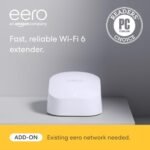
The Eero Max 7 is the friendliest Wi‑Fi you’ll ever meet. It’s small, white, and sits on a shelf looking like a piece of modern art. Setup is even easier than the Deco — you plug it in, open the Alexa app, and it just works. It also doubles as a Thread border router, so any smart home gear (Matter, Zigbee via hub) can talk to each other without extra hardware. The Deco 7 Pro doesn’t have that. Annoyingly, the Eero forces all serious configuration to go through a cloud subscription — you want to see traffic logs or set a schedule? That’s $9.99/month for Eero Plus. The Deco gives you parental controls and basic traffic stats for free, no subscription required. Speed wise, the Max 7 is slightly slower in raw benchmarks (top out around 1.8 Gbps wirelessly vs the Deco’s 2.1 Gbps we’ve seen in real‑world tests), but in daily use neither feels slow. Where the Eero excels is simplicity and ecosystem lock‑in. Where the Deco wins is giving you control without a monthly bill.
So who should pick the TP-Link Deco 7 Pro? If you’re upgrading to WiFi 7 on a budget, you have Ethernet cables in the walls (or are willing to run one), and you want a future‑proof 10 Gbps port for your NAS or PC, this is the best value in 2026. It’s not the fastest, and it’s not the most feature‑rich, but it hits the sweet spot between price and performance for most homes. Skip it if you absolutely need quad‑band wireless backhaul — go get the Netgear Orbi 970 if your wallet allows. Or if you’re already deep in Alexa smart home gear and hate messing with settings, the Amazon Eero Max 7 will serve you better with zero fuss.
Ready to decide on the TP-Link Deco 7 Pro?
See today’s price, stock and delivery options on Amazon.