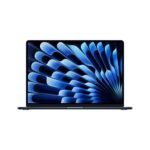
Apple's M5 MacBook Air delivers a premium blend of cutting-edge AI performance, sleek design, and ecosystem integration that justifies its higher price point for discerning users.
Price vs. rivals
Typical
CheaperTypicalPricier
Priced slightly above typical mid-range ultrabooks, reflecting Apple's premium positioning and the inclusion of AI-capable M5 chip, yet remains competitive with high-end alternatives.
Ease of use
Excellent 95/100
The MacBook Air's intuitive macOS, familiar design, and features like Touch ID and seamless integration make it very easy for an average person to use.
Overview
If you’re wondering whether the Apple MacBook Air M5 is worth the upgrade or just another thin laptop with a faster chip, here’s the short answer: yes, for most people, it’s the smartest $1,234 you’ll spend this year, provided you don’t need the raw power of a Pro. This 2026 Air keeps the same featherlight profile and adds an M5 chip that’s built to handle AI tasks without breaking a sweat—or your back. The 13.6-inch Liquid Retina display remains excellent, the 16GB of unified memory and 512GB SSD are the new baseline, and Wi-Fi 7 finally shows up. It solves the problem of wanting a laptop that’s fast enough for modern work and play, yet light enough to forget you’re carrying it.
The M5 Air doesn’t reinvent the wheel. What it does is take the already polished Air formula—silent, cool, absurdly portable—and give it a brain that talks to AI models and creative apps more fluently. This is for the student, the remote worker, the writer who also dabbles in photo editing or runs local LLMs for fun. It’s not for the person rendering 8K video all day; that’s Pro territory. But for everything else, this is the sweet spot.
Key Features
M5 chip with 16-core Neural Engine – This is the first Air where AI tasks don’t feel like an afterthought. You can run image generation models, summarize documents, or use real-time language translation without the fan ever spinning up.
13.6-inch Liquid Retina display – Still 2560×1664, still 500 nits, still excellent for indoor use. It’s bright enough to use near a window, though direct sunlight will make you squint. Colors look natural out of the box.
16GB unified memory (base config) – Apple finally made 16GB the floor. That means you can keep 20 browser tabs open alongside Slack, Spotify, and a coding environment without the system feeling cramped. 8GB is gone, and good riddance.
512GB SSD – Plenty for most people’s apps and files. If you hoard 4K videos or have a massive music library, consider the 1TB upgrade—the SSD isn’t user-replaceable, so buy what you need now.
12MP Center Stage camera – Video calls finally look decent on an Air. The camera follows you as you move, and the sensor is noticeably less grainy than the previous 1080p unit. Good for Zoom meetings or FaceTime with family.
Wi-Fi 7 and Bluetooth 5.3 – Future-proofing, mostly. Wi-Fi 7 is faster and more stable if you have a compatible router, but even on Wi-Fi 6, it’s rock solid. Bluetooth 5.3 means your AirPods Pro connect instantly and stay connected.
Touch ID and MagSafe charging – Touch ID is still the fastest way to unlock or authenticate purchases. MagSafe frees up the two Thunderbolt 4 ports for displays or drives, and it snaps off safely if someone trips over the cord.
Fit for You
You spend more time in coffee shops than at a desk and need a laptop that slides into a messenger bag without weighing you down.
You run AI tools like ChatGPT, Midjourney via diffusion models, or local transcription apps, and you want them to feel instantaneous rather than sluggish.
You’re a student who writes essays, does research with 30 browser tabs, and occasionally edits photos for a class project—no dedicated GPU required.
You work remotely and participate in hours of video calls each day; the improved camera and microphone array make you look and sound better without extra gear.
You’re still using an Intel-based Mac and wondering why your battery dies by noon. This Air will give you a full workday and then some.
You want a laptop that stays silent and cool under normal use—no fan noise, no hot lap, even when you’re pushing it with multiple apps.
Uses
Here’s where the M5 Air really shows its stuff. Imagine you’re a freelance writer who also dabbles in AI image generation. You’ve got a deadline in two hours, and you need to generate a dozen variations of a product photo concept. On an older Air, that would take forever and the laptop would heat up. On the M5, using local Stable Diffusion models, each generation completes in seconds. The laptop stays cool. You don’t hear a fan because there isn’t one. That’s the difference.
Or picture yourself in a long Zoom call—three hours of team brainstorming. The 12MP Center Stage camera keeps you framed as you lean back or reach for notes. The three-mic array picks up your voice clearly even when the espresso machine is grumbling in the background. On battery, you finish the call with 60% left. That’s the M5 efficiency at work.
Another scenario: you’re a developer running Docker containers, a local LLM, and VS Code with a dozen extensions. On an Intel Mac, the fans would roar. On this Air, it’s dead quiet. The 16GB of unified memory handles the juggling act with only occasional swap warnings if you push to 30 containers. The M5’s performance cores handle compilation quickly; the efficiency cores keep background tasks from draining battery.
Experience
Living with the MacBook Air M5 is mostly a pleasure, with a couple of small gripes. Setting it up is the usual Apple smoothness: power on, connect to Wi-Fi, sign in with your Apple ID, and within ten minutes you’re in your familiar desktop. Migration Assistant from an old Mac works fine, though transferring a large photo library over Wi-Fi will test your patience—use a cable if you can.
Day to day, the display is a joy for reading and typing. The keyboard—the same Magic Keyboard from the M3 Air—has just the right amount of travel, and it’s quiet enough that you won’t annoy a roommate typing at 2 AM. The trackpad is enormous and responsive; palm rejection is excellent.
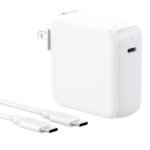
The battery life is genuinely impressive. Apple claims up to 18 hours of video playback, and in real-world mixed use (browsing, writing, Slack, some video calls, light photo editing), you’ll comfortably get 12–14 hours. That’s an all-day machine. Charging via the included 30W USB-C adapter is slow—expect two hours to full from empty. If you need faster, you can use a higher-wattage GaN charger, but the 30W is adequate for overnight.
Now the annoyances. The Midnight colour looks stunning out of the box—deep, dark blue—but it’s a fingerprint magnet. You’ll be wiping it down constantly. Other colours like Silver or Starlight hide smudges better. The 60Hz refresh rate on the display is fine for most tasks, but if you’re used to 120Hz on an iPad Pro or iPhone Pro, scrolling will feel slightly less fluid. Apple reserves ProMotion for the Pro line, so you’ll have to accept that trade-off.
The two Thunderbolt 4 ports are enough for most people, but if you regularly connect multiple external drives and a monitor, you’ll need a dock. The headphone jack is still on the right side, which is slightly annoying if you’re right-handed and the cord gets in your way. No SD card slot, either—photographers will need a dongle.
During heavy sustained loads (say, compiling a large codebase or running a continuous AI batch), the M5 Air can get warm on the bottom. It’s never uncomfortably hot, but it’s noticeable. The lack of active cooling means the chip will throttle earlier than a MacBook Pro M5 with a fan, so for long render jobs, the Pro is faster. For bursts of activity, the Air keeps up just fine.
Pros and Cons
Pros
Incredible battery life – You can leave the charger at home for a full workday, even with video calls and AI tools running.
Silent operation – No fan means no noise, ever. Great for libraries, meetings, or late-night work.
Excellent AI performance – The M5’s Neural Engine and unified memory make local AI tasks fast enough to be actually useful.
Light and portable – 2.7 pounds (1.24 kg) is easy to carry everywhere; you’ll forget it’s in your bag.
Great keyboard and trackpad – Comfortable typing and the best trackpad in any laptop, period.
Finally 16GB baseline – No more worrying about memory pressure with multiple apps open.
Cons
60Hz display – Scrolling isn’t as smooth as on Pro models or high-refresh-rate phones. If you’re sensitive to it, try before you buy.
Only two Thunderbolt ports – You’ll likely need a dongle or dock if you connect multiple peripherals.
Fingerprint-prone Midnight colour – Looks gorgeous for about ten minutes after you wipe it; then it’s smudge city.
Slow included charger – The 30W adapter charges slowly; you’ll want a faster GaN charger if you’re in a hurry.
No SD card slot or HDMI – Photographers and presenters will need adapters. The Pro models include HDMI, but here you get none.
Thermal throttling under sustained load – For long exports or continuous AI batch processing, a MacBook Pro M5 will finish faster. The Air is great for bursts, not marathons.
Advantages
Over typical Windows ultrabooks at this price, the MacBook Air M5 offers two big wins: battery life that actually matches the marketing, and an ecosystem that just works. You get seamless Handoff with your iPhone and iPad, iMessage and FaceTime built in, and apps that are optimized for Apple Silicon. Many Windows laptops in the $1,200 range have faster multi-core CPUs but consume more power and run hotter. The Air stays cool and quiet without sacrificing real-world speed.
Against the Dell XPS 13 (2025), the Air has significantly better battery life and a better trackpad. The XPS has a slightly sharper OLED display, but the Air’s display is still very good and much easier on battery.
Against the Microsoft Surface Laptop 7, the Air is lighter, has a better webcam, and runs AI tasks faster thanks to the M5’s dedicated Neural Engine.
Against the previous M3 Air, the M5 brings a meaningful jump in AI workload performance and doubles the base memory. If you do anything with machine learning or local LLMs, the upgrade is worth it.
Who Should Buy
Students and knowledge workers – You’ll love the portability, battery life, and quiet operation. The M5 handles everything from writing papers to coding projects without complaint.
Creative professionals who don’t render all day – Photographers, illustrators, and light video editors will find the M5 Air plenty fast, especially with AI-assisted tools.
Remote workers and frequent travelers – The combination of long battery life, great camera, and light weight makes this the ultimate road warrior laptop.
AI enthusiasts and tinkerers – If you run local models, experiment with diffusion, or use AI coding assistants, the M5 Air is one of the best laptops for AI tasks in 2026 without going up to a Pro.
Skip it if – You’re a professional video editor or 3D artist who needs sustained GPU power for hours at a time. In that case, get a MacBook Pro M5 with active cooling and extra GPU cores. Similarly, if you need more than two external displays, the Air won’t cut it (it supports one external display up to 6K).
FAQ
Is the MacBook Air M5 worth it?
Yes, for most buyers. The M5 chip delivers a noticeable performance jump for AI and daily tasks, the battery life is excellent, and the 16GB base memory finally eliminates the memory bottleneck. If you don’t need the Pro’s extra ports, fan, and higher sustained performance, the Air is the better value.
How does the MacBook Air M5 compare to the MacBook Pro M5?
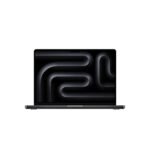
The short version: the MacBook Air M5 is lighter, cheaper, and silent, while the MacBook Pro M5 has a ProMotion display, more ports (HDMI, SD slot), active cooling for longer sustained loads, and a much larger battery. If you do short bursts of intensive work, the Air is fine. For long renders or heavy multi-core tasks, get the Pro.
Is the MacBook Air M5 good for gaming?
It’s decent for Mac-compatible games at medium settings. The integrated GPU in the M5 is faster than the M3’s, but don’t expect to run AAA titles at high frame rates. Native Apple Silicon games like “Baldur’s Gate 3” or “No Man’s Sky” run well at 1080p. For serious gaming, a Windows PC or console is still better.
What is the battery life like on the MacBook Air M5?
You can expect 12–14 hours of real mixed use: web browsing, email, video calls, and light creative work. Heavy AI processing or video editing will bring it down to 8–9 hours. Charging via the included 30W adapter takes about 2 hours to full; a 67W GaN charger cuts that to 80 minutes.
Can the MacBook Air M5 handle AI tasks like running local LLMs?
Yes, and it’s one of its strengths. The 16GB of unified memory is enough for 7B parameter models, and the 16-core Neural Engine accelerates inference. You can run Ollama, LM Studio, or diffusion models locally without the laptop getting hot or loud. It’s a capable machine for AI experimentation.
Is the 256GB SSD option worth it?
There is no 256GB option this year. The base model comes with 512GB, which is adequate for most users. If you store lots of media or run multiple virtual machines, upgrade to 1TB or 2TB. The SSD is soldered, so choose carefully.
Final Verdict
The Apple MacBook Air M5 is the laptop most people should buy. It nails the essentials—portability, battery life, performance, and a great display—while adding enough AI muscle to feel ready for the next few years. The $1,234 price is fair for what you get, especially with 16GB of memory standard. Yes, the 60Hz screen and limited ports are compromises, but they’re trade-offs that make sense for a machine this thin and light.
If you’re torn between the Air and the Pro, ask yourself one question: do you regularly push a laptop for hours at full load? If not, save the money and get the Air. It’s fast enough for 95% of what people do, and it won’t weigh you down. That’s the best laptop for most of us in 2026.
The MacBook Air with Apple’s M5 chip sits in a weirdly sweet spot. It’s light (2.7 pounds), it’s quiet (no fan – ever), and it costs $1,234 with 16GB of unified memory and a 512GB SSD. That’s not cheap for an ultraportable, but it’s cheaper than the MacBook Pro M5 and performance is close enough for 90% of what most people do. You get Wi‑Fi 7, a 12MP Center Stage camera, and a 13.6‑inch Liquid Retina display that’s great for text but lacks the Pro’s mini‑LED contrast. The real question: is the MacBook Air M5 worth it when Dell, Microsoft, and ASUS all have fast ARM or Intel alternatives in 2026? Here’s where it wins and where it doesn’t.
Product
Price Range
Key Strength
Key Weakness
Best For
Apple MacBook Air M5 (13″)
$1,234
No‑fan design, all‑day battery (15+ hours), M5 neural engine for local AI
Only two Thunderbolt 4 ports, no active cooling for sustained loads
Students, writers, light coders, anyone who wants a silent laptop that handles AI tasks like summarising text or running small LLMs
Apple MacBook Pro M5 (14″)
Starts around $1,599
Active cooling, up to 12‑core GPU, mini‑LED XDR display, HDMI + SD slot
Heavier (3.5 lbs), fan noise under load, costs $300+ more
Video editors, 3D modellers, developers compiling large codebases – anyone who needs sustained performance
Dell XPS 13 (2026, Intel Core Ultra 2)
Roughly $1,199 – $1,499
Thinner bezels, optional 3K OLED touchscreen, two USB‑C + headphone jack
Fan spins up with two browser tabs open, battery life ~9 hours, trackpad is fine but not Mac level
Windows loyalists who prefer a 16:10 OLED screen and don’t need all‑day battery
Microsoft Surface Laptop 6 (for Business)
About $1,299
3:2 PixelSense touchscreen, slim aluminium body, ARM version runs silent (but app compatibility spotty)
Port selection is stingy (1 USB‑A, 1 USB‑C), keyboard has mushy keys, and the trackpad click is loud
Office workers who rely on Microsoft 365 and want a touchscreen for marking up documents
ASUS ZenBook S 14 OLED
$1,099 – $1,299
2.8K OLED display (gorgeous colours), full HDMI 2.1, USB‑A + two USB‑C, lightweight at 2.6 lbs
Build creaks under palm rest pressure, no facial recognition, OLED risk of burn‑in after a few years
Budget‑minded creatives who want rich colours and don’t mind replacing a laptop in 3 years
MacBook Air M5 vs MacBook Pro M5
This is the classic fork in the road. The MacBook Air M5 and the MacBook Pro M5 share the same M5 chip, but the Pro has a fan. That means the Pro can keep the CPU and GPU at full throttle for hours – useful if you’re exporting 4K video or training a small model. The Air, with its passive cooling, will start to throttle after about 10 minutes of heavy load. For everyday AI stuff – summarising a meeting transcript locally, running a local Llama 3.2 8B model, or batch‑resizing photos – the Air doesn’t break a sweat. The battery difference is real, too: the Air gives you a solid 15 hours of mixed use, while the Pro squeezes maybe 12 because the mini‑LED display guzzles power. If you do occasional heavy lifting, get the Air and wait an extra minute. If you do it daily, the Pro’s extra $300 is worth the saved time.
MacBook Air M5 vs Dell XPS 13
The Dell XPS 13 remains the Windows champion of sleek, but it comes with compromises. The 2026 model runs Intel’s Core Ultra 2, which matches the M5 in single‑core and falls behind in multi‑core. More annoying: the fan. Dell’s thermal tuning is aggressive – you’ll hear a whine when you plug in an external monitor or open a Zoom call with a few tabs. The Air stays silent. The Air’s trackpad is also a class above – the XPS’s feels hollow after a week. The XPS 13 does offer a gorgeous 3K OLED touchscreen, which the Air lacks (Liquid Retina is fine, not jaw‑dropping). And Windows with ARM emulation still trips up on some apps. Honestly, if you don’t need Windows‑exclusive software like SolidWorks or specific VPN clients, the MacBook Air M5 is the better everyday machine. Go XPS if you want touch and hate macOS.
MacBook Air M5 vs Microsoft Surface Laptop 6
Microsoft’s Surface Laptop 6 (the ARM version, with Snapdragon X Elite) is the closest Windows rival in terms of silence and battery life. It lasts about 13 hours in real use – close, but not quite the Air’s 15. The Surface has a taller 3:2 screen, which is lovely for reading web pages and documents (more vertical space). But the keyboard is a letdown: shallow travel, and the trackpad clicks with a hollow *thock*. The Air’s Magic Keyboard is still the best in the business. The Surface’s killer feature is the touchscreen, but on a clamshell design it’s mostly for scrolling – you’ll propably use the trackpad 99% of the time. For AI tasks, the Air’s Neural Engine runs CoreML models faster than the Snapdragon’s Hexagon on most apps. The Surface’s port selection is better (USB‑A) but only one USB‑C. If you need a touchscreen and live in OneNote, get the Surface. If you want a laptop that just works every time without thinking, get the Air.
MacBook Air M5 vs ASUS ZenBook S 14 OLED
ASUS brings the value play. The ZenBook S 14 costs as little as $1,099, undercuts the Air by $135, and gives you an OLED panel that blows the MacBook’s Liquid Retina away in contrast and colour volume. It’s also lighter (2.6 lbs versus 2.7), and the port selection is actually generous – full HDMI 2.1, USB‑A, two USB‑C. So why isn’t it the obvious pick? Build quality. Press on the palm rest and you’ll hear a flex and creak that the midnight aluminium Air doesn’t. The ZenBook’s battery life is about 9 hours on OLED, less than the Air’s. And the fan – yes, it has one – spins up even during Windows update installs and never fully shuts off. For the same money, the Air feels like a laptop you’ll still love in three years. The ZenBook feels like a smart choice today that you’ll want to replace in two. For best laptop for AI tasks 2026, the Air’s integrated M5 Neural Engine and fanless operation make it the smarter long‑term buy.
So who should pick the Apple MacBook Air M5 review unit? You, if you want the lightest, quietest, longest‑lasting laptop that can handle AI tasks like real‑time voice transcription or running a local code‑generating model without dragging. You value build polish and a trackpad you can trust. You don’t need a dedicated GPU, and you’re happy with macOS. Who should look elsewhere? If you edit video all day or compile massive projects, grab the MacBook Pro M5 instead. And if you absolutely need a touchscreen plus the Windows ecosystem, the Surface Laptop 6 is a fine alternative – just be ready for a louder click and a shorter battery life. The Air wins the “is MacBook Air M5 worth it” argument for most people, but “most people” isn’t everyone.
Ready to decide on the MacBook Air M5?
See today’s price, stock and delivery options on Amazon.