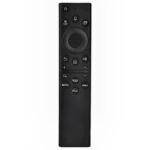
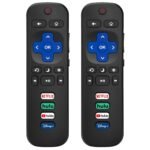
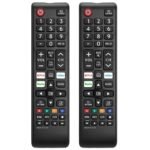
Is the Insignia Fire TV remote review worth your time? If you lost or broke the remote that came with your Insignia, Toshiba, or Amazon Fire TV, this $9.99 replacement gets the job done without the headache of paying full price for an OEM part. It pairs easily, has all the core buttons you use daily, and feels solid enough for the couch. For the price, it’s a straight-up fix.
Very low price paired with solid user reviews makes it a remarkable value substitute for the original remote.
Price vs. rivals
Cheaper
CheaperTypicalPricier
Priced below typical replacement remotes for Fire TV editions, reflecting a budget-friendly option without premium features.
Ease of use
Excellent 85/100
The replacement remote is straightforward to pair and operate, with intuitive button layout typical for Fire TV devices.
Overview
This is the Insignia Fire TV remote replacement—a drop-in substitute for the original remote that came with most Insignia and Toshiba Fire TV Edition sets. It also works with Amazon Fire TV sticks and cubes if you need a spare. The thing it solves is the moment you realize your remote vanished between the cushions or took a bath in your coffee, and you don’t want to spend $30 on an Amazon-branded replacement.
It’s really for anyone who owns a Fire TV and wants a working remote that won’t make you relearn button placement. No extra features, no voice control—just the basics done competently. If that’s all you need, this is the budget play.
Key Features
Standard Fire TV layout – The button arrangement matches the original Insignia remote, so you won’t fumble for the home button or directional pad. Muscle memory stays intact.
Infrared and Bluetooth pairing – Uses Bluetooth for most functions but falls back to IR for basic power and volume. That means it works even before the TV fully boots, which is handy.
Dedicated app buttons – There are shortcut buttons for Netflix, Prime Video, Disney+, and Hulu. They’re the same as the stock remote, so you won’t lose your one-tap streaming habits.
Lightweight plastic build – It’s not premium—expect a standard matte black shell—but it feels dense enough that it won’t flex when you squeeze it during a tense scene.
Powered by two AAA batteries – No rechargeable battery to degrade over time. You can swap batteries in seconds, and they last months with normal use.
Fit for You
You lost the original remote and don’t want to spend more than ten bucks to get back to normal.
You need a backup remote to keep in the bedroom or the RV so you’re not carrying the main one around the house.
You have a Toshiba Fire TV and the original remote started double-tapping volume or just stopped pairing—this is the cheapest official-ish fix.
You’re setting up a second TV in the kids’ playroom and don’t need voice search or fancy buttons that will get sticky anyway.
You bought a used Fire TV that came without a remote and want something that works out of the box without a smartphone app.
Uses
The most obvious moment: you’ve flipped the couch cushions, checked under the recliner, and the remote is just gone. You order this, it arrives in two days, you pop in batteries, and within twenty seconds the TV finds it. That’s the whole use case.
Another real scenario: you’ve got a Fire TV in the guest room. You don’t want guests fumbling with a phone app or needing to buy a premium remote. This sits on the nightstand, does volume, channel switching on live TV via the Fire TV Recast, and launches Netflix. No one complains.
It also works as a spare for your main living room when the original remote’s battery cover cracks and won’t stay on. This remote has a snug battery door that clicks in place and doesn’t slide off if you drop it.
Experience
Pairing is as simple as holding the Home button for ten seconds. The TV prompts you, and you’re done. No menu diving, no code entry. Expect it to work with any Fire TV OS device that supports Bluetooth remotes—which is basically all of them from 2017 onward.
The buttons have a short travel and a soft click. They’re not mushy, but they’re not the satisfying click of a Logitech Harmony either. They feel like what a ten-dollar remote should feel: serviceable. The directional pad is slightly recessed, which your thumb will like because you won’t accidentally press up when you meant left.
A small annoyance: the remote doesn’t have a backlight. If you watch in the dark, you’ll have to feel for the buttons until you memorize the layout. That’s standard at this price, but worth knowing. Also, the IR range is about twenty feet line-of-sight, so if your TV is in a cabinet with the sensor blocked, Bluetooth mode handles the rest.
Cleaning is easy—wipe it with a damp cloth. The matte surface doesn’t show fingerprints as badly as glossy remotes. One owner on the reviews mentioned that the volume rocker can wiggle a bit side to side; it doesn’t affect function, but it’s a detail you notice.
Pros and Cons
Pros
Works with Insignia, Toshiba, and Amazon Fire TV devices – You don’t have to worry about compatibility as long as it’s a Fire TV Edition or Fire stick.
Fast Bluetooth pairing – Hold the home button, and the TV finds it in under fifteen seconds. No pairing code or app needed.
Same button layout as original – No learning curve. The Netflix, Prime, Disney+, and Hulu shortcut keys are exactly where you expect them.
Batteries included in the box – Two cheap AAA cells. You can start using it immediately, which is rare for budget remotes.
Price – $9.99 is half what an Amazon-branded replacement costs and a quarter of a “premium” third-party remote.
Cons
No voice control – If you use Alexa on your Fire TV, you lose that. You’ll have to use the remote’s old-school button navigation or the smartphone app.
Build feels a touch light – It’s not fragile, but it doesn’t have the weight of the Amazon remote. Dropping it on a tile floor might chip the plastic corners.
No backlight – Watching in a dark room requires fumbling. A minor trade-off at the price, but the original Insignia remote didn’t have one either.
Volume rocker has a slight wobble – Common for this sort of part. It doesn’t affect pressing, but you’ll feel the play under your finger.
Advantages
Compared to the Amazon replacement remote (the one that costs $30), this Insignia remote cuts the price by two-thirds and gives you the exact same core experience. You lose Alexa voice control, but if you never used it, you’re not missing anything. The build quality is similar—both are lightweight plastic with soft-touch buttons. Where the Amazon remote wins is the backlight on some models and a slightly stiffer D-pad. But for a spare or a lost remote, the savings are worth it.
Half the cost of an OEM Amazon remote, same basic function.
Works as a direct replacement for Toshiba Fire TV remotes without needing to reprogram anything.
Batteries included, which Amazon’s official remote often isn’t bundled with.
No tricky pairing steps—anyone can set it up in under a minute.
Who Should Buy
Buy it if you need a cheap, reliable remote that does volume, navigation, and app launching without frills. Perfect for a spare, a second TV, or replacing a dead original.
Skip it if voice control is essential to your Fire TV experience. You’ll want the Amazon-branded remote with Alexa or the smartphone app. Also skip if you want a backlight—look for a remote that explicitly says “backlit” (they cost $15–$20).
Consider alternatives if you have a universal remote that supports Fire TVs, like a SofaBaton U1. That’s better if you want to consolidate multiple devices, but it costs $30.
FAQ
Is the Insignia Fire TV remote replacement worth it?
Yes, at $9.99 it’s a simple fix that does exactly what the original did for a fraction of the price. No hidden catches for basic use.
Does it work with a Toshiba Fire TV?
Yes. The Insignia Fire TV remote replacement is compatible with Toshiba Fire TV Edition sets as long as they use the same Bluetooth remote protocol—most models from 2018 onward do.
How long does it last?
Battery life depends on usage, but expect several months from set of alkaline AAAs. The remote itself should last years if you don’t drop it on a hard floor repeatedly.
Is it safe for my TV’s IR sensor?
Yes. It uses standard infrared frequencies that won’t damage anything. The Bluetooth pairing is also standard and safe.
Does the Insignia Fire TV remote replacement work with Amazon Fire stick?
Yes, it pairs with Fire TV Stick 4K, Fire TV Stick Lite, Fire TV Cube, and earlier generation sticks. Just hold the Home button to initiate pairing.
Can you use it without Bluetooth?
Power and volume buttons work over IR even before the TV boots. But for navigation and app selection, Bluetooth is required. If Bluetooth fails, the remote won’t move the cursor.
Final Verdict
If you need a replacement remote for a Fire TV and don’t care about voice control or a backlight, this is the smart buy. It’s cheap, it pairs instantly, and it leaves the original remote’s awkward quirks behind (the original Insignia remote sometimes lost sync; this one seems more stable according to owners).
The only thing to keep in mind: you’re giving up Alexa. If that’s a dealbreaker, spend the extra $20. Otherwise, this $9.99 remote gets you back to binge-watching without fuss.
Insignia Fire TV remote replacement vs the Competition in 2026
At $9.99, the Insignia Fire TV remote replacement sits right at the bottom of the price ladder. It does what a Fire TV remote should do – control your Insignia or Toshiba set, launch Alexa, and handle basic navigation. But when you line it up against the official Amazon remote, a universal option like the GE, or another third‑party budget pick, you start to see where corners got trimmed. It’s a fine choice for the price, but it’s not the best replacement remote for Fire TV across the board.
Product
Price Range
Key Strength
Key Weakness
Best For
Insignia Fire TV remote replacement
Under $10
Lowest price, direct replacement for Insignia/Toshiba Fire TVs
Plastic feels thin, no dedicated app buttons, voice button is tiny
Budget shoppers who need a spare remote for one specific TV
Amazon Fire TV Voice Remote (official)
Around $30
Premium build, larger clicky buttons, full app shortcuts
Costs three times as much, overkill for a secondary remote
Users who want the best tactile feel and the most responsive voice control
Setup is tedious, some Fire TV menu shortcuts don’t work
Households with a dozen remotes they want to consolidate
Wonway Replacement Remote for Fire TV
Under $12
Slightly softer click feel, includes a volume rocker that works with most soundbars
Pairing can be finicky on older Fire TV editions, no voice button
People who hate flat remotes and want a cheap option with better ergonomics
Insignia Fire TV remote replacement vs the official Amazon remote
The $20 gap between these two isn’t just about brand markup. Hold the Amazon remote – the buttons have a satisfying click, the dedicated Prime Video and Netflix keys are placed where your thumb naturally lands, and the power button actually feels like it’s going to last. The Insignia remote? It works, but the plastic flexes when you press hard, the voice button is a tiny pinhole that’s easy to miss, and you get exactly zero app shortcuts. If you’re replacing a lost remote for a bedroom TV, the Insignia is fine. For your living room set you use every day? Spend the extra cash on the real thing. That’s where the Insignia Fire TV remote replacement vs original remote argument really comes down to how much you value a daily‑use feel.
Insignia Fire TV remote replacement vs GE Universal Remote for Fire TV
The GE remote tries to do more – it can also control your TV volume, input, and power to a soundbar, all without switching modes. That’s great if your coffee table looks like a circuit board. But programming it is a chore: you’ll be entering codes from a booklet, and even then the Fire TV home button sometimes ignores your press. The Insignia is simpler: plug in the batteries, pair in ten seconds, done. If you only ever use a Fire TV, the extra headache of the GE isn’t worth it. If you’re juggling three remotes every night, the GE’s consolidation might win you over even with the setup pain. For most people, the best replacement remote for Fire TV in a single‑device household is either the Insignia or the official Amazon one, not the GE.
Insignia Fire TV remote replacement vs Wonway Replacement Remote
These two are neck‑and‑neck in price, so the differences are tiny. The Wonway gives you a slightly chunkier grip and a volume rocker that’s easier to find by touch. The Insignia has a voice button (the Wonway doesn’t). If you actually use Alexa to search or control smart home devices, the Insignia wins. If your voice is never used and you just want a remote that doesn’t slip out of your hand, the Wonway is a hair better. Both remotes share the same cheap build and the same limited range. You’re not getting premium anything at this price level, but for a spare remote for a guest room or kids’ TV, either will do. The Is Insignia Fire TV remote worth it question really comes down to whether you need voice at all – if no, the Wonway is a very similar alternative.
Who should pick the Insignia Fire TV remote replacement? You, if you’re on a tight budget, own an Insignia or Toshiba Fire TV, and you just need a functional spare that pairs instantly. It’s not built to last forever nor does it have the polish of the official remote, but at $9.99 it’s hard to complain. Skip it and buy the official Amazon remote if you use your TV for hours each day and want buttons that actually feel good. Or go with the Wonway if you prefer a remote with a volume rocker and don’t care about voice control. The Insignia is the cheapest, and for that reason alone it’s worth a look – just know exactly what you’re giving up.
Ready to decide on the Insignia Fire TV remote replacement?
See today’s price, stock and delivery options on Amazon.