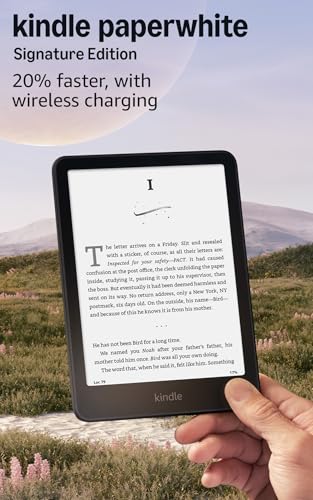
If you’re wondering whether the Amazon Kindle Paperwhite Signature edition is worth the upgrade, the short answer is yes — if you read a lot and hate fussing with cables. It’s the best-specced Paperwhite yet, with an auto-adjusting front light, wireless charging, and 32GB of storage. But you pay a premium for those extras, and not everyone needs them. This Kindle Paperwhite Signature review walks you through what you actually get, and where you might be fine spending less.
Die Kombination aus hochwertigen Funktionen und bewährter Kindle-Qualität bietet ein ausgewogenes Preis-Leistungs-Verhältnis im Vergleich zu anderen High-End-E-Readern.
Price vs. rivals
Pricier
CheaperTypicalPricier
Priced notably higher than the standard Paperwhite and most entry-level e-readers, yet competitive with premium alternatives such as the Kobo Libra Colour and previous-generation Kindle Oasis, reflecting its upgraded features like wireless charging and larger storage.
Ease of use
Excellent 92/100
The auto-adjusting front light and wireless charging make it highly intuitive and convenient for everyday reading.
Overview
The Kindle Paperwhite Signature Edition is Amazon’s top-tier 6.8-inch e-reader, designed for people who want everything the Paperwhite line offers — waterproofing, a sharp display, weeks of battery — plus a few extras the standard model skips. It’s the same size and shape as the regular Paperwhite, but with auto-brightness, wireless charging, and double the storage.
This model solves a specific problem: you read outside in shifting light, you want to charge without plugging in, and you hoard audiobooks alongside your ebooks. It’s really for the reader who treats their device as a daily tool, not an occasional toy. If you read a book every couple of weeks and always near a lamp, the cheaper Paperwhite does the same job.
Key Features
Auto-adjusting front light — The screen brightness changes on its own based on ambient light, so you don’t fiddle with sliders going from sun to shade. It works well, though some owners mention it can be a touch slow to react indoors.
Wireless charging — Drop it on any Qi pad (like the one you probably already have for your phone) and skip the USB-C cable. The catch is that Amazon sells its own Wireless Charging Dock separately, and it’s pricey.
32GB storage — Plenty of room for thousands of ebooks plus dozens of audiobooks. If you mostly read text-only, 16GB is enough; this matters if you listen to Audible on your Kindle.
Adjustable warm light — You can shift the screen from cool white to amber for nighttime reading. It’s gentler on your eyes than a phone or tablet, and you can set it on a schedule.
IPX8 waterproofing — Survives a drop in the bath or a splash at the pool. Amazon says it’s fine in 2 meters of fresh water for 60 minutes. Just don’t take it snorkeling.
Weeks-long battery — Amazon claims up to 10 weeks on a single charge (half an hour of reading daily with wireless off). Real-world use with the light on and some Wi-Fi drops that to maybe 6–7 weeks, still excellent.
Fit for You
You read for an hour or more every day and want a screen that adjusts itself as you move from a sunny window to a dim couch.
You already own a wireless charger and want one less cable to keep track of.
You listen to audiobooks through your Kindle and need space for a dozen long titles alongside your library.
You read in the bath, by the pool, or on a rainy porch and don’t want to panic if it gets splashed.
You find yourself squinting at your phone in bed and want a warm-light option that helps you wind down.
You travel light and prefer a device that holds two months of reading without needing a charger.
Uses
Picture this: you’re at a park bench under a tree, sunlight flickering through leaves. The Paperwhite’s auto-brightness dials the front light up and down as clouds pass. You don’t touch a thing. That’s the signature convenience.
At night, you set the warm light to a timer so it gradually turns amber after 9 p.m. You read for forty minutes, put it on the nightstand, and the next morning it’s still at 80% battery because wireless charging topped it off while you slept. No plugging, no fumbling.
On a beach vacation, you bury it in a bag with a damp towel, then pull it out and keep reading. The IPX8 rating means a little sand and seawater won’t wreck it. Just rinse it off later.
When you fly, you load up a couple of audiobooks alongside your current novel. The 32GB means you’re not deleting old titles to make room. You switch between reading and listening on the same device without thinking about space.
Experience
Setting it up takes maybe five minutes: charge it (or just place it on your Qi pad), connect to Wi-Fi, sign into your Amazon account. It syncs your library and reading position from your phone or old Kindle automatically. First-time users might need to poke around the settings to adjust the warm light schedule — it’s buried under “Device Options.”
The display is crisp, with 300 pixels per inch — the same as the standard Paperwhite. Text looks like ink on paper, even in direct sunlight. The bezels are flush, so the screen sits flat with the frame. That means no dust trapped in a recessed edge, but also slightly more glare than the older recessed screens.
Everyday reading is smooth. Page turns are instant, and the touch response is accurate. The auto-brightness works maybe 90% of the time — sometimes in a dark room it sets the light a notch higher than you’d pick yourself. You can always override it with the slider, but it’s a tiny friction.
The one annoyance: the power button is on the bottom edge, near the USB-C port. You’ll hit it by accident when holding the device one-handed, especially if you’re left-handed. Several owners mention this; you learn to grip it differently after a week.
Storage is straightforward. Plug it into a computer and it shows up as a drive, or you manage books through the Kindle app. The 32GB feels generous until you start syncing Audible titles — one audiobook can be 200–400 MB. But for most people, it’s more than enough.
Pros and Cons
Pros
Auto-brightness that works — It frees you from manual fumbling, and it’s the main reason to choose this over the standard Paperwhite.
Wireless charging — Convenient if you already have a pad; one less cable to carry.
Large storage — 32GB covers heavy audiobook users or people who want their whole library offline.
Waterproofing — Real peace of mind for bath readers and poolside loungers.
Long battery — Weeks between charges, even with the light on.
Cons
Price premium — It costs $70 more than the standard Paperwhite (which already has a warm light and waterproofing). You’re paying mostly for auto-brightness and wireless charging.
Power button placement — It’s easy to press accidentally. You’ll adapt, but it shouldn’t be a thing you have to adapt to.
No headphone jack — Audiobooks require Bluetooth headphones or speakers. The standard Paperwhite has the same limitation, but it’s worth noting.
No page-turn buttons — The Kindle Oasis has physical buttons; the Paperwhite Signature doesn’t. If you read one-handed and like tactile feedback, you might miss them.
Advantages
Compared to the standard Kindle Paperwhite, the Signature Edition adds exactly three things: auto-brightness, wireless charging, and double the storage. Those three things make it a better daily driver if you read in changing light and want a tiny bit of luxury. It also beats the Kindle Oasis in battery life and price (more on that below).
Auto-brightness is something you stop noticing after a day, which is exactly the point. It just works.
Wireless charging is one of those “nice to have” features that becomes a habit fast — you plop it down and forget.
The 32GB storage is genuinely useful for audiobook listeners; the standard Paperwhite’s 16GB fills up quickly with a few Audible titles.
Who Should Buy
Buy it if you read daily, especially outdoors or in varied lighting, and you like the idea of never plugging in a cable again. Also buy it if you listen to audiobooks on your Kindle and don’t want to manage storage.
Skip it if you read mostly at a desk or in bed with a consistent lamp — the standard Paperwhite will save you $70 and do everything else the same. Skip it if you want physical page-turn buttons; in that case, look at the Kindle Oasis (though it has a smaller screen, no USB-C, and charges via micro-USB, which feels dated).
For a Kindle Paperwhite Signature vs Oasis decision: the Oasis has a metal build, page-turn buttons, and a slightly larger screen (7 inches), but it costs more ($279.99 for 32GB) and its battery is smaller. The Signature Edition is the better value unless buttons are non-negotiable.
FAQ
Is the Kindle Paperwhite Signature Edition worth it?
Yes, if you value auto-brightness and wireless charging enough to pay $70 more than the standard Paperwhite. For heavy daily readers who read in multiple locations, it’s a real quality-of-life upgrade. For casual readers, the regular model is a smarter buy.
How does the Kindle Paperwhite Signature vs Oasis compare?
The Oasis has physical buttons and a slightly larger screen, but its battery life is shorter (weeks vs. weeks plus some) and it still uses micro-USB. The Signature Edition offers wireless charging, USB-C, and longer battery for less money. Buttons are the only clear win for the Oasis.
Is this the best e-reader for outdoor reading?
Yes, thanks to the auto-adjusting front light and high-contrast e-ink screen. The 300 PPI display handles direct sun without glare, and the auto-brightness saves you from squinting when you move between sun and shade. It’s hard to beat for outdoor use.
How long does the battery last on a 32GB Kindle Paperwhite?
Expect 6–10 weeks depending on your light settings and Wi-Fi use. Wireless charging won’t reduce battery life; it just gives you an easy way to top up. If you read an hour a day with moderate light, charge it once every six weeks or so.
Can I use any wireless charger with this wireless charging e-reader review mentions?
Yes, any Qi-certified charger works. Amazon sells a dedicated charging dock, but it’s not necessary. A standard phone charger pad works fine, though the Kindle’s larger size means you might need to center it carefully.
Is it safe to take this Kindle in the bath?
Yes, it’s IPX8 rated for immersion in fresh water up to 2 meters for 60 minutes. As long as you don’t drop it in soapy water or leave it submerged longer, it’ll survive. Just dry it off afterward.
Final Verdict
The Kindle Paperwhite Signature Edition is the best all-around e-reader Amazon makes for most people. It sacrifices nothing important, gains a few genuinely handy features, and avoids the Oasis’s aging design. If you read a lot and can stomach the price, it’s an easy recommendation.
One thing to keep in mind: the standard Paperwhite does 90% of what this does for $179.99. The Signature Edition is for people who want that last 10% of convenience — and don’t mind paying for it. If that sounds like you, it’s a great buy. If not, you’re not missing much.
Kindle Paperwhite Signature Edition vs the Competition in 2026
The Kindle Paperwhite Signature Edition sits at the top of Amazon’s standard e-reader lineup, offering a 6.8-inch screen, auto-adjusting warm light, wireless charging, and a full 32GB of storage for $249.99. It’s the version you buy when you want every convenience Amazon can fit into a waterproof shell, but it’s not the only game in town. Depending on how much you value physical buttons, open ecosystems, or a lower price, one of its rivals might suit you better.
Readers who want the smoothest, most polished Amazon experience
Kindle Oasis (2019)
Premium (~$250+)
Physical page-turn buttons; ergonomic grip; metal build
Older hardware, micro-USB, smaller battery, no USB-C
People who can’t live without buttons and prefer a premium feel
Kobo Libra 2
Mid-range (~$180)
Physical buttons; open EPUB support; built-in Pocket integration
No wireless charging; smaller Amazon ecosystem
Library borrowers and those who want freedom from Amazon’s store
Nook GlowLight 4
Budget (~$130)
Low price; physical page-turn buttons; headphone jack
Smaller, lower-res screen; no waterproofing; only 8GB
Casual readers on a tight budget who still want buttons
Kindle Paperwhite Signature Edition vs Kindle Oasis
If you’re stuck between these two Amazon flagships, it’s really a fight between modern convenience and button-based nostalgia. The Oasis has that iconic tapered grip and physical page-turn buttons, which still feel more natural than tapping glass, especially when you’re reading one-handed in bed. But the Oasis hasn’t been updated since 2019 — it still uses micro-USB, its battery is noticeably smaller, and you don’t get wireless charging or auto-adjusting light. The Paperwhite Signature Edition, by contrast, is newer, charges on a Qi pad, and its screen matches the Oasis in resolution while adding the auto-brightness sensor. So the “Kindle Paperwhite Signature vs Oasis” decision boils down to this: if buttons are non-negotiable and you can tolerate older ports, the Oasis still has a place. For everyone else, the Signature Edition is the better all-rounder.
Kindle Paperwhite Signature Edition vs Kobo Libra 2
The Kobo Libra 2 is the closest rival on paper, and it costs about $70 less. It gives you physical buttons, a 7-inch screen that’s nearly identical in sharpness, and full waterproofing. More importantly, it handles EPUB files natively, which means you can borrow library books from OverDrive directly on the device, no computer needed. That’s a huge advantage if you’re a frequent library user. What the Signature Edition offers back is the Amazon ecosystem — Kindle Unlimited, Audible integration (via Bluetooth), and the convenience of Whispersync between devices. The Signature also charges wirelessly, which the Libra 2 doesn’t. So if you’re deep in Amazon’s world, the Signature Edition’s extra $70 buys you that integration plus wireless charging. If you want to avoid lock-in and save money, the Libra 2 is a better choice. For outdoor reading, both are waterproof and have warm lights, but the Signature’s auto-brightness is a real plus when moving from shade to sun — one less thing to adjust yourself.
Kindle Paperwhite Signature Edition vs Nook GlowLight 4
Barnes & Noble’s Nook GlowLight 4 is the dark horse here, primarily because it costs roughly half the Signature Edition’s price. It has physical page-turn buttons, a comfortable rubberized back, and even a headphone jack for audiobooks — something neither Kindle offers. But the trade-offs are sharp. The 6-inch screen has a lower resolution (300 PPI is still fine, but the contrast isn’t as punchy), there’s no waterproofing, no warm light adjustment, and storage tops out at 8GB. You’re also tied to the Nook store, which has a smaller selection and rarely matches Amazon’s prices. The GlowLight 4 is perfectly fine for someone who reads a few novels a year and doesn’t need to take it poolside. But if you read outdoors frequently, want weeks of battery, or need space for comics and audiobooks, the Signature Edition is worth the big jump in cost. This is a clear case where “best e-reader for outdoor reading” goes to the Kindle — the Nook is strictly indoor-only.
So who should buy the Kindle Paperwhite Signature Edition? Anyone who wants the most complete, hassle-free reading kit Amazon makes: auto-brightness for daylight reading, wireless charging so you never fiddle with cables, 32GB for a library that travels with you, and waterproofing that actually works after a splash. The “is Kindle Paperwhite Signature worth it” question is really whether you value those extras — if you do, the price feels fair. But if you’re a library addict who hates proprietary formats, the Kobo Libra 2 is a better fit. And if buttons are your hill to die on, the aging Oasis still deserves a look, even with its micro-USB port. The Signature Edition isn’t the only strong e-reader in 2026, but it’s the one that checks the most boxes for the typical Amazon customer.
Ready to decide on the Kindle Paperwhite Signature Edition?
See today’s price, stock and delivery options on Amazon.