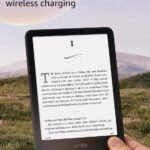
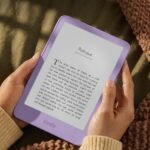
This Amazon Kindle Paperwhite review gets a quick answer out of the way: yes, the 2024 Paperwhite is worth it for most readers. It is a 7-inch glare-free e-reader with USB-C, and Amazon says it runs for weeks on a charge. The Oasis is nicer; it’s also noticeably more expensive and harder to justify.
Combines superior reading features and long battery life at a accessible price point.
Price vs. rivals
Pricier
CheaperTypicalPricier
Priced moderately above baseline models but below premium flagship alternatives, reflecting its balanced feature set and brand reliability.
Ease of use
Excellent 90/100
The Kindle Paperwhite's dedicated e-reader interface, glare-free screen, and long battery life make it straightforward and comfortable for typical reading tasks.
Overview: What this Amazon Kindle Paperwhite review says up front
The Paperwhite sits between the cheap basic Kindle and the premium Kindle Oasis. It’s the version Amazon expects most people to buy, and the one they usually should. It solves a specific problem: reading on a phone leaves your eyes tired, your battery dead, and your attention pulled toward notifications.
The 2024 model has a 7-inch screen, a step up from the basic Kindle’s 6 inches, without the Oasis price. It’s for someone who wants a dedicated device that disappears in the hand. This Amazon Kindle Paperwhite review keeps coming back to the same point: it’s the one to buy.
Key Features: Amazon Kindle Paperwhite 2024 features that matter most
Nothing here will surprise you, but each one exists for a reason.
7-inch glare-free display: The whole point. It’s a glare-free e-reader in practice because e-ink reflects light instead of shooting it at your eyes.
Weeks of battery life: Amazon says weeks, and owners tend to agree. You’ll charge this less often than anything else you own.
Adjustable warm light: Shift the screen toward amber at night. It’s a small thing that makes a big difference at 11 p.m.
IPX8 waterproofing: Bath and pool reading become real options, and accidents stop being scary.
16GB storage: Enough for thousands of ebooks. Downloading a lot of audiobooks? Look at the larger model. For plain reading, this holds up.
Fit for You: A glare-free e-reader for how you actually read
This one matches these kinds of people:
You read on your phone at night and wake up with tired eyes.
You pack three paperbacks for a weekend trip and regret the weight.
You read outside in the sun and spend half the time shading a tablet screen.
You fall asleep reading and want a screen that can go dimmer than a phone’s lowest setting.
You travel and want a Kindle with weeks of battery life so power outlets aren’t part of the plan.
You borrow library books without leaving the house.
Uses: The best e-reader for reading in bed, on a train, in the sun
The magic moment is in bed. With the warm light turned down and dark mode on, the screen glows about as much as a nightlight. You can read until your eyes close, and the device just sleeps beside you.
On a train or plane, the 7-inch screen fits into a jacket pocket, and the battery outlasts any flight you’ll take. It’s lighter than a paperback, so it’s comfortable one-handed.
Outside is where a glare-free e-reader earns its keep. Direct sunlight, which washes out a phone screen, makes this one sharper. That’s the old paper trick, and it still works.
You’ll reach for it in the same moments you used to reach for a book. That’s the whole use case.
Experience: Kindle Paperwhite vs Kindle Oasis, and the daily reality
Setup is faster than you’d think: sign in, pick a font, and your library syncs. The first thing you’ll notice is that you stop thinking about the device and start thinking about the book. Owners tend to say page turns feel quick enough that the technology disappears.
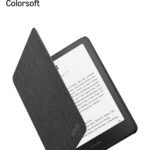
The screen is flush glass, which means fingerprints. It wipes clean with a shirt, but if that bothers you, a matte screen protector fixes it. The soft-touch back collects scratches easily, so a basic case is worth it.
There’s no sound, no fan, no vibration. The only noise is the faint e-ink flash with each page turn. Most people stop seeing it after a chapter.
What you won’t see in a spec list: reading faster than you expected. The next page is a tap away, the screen sits at a comfortable distance, and the book disappears. That’s the real product.
If you’re torn between the two, the Kindle Paperwhite vs Kindle Oasis decision settles on buttons and metal. The Oasis has both and costs more; the Paperwhite has the newer screen, the same sharpness, and USB-C. Unless tap-to-turn bothers you, saving the difference is the smart play.
Pros and Cons: The 2024 Kindle Paperwhite review
Pros
Screen quality: Sharp text and even lighting make long sessions easy on the eyes.
Battery life: A Kindle with weeks of battery life isn’t hype; it’s the biggest practical difference from a phone or tablet.
Glare-free display: Direct sun, poolside, park bench, all fine.
Water resistance: IPX8 means you stop worrying in the bath.
Ecosystem: Kindle store, library lending, and sync between devices cover most reading lives.
Price: $199.99 is fair for the screen and endurance you get.
Cons
No page-turn buttons: The Oasis has them; the Paperwhite doesn’t. You adapt, but you’ll know.
E-ink refresh: A faint flash happens with page turns. Most people tune it out, but it’s not a tablet.
Closed ecosystem: It’s an Amazon device first, so non-Amazon formats take workarounds like Send-to-Kindle.
Bluetooth-only audio: There’s no headphone jack for Audible, so wired listeners need an adapter.
Accessories add up: The price covers the device; a case and a wall charger push it higher.
Advantages: A Kindle with weeks of battery life and a better price
Compared to a tablet, the advantages are easy to list. A tablet can do a thousand things, but it glares in sunlight, buzzes with notifications, and needs a charger daily. The Paperwhite does one thing and does it in a package lighter than most paperbacks.
Front light: Light shines onto the screen, not into your eyes, which is why this counts as a glare-free e-reader in bright spaces.
Focus: There’s no app store, no feed, nothing to check. It’s only a book machine.
Library lending: In many regions, OverDrive lets you borrow library books directly on the device.
Price versus Oasis: You get the same screen class and USB-C for less money.
Who Should Buy: Everyone, with a few exceptions
This Amazon Kindle Paperwhite review ends up saying yes for most readers, with a few clear exceptions.
Buy it if you read fiction, history, or longform journalism anywhere outside your desk.
Buy it if you’re replacing an old Kindle and want a bigger screen, warm light, and waterproofing.
Buy it if you want a distraction-free gift for someone who’s always on their phone.
Skip it if you need page-turn buttons; the Oasis is the current Kindle with them.
Skip it if you read many PDFs, academic papers, or graphic novels with precise color; a tablet or a larger e-reader handles those better.
Skip it if you’re heavily tied to Apple Books; the Kindle store is its own world.
FAQ: Is Kindle Paperwhite 2024 worth it?
Is the Kindle Paperwhite 2024 worth it?
Yes, for most readers it is, because the display, battery life, and price hit a sensible balance. The only serious alternative is the Oasis, which costs more for buttons and a metal build. If you want a dedicated reading device, the 2024 Paperwhite is the one to buy.
How long does the Kindle Paperwhite battery last?
Expect weeks, not days. Amazon says the 2024 model is a Kindle with weeks of battery life, and owners generally describe charging every two or three weeks with normal reading. Running the front light at full brightness drains it faster, but still far slower than any phone.
Is the Kindle Paperwhite good for reading in bed?
Yes, it’s one of the best e-readers for reading in bed, thanks to the warm light and dark mode. Crank the warm setting up and the brightness down, and the screen glows like an old lamp. It won’t keep you up the way a phone will.
Can you read the Kindle Paperwhite in the sun?
Yes, that’s the whole point of an e-ink screen. This is a glare-free e-reader, so direct sunlight makes the page clearer instead of washing it out. The screen reflects light like paper, and that means outside reading actually feels easier than inside. If you read on a porch or at the beach, you’ll notice it immediately.
Kindle Paperwhite vs Kindle Oasis: which should I buy?
Buy the Paperwhite unless page-turn buttons matter more than anything else. The Oasis is the only current Kindle with them, plus a metal build and an asymmetric grip. The Paperwhite answers with the same size screen, a lower price, and USB-C. That’s the usual settlement.
Is the Kindle Paperwhite waterproof?
Yes, the 2024 model has an IPX8 rating, so it survives fresh-water submersion and bath-time reading without a second thought. You can drop it in a pool and pick it up after it dries. Just let the charging port dry before plugging in.
Final Verdict: Amazon Kindle Paperwhite review bottom line
This Amazon Kindle Paperwhite review’s bottom line is short: the 2024 Paperwhite is the right e-reader for almost anyone who reads. It isn’t the cheapest Kindle or the fanciest one. It’s the one that gets the balance right.
One thing to keep in mind: it’s a dedicated reading device, not a mini-tablet. For $199.99, that’s exactly what it should be, and it’s a fair deal.
Kindle Paperwhite 2024 vs the Best E-Reader Alternatives in 2026
The Kindle Paperwhite 2024 sits right in the middle of the e-reader market—not the cheapest, not the priciest, and that’s exactly where it thrives. Amazon sells more of these than any other model because it fixes the things that used to annoy people: the screen is flush, the battery actually lasts weeks, and the 7-inch display with adjustable warm light makes reading in bed genuinely comfortable. But the competition has gotten sharper. Kobo keeps nibbling at Amazon’s lead, and the aging Kindle Oasis still has die-hard fans. Here’s where the Paperwhite lands when you stack it against the real alternatives.
Product
Price Range
Key Strength
Key Weakness
Best For
Kindle Paperwhite 2024
$199.99
7″ glare-free display, weeks of battery, warm light
No page-turn buttons, Amazon ecosystem lock-in
Anyone who wants a reliable all-rounder with no bull
Kindle Oasis (2019)
$250–$280
Physical page-turn buttons, premium metal build
Micro-USB charging, older battery, smaller screen
People who crave buttons and don’t mind paying for nostalgia
Kobo Libra 2
$190–$210
Page-turn buttons, USB-C, waterproof, open ecosystem
Slightly heavier, fewer bookstores, no Audible
Readers who want buttons and hate being tied to Amazon
Kobo Clara BW
$130–$150
Compact 6″ design, great value, USB-C
Smaller screen, no buttons, no auto-adjusting light
Budget buyers and travelers who prioitize pocket space
Kindle Paperwhite 2024 vs Kindle Oasis: The Button Debate
The Oasis is the one e-reader that makes you stop and ask: do I actually miss physical buttons? Because that’s really the only reason to pick it over the Paperwhite 2024. The Oasis has two buttons on one side, so you can hold it in one hand and flip pages without moving your thumb. It feels great. But everything else about the Oasis is showing its age. It charges via micro-USB—yes, in 2024—so you’ll need a separate cable. The battery is smaller, and the screen is the same 7-inch size but with older front lighting. You also pay $50 to $80 more for that privilege. If buttons are non-negotiable for you, the Oasis is still the only Kindle that’s got them. But if you’re asking “is Kindle Paperwhite 2024 worth it” instead, the answer is almost always yes. The Paperwhite has a newer screen, USB-C, and longer battery life. The Oasis is for purists. The Paperwhite is for everyone else.
Kindle Paperwhite 2024 vs Kobo Libra 2: Buttons, But Different
The Kobo Libra 2 gives you the page-turn buttons the Paperwhite lacks, and it does it without the Oasis’s aging hardware. It’s also 7 inches, also waterproof, and charges via USB-C. On paper, it’s a dead heat. But the real difference isn’t the hardware—it’s the ecosystem. The Kindle store has more books, better deals, and Audible integration. Kobo’s store is thinner, and you can’t listen to Audible on it. On the flip side, the Libra 2 supports ePub natively and lets you borrow library books through OverDrive directly on the device. With a Kindle, you either convert files or stay inside Amazon’s walled garden. So if you’re doing a Kindle Paperwhite 2024 vs Kobo Libra 2 comparison, ask yourself: do you want the biggest bookstore, or do you want freedom to load books from anywhere? The Kobo is lighter in the hand, too—actually, the Libra 2 is a bit heavier, but the button placement makes it feel more balanced for one-handed reading. Also, the Libra 2’s screen is slightly sharper per inch. Small difference, but it’s there. If you’re a library-power user, the Kobo wins. If you buy most of your books, stick with the Paperwhite.
Why the Kobo Clara BW Gives You More for Less
The Clara BW is what you buy when you want a Kindle Paperwhite 2024 but don’t want to spend $199.99. It’s $50 to $70 cheaper, and what you lose is mostly size and some lighting refinement. The Clara’s 6-inch screen is fine for reading—it’s still sharp and glare-free—but you’ll turn pages more often, and the text feels a bit more cramped if you read dense non-fiction or multi-column PDFs. The Paperwhite’s 7 inches is genuinely nicer for long sessions, especially in bed. The Clara also lacks the auto-brightness sensor that the Paperwhite has, so you’ll fiddle with the light slider more often. But here’s the thing: the Clara BW is a joy to travel with. It slips into a small jacket pocket, and the battery lasts almost as long as the Kindle’s. If your main use case is commuting or reading on the go, the Clara is a smart alternative. If you read mostly at home, in bed, for hours at a time, the Paperwhite’s bigger screen and warm light make it worth the extra cash.
Who should buy the Kindle Paperwhite 2024? Anyone who reads primarily in bed, wants a screen that doesn’t glare under a lamp, and values battery life you don’t have to think about. It’s a glare-free e-reader with weeks of battery life, and that’s not marketing fluff—it actually lasts that long. The warm light is adjustable, the 7-inch display is the sweet spot, and at $199.99 it’s fairly priced for what you get. But if page-turn buttons matter to you, or if you refuse to be locked into Amazon’s ecosystem, the Kobo Libra 2 is the better call. And if you’re on a tighter budget, the Kobo Clara BW gives you 90% of the experience for a lot less. The Paperwhite isn’t perfect—no buttons, no 3.5mm jack, no native ePub—but it’s the best recommendation for most people, and that keeps it at the top of the category.
Ready to decide on the Kindle Paperwhite 2024?
See today’s price, stock and delivery options on Amazon.