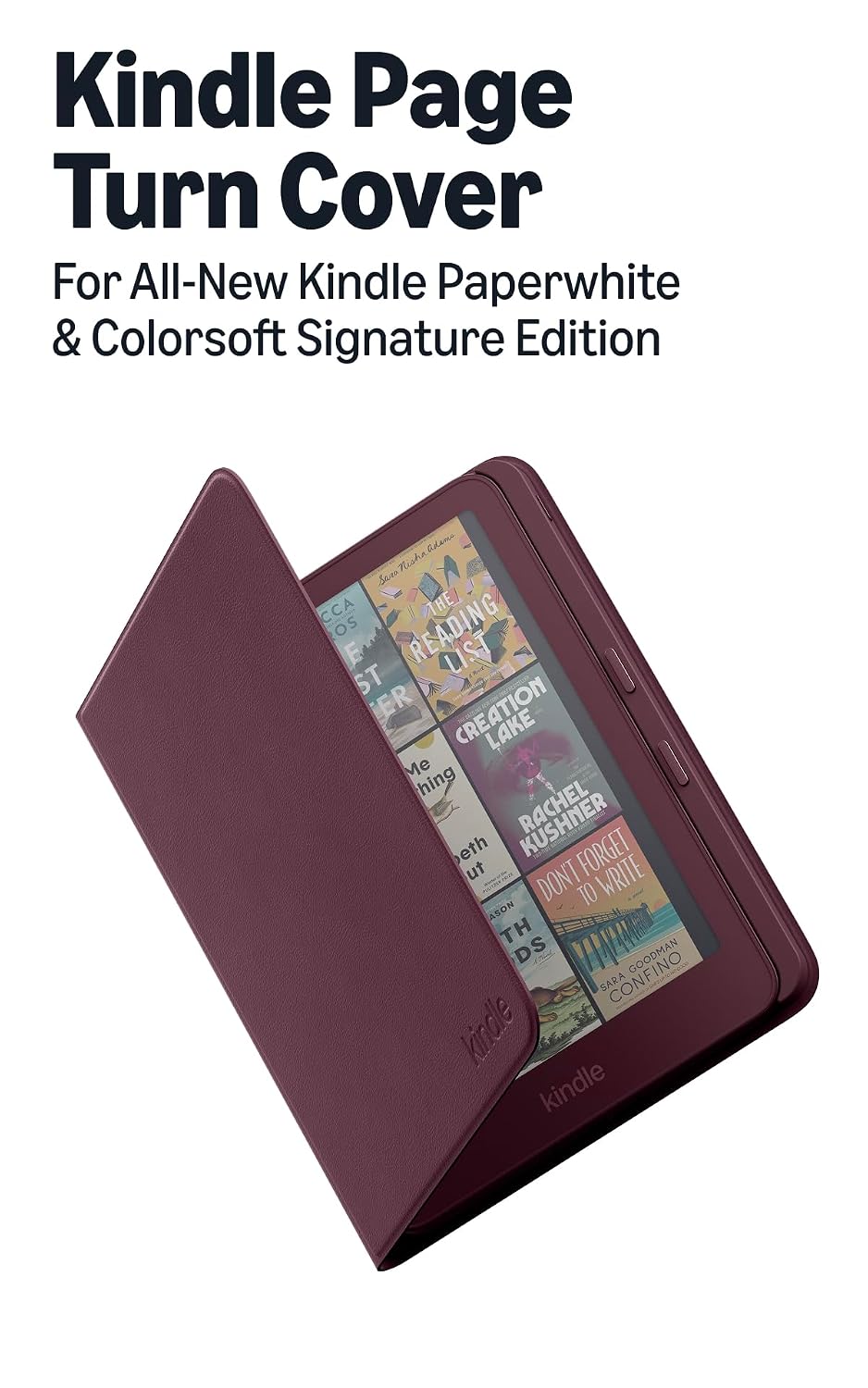
Premium pricing aligns with Amazon's official accessory quality, plant-based leather material, and unique physical page-turn buttons for superior user experience.
Price vs. rivals
Pricier
CheaperTypicalPricier
Priced notably above typical Kindle covers and cases, positioning as a premium, feature-rich accessory. The integrated physical page-turn buttons and plant-based leather material justify a higher cost compared to basic fabric or silicone options, though it remains within the upper range of comparable premium accessories.
Ease of use
Excellent 95/100
The magnetic attachment and physical page-turn buttons make this cover extremely intuitive and easy to use for any average person.
Overview
The Amazon Kindle Page Turn Cover review comes down to one question: does a $79.99 magnetic case with physical buttons actually improve how you read? For anyone who reads one-handed—on the train, in bed, while eating—the answer is a clear yes. This cover replaces the usual fabric or silicone cases with a plant-based leather shell that attaches magnetically and adds two page-turn buttons on the spine. It’s built specifically for the Kindle Paperwhite and Colorsoft Signature Edition from 2026, so older models need not apply.
Physical buttons aren’t new to e-readers—remember the old Kindles with side buttons?—but Amazon dropped them years ago in favor of touchscreens. This cover brings that feel back without requiring a separate remote or clicking the screen. The problem it solves is simple: tap-to-turn works fine until your grip shifts, your thumb is cold, or you’re balancing a coffee. The buttons sit right where your thumb rests, so you flip pages without moving your hand at all. That’s the whole point, and it pulls it off neatly.
Key Features
Magnetic attachment: The cover snaps onto the back of the Kindle via strong embedded magnets. Day to day, that means zero fumbling with clips or slipping—just hold the cover near the device and it clicks into place. No guesswork.
Physical page-turn buttons: Two slim buttons on the right spine edge. Each press sends a signal through a small contact patch on the back. Owners tend to mention they prefer the slight click feedback over screen taps, especially in winter with gloves.
Plant-based leather exterior: The outer shell is a synthetic leather with a soft, slightly grippy texture. It doesn’t attract lint like silicone covers do, and a quick wipe handles most smudges. Not vegan leather from petroleum, but a plant-based alternative that feels closer to real leather than the usual polyurethane.
Auto wake/sleep via magnets: Open the cover and the Kindle wakes; close it and it goes to sleep. Standard for the category, but worth noting because some third-party covers mess this up. This one doesn’t.
Interior microfiber lining: The inside has a soft, non-abrasive lining that prevents scratches on the screen. Important for people who toss a Kindle in a bag without a sleeve—the flap doubles as protection.
Made for 2026 Paperwhite and Colorsoft Signature Edition: The magnets and button contacts align only with the latest 7.8-inch screen models. If you have an earlier Paperwhite or the standard (non-Signature) 2026 version, it won’t fit. Amazon is clear on this, but it’s easy to overlook.
Fit for You
You read in bed on your side and turn pages with one hand while the other is under the pillow.
You commute on a crowded train or bus and need to grip the Kindle firmly without worrying about accidental screen presses.
You wear gloves for outdoor reading—walking the dog, waiting for a bus—and screen taps don’t register reliably.
You cook or eat while reading and want to turn pages with a greasy thumb without smearing the screen.
You’re tired of fabric covers that pick up dust and pet hair or rubbery cases that get sticky over time.
You prefer a tactile click over the silent, frictionless swipe—it helps you know you actually turned the page.
Uses
Picture a Tuesday morning: you’re eating an egg sandwich with one hand, holding the Kindle in the other. The cover’s spine sits against your palm, your thumb rests on the lower button. You finish a chapter without touching the screen even once. That alone justifies the price for some people.
Another night, you’re lying on your side with the Kindle propped on the pillow. The magnetic grip is strong enough that the cover stays closed when you set it down, but you can fold the front flap all the way around to read in one hand. The buttons still work in that folded position because the contacts are on the back, not the spine.
Long flights work well too. You can stow the Kindle in a cramped seat pocket without worrying about scratches. On arrival, you pull it out and the magnets realign instantly. No case removal for charging either—the USB-C port is fully accessible, and the button contacts don’t interfere with wireless charging if your model supports it.
Experience
Setup amounts to placing the Kindle’s back against the cover’s magnet panel. It snaps into place with a satisfying thunk. Pairing isn’t needed—the buttons communicate through direct electrical contact, not Bluetooth. That’s both a strength and a limitation: the cover won’t work if the Kindle’s back contacts are dirty or if the case shifts even a few millimeters. I’d recommend cleaning the back of your Kindle every couple of weeks to keep the contacts reliable.
Everyday use is largely frictionless. The buttons are recessed just enough to avoid accidental presses when you grab the Kindle by the spine. They require a deliberate click, not a brush. After a few minutes you stop thinking about them—they become an extension of your thumb. The one annoyance: if you hold the Kindle naturally (thumb parallel to the spine), the buttons sit perfectly; if you have large hands or a different grip, the lower button might fall under your palm instead of your thumb. It’s worth trying in a store if possible.
The plant-based leather develops a slight patina over time—nothing dramatic, but the surface gets shinier where you hold it. Not a flaw, just worth noting if you prefer a uniform look. Cleaning the exterior is easy with a damp cloth; avoid alcohol wipes because they can strip the top coat. The interior microfiber picks up very little dust compared to the suede-like lining on older Amazon covers.
Noise? The buttons make a soft click, audible to you but not to someone sitting next to you on a bus. The flap closes with a gentle magnetic pull; no loud slap. It’s a quiet accessory for someone who reads in quiet places.
The only real day-to-day gripe owners tend to mention is that the cover adds noticeable weight—about 4 ounces—to a device that’s featherlight on its own. If you read for hours holding the Kindle aloft, you’ll feel the difference. The tradeoff is the button convenience, but it’s a real tradeoff.
Pros and Cons
Pros
Physical buttons on a modern Kindle: You get the old-style tactile page turning without Bluetooth pairing or batteries. The response is instant—no lag.
Strong magnetic hold: The case stays put during normal use and even survives a gentle drop. It won’t slide off in a bag.
Premium feel for a reasonable premium: The plant-based leather looks more polished than most $25 fabric cases. The stitching is neat, the buttons are well-integrated.
One-handed reading, actually: The button placement works for left- and right-hand gripping (rotate the cover 180 degrees to switch). Your thumb never leaves the side.
Auto wake/sleep works flawlessly: Unlike some third-party magnetic covers, the magnet alignment is exactly right. No missed wake events.
Cons
Only fits two very specific models: If you don’t have the 2026 Paperwhite Signature Edition or the 2026 Colorsoft Signature Edition, this cover is useless. No backwards compatibility.
Adds bulk and weight: The cover makes the Kindle about 40% heavier and noticeably thicker. It’s not a slim case—it’s a protective shell with embedded tech.
Buttons require precise alignment: A slight shift can cause missed presses. If the cover gets bumped, you might need to reposition it. The magnetic catch helps but doesn’t prevent all movement.
Price is $79.99: That’s more than twice the cost of a good fabric case. You’re paying for the button mechanism and the magnets. Worth it only if you’ll actually use the buttons daily.
Not drop-proof: The front flap covers the screen, but the sides and corners are exposed. A fall onto concrete might still damage the bezel. It’s a cover, not a tank.
Advantages
Kindle Page Turn Cover vs fabric case: Fabric cases are lighter and cheaper, but they don’t have buttons. If you press the screen to turn pages, a fabric case works fine. If you hate screen presses, the buttons win by miles.
best Kindle cover for one-handed reading: No other case on the market offers physical buttons integrated into a slim cover for the 2026 models. The closest alternative is a Bluetooth page-turn remote, but that’s a separate device you can lose.
Build quality matches first-party standards: The magnets are stronger than typical third-party magnetic cases, and the microfiber interior doesn’t shed lint. Amazon knows its own devices, so fit is exact.
Plant-based material avoids common pitfalls: Unlike silicone, it doesn’t get sticky. Unlike hard plastic, it has some grip. Unlike fabric, it wipes clean easily.
Who Should Buy
Buy it if: you own the 2026 Kindle Paperwhite Signature Edition or Colorsoft Signature Edition, read one-handed more than 30 minutes a day, and wish Amazon had kept physical buttons. The convenience is real.
Buy it if: you read while eating, commuting, or in cold weather where gloves make tapping unreliable. The buttons solve a specific physical annoyance.
Buy it if: you prefer a premium look and feel and are okay spending $79.99 to get it. The plant-based leather ages well and looks better than most fabric options after a year.
Skip it if: you have an earlier Kindle model (2024 or older) or the standard Paperwhite (non-Signature) from 2026—it won’t fit. Get a simple magnetic cover instead.
Skip it if: you read two-handed propped on a table or stand, where you never touch the screen anyway. The buttons add no benefit there, and the extra weight is just a downside.
Skip it if: you’re on a tight budget. A $20 fabric case from a third-party brand does the basic job of protecting the screen and waking the device. You lose the buttons, but you also save $60.
FAQ
Is the Kindle Page Turn Cover worth it?
If you read one-handed for long stretches and find screen taps disruptive, yes—it turns a small frustration into a non-issue. For casual readers who hold the Kindle with both hands, the $79.99 price is harder to justify.
How long does the plant-based leather last?
Expect a year of daily use before the surface starts showing noticeable wear at contact points. The magnets and buttons should hold up longer—those parts don’t degrade from normal handling. Keep it clean and avoid direct sunlight for the longest life.
Does it work with a screen protector?
Yes, the cover’s interior flap clears any standard screen protector. Thick privacy protectors might add just enough bulk to make the flap’s magnetic closure feel slightly loose, but most owners report no issue.
Is the Kindle Page Turn Cover safe for the screen?
Yes—the inner lining is soft microfiber that won’t scratch the screen. The magnets are positioned away from the display area and are strong enough to keep the flap closed without pressing on the screen.
Can I charge my Kindle while the cover is on?
Yes, the USB-C port is fully exposed. Wireless charging also works on models that support it—the cover’s back panel doesn’t interfere with the charging coil location.
Does the cover work with a pop socket or grip strap?
Not easily. The magnetic attachment relies on a flat, unobstructed back. Adding a pop socket prevents the cover from sitting flush, so you’d have to remove it each time. Consider a different case if you use finger grips.
Final Verdict
The Amazon Kindle Page Turn Cover is a niche product that does its one job extremely well. It adds physical buttons to a modern Kindle without Bluetooth fuss, and it does so in a package that looks and feels premium. The catch is that you have to own exactly the right device and be willing to pay for that convenience. For the right person—anyone who reads one-handed daily—it’s a small luxury that quickly feels indispensable. For everyone else, a simple fabric case will save you money and weight. Pick your priority.
The Kindle Page Turn Cover is a specific solution to a real irritation: jabbing your thumb at a screen to turn a page. Most cases just protect your device. This one changes how you use it. It’s not a general-purpose sleeve; it’s a specialized tool for one-handed reading comfort, and it costs like one. The question is whether the hardware buttons are worth the premium over the standard cases, strap systems, and DIY fixes. Here’s how the Page Turn Cover stacks up against the obvious alternatives you’re considering.
Product
Price Range
Key Strength
Key Weakness
Best For
Kindle Page Turn Cover
$79.99
Physical page-turn buttons, magnetic attachment
High price, adds noticeable thickness
One-handed reading without screen tapping
Amazon Fabric Case
~$35
Lightweight, official fit, auto wake/sleep
No grip, still requires screen taps
Budget protection and minimal bulk
Fintie Case w/ Hand Strap
~$20
Integrated strap for secure holding
Cheaper materials, no buttons, bulky
Readers who fear dropping their Kindle
PopSocket + Thin Case
~$25
Customizable grip, removable
Wobbles on a desk, ugly, no page-turn fix
Tinkerers who adjust grip constantly
Kindle Page Turn Cover vs Amazon Fabric Case
The official Fabric Case is the default for most Kindle owners. It’s half the price and weighs practically nothing. Slap it on, it works. But the core experience is identical to a naked Kindle: you’re holding a slab, and you must tap the screen to turn a page. The Page Turn Cover trades that weight savings for a physical button bar. Is that worth an extra $45? If you read one-handed while commuting or lying down, absolutely. The Fabric Case makes you reach with your thumb or shift your grip. The Page Turn Cover lets your thumb just rest and click. The Fabric Case is better if you care mostly about shoving the Kindle in a bag. The Page Turn Cover is better if you care mostly about the reading session itself.
Kindle Page Turn Cover vs Fintie Hand Strap Case
Fintie’s case with a hand strap takes a different approach. It solves the “fear of dropping” problem by strapping your hand to the back. It’s clever, and it costs about $60 less. You still tap the screen, but you won’t drop it. The Page Turn Cover doesn’t have a strap — it relies on the grip-friendly back cover and the magnetic snap. The Fintie feels like a secure glove, but the Page Turn Cover feels like a precision instrument. Decide this way: if your main problem is dropping the Kindle, get the Fintie. If your main problem is the annoyance of tapping the screen, the Page Turn Cover is the only real fix here.
Kindle Page Turn Cover vs PopSocket + Thin Case
This is the DIY route. Grab a cheap thin case and stick a PopSocket to it. It’s versatile, cheap, and you can customize the position. But it has obvious downsides. A PopSocket creates a lump on the back of your flat device, so it wobbles on a desk. And it solves zero issues with page turning. The Page Turn Cover is a single, sleek unit. It lies flat, it snaps on magnetically, and it actually does its job better than a sticky plastic disc. The PopSocket combo is for the tinkerer who wants to optimize their own grip. The Page Turn Cover is for the reader who wants a hardware fix for software interaction.
So, Who Pulls the Trigger?
Buy the Kindle Page Turn Cover if the single most annoying thing about your Kindle is the tap-to-turn interaction. You’re willing to pay for a polished, integrated hardware fix. You don’t care that it costs more than a standard case, because it does more. But you should get the Amazon Fabric Case (or the Fintie strap) if you just want something to cover the screen and don’t mind interacting with the screen itself. The Page Turn Cover isn’t for everyone, but for the specific annoyance it targets, it’s the only thing that actually works without a Bluetooth remote glued to your hand.
Ready to decide on the Kindle Page Turn Cover?
See today’s price, stock and delivery options on Amazon.