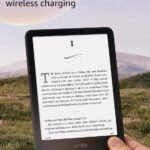
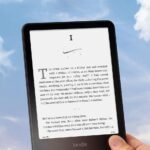
Is the Amazon Kindle Paperwhite Signature review worth your time? If you read a lot, especially at night or by the pool, the premium model justifies its price with an auto-adjusting front light, 32GB of storage, and wireless charging. It’s the same size as the regular Paperwhite but skips the ads and adds features that make it feel like the e‑reader that actually thinks ahead for you.
The latest design with premium materials and advanced auto-adjusting light justifies a high-end positioning within the Kindle ecosystem.
Price vs. rivals
Pricier
CheaperTypicalPricier
Priced at a premium compared to standard e-readers, reflecting the upgraded display, storage, and design features.
Ease of use
Excellent 90/100
The Kindle Paperwhite is highly intuitive for reading, with a simple interface and auto-adjusting light that requires minimal setup.
Overview
The Kindle Paperwhite Signature Edition is Amazon’s top‑tier e‑reader, built for people who want to forget they’re reading on a screen. It solves the problem of juggling physical books, dealing with harsh glare, and running out of battery mid‑chapter. This version swaps plastic for aluminum, grows the display to seven inches, and adjusts its light to match the room automatically.
Really, it’s for the kind of reader who has a pile of library holds, a long commute, and a bathtub that doesn’t have a shelf. The Signature takes the standard Paperwhite formula and adds convenience—no ads, twice the storage, Qi wireless charging, and a light that doesn’t need you to tap the brightness slider every time the sun dips behind a cloud.
Key Features
Auto‑adjusting front light – Instead of fiddling with brightness and warmth, the Kindle reads the light around you and changes the screen accordingly. It works well enough that you’ll stop thinking about screen settings after the first day.
7‑inch glare‑free display – That extra half‑inch (the standard Paperwhite is 6.8”) means fewer page turns and better handling of diagrams or mangas. The screen stays crisp in direct sun, which is where LCD tablets fall apart.
32GB of storage – Roughly 30,000 books, or a few hundred graphic novels. Most people won’t fill 8GB, let alone 32GB, but if you load up on audiobooks, comics, or keep your entire library offline, the space is there.
Wireless charging (Qi) – Drop it on any Qi pad instead of wrestling with a cable. The included USB‑C cable is still there if you need it, but the convenience of a bedside charger is a quiet pleasure.
IPX8 waterproofing – Survives a dip in two metres of fresh water for an hour. Poolside, bath readers, and beachgoers get peace of mind without a ziplock bag.
Aluminum body – The metal back feels cooler and sturdier than the plastic of earlier Kindles. It also picks up fingerprints faster, so keep a microfiber nearby if that bugs you.
Fit for You
You read in bed every night and the overhead light wakes up your partner – the auto‑dim light drops to a warm amber that’s gentle on both of you.
You spend weekends at the beach and have killed a paperback with a rogue wave – the waterproofing and glare‑free screen mean you can read while the sand blows.
You travel for work and hate choosing between three physical books – 32GB lets you pack a dozen audiobooks alongside a full library of texts.
You’re into library apps like Libby – the Kindle integrates seamlessly (sorry) with the OverDrive system, so borrowing and returning takes seconds.
You already own a wireless charger for your phone – leaving the Signature on the same pad overnight is one less cable to trip over.
Uses
Picture standing at a crowded subway platform in late afternoon. The sun slants through the glass, bright enough to wash out your phone screen. You pull out the Kindle, the auto‑light already ramps up, and the text stays sharp. No squinting, no cupping your hand around the display.
Later that night, you’re in a dark hotel room. The Kindle doesn’t blast you with blue light because the sensor has already dialled the front light to a warm, low glow. You can read for another hour without your eyes feeling heavy the next time you look at your phone.
On a trip to the pool, you toss it in your bag next to a damp towel. The USB‑C port is sealed, the body is rated for submersion, and the back doesn’t get hot in the sun the way a tablet does. You read for three hours straight and the battery barely dips—the Signature can last up to ten weeks with half‑hour reading and light on at 13. That’s not a number I made up; it’s the official claim, and owners tend to find it holds up.
Experience
Setting it up takes longer to unbox than to configure. Open the box, peel the sticker off the screen, press the power button, and connect to Wi‑Fi. Amazon pushes you to sign into your account, but you can skip the ad‑free option (it comes without ads on the lock screen, which is a Signature perk). The whole thing is done before you finish a coffee.
Everyday use is a series of small, good decisions. The seven‑inch screen is big enough that you don’t tap the next page every five seconds, but light enough that holding it one‑handed doesn’t tire your wrist. The aluminum back is cool at first touch and warms up to skin temperature after a few minutes. The only annoyance: it’s slippery. Without a case, it has a tendency to slide off a tilted lap.
The auto‑light is the standout. You will notice it the first time you walk from a sunny window into a dim room and the screen adjusts before you’ve taken three steps. The catch is that it can be a hair slow in mixed lighting—say, sitting under a lamp in a dark room—but it settles after a second. You can override it manually, but you probably won’t.
Battery life is the sort of thing you forget about. Charge it once every two to three weeks, depending on how much you read and how often you use the front light at max brightness. Wireless charging is convenient if you have a pad; without one, the USB‑C port works fine. A full charge takes about three hours via cable, a bit longer on Qi.
Cleaning is straightforward: wipe the screen with a soft cloth. The aluminum back smudges easily, so if that bothers you, a silicone case is a cheap fix. Noise is nonexistent—no fan, no buzz.
Pros and Cons
Pros
Auto‑adjusting front light that actually works – Saves you from tweaking the brightness slider multiple times a day. It’s one of those features you don’t miss until you have it.
32GB storage for heavy hoarders – If you load up on audiobooks, manga, or like to keep your entire library offline, you’re set. Even if you don’t, the extra space means you never have to delete a book.
Waterproofing that doesn’t cost extra – The base Paperwhite is also IPX8, so this isn’t unique, but it’s still a blessing for people who read in risky places.
No ads on lock screen – The regular Paperwhite saves you $20 by showing you ads when the screen sleeps. The Signature skips that from the start, which is how paid e‑readers should work.
Wireless charging – A small convenience that makes a difference if you already use Qi pads. No more hunting for a cable.
Cons
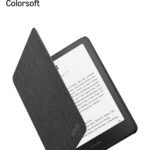
Slippery metal back – The aluminum looks great but has zero grip. Without a case, you’ll be paranoid about dropping it. Plan to buy a case or a pop‑socket.
Price premium over the standard Paperwhite – At $249.99, it’s $70 more than the 16GB Paperwhite with ads. For many people, the auto‑light and wireless charging aren’t worth the jump.
No page‑turn buttons – That’s a carry‑over from all modern Kindles, but if you came from an older model or a Kobo, you might miss physical buttons. Touch‑screen tapping works fine, it’s just less tactile.
Qi charging pad sold separately – The convenience of wireless charging requires spending another $20–40 on a pad. If you don’t already own one, that cost starts to sting.
32GB is overkill for most book readers – Unless you read massive PDFs or listen to a lot of Audible, 8GB is plenty. The extra storage is a nice fallback, not a daily advantage.
Advantages
Over the standard Paperwhite, the Signature gives you twice the storage, auto‑light, wireless charging, and no ads—for $70 more. The auto‑light alone is worth the bump for nighttime readers.
Compared to a Kobo Sage or Clara, the Signature wins on ecosystem: Amazon’s store, Kindle Unlimited, and the best library integration (Libby/OverDrive) are hard to beat in the US. The trade‑off is a locked‑down file format, but most casual readers don’t care.
Against a tablet or phone, the e‑ink display is the clear winner for eye strain and battery life. You can read for hours without the backlight feeling harsh, and the battery lasts weeks instead of hours.
The aluminum build feels more premium than any plastic Kindle before it. It also weighs slightly less (about 205 grams) than the plastic Paperwhite, which you notice when reading one‑handed in bed.
Who Should Buy
Buy it if you read in varied lighting—coffee shops, bed, park—and want the light to handle the change for you. Also buy it if you want the largest storage and a metal body that feels nicer than plastic.
Buy it if you already own a Qi charger and hate cables. The wireless charging is a small quality‑of‑life upgrade that adds up over months.
Skip it if you’re a casual reader who goes through a couple of books a year. The $179 Paperwhite (with ads) will do everything you need.
Skip it if you prefer physical page‑turn buttons or need open file‑format support (ePub from outside Amazon). Look at a Kobo instead.
Skip it if you read only text and never listen to audiobooks or download manga. The 32GB will sit mostly empty, and the auto‑light is nice but not essential.
FAQ
Is the Amazon Kindle Paperwhite Signature worth it?
Yes, for dedicated readers who want an auto‑adjusting light, extra storage, and wireless charging without dealing with ads. If you read in varied lighting or at night, the convenience is real. Casual readers will be fine with the standard Paperwhite.
How long does the battery last on the Kindle Paperwhite Signature?
Amazon claims up to ten weeks of half‑hour daily reading with the light at 13. Real‑world use—mixing audiobooks over Bluetooth, higher brightness—gets you two to three weeks between charges. Wireless charging makes topping up painless.
Is the Kindle Paperwhite Signature waterproof?
Yes, it’s rated IPX8, meaning it can survive in two metres of fresh water for 60 minutes. It’s designed for poolside and bathtub reading, not for deep‑sea diving. Salt water or chlorine requires a rinse afterward.
Can I listen to audiobooks on the Kindle Paperwhite Signature?
Yes. It supports Audible audiobooks over Bluetooth headphones or speakers. You cannot use wired audio—there’s no headphone jack. The 32GB storage is handy if you download several audiobooks at once.
Does the Kindle Paperwhite Signature come with ads on the lock screen?
No. The Signature Edition ships without Sponsored Screensavers (ads). The regular Paperwhite usually has them unless you pay an extra $20 to remove them. This model keeps the lock screen clean.
What colour does the Kindle Paperwhite Signature come in?
The newest model is available in Seaglass Green, plus the standard Metallic Black and Agave Green (though Seaglass is the featured colour). The aluminium finish changes with the colour, so the green has a subtle metallic tone.
Final Verdict
The Amazon Kindle Paperwhite Signature Edition is the best e‑reader Amazon makes today—if you read enough to appreciate its upgrades. The auto‑adjusting front light is the headline feature, and it delivers. The aluminum body, wireless charging, and ad‑free lock screen feel like they should be standard on a $250 device, but they’re not on the cheaper model. The one thing to keep in mind: the slippery metal back means you’ll almost certainly want a case, adding to the cost. If you’re a heavy reader who values comfort and convenience, spend the extra cash—you’ll forget the price after the first week of not adjusting your screen light.
Amazon Kindle Paperwhite Signature vs the Competition in 2026
The Amazon Kindle Paperwhite Signature Edition sits at the top of Amazon’s standard e-reader line, but it’s no longer the only refined option at this price. You’ve got the Kobo Libra Colour bringing color to the page, the Onyx Boox Page opening up Android apps, and the budget Kobo Clara BW if you just want to read without fuss. Each has a clear reason to exist, and none is a universal winner. This comparison breaks down where the Signature shines, where it compromises, and which alternative you should actually buy.
Product
Price Range
Key Strength
Key Weakness
Best For
Amazon Kindle Paperwhite Signature Edition
$249.99
Auto-adjusting front light, 32GB storage, waterproof
No page-turn buttons, proprietary file formats
Readers deep in the Amazon ecosystem
Kobo Libra Colour
~$220
Color E Ink screen, physical page-turn buttons
Smaller internal storage (16GB), less contrast in B&W
Comic/graphic novel fans and button lovers
Onyx Boox Page
~$280
Full Android OS, stylus support, expandable storage
Worse battery life, slower screen refreshes
Techies who want note-taking + reading in one device
Kobo Clara BW
~$130
Great value, USB-C, waterproof
No warm light (only on Clara 2E), smaller 6″ screen
Budget-conscious readers who want a simple, solid e-reader
Amazon Kindle Paperwhite Signature vs Kobo Libra Colour
This is the fight that most people should pay attention to. The Libra Colour’s big trick is its color E Ink screen — you can read comics, graphic novels, or magazine layouts with actual hues, which the Paperwhite Signature can’t do. But the color panel adds a noticeable greyish haze over the black-and-white text pages you read ninety percent of the time. The Paperwhite Signature’s screen is sharper for plain text, with that auto-adjusting front light that actually works well in pitch dark. Then there’s the physical button argument. The Libra Colour gives you two real page-turn buttons, and the whole device is designed to be held in one hand while your thumb taps. The Paperwhite Signature has no buttons, so you swipe or tap the screen. That’s fine on a table, but annoying when you’re reading one-handed in bed and your thumb keeps drifting. The trade-off comes down to whether you want colors and buttons but a murkier reading experience, or crisp text and Amazon’s whisper-smooth ecosystem. If you borrow library books via Libby, both handle OverDrive, but Amazon still makes it harder to get non-Amazon books onto the device.
Amazon Kindle Paperwhite Signature vs Onyx Boox Page
The Boox Page is a different beast entirely. It runs full Android, so you can install the Kindle app, Kobo app, Libby, Pocket, any note-taking app, even a browser. That sounds amazing, and it is — if you want a single device for reading, annotating PDFs, and maybe some light note-taking with a stylus (which the Paperwhite Signature can’t do at all). But the Bill comes due in battery life. The Paperwhite Signature lasts weeks, maybe months. The Boox Page, running Android and Wi-Fi, might give you three to five days of moderate use. And the screen refresh on the Boox isn’t as clean for page turns; you get more ghosting unless you set it to full refresh every time, which makes it slower. The Paperwhite Signature is a dedicated reading appliance. The Boox is a Swiss Army knife that sometimes cuts the table. If you truly need to write on PDFs or use apps like Comixology separately, the Boox Page wins. But if you just want to read without fiddling, the Signature is the better tool.
Amazon Kindle Paperwhite Signature vs Kobo Clara BW
Someone will suggest the Clara BW because it’s half the price, and they’re not wrong. At around $130, you get a waterproof body, USB-C, and a clean 6-inch screen that handles black and white text as well as any reader under $200. What you lose is the bigger 7-inch display — which actually matters for reading paperbacks without squinting — and the auto-adjusting light. The Clara’s light is manual, which is fine, but you’ll be tapping the brightness slider more often. The Signature also gives you 32GB of storage; the Clara BW comes in 16GB, and you’ll fill that faster if you download audiobooks (yes, the Signature plays Audible too). The real pain point is Amazon’s ecosystem lock-in — if you’re already buying Kindle books, the Signature is a no-brainer upgrade. The Clara BW is for the person who says “I just want to read Libby books and maybe buy the occasional ePub from Kobo’s store.” That person should save the $120.
Pick the Amazon Kindle Paperwhite Signature Edition if you buy most of your books from Amazon, want the best-in-class screen for pure reading, and don’t care about color or buttons. It’s also the obvious choice if you listen to Audible and want the storage space. But if you read a lot of color comics or still miss real page-turn buttons, the Kobo Libra Colour is the better alternative. And if you need Android apps and note-taking, skip both and get the Onyx Boox Page — just accept that you’ll charge it every few days. The budget play is the Kobo Clara BW, no question.
Ready to decide on the Amazon Kindle Paperwhite Signature?
See today’s price, stock and delivery options on Amazon.