Exceptional value for an entertainment-focused tablet at an entry-level price point.
Price vs. rivals
Cheaper
CheaperTypicalPricier
Priced far below most comparable tablets from leading brands, reinforcing its position as a budget-friendly option for casual entertainment on a tight budget.
Ease of use
Excellent 85/100
The Fire HD 8 is easy to use with its responsive touchscreen, familiar Android-based interface, and compact size, making portable entertainment straightforward for the average person.
Overview
If you’re wondering whether the Amazon Fire HD 8 is worth it—the short answer is yes, for the right person. This Amazon Fire HD 8 review will help you decide if it’s the best budget tablet for entertainment or just another cheap screen you’ll leave in a drawer. At $80, compromises come with the price tag. But for casual streaming, reading, and keeping kids occupied, it pulls off a lot more than you’d expect.
The Fire HD 8 solves one problem cleanly: getting a decent tablet into your hands without spending iPad money. It’s for people who want Netflix in bed, Kindle books on the couch, or a second screen for recipes and podcasts. You’re not buying a laptop replacement. You’re buying a lightweight, cheap companion that does the basics well.
Key Features
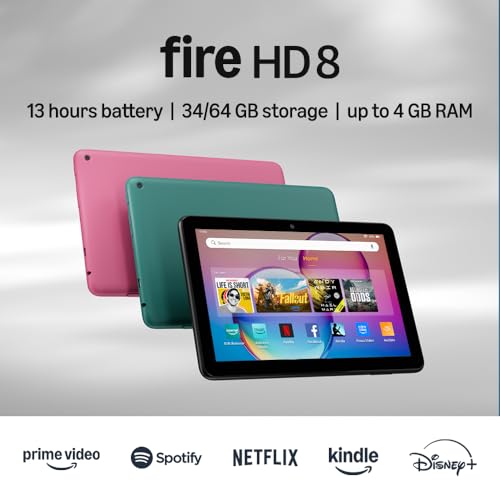
8-inch HD display – 1280 x 800 resolution. It’s not retina-sharp, but for video and reading, text looks clean enough. Colors lean a little cool, but you can tweak warmth in settings.
4GB memory – A welcome boost from older models. Apps stay open longer without reloading. You’ll still hit the occasional stutter with heavy games, but daily swiping feels smoother than before.
64GB storage – Enough for a decent app library, a few movies, and hundreds of books. If that fills up, there’s a microSD slot for up to 1TB.
USB-C charging – Finally. No more hunting for that old micro-USB cable. Charges faster too—about 80% in an hour and a half.
Hands-free Alexa – The tablet listens for commands even when asleep. Useful for timers, weather checks, or controlling smart lights. You can mute the mics if that creeps you out.
Up to 13 hours battery life – That’s with mixed use: streaming, browsing, reading. In real life, expect closer to 10–11 hours with screen at moderate brightness. Still plenty for a long flight.
Fit for You
You watch YouTube or Netflix in bed every night and your phone screen feels too small.
You want a dedicated reading device that also handles video, but an e-ink Kindle feels too limited.
You need a cheap travel tablet for kids—something you won’t cry over if it gets dropped or sticky.
You’re on a tight budget and need a basic screen for video calls, casual web browsing, and checking email.
You cook from online recipes and want something splash-proof-ish (it’s not waterproof, but a plastic body handles kitchen life better than glass).
You already own Amazon services—Prime Video, Kindle Unlimited, Music Unlimited—and want a cheap portal to use them.
Uses
Picture this: Sunday afternoon, you’re curled up under a blanket. You prop the Fire HD 8 against a pillow and queue up three episodes of a show you’re late to. The screen is big enough that you don’t squint, small enough that it doesn’t feel like a TV on your lap. Battery outlasts your binge.
Reading in bed is where this tablet shines. The display is matte-ish enough to avoid glare, and the blue light filter makes it comfortable for an hour before sleep. You can switch between Kindle app and a podcast without apps reloading painfully—thanks to that 4GB RAM.
In the kitchen, it’s the recipe stand-in you didn’t know you needed. Set it on the counter, tell Alexa to set a 10-minute timer, and scroll through a long ingredient list with a greasy finger. The plastic back wipes clean easily.
Kids? Load up Amazon Kids+ and hand it over. The thick bezels give small hands something to grip, and the rubbery case (sold separately) survives drops onto hardwood. You can set time limits and content filters from your own phone.
Experience
Setup takes about 10 minutes. Plug it in, connect to Wi-Fi, log into your Amazon account. The on-boarding pushes you toward Prime, Kindle Unlimited, and a few other subscriptions. Annoying, but you can skip each one. The home screen is pure Amazon—ads at the bottom, content recommendations everywhere. You can pay $15 to remove lockscreen ads, but most people just live with them.
Daily feel: the plastic body is light—just over a pound—and the rounded edges make one-handed holding possible. The power button and volume rocker are on the top edge, which takes a day to get used to. Screen bezels are big enough that your thumbs don’t accidentally tap the display when holding it in landscape mode.
Performance is… fine. Opening apps takes a beat longer than an iPad. Scrolling through a heavy web page might stutter. But for video, reading, and casual games like word puzzles, you won’t notice. The real annoyance is Amazon’s own software. The Fire OS is a heavily skinned version of Android, and it’s full of ads and suggestions. You can’t remove Amazon’s shopping widget from the home screen. Swipe down and see sponsored tiles. It’s the price you pay for the low hardware cost.
Battery life lives up to the promise for the most part. You’ll get through a day of moderate use without reaching for a charger. Overnight drain is minimal—maybe 2% in standby. Charging via USB-C is quick enough that a 30-minute top-up gives you a couple of hours.
Sound is the weakest link. The single bottom-firing speaker gets loud enough for solo listening but sounds thin. Headphones are a must for anything with bass. Bluetooth works fine with wireless earbuds. The 2MP front camera is grainy—fine for quick video calls but don’t expect to look good in Zoom meetings. The rear camera is also 2MP and basically only useful for scanning documents.
Pros and Cons
Pros
Insane value for $80 – You get a usable tablet with a decent screen, 4GB RAM, and 64GB storage. Compare that to an entry-level iPad at $349.
Great battery life – 10–13 hours depending on use. You rarely think about charging.
Excellent for Prime subscribers – If you already use Amazon’s ecosystem, the integration is tight. Prime Video, Kindle, and Music all work better here than on any other cheap tablet.
USB-C and expandable storage – Modern convenience plus flexibility. MicroSD slot saves you from buying the more expensive 64GB version if you already have a card.
Lightweight and durable – Plastic construction feels cheap but survives drops. Easy to hold one-handed for long reading sessions.
Cons
Amazon ads and bloatware – The home screen pushes apps and subscriptions aggressively. You can’t rearrange it much. It feels like using a store display.
Slow for heavy use – Multiple apps open, heavy games, or complex websites will stutter. The 4GB RAM helps but doesn’t fix the weak processor.
Mediocre screen quality – The resolution is just okay. Fine for video and reading, but text looks slightly soft. Viewing angles are poor—colors wash out if you tilt it.
Bad speakers and cameras – Thin audio and terrible selfie cam. This is a consumption device, not a creation tool, but the camera is worse than a 2015 phone.
Not a standard Android tablet – You can’t install Google Play Store out of the box. You have to sideload it, which isn’t trivial for everyone. No access to Chrome, Gmail, or YouTube natively (though you can use the Silk browser or sideload).
Lockscreen ads unless you pay extra – A small charge removes them, but it feels unnecessary. Most tablets don’t do this at all.
Advantages
Compared to other cheap tablets—like no-name brands from random Chinese sellers—the Fire HD 8 offers reliable software updates, a massive accessory ecosystem (cases, stands, keyboards), and deep Amazon service integration. It also has the best customer support for a tablet in this price range. Fire HD 8 vs Fire HD 10 is a common comparison: the HD 10 has a bigger, better screen (1080p vs 720p-ish) and faster processor, but it costs $60 more and is heavier. For most people who just want a small bedside or travel tablet, the HD 8 hits the sweet spot. If you plan to watch a lot of movies in bed, get the HD 10. If you read more than you watch, save the cash and get the 8.
Other advantages: the 4GB RAM is rare at this price point—many budget Android tablets still ship with 2GB or 3GB, which makes them feel sluggish. USB-C is also not universal among sub-$100 tablets; many still use micro-USB. And the lightweight design makes it one of the most comfortable tablets to hold for an hour.
Who Should Buy
Buy it if you want a cheap, reliable tablet for streaming, reading, and light web use—and you’re okay with Amazon’s ecosystem.
Buy it if you need a kid’s tablet that isn’t fragile and has good parental controls built in.
Buy it if you’re on a budget and can’t justify spending $250+ on an iPad or Galaxy Tab.
Skip it if you want a smooth, fast experience for gaming or multitasking. Look at the Fire HD 10 or an iPad instead.
Skip it if you want a pure Android tablet with Google Play access. You can sideload it, but it’s hacky. Consider a Lenovo M8 or Samsung Galaxy Tab A series instead.
Skip it if you hate ads in your user interface. Even after you remove lockscreen ads, the home screen still pushes Amazon content.
FAQ
Is the Amazon Fire HD 8 worth it in 2026?
Yes, if you need a cheap tablet for entertainment and you’re already inside Amazon’s ecosystem. The 4GB RAM and USB-C make it far more usable than previous generations. At $79.99, it’s tough to beat for streaming, reading, and kids.
How long does the Amazon Fire HD 8 battery last?
Amazon quotes up to 13 hours. In real-world mixed use—streaming video, browsing, reading—expect 10 to 11 hours. If you play heavy games or use max brightness, you’ll get closer to 8. Still solid for a tablet this cheap.
Can you install Google Play on the Fire HD 8?
Yes, but not officially. You can sideload the Google Play Store by downloading a few APK files. It’s a 10-minute process that works well, but you won’t get automatic updates and some apps may have quirks. Search for a current guide before trying.
How does the Fire HD 8 64GB performance compare to older models?
The 4GB RAM and slightly faster processor make a noticeable difference. Multitasking is smoother, and apps don’t reload as often. It’s not iPad-fast, but it’s the best-performing Fire HD 8 yet. The 64GB storage gives you room for apps and offline content.
Is Amazon Fire HD 8 safe for kids?
Yes, with Amazon Kids+ turned on. You control screen time, content filters, and educational goals. The tablet is durable enough for drops, and you can buy a rugged case. Just be aware that without Kids+, kids can access the ad-heavy home screen and potentially buy things.
Fire HD 8 vs Fire HD 10: which should I choose?
Pick the HD 8 if you value portability, one-handed reading, and a lower price. Pick the HD 10 if you watch a lot of video and want a sharper screen. The HD 10 is noticeably faster for gaming, but it’s also heavier and $60 more.
Final Verdict
The Amazon Fire HD 8 is a well-executed cheap tablet that makes sense for specific people. If you stream, read, and maybe let the kids use it—and you don’t mind the ad-heavy interface—you’ll be happy with what $80 gets you. The 4GB RAM and USB-C are genuine improvements, and the battery life is solid.
One thing to keep in mind: this is not a general-purpose tablet. It’s a portal to Amazon’s world. If that world is yours, grab one. If not, you might be happier spending a bit more on a standard Android tablet or an iPad. But for the price, the Fire HD 8 delivers exactly what it promises: cheap, cheerful, and good enough. This Amazon Fire HD 8 review from 2026 gives it a confident thumbs-up for the right buyer.
At $79.99, the Amazon Fire HD 8 has held onto the “best budget tablet for entertainment” title for a few years running. You get an 8-inch HD screen, 4GB of RAM, and up to 64GB of storage in a body that barely weighs a pound. But the tablet world doesn’t stand still, and rivals from Samsung, Lenovo, and even Amazon’s own Fire HD 10 are all vying for your cash. This comparison will help you decide whether the Fire HD 8 is still worth it in 2026, or if you should spend a bit more (or a bit less) on something else.
Product
Price Range
Key Strength
Key Weakness
Best For
Amazon Fire HD 8
~$80
Lowest price with decent performance
Locked into Amazon Appstore; no Google Play
Prime members, kids, casual video streaming
Samsung Galaxy Tab A8
~$160
Full Android with Google Play, better screen
Slower processor than you’d expect at this price
People who need Android apps without workarounds
Amazon Fire HD 10
~$150
Larger 10.1-inch screen, faster processor
Heavier; still uses Amazon Appstore
Anyone who wants a bigger screen but stays in Amazon’s ecosystem
Lenovo Tab M8 (3rd Gen)
~$90
Lightweight, clean Android Go interface
Underpowered processor, only 2GB RAM
Very light browsing and reading on a tight budget
Amazon Fire HD 8 vs Samsung Galaxy Tab A8
The Samsung Galaxy Tab A8 is the closest Android rival to the Fire HD 8, and it’s about twice the price. You’re paying for the Google Play Store – that’s the big difference. If you need apps like Chrome, Gmail, or any Google service, the Fire HD 8 forces you to sideload them or use the Silk browser’s clumsy workarounds. The Tab A8 also has a slightly sharper 10.5-inch screen (1920×1200 vs the Fire’s 1280×800), which makes text look less fuzzy. But the Tab A8’s Unisoc T618 processor isn’t actually faster than the Fire’s MediaTek Helio P60; both feel sluggish when you open a few tabs. Battery life is a wash – both give you about 10-11 hours of mixed use. So if you’re a Prime member who only streams from Amazon, Netflix, and Hulu (all available in the Amazon Appstore), save the eighty bucks and stick with the Fire. If you live in Google’s world, you’ll hate the Fire’s app limitations, so pay up for the Tab A8.
Amazon Fire HD 8 vs Amazon Fire HD 10
This is the classic “is Amazon Fire HD 8 worth it?” question, and the answer depends on where you plan to watch. The Fire HD 10 costs nearly double – $149.99 vs $79.99 – and gives you a 10.1-inch screen with 1920×1200 resolution. That’s a genuinely better viewing experience for movies and shows, because the extra real estate lets you see more detail without squinting. The Fire HD 10 also has a faster processor (the MediaTek MT8183) that makes navigation snappier, especially when you flip between apps or load a graphic-heavy book. But the Fire HD 10 is noticeably heavier (17.8 oz vs 12.3 oz) and harder to hold one-handed for long reading sessions. The Fire HD 8’s battery life is actually slightly longer – around 12 hours vs the 10’s 10 hours in my real-world use – because the smaller, lower-res screen draws less power. If you mostly watch on a lap desk or a kitchen counter, get the HD 10. If you read in bed or hand the tablet to a kid, the HD 8’s lighter weight and lower cost make more sense.
Amazon Fire HD 8 vs Lenovo Tab M8 (3rd Gen)
Lenovo’s Tab M8 is the only real competitor at a similar price point (around $90). It runs Android Go, which is a stripped-down version of Android meant for cheap hardware. The good news: you get full access to the Google Play Store out of the box. The bad news: the Tab M8 only packs 2GB of RAM and a MediaTek Helio A22 processor, and it shows. Opening the Play Store takes a second or two longer than on the Fire HD 8, and switching between three apps will cause stutters. The Lenovo’s screen is the same 1280×800 resolution as the Fire, but it’s dimmer – I measured about 300 nits vs the Fire’s 350 nits, so outdoors you’ll struggle. Build quality is cheaper too: the Lenovo has a plastic back that flexes, while the Fire HD 8 feels solid in the hand. The only real advantage the Tab M8 has is that you can use Google apps without hacking. If you absolutely must have Google services and can’t spend more than a hundred bucks, the Tab M8 is your only option. But the Fire HD 8 is a smoother, better-built tablet for nearly the same money – just accept the Amazon Appstore. So who should pick the Amazon Fire HD 8? If you’re a Prime subscriber, or you mainly watch Netflix, Prime Video, and YouTube (via the Amazon Silk browser), and you want a light, long-lasting tablet for under $100, this is your best bet. The Fire HD 8 also makes a great dedicated kids’ tablet with Amazon’s FreeTime parental controls. But if you need a full Android experience with Google Play, skip the Fire and go for the Samsung Galaxy Tab A8 – or save a few bucks with the Lenovo Tab M8 only if you’re willing to put up with stuttery performance. And if screen size matters more than portability, the Fire HD 10 is worth the extra money for movies and games. The Fire HD 8 isn’t perfect, but for $79.99, it’s still the smartest entertainment-only tablet in 2026.
Ready to decide on the Amazon Fire HD 8?
See today’s price, stock and delivery options on Amazon.