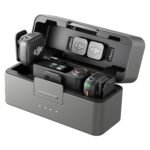
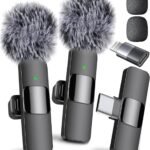
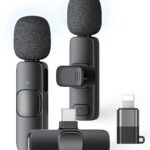
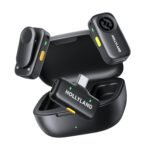
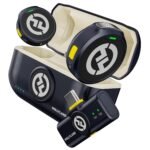
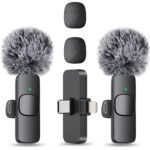
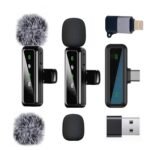
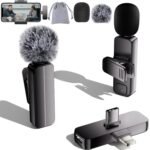
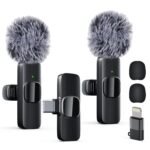
Is the DJI Mic Mini worth it? This DJI Mic Mini review cuts straight to it: absolutely, if you want great wireless audio without the usual bulk or price tag. For $59, DJI packed their wireless know-how into a system so light you’ll forget you’re wearing it. That’s the short answer. The long answer depends on how you shoot.
This product delivers premium-grade features like active noise cancelling and ultralight design at a fraction of the typical market price, offering exceptional value.
Price vs. rivals
Cheaper
CheaperTypicalPricier
Priced well below most comparable dual-channel wireless microphone systems; positioned as a budget-friendly entry in the segment.
Ease of use
Excellent 90/100
The simple setup and lightweight design make it very easy for average users to use immediately.
Overview
The DJI Mic Mini is the kind of product that makes you wonder why it took so long to exist. It’s a tiny, ultralight wireless microphone system aimed directly at mobile creators and solo shooters who don’t want to deal with clunky transmitters. It solves the problem of bad camera audio by giving you a direct, clean feed that fits in the change pocket of your jeans. This isn’t a cinema rig, but it’s a massive upgrade over your phone’s internal mic.
It comes in a few flavors, but the 2 TX + 1 Mobile RX kit is the one to get. You get two mics for interviews or ambient recording, and a receiver that plugs straight into your phone. No audio interface, no bulky XLR adapter, just power on and record. For $59, it’s aggressively priced.
Key Features
Ultralight Transmitters: Each TX weighs under 10 grams. You can clip it to a delicate silk collar or a thick hoodie without any droop. It disappears on the wearer.
Active Noise Cancelling: The DJI Mic Mini noise cancelling feature filters out consistent background hum — think fans, traffic, or AC units. It won’t silence a barking dog, but it cleans up the track noticeably for the size.
Magnetic Attachment System: The mics come with magnetic clips and backing plates. You can stick the TX to a metal door frame, a computer stand, or the underside of a shelf for hands-free recording. It’s a genuinely useful touch.
Pocketable Charging Case: The case is small enough to fit in a jeans coin pocket. It holds both transmitters and the receiver, giving you about 18 hours of total battery life.
USB-C Passthrough on Receiver: The mobile RX has a USB-C port on the bottom. You can charge your phone while recording, which is a lifesaver on long shoots or live streams.
Reliable Wireless Range: DJI claims 400 meters line-of-sight. In real-world conditions with walls and pockets, you’ll get a stable connection across a large room or outdoor patio without dropouts.
Fit for You
You shoot vertical video for TikTok or Reels and need audio that doesn’t sound like a tin can.
You’re an interviewer who needs to clip a mic on a guest without making it a whole production.
You want the DJI Mic Mini for iPhone setup without needing a specific dongle or adapter for every new phone model.
You hate riding the gain on your camera because the levels are always too low or suddenly peaking.
You travel light and can’t justify the space a full-sized wireless kit takes up.
You’re buying your first wireless mic and don’t want to spend Rode or Sennheiser money yet.
Uses
Imagine you’re vlogging in a busy downtown area. Traffic is humming, a breeze is picking up, and people are chatting nearby. You pop the dead cat windscreen on the Mic Mini, clip it to your collar, and start walking. Your voice cuts through the mess clearly, and the background noise drops to a manageable level. It’s not studio silence, but it’s a million miles away from what your phone’s mic would capture.
Or maybe you’re filming a hands-on tutorial over your desk. The magnet lets you attach the transmitter to the underside of a metal shelf, pointing directly at your workspace. It’s stable, invisible to the camera, and picks up the sounds of what you’re doing without you having to hold a mic. It feels like a cheat code the first time you use it.
Experience
Setup is refreshingly simple. Plug the mobile receiver into your iPhone or Android, power on the transmitters, and they sync automatically. No menus, no button combinations to hold, no pairing stress. It just works. The mobile RX is slim enough that it doesn’t feel awkward with a phone case, and the passthrough charging means you can record for an hour without draining your battery.
The magnets are the feature you didn’t know you needed. You’ll find yourself sticking the mic to random metal objects just because you can. The battery life is solid — the transmitters last through a full shooting day, and the case tops them up overnight. The audio quality is clean and present, with a slightly warmer tone than some competitors. It’s not as rich as a high-end lav, but it’s impressive for something this small.
The catch is the case. It’s functional, but the hinge feels a bit fragile for long-term abuse. You’ll want to be gentle closing it. Also, there is no internal recording. If the signal drops for a split second, that audio is gone. It doesn’t happen often, but on a pro shoot, that’s a risk you might not want to take.
Pros and Cons
Pros
Price: $59 for a dual-channel wireless system from DJI is hard to argue with. It undercuts nearly every serious competitor.
Size and Weight: You’ll barely notice it in your pocket or on your collar. It solves the “where do I put this?” problem perfectly.
Audio Quality: Clear, present, and much better than any built-in camera or phone mic. The noise floor is low for such a tiny capsule.
Magnetic Mounting: The magnets are strong and make placement fast and creative. It turns any metal surface into a mount.
USB-C Passthrough: Recording without losing phone battery is a luxury that many budget mics overlook.
Cons
No Internal Recording: Unlike the Rode Wireless Go, there’s no onboard backup. If the signal drops, the audio is gone. It’s a safety net you’ll miss.
Case Build Quality: The charging case is functional but feels plasticky. The hinge doesn’t inspire confidence for heavy travel use.
Limited Gain Control: You don’t get fine-grained control over input levels. It’s mostly set and forget, which works, but pros might want more tweakability.
Non-Locking Connector: The USB-C connection is snug, but a hard tug could knock it loose. It’s not ideal for action-heavy or run-and-gun shoots.
Advantages
In the DJI Mic Mini vs Rode Wireless Go debate, the choice is clear for most people. Rode offers internal recording and a more rugged build, but the DJI is half the price, smaller, and has magnetic mounts. For the vast majority of mobile creators, the DJI is the smarter buy. You’re getting similar audio quality in a much more portable package.
If you’re hunting for the best budget wireless mic for creators right now, this is the front-runner. It beats the Hollyland Lark M2 in ecosystem integration and noise cancelling, and it undercuts the Rode Wireless Go II significantly. It’s not perfect, but at this price point, the compromises are easy to live with.
Who Should Buy
Buy it if: You’re a solo creator who wants reliable wireless audio without a bulky rig or a big price tag.
Buy it if: You primarily shoot on a phone and want a straightforward audio upgrade that works out of the box.
Skip it if: You absolutely need internal recording as a safety net for paid professional work where dropouts aren’t acceptable.
Skip it if: You need a metal-bodied, rugged case that can survive being thrown in a gear bag with heavy equipment.
FAQ
Is the DJI Mic Mini worth it?
Yes, for most creators. It delivers reliable wireless audio in a tiny, affordable package. The trade-off is the lack of internal recording, but the price and portability make it an easy recommendation for everyday vlogging or interviews.
How does the DJI Mic Mini noise cancelling work?
It uses active processing to reduce constant low-frequency sounds like wind, air conditioning, or traffic hum. It works well in moderate noise, but it won’t isolate your voice from a loud crowd or sudden sharp sounds.
Is the DJI Mic Mini compatible with the DJI Mic 2?
No, the Mic Mini uses a different wireless protocol than the DJI Mic 2. You cannot mix and match transmitters or receivers between the two systems. They are completely separate product lines.
Can you use the DJI Mic Mini for iPhone?
Yes, the kit includes a mobile receiver that plugs directly into your iPhone’s Lightning or USB-C port. It’s recognized instantly in the camera app or any recording app like Blackmagic Camera or Filmic Pro.
How long does the DJI Mic Mini battery last?
The transmitters last about 6 hours on a full charge. The charging case holds enough power for about 18 hours total, which covers a full day of shooting even with breaks and b-roll.
What is the wireless range of the DJI Mic Mini?
DJI rates it at 400 meters line-of-sight. In real-world conditions with obstacles, you can rely on 50 to 100 meters of stable connection, which is solid for outdoor shoots and large indoor spaces.
Final Verdict
The DJI Mic Mini review comes down to this: buy it for the portability, the clever magnetic system, and the unbeatable price. It’s not a bulletproof pro kit, but it’s a fantastic tool for the vast majority of creators. You’ll reach for it constantly because it’s so easy to use and carry.
The one thing to keep in mind is the lack of internal recording. For solo content or casual interviews, it’s rarely an issue. For critical client work where you can’t afford a single dropout, you might want a system with onboard backup. But for everyone else, this is the best wireless mic deal on the market right now.
DJI Mic Mini vs the Competition in 2026: A Real-World Comparison
At $59, the DJI Mic Mini is the cheapest wireless mic system I’ve seen with active noise cancelling. That sounds like a steal — and often it is — but you’re trading away some things you might miss. Here’s how it measures up against three other popular kits for creators who want decent audio without breaking the bank.
Product
Price Range
Key Strength
Key Weakness
Best For
DJI Mic Mini
$59
Ultralight design, effective Active Noise Cancelling, long battery life
Plastic build, no on‑board recording, range drops indoors
Budget vloggers and iPhone creators who need ANC
Rode Wireless Go II
About $300
32-bit float safety track, rugged metal body, internal recording
Heavier, no ANC, expensive
Pros who want a safety net and don’t mind the weight
Hollyland Lark M2
Roughly $150
Tiny transmitters, solid audio, dual‑channel in a compact case
No ANC, charging case latch can be annoying
YouTubers who want a middle ground in size and price
Synco G2
Around $70
Very cheap, decent range, comes with multiple mounts
No ANC, no USB-C, bulkier transmitter and receiver
Extreme budget shoots where you need spare parts
DJI Mic Mini vs Rode Wireless Go II: Is Active Noise Cancelling Enough?
This face‑off really comes down to why you’re buying. The Rode Wireless Go II is built like a tank — metal clips, internal SD recording, and a 32‑bit float backup that saved me once when a guest speaker yelled into the mic during an interview. The DJI Mic Mini doesn’t have any of that. What it does have is active noise cancelling that actually works on a windy patio or near an air conditioner. If you constantly record in uncontrolled noisy environments, the DJI Mic Mini’s ANC is a genuine advantage over the Rode. But if you ever lose a recording because the battery died or the signal dropped, you’ll wish you had the Rode’s internal backup. The DJI Mic Mini vs Rode Wireless Go decision is simple: pick the Rode if you need safety, pick the DJI if you need to kill background hum on a budget.
DJI Mic Mini vs Hollyland Lark M2: Which One Feels Better in Your Pocket?
The Hollyland Lark M2 is just a touch bigger than the DJI Mic Mini, but it makes you pay for that extra size with a more fiddly charging case — the latch pops open sometimes when I toss it in a bag. Audio quality between these two is surprisingly close; both are perfectly fine for talking‑head videos and interviews. The big differentiator is noise cancelling. The DJI Mic Mini’s ANC mode is noticeably stronger than the Lark M2’s simple low‑cut filter. If you shoot in a coffee shop or on a street corner, the DJI keeps your voice cleaner. On the other hand, the Lark M2 has a USB‑C receiver with a headphone jack that lets you monitor live audio — the DJI Mic Mini receiver doesn’t offer that. For iPhone users specifically, the DJI Mic Mini plugs straight in with a Lightning or USB‑C connector, which feels more integrated than the Hollyland’s adapter cable. Is the DJI Mic Mini worth it over the Lark M2? If ANC matters to you, yes. If you want live monitoring, the Hollyland is your better bet.
DJI Mic Mini vs Synco G2: The Budget Line Gets Blurred
The Synco G2 has been the go‑to ultra‑budget option for years. It costs roughly $10–$15 more than the DJI, but it feels older: the transmitters are bigger, the receiver requires a micro‑USB cable, and there’s no noise cancelling of any kind. The DJI Mic Mini absolutely crushes it on portability and out‑of‑box ease. You pull it out, clip it on, and it just works with an iPhone or Android, no dongle juggling. The Synco G2 does one thing better, and it’s a weird one: it has a proper belt‑clip receiver with a headphone jack, so you can monitor audio from a camera’s headphone output while recording. That’s a niche scenario, but if you’re filming scripted pieces or need to hear levels, the Synco wins. For 95% of creators shooting quick vlogs or social media clips, the DJI Mic Mini is the smarter buy — especially if you’re looking for the best budget wireless mic for creators right now.
So who should pick the DJI Mic Mini? If you’re making short videos for TikTok or Instagram, or you need a lightweight wireless mic for your iPhone that actually cuts wind and room buzz, this is it. You’re getting the active noise cancelling feature for a price that’s half of what competitors charge for similar ANC. The trade‑offs (plastic build, no internal recording, shorter range through walls) are real but manageable for most casual creators. Who should look elsewhere? If you record interviews where a lost file would ruin your day, grab the Rode Wireless Go II. If you need live monitoring on a budget, the Hollyland Lark M2 or even the Synco G2 will serve you better. But if you want small, cheap, and quiet — the DJI Mic Mini is hard to beat.
Ready to decide on the DJI Mic Mini?
See today’s price, stock and delivery options on Amazon.