Strong rating and versatile features justify the mid-range price point, offering solid value against similarly priced competitors.
Price vs. rivals
Pricier
CheaperTypicalPricier
Priced moderately above basic smart home camera alternatives, reflecting the Ring ecosystem and brand reputation, yet still within a competitive mid-range tier.
Ease of use
Excellent 90/100
The high customer rating and straightforward app control make it easy for most people to set up and operate, though the pan and tilt features may require a brief learning period.
Ring Pan-Tilt Indoor Cam Overview
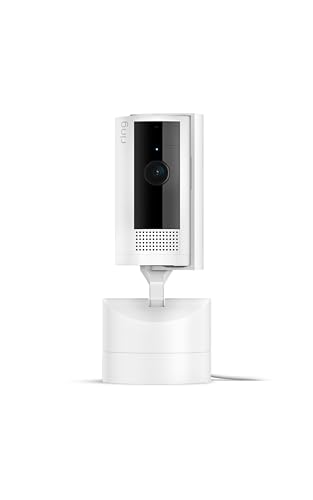
With its motorized base and sharp 1080p video, the Ring Pan-Tilt Indoor Cam review comes down to this: yes, it’s worth it if you need to cover a full room from one spot. At $59.99, it’s one of the best indoor security cameras for home use when you want pan and tilt without paying for multiple fixed cameras.
Most indoor cameras stare at one wall and hope nothing interesting happens behind them. Not this one. The Ring Pan-Tilt spins a full 360 degrees horizontally and tilts 149 degrees vertically, so it can track a toddler, follow your cat, or sweep an entire open-plan living area from a single corner shelf.
It’s Ring’s first pan-tilt model, and it’s built for people who already live in the Amazon ecosystem—Alexa users, Ring doorbell owners—or anyone tired of blind spots. You’re not replacing a full security system here; you’re plugging one camera into a corner outlet and finally seeing the whole room.
Key Features of This 360 Pan Tilt Indoor Camera
360-degree pan and 149-degree tilt: The motorized head rotates constantly or on command, so a single camera can watch your whole living room instead of needing three fixed ones.
1080p HD video with colour night vision: The picture is crisp enough to read a label on a package during the day, and at night you get colour footage, not that grainy green-grey mess.
Two-way talk with noise cancellation: You can tell the delivery driver where to leave a parcel or bark at the dog to get off the couch. The audio is clear on both ends, and background hum gets filtered out.
Motion detection with adjustable zones: You draw boxes on the live feed to ignore the busy street outside and only get alerts when someone walks into the room.
Works with Alexa and Ring ecosystem: Say “Alexa, show the living room camera” and the feed pops up on your Echo Show. It also integrates with Ring alarms and other Ring cams.
Optional Ring Protect plan for recording: Without a subscription ($3.99/month or $39.99/year), you get live view and alerts but no saved clips. Pay up and you get 30 days of video history plus person and package alerts.
Is the Ring Pan-Tilt Cam Right for You?
You’ve got an open-plan kitchen-living area and one camera needs to cover the whole space.
You want to check on a free-roaming pet during the day without guessing where they’ll be.
You live in a rental and can’t drill holes for three separate cameras.
You already use Ring doorbells or alarms and want everything in one app.
You’re setting up a small office or shop and need to monitor the sales floor from one corner.
You like the idea of a camera that follows motion automatically so you don’t have to tap around in the app.
Real Uses for This Ring Indoor Camera with Two-Way Talk
Picture this: you’re at work and you want to see if the dog has eaten your shoes again. With a fixed camera, you might catch a tail disappearing around a corner. With the Ring Pan-Tilt, you can swivel the view right to where the chewing is happening.
Or it’s 2 PM and a package gets delivered. You open the app, spin the camera toward the front door (assuming it faces that way), and use two-way talk to tell the driver to leave it behind the plant. No need to yell through a door you’re not behind.
Late at night, you hear a thump from the kitchen. The camera’s motion detection pings your phone. You open the feed, and the pan-tilt motor quietly sweeps the room until you find the cat on the counter. Then you go back to sleep without getting up.
Living with the Ring Pan-Tilt Indoor Cam
Setting it up is typical Ring: plug it in, open the app, scan the QR code, name the camera, connect to Wi-Fi. It took about five minutes. The camera talks to you during setup—”Your Ring camera is now set up”—which is either helpful or slightly creepy depending on your mood.
The motor is quiet but not silent. When it pans across the room, you hear a faint whir—like a tiny robot rolling over. In a quiet bedroom at night, you’ll notice it. In a living room with the TV on, you won’t.
The plastic build feels solid enough for a $60 camera. No creaking, no cheap wobble. The base is weighted, so it doesn’t tip when the head rotates. But it’s still plastic—drop it and it’ll probably crack.
One annoyance: the power cable is micro-USB, not USB-C. In 2024, that’s a bit dated. And the cable is only about six feet long, so your outlet placement matters more than it should.
The Ring app is clean but pushy about the subscription. Expect a nudge to sign up for Ring Protect every time you open the settings. That’s how they get you—the camera is cheap, the storage is the real product.
Ring Pan-Tilt Indoor Cam Pros and Cons
Pros
Full room coverage from one spot: The motorized pan and tilt means you don’t need multiple cameras for a single room, saving money and clutter.
Crisp 1080p video with colour night vision: Both day and night footage is clear enough to identify faces, packages, and pet mischief.
Two-way talk works well: The noise cancellation actually helps—you can hear and be heard without the usual echo or feedback.
Integrates with Alexa seamlessly enough: If you have an Echo Show, you can pull up the feed by voice, which is genuinely handy when your hands are full of groceries.
Privacy cover built in: A physical slide on the front blocks the lens when you’re home, so the camera isn’t watching you unless you want it to.
Cons
Recording requires a subscription: Without Ring Protect ($3.99/month), you get live view only—no saved clips, no history. That stinginess is standard for Ring but still frustrating.
Micro-USB power cable: In 2024, a $60 gadget should come with USB-C. The cable is also shorter than ideal for some setups.
Motor noise is audible in quiet rooms: The pan and tilt mechanism isn’t loud, but it’s not silent. If you’re placing this in a bedroom or nursery, you’ll hear it move.
No person detection without the subscription: Motion alerts hit your phone for every moving curtain and passing car unless you pay for smart alerts.
Plastic build won’t survive a drop: It feels solid on the shelf, but it’s not rugged. A fall from a tabletop might break the base or the lens housing.
Ring Pan-Tilt vs Wyze Cam Pan: How It Stacks Up
Versus fixed cameras like the Ring Stick Up Cam Indoor, you get dramatically more coverage. One Pan-Tilt can replace two or three fixed cams in a single room. That’s the main sell.
Compared to the Wyze Cam Pan v3, the Ring has better two-way audio and tighter Alexa integration. But Wyze offers 24/7 continuous recording for less money without a subscription fee—so Ring’s advantage is ecosystem, not price.
For 360 pan tilt indoor camera shoppers, the Ring delivers smoother motor movement than most budget options. The tracking is more natural, less jerky, and the app doesn’t lag as much when you’re steering it manually.
Ring wins on ecosystem and two-way talk quality.
Wyze wins on price and free cloud storage.
Choose Ring if you already own Echo devices or Ring doorbells.
Choose Wyze if you want continuous recording without a monthly fee.
Who Should Buy the Best Indoor Security Camera for Home
You’ll love it if:
You’re in the Ring ecosystem and want to fill a gap in your camera coverage without learning a new app.
You’re a pet owner who needs to follow a cat or dog around a large room.
You’re a renter who wants maximum coverage from minimum wall damage.
You’re setting up a small business or shop and need to monitor the sales floor from one corner.
You should skip it if:
You’re on a tight budget and want continuous recording without a monthly fee—look at Wyze or Eufy instead.
You just need a door-facing camera; a fixed Ring Stick Up Cam is simpler and cheaper.
You’re creeped out by a camera that moves on its own—the motorized tracking can feel intrusive if you’re home.
Frequently Asked Questions About the Ring Pan-Tilt Cam
Is the Ring Pan-Tilt Cam worth it?
If you need to watch a whole room from one camera and you’re already in the Ring or Alexa ecosystem, yes. The coverage per dollar is excellent. If you want free cloud storage or continuous recording, the subscription cost makes it less appealing.
What’s the difference between Ring Pan-Tilt vs Wyze Cam Pan?
Ring has better build quality, clearer two-way audio, and deeper Alexa integration. Wyze offers free cloud storage, continuous recording, and a lower entry price. Choose Ring for ecosystem, Wyze for value.
Can the Ring Pan-Tilt Indoor Cam record 24/7?
No. It records clips when motion is detected, not continuously. Even with the Ring Protect subscription, you get event-based recordings, not a non-stop feed. For continuous recording, you’d need a different brand like Wyze or a dedicated NVR system.
Is the Ring Pan-Tilt Indoor Cam safe to use indoors?
Yes. It’s designed for indoor use only—don’t put it outside. It has a physical privacy cover that slides over the lens when you want it off, and you can set privacy zones in the app to block certain areas from recording.
How long does the Ring Pan-Tilt Indoor Cam last?
Ring cameras typically last 3-5 years of daily use before the motor or electronics start to wear. The pan-tilt motor adds a moving part that could fail sooner than a fixed camera, but Ring’s warranty covers the first year.
Does the Ring Pan-Tilt Cam work without Wi-Fi?
No. It requires a stable 2.4GHz or 5GHz Wi-Fi connection for setup, live view, recording, and alerts. If your Wi-Fi goes down, the camera stops sending notifications and can’t be viewed remotely until the connection returns.
Ring Pan-Tilt Indoor Cam Final Verdict
The Ring Pan-Tilt Indoor Cam solves a real problem: covering a whole room without covering your walls in cameras. At $59.99, it’s a fair price for the hardware, especially if you already trust the Ring app and own an Echo device.
The catch is the subscription. Without Ring Protect, you’re paying $60 for a live-view-only camera that can’t save a single clip. That might be fine for checking on the dog mid-day, but if you need recorded evidence of anything, budget for the monthly fee. For anyone already in the Ring ecosystem, this is a solid upgrade from a fixed camera—just know what you’re signing up for.
Ring Pan-Tilt Indoor Cam vs the Competition in 2026
The indoor security camera market has settled into a few clear camps: budget pan-tilts, ecosystem locks, and privacy-first options. Ring’s 2024 Pan-Tilt Indoor Cam sits right in the middle at $59.99, offering full 360-degree pan coverage and two-way talk that actually works well with Alexa. But the question isn’t really whether it’s a good camera — it’s whether you should buy it over the cheaper alternatives or something that keeps footage off a server entirely. Here’s how it stacks up against three direct rivals that shoppers like you compare it to most often.
Product
Price Range
Key Strength
Key Weakness
Best For
Ring Pan-Tilt Indoor Cam
$59.99
True 360° pan with smooth motor, Alexa-first integration, solid two-way talk
Requires Ring Protect subscription for recording; no free continuous recording
Ring doorbell owners or households that rely on Alexa and want full room coverage
Wyze Cam Pan v3
Around $35
Color night vision, pan/tilt, and tracking at a shockingly low price
App notifications can lag; privacy concerns persist around data handling
Budget buyers who want pan-tilt and don’t mind a less polished app experience
Eufy Indoor Cam 2K Pan & Tilt
Around $50
2K resolution, local storage via microSD, HomeKit Secure Video support
App feels clunky; motor movement is noisier than Ring’s
Privacy-focused people who want high-res footage without a monthly fee
TP-Link Tapo C210
Around $30
Cheapest reliable pan-tilt camera with motion tracking and good night vision
Build is plasticky; no privacy shutter; two-way audio sounds tinny
Renters or anyone covering a single room on a tight budget who still wants pan-tilt
Ring Pan-Tilt Indoor Cam vs Wyze Cam Pan v3
Let’s get this out of the way: the Wyze Cam Pan v3 costs nearly half what Ring asks. For that $35, you get color night vision that’s genuinely vivid in dim light — Ring’s black-and-white night mode looks dated next to it. Wyze also gives you free person detection and 12-second event clips with no subscription at all. That’s a major win if you resist paying monthly fees. But there’s a cost beyond the price tag. Wyze’s app, while packed with features, sends push notifications that sometimes arrive five to ten seconds after motion happens. That lag gets annoying fast. The Ring Pan-Tilt Cam’s notifications hit almost instantly, thanks to its tight AWS server framework. Also, the Wyze camera’s pan motor hums audibly during quiet nighttime recording, whereas the Ring motor is near-silent — a small thing until you place it in a nursery or bedroom. For this Ring Pan-Tilt vs Wyze Cam Pan comparison, the real decider is your existing setup. If you already own a Ring doorbell or use Alexa, Ring’s camera creates a single dashboard that Wyze can’t match. If you don’t care about ecosystems and just want the cheapest full-room pan-tilt camera that works, buy the Wyze and save the $25.
Ring Pan-Tilt Indoor Cam vs Eufy Indoor Cam 2K Pan & Tilt
The Eufy Indoor Cam 2K Pan & Tilt is the same $50 neighborhood, and it’s the strongest alternative for anyone who hates monthly subscriptions. You get 2K resolution — noticeably sharper than Ring’s 1080p, especially when you zoom in to read a label or a face across the room. Footage saves to a microSD card (not included, so add $10). Zero fees. That alone makes it the smarter buy for anyone who doesn’t want a “Ring Protect” bill showing up every year. But the Eufy motor is louder. It clicks and whirs when it pans to follow a pet, and you’ll hear it in a quiet room. Ring’s motor is smoother and quieter by a clear margin. Eufy’s app also takes an extra tap or two to pull up live view; Ring’s loads faster, especially on an Alexa Show screen where you just say “show the living room.” If HomeKit matters to you — and for privacy-focused buyers, it often does — Eufy supports HomeKit Secure Video, so your clips live in Apple’s encrypted cloud. Ring has no HomeKit support whatsoever. That’s a firm trade-off. Is Ring Pan-Tilt Cam worth it over the Eufy? If you already pay for Ring Protect or use Alexa multiple times a day, yes. If you want sharper video and no recurring fees, the Eufy wins handily.
Ring Pan-Tilt Indoor Cam vs TP-Link Tapo C210
The Tapo C210 is the budget king. At around $30, it offers pan, tilt, motion tracking, and 1080p night vision that’s perfectly adequate for a hallway or garage. And it works — reliably, for years, without the app crashing. That is its superpower: it just works, and it costs less than a pizza delivery for two. So why would anyone pay double for the Ring? Build quality, for one. The Tapo’s plastic housing creaks if you adjust the angle manually. The Ring body feels dense and solid, mounted on a metal plate. The Tapo’s two-way talk has that hollow, underwater sound — you can hear someone, but they don’t always hear you clearly. Ring’s two-way talk is sharp, with decent noise cancellation. You can actually say “stop jumping on the couch” and the dog listens (well, maybe not the dog, but the person on the other end hears you). The Ring Pan-Tilt Indoor Cam also covers a true 360-degree horizontal range without hitting a hard stop. The Tapo stops at 340 degrees and sometimes overshoots its return position. Small annoyance, but when you’re trying to track a kid running through the room, that gap matters. The Tapo is the best 360 pan tilt indoor camera alternative at its price. But it’s not the best overall. For the difference of $30 — a single meal out — the Ring gives you better build, better audio, and a motor that doesn’t sound like it’s grinding coffee.
Which one to buy in 2026
Buy the Ring Pan-Tilt Indoor Cam if you already own a Ring doorbell, use Alexa, or want the smoothest pan motor and clearest two-way talk in a single indoor camera. It’s the best indoor security camera for home integration among its direct pan-tilt peers. Skip it if you refuse to pay for cloud storage — the Eufy 2K Pan & Tilt gives you sharper video with no subscription, and the Wyze Cam Pan v3 does similar for $25 less. And if you just need to keep an eye on a single room and want to spend as little as possible, the Tapo C210 gets the job done without complaint. The Ring is not the budget pick. But it is the pick that feels finished.
Ready to decide on the Ring Pan-Tilt Indoor Cam?
See today’s price, stock and delivery options on Amazon.