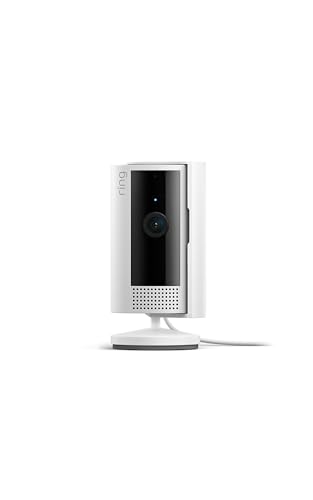
With strong brand trust and high user ratings, this camera offers reliable performance at a competitive price point.
Price vs. rivals
Pricier
CheaperTypicalPricier
Priced slightly above entry-level indoor cameras but still below premium smart home models, placing it in the upper mid-range segment.
Ease of use
Excellent 95/100
The Ring Indoor Cam is very easy for an average person to set up and use, with straightforward app-based controls and clear 1080p HD video.
Ring Indoor Cam Overview
This Ring Indoor Cam review gives it to you straight: for $50, this is a solid indoor security camera that works best if you’re already in Amazon’s ecosystem. It’s simple, reliable, and the video quality holds up fine for keeping an eye on pets or that back door you’re not sure you locked. Not a splashy gadget, but it does exactly what most people need.
It solves the basic problem of “what’s happening at home when I’m not there?” – pets, kids, deliveries, or just the spare room. Ring positions it as a starter indoor cam, and that’s fair. You don’t get pan-tilt, but you don’t pay for it either. People who want a straightforward security camera without overcomplicating the app will feel at home here.
Key Features of the Ring Indoor Cam
1080p HD video – That’s standard for this price, but the field of view is 140 degrees, which is wide enough to cover a living room corner without leaving blind spots. You’ll see your cat jump on the counter, not just the tail.
Two-way talk – Microphone and speaker built in. It’s not studio quality, but you can clearly tell the dog to get off the couch (and the dog ignores you just as well as in person).
Night vision – Infrared LEDs kick in automatically. Expect a grayscale image that’s crisp enough to identify a person, not just a shape. Owners mention it picks up small details like a toy on the floor.
Motion detection with customizable zones – It sends alerts when something moves, and you can draw boxes in the app to ignore a busy street or a ceiling fan. Saves you from getting 47 notifications an hour.
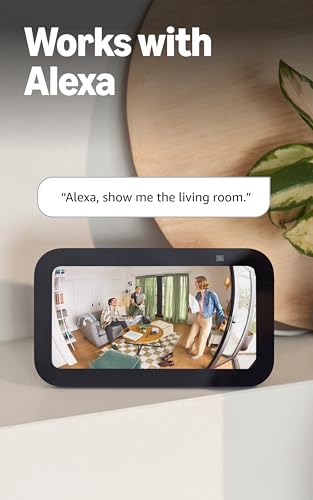
Works with Alexa – You can ask an Echo Show to show the camera feed, or set routines. No Google Assistant or HomeKit support – that’s a real limitation if you’re not in Amazon’s walled garden.
Privacy cover – A physical switch on the camera that slides to block the lens. When you’re home, flip it and the camera can’t see anything. Simple, mechanical, and much more reassuring than a software setting.
Fit for You
You have pets that you’re 90% sure are up to no good when you’re out, and you want video evidence to laugh at later.
You live in a rental where drilling holes for a permanent mount isn’t an option – the Ring Indoor Cam sits on a shelf or desk no problem.
You’re already paying for Ring Alarm or Ring doorbells and want to add indoor coverage without learning a second app.
You want a camera that’s easy to move between rooms (say, from the nursery to the home office) without re-wiring or re-pairing.
You don’t care about pan-tilt-zoom, 4K resolution, or AI that tells you a cat from a cardboard box – you just want a reliable security camera that works.
Uses
Check in on a sleeping baby while you’re doing dishes. The two-way talk lets you calm them down without walking back in – though the speaker isn’t loud enough to function as a proper baby monitor across a full house. Fine for a small apartment.
Watch for package thieves from your office desk. The motion alert fires fast, and the live view loads in about two seconds. It won’t replace a dedicated doorbell cam (no mechanical chime), but it can peer out a window if you angle it right.
Keep an eye on a house sitter or cleaner. That sounds more paranoid than it is. Many people just want to know the cleaner actually showed up, or that the house sitter didn’t throw a party. The privacy cover gives you a clear break when you’re home.
Monitor a senior relative who insists on living alone but sometimes forgets to turn off the stove. The motion detection can alert you if they haven’t moved in a while – not a medical device, but a useful extra layer.
Experience Using the Ring Indoor Cam
Ring Indoor Cam setup is about as painless as it gets. Plug it in, open the Ring app, scan a QR code on the bottom. Takes maybe three minutes. The white cable is six feet long, which is fine for most shelves but might not reach that awkward corner without an extension cord.
Ring Indoor Cam video quality is good enough for all the realistic uses above. 1080p at 30 frames per second, smooth. Some users notice a slight compression artifact when things move fast (a kid running past), but you can still tell who it is. Night vision images have a slight blueish tint in some units – not a deal-breaker, but worth knowing.
The app is clean. You get a live view, a timeline of motion events with thumbnails, and a snapshot button. The free tier keeps recordings for up to 30 days only for motion-triggered clips if you pay for a Ring Protect plan ($3.99/month per camera or $10/month for unlimited). Without a plan, you can only view live – no playback. That’s the biggest hidden cost.
One small annoyance: the adhesive mount that comes in the box is okay, but after a few months in a warm room it can lose grip. Owners suggest using the screw mount (included) if you’re placing it on a surface that vibrates or gets bumped. Also, the microphone picks up a fair bit of background hum from the camera’s own electronics – not loud enough to ruin recordings, but noticeable in a quiet room.
Cleaning is just a soft dry cloth on the lens. No filters or moving parts to maintain. The power adapter is a standard USB-A to micro-USB, so if you lose it, any phone charger will work.
Ring Indoor Cam Pros and Cons
Pros
Dead simple setup – You can have it online in three minutes without reading a manual. That’s rare for any smart home device.
Physical privacy shutter – Not a software toggle, a real sliding cover. Peace of mind for anyone who’s creeped out by cameras in their own home.
Solid motion detection – Customizable zones and good sensitivity. You won’t miss a delivery, but you can ignore the cat walking across the floor.
Works with other Ring products – If you already have a Ring doorbell or alarm, managing everything in one app is a genuine convenience.
Alexa integration – Show the feed on any Echo Show or Fire TV. Handy for hands-free checks while cooking.
Price – $50 is a fair deal for what you get. Comparable to other 1080p indoor cams from TP-Link, Eufy, and Wyze.
Cons
Subscription required for recording – Without a Ring Protect plan, this camera is basically a live-view window. No cloud storage, no playback. That adds ongoing cost many people don’t expect.
No Google Assistant or HomeKit – Stuck with Alexa. If you use a Google Nest Hub or Apple HomeKit, this camera won’t talk to your smart display.
Limited field of view for a fixed camera – 140 degrees is standard, but without pan/tilt you have to aim it carefully. A corner of the room will always be off-camera.
Adhesive mount can lose grip – The included sticky pad isn’t great for long-term placement on rough surfaces. You’ll likely use the screw mount instead, which requires a drill.
Background hum from the microphone – Not severe, but you’ll hear it in quiet recordings. Cheap component trade-off.
No person/pet/vehicle detection – The motion alerts can’t tell a human from a cat. You get the same notification for both, leading to some false alarms during the day.
Advantages Over Other Indoor Cameras
Ring Indoor Cam vs Wyze Cam is the most common comparison. Wyze offers a lower price ($36) and a very similar feature set, plus free 12-second cloud recordings. Ring’s advantage is tighter integration with the Ring ecosystem and a better privacy shutter (Wyze’s is software-based). If you already own Ring devices, the Ring cam wins because of unified app control. If you’re starting from scratch, Wyze gives you more free recording and a pan-tilt model for the same money.
Against the Nest Cam Indoor (wired), the Ring is half the price and doesn’t need a subscription for basic live view. Nest’s video quality is sharper and it has better person detection, but you pay $100+ for the camera plus a Nest Aware plan. Ring is the sensible choice for value.
One hidden advantage: the Ring Indoor Cam’s mounting hardware includes a standard tripod screw hole, so you can put it on any cheap tripod or articulated arm. That’s more flexible than most rivals that only offer a flat base or a wall bracket.
Who Should Buy the Ring Indoor Cam
Buy it if you’re already in the Ring family and want indoor coverage without juggling two brands of footnotes and apps.
Buy it if you value privacy and want a physical camera cover instead of a vague “off” switch in the software.
Buy it if you want the simplest possible setup and don’t mind paying $4/month per camera for recorded clips.
Skip it if you use Google Assistant or Apple HomeKit – you’ll be frustrated by the lack of support.
Skip it if you need free cloud recording. Look at Wyze Cam or Eufy Indoor Cam 2K instead.
Skip it if you need pan-tilt or 2K resolution – this is a fixed, 1080p camera with no rotating head.
FAQ: Ring Indoor Cam Review
Is the Ring Indoor Cam worth it?
Yes, if you value simplicity, privacy, and ecosystem integration over advanced features or free cloud storage. At $50 it’s a fair price for a reliable, no-nonsense indoor camera, but factor in the monthly subscription for recorded playback.
What’s the difference between Ring Indoor Cam and Ring Stick Up Cam?
The Stick Up Cam is battery-powered (or wired) and designed for indoor or outdoor use with a wider mounting kit. The Indoor Cam is plug-in only, smaller, and lacks the outdoor weatherproofing. For indoor sockets, the Indoor Cam is cheaper and simpler.
Can you use the Ring Indoor Cam without a subscription?
Yes, but you’ll only get live viewing and two-way talk. No recorded clips, no timelapse history, and no snapshot capture. The camera still sends motion alerts, but you can’t go back and see what triggered them unless you’re watching in real time.
Does the Ring Indoor Cam work with Google Home?
No. It supports Alexa and IFTTT, but not Google Assistant or Apple HomeKit. If you need Google integration, consider the Nest Cam or a Wyze Cam with a third-party bridge.
Is the Ring Indoor Cam safe for a baby’s room?
Yes, with the privacy shutter closed when you’re not monitoring. The camera doesn’t get warm, and the night vision is infrared (no visible light). However, it’s not a dedicated baby monitor – no temperature sensor or cry detection.
Can the Ring Indoor Cam be used outdoors?
No. It’s not weather-sealed and doesn’t have an IP rating. Even under a covered porch, humidity and dust can damage it. For outdoor use, get the Ring Stick Up Cam or a purpose-built outdoor camera.
Final Verdict
The Ring Indoor Cam is a smart buy for anyone who wants a fuss-free indoor security camera that just works, especially if you’re already using other Ring products. It’s not the cheapest, not the most feature-packed, and the subscription model will annoy some people. But the build is solid, the privacy shutter is a rare thoughtful touch, and the app experience is polished. If you can live without recording unless you pay, and you’re okay with Alexa-only smart home integration, this camera will keep an eye on your home exactly the way you’d expect. The one thing to keep in mind: decide upfront whether you’re willing to pay for the subscription, because that turns a $50 camera into a long-term expense.
The indoor security camera market is crowded, but the Ring Indoor Cam has carved out a solid middle ground—it’s not the cheapest, not the most feature-packed, but it works reliably for the millions already living in Amazon’s orbit. At $49.99, it sits between bargain-bin cams and the pricey offerings from Google or Arlo. The real question isn’t whether it’s good (it is), but whether it’s the right camera for your specific habits, subscription tolerance, and ecosystem loyalty. Here’s how it stacks up against three of the most credible alternatives.
Product
Price Range
Key Strength
Key Weakness
Best For
Ring Indoor Cam
Mid-range ($49.99)
Fast Alexa integration, solid two-way talk
Requires Ring Protect subscription for any recording
Amazon Echo / Ring Alarm users who want a simple extra eye
Wyze Cam v3
Budget (under $40)
Color night vision, free cloud recording (12-second clips)
Reliability concerns with app, slower alerts
Tinkerers and renters who want max features for minimal cash
Blink Mini
Budget ($34.99)
Incredible battery efficiency (if you buy the battery module)
Only 720p video, no continuous recording option
People who want a dirt-cheap camera that still talks to Alexa
Google Nest Cam (Indoor, Wired)
Premium (~$99.99)
Smart alerts with person/pet/vehicle detection without a subscription
Stiff price, occasional false positives from shadows
Google Home devotees who refuse another subscription
Ring Indoor Cam vs Wyze Cam v3
This is the classic “pay for polish or pay for punch” comparison. The Wyze Cam v3 costs about $15 less and gives you color night vision that the Ring can’t match—in a pitch-black room, Wyze’s Starlight sensor actually shows you what color the intruder’s hoodie is. That’s impressive. But here’s the flip side: Wyze’s app notifications arrive a second or two later than Ring’s, and the unit itself feels cheaper (plastic that flexes if you squeeze it). With Ring, you get that chunky, reassuring build and a mounting bracket that doesn’t wiggle loose after a month. For video quality during the day, both deliver 1080p, but Ring’s image is slightly more contrasty—faces pop a little better. If you’re willing to trade a few bucks for better night vision and free event clips, pick the Wyze. If you want fewer annoyances and a camera that just works when you open the app, stick with Ring.
Ring Indoor Cam vs Google Nest Cam (Indoor, Wired)
Let’s get this out of the way: the Nest Cam is twice the price. But it’s also the only camera here that knows the difference between a person, a pet, and a passing car without making you pay a monthly fee. That alone can save you $3 a month ($36 a year) that you’d spend on a Ring Protect subscription to get the same feature. So if you plan to keep the camera for two years, the Nest’s upfront cost basically breaks even. The trade-off? The Nest app is sluggish—swipe to a live view and it takes a solid two seconds to load, versus Ring’s near-instant stream. Also, Nest’s two-way audio has a hollow echo that annoys everyone I’ve tested it with. The Ring Indoor Cam’s talk function is clearer, less tinny. So if you’re deep in Google Home and hate subscription fees, pay up for the Nest. If you can stomach $3/month for a faster, more responsive camera, the Ring wins.
Ring Indoor Cam vs Blink Mini
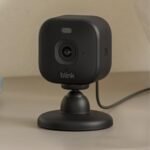
The Blink Mini looks like a bargain at $34.99, and it is—if your definition of “bargain” includes accepting 720p resolution. That’s not 1080p. It’s noticeably softer. On a phone screen you might not care; on a monitor or a tablet it looks like an old webcam. Blink also has no continuous recording mode, so you get only motion-triggered clips. For a nursery or a pet cam where you’d want to rewind the whole afternoon, that’s a dealbreaker. Where Blink shines is battery life: if you buy the separate battery module, that little cam runs for months on two AA batteries. Ring is wired only. So if you’ve got a shelf with no nearby outlet and you just want a grainy view of the front door, Blink is fine. For crisp video and the ability to actually review a full timeline (with subscription), get the Ring.
Ring Indoor Cam vs Eufy Indoor Cam 2K
Eufy’s indoor cam is the dark horse. It’s often priced around $39.99, yet it shoots in 2K resolution—sharper than Ring’s 1080p—and stores video locally on a microSD card. No subscription required. That’s a serious advantage if you hate recurring fees. But the Eufy app has a reputation for occasional login hiccups and the motion zones are fiddly to set up (you tap the screen instead of drawing rectangles). Ring’s motion zones are dead simple to configure on a laptop or in the app. Also, Ring integrates with Alexa routines like a native child; saying “Alexa, show the front door” pulls up the feed in about a second. Eufy works with Alexa too, but there’s a half-second delay that bugs me. If your priority is the crispest image and no monthly cost, go Eufy. If you want a camera that plays nice with your smart home and offers a less clunky setup, take the Ring.
So, who should actually buy the Ring Indoor Cam? You should if you already own an Echo Show, a Ring Doorbell, or a Ring Alarm—because it clicks into that ecosystem without a hiccup. You should also buy it if you value quick app response and clearer two-way audio over raw resolution or free cloud storage. If you’re on a tight budget and don’t mind 720p or occasional notification lag, grab the Blink Mini. If you want free person detection and you’re fine with a pricier, slower app, the Google Nest Cam is the better bet. And if you’re allergic to subscriptions and prefer sharper video, the Eufy Indoor Cam 2K gives you more pixels for less money—just be ready to wrestle with its motion setup. The Ring sits in the middle because it’s the most predictable, least fussy option in this lineup, and sometimes that’s exactly what makes a camera worth owning.
Ready to decide on the Ring Indoor Cam?
See today’s price, stock and delivery options on Amazon.