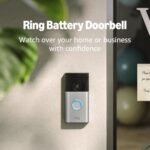
Offers 2K video resolution and enhanced audio at a competitive price point, providing solid value for a wireless video doorbell.
Price vs. rivals
Typical
CheaperTypicalPricier
Priced below many premium competitors with similar features, offering strong value in the mid-low segment for a 2K wireless doorbell.
Ease of use
Excellent 85/100
The Blink Battery Doorbell 2K+ is generally easy for an average person to install and use thanks to its wireless setup, simple app interface, and clear 2K video, though the included Sync Module adds a minor setup step.
Overview – A Wireless Video Doorbell for Apartments
This Blink Doorbell 2K+ review tells you straight: it’s worth it if you want crisp video without monthly fees, but expect trade-offs in battery life. For apartment dwellers who prioritize sharp footage and free local storage, this model delivers. Just be ready for its quirks.
At $79.99, the Blink Battery Doorbell 2K+ solves a simple problem: seeing who’s at your door clearly, whether you’re home or not. It’s wireless, so you don’t need existing doorbell wiring—a huge plus for renters. The Sync Module Core (included) handles local video storage, so there’s no subscription required for basic recording. This is a doorbell for people who want solid performance without committing to a monthly bill.
Key Features
2K video resolution – You’ll actually read a package label or recognize a face, not just guess at a blur. It’s a noticeable step up from 1080p, especially on a phone screen.
Enhanced audio with two-way talk – The mic picks up voices clearly enough to tell a delivery driver where to leave the box. Expect a slight delay, but it’s usable.
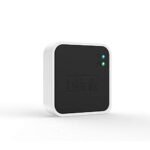
Sync Module Core included – This little box plugs into your router and stores recorded clips locally (via USB). No cloud subscription needed, which saves you money long-term.
Wireless and battery-powered – You can mount it anywhere within Wi-Fi range, no wiring required. Great for apartments where drilling holes isn’t allowed.
Infrared night vision – Motion-triggered clips at night are grainy but clear enough to identify a person or animal. Don’t expect to read fine print in total darkness.
Customizable motion zones – You can draw areas in the app to ignore, so a passing car doesn’t set off a notification. It works, but setting it up takes a couple tries to get right.
Fit for You
You’re in an apartment with no doorbell wiring and don’t want to call an electrician.
You refuse to pay a monthly subscription just to see who rang your bell.
You want to spot the difference between a package thief and a friendly neighbor on the footage.
You already own other Blink cameras and want everything in one app (even if that app is a bit clunky).
You need a doorbell that works in cold winters—Blink rates it for down to -4°F, which covers most climates.
You’re not a fan of complicated setup; sticking this on with the included mount takes about ten minutes.
Uses
You’re at work and get a notification. The 2K video loads in the app and you watch a delivery driver set a package down—right where you asked. The footage is sharp enough to read the “Fragile” sticker on the box. At night, the infrared kicks in: you see a shape walking up, but it’s not crisp. Good enough to know it’s a person, not a cat.
When a friend stops by unannounced, you answer through the speaker. Your voice comes through okay, theirs a little tinny. You tell them “come in” and unlock the door remotely (if you’ve paired it with a smart lock). The real win is not missing a single visitor because you’re in the shower.
The motion detection is fine for a quiet hallway, but on a busy street expect a few extra alerts about cars. You can dial down the sensitivity or draw a motion zone to ignore the sidewalk. It’s not perfect, but it reduces the noise.
Experience – Blink Doorbell 2K+ Battery Life and Daily Use
Setting up the Blink Doorbell 2K+ is straightforward. Screw the mount to your wall (or use the adhesive strip for smooth surfaces), pop in the two AA lithium batteries, and pair it with the Sync Module Core via the app. The app walks you through scanning a QR code—takes about 15 minutes total. The Sync Module itself is a boxy white plug that needs to sit near your router; it has a USB slot for local storage (you supply the drive).
Battery life is the biggest compromise. Owners generally see two to three months on a set of lithium AAs with average activity (a few events per day). If your door gets a lot of traffic, you’ll be changing batteries every six weeks. The app sends a push notification when the battery is low, which helps. Swapping them is easy: the faceplate pops off with a small tool (included). No wiring, no tools required. But you’re still buying batteries twice as often as you’d like.
The app is functional but not delightful. It loads clips quickly over Wi-Fi, but navigating settings feels like a maze. You’ll tap around to find motion zones or adjust video quality. Once set, you rarely need to touch it. The two-way audio has a half-second delay that can make conversations stilted—fine for “leave it at the door,” not great for a full chat.
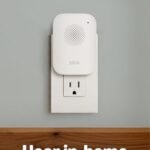
One minor annoyance: the doorbell doesn’t have a chime unless you plug in the included indoor chime module. Without it, you only get phone notifications. That means if you’re in the kitchen with your phone on the counter, you might miss a ring if you’re not looking. The chime module is easy to install (plugs into an outlet) and loud enough for a small apartment.
Pros and Cons
Pros
No subscription required – You get free local storage with the Sync Module. Ring and others charge monthly for the same basic history.
Clear 2K video – Daytime footage is sharp enough to read license plates on a parked car. Night vision is decent for identification.
Easy wireless install – No wiring, no drilling through brick. Great for renters or anyone who doesn’t want to mess with doorbell transformers.
Sync Module Core included – Most competitors sell a separate hub or dongle. Blink includes it for the price.
Works with Alexa – You can view the camera feed on an Echo Show or have it announce “Someone at the door.” Integration is smooth once set up.
Cons
Battery life is shorter than claimed – Advertised as up to two years (with minimal use), but typical real-world is two to three months. Expect to replace batteries every season.
Motion detection can be slow – The camera records only after motion is detected, so you might miss the first second of an event. That’s standard for battery doorbells, but it still frustrates.
No continuous recording option – You only get clips when motion triggers. If you want 24/7, you need a wired PoE camera, not this.
Chime requires a separate module – Without the plug-in chime, you only have phone alerts. That’s easy to overlook during setup.
App feels dated – Menu layouts are clunky, and the live view takes a couple seconds to load. It works, but it’s not polished.
Advantages – Blink Doorbell 2K+ vs Ring Doorbell
Put this next to a Ring Video Doorbell and the differences become clear. The biggest advantage of the Blink is cost of ownership: no subscription. Ring charges $3.99/month (or $39.99/year) for cloud storage and advanced features. Blink gives you free local storage with the Sync Module. That’s $48 a year saved—over a few years, it buys you a second doorbell.
Video quality is similar: both offer 2K resolution in good light. Blink’s night vision is slightly more grainy than Ring’s, but the difference is small. Blink’s two-way audio is a bit more delayed than Ring’s. Where Blink wins for apartment dwellers is the wireless simplicity—no need to connect to existing doorbell wiring, no transformer issues. Ring’s hardwired models lose points if your home doesn’t have a proper setup.
The Sync Module also gives Blink an edge if you want to add more cameras later. You can pair multiple Blink devices to one module, keeping clips in one place. Ring’s base station is a separate purchase. Overall, if you hate monthly fees, the Blink Doorbell 2K+ is a smarter long-term buy.
Who Should Buy
Renters – No wiring, no permanent alterations. Stick it up, take it down when you move. A perfect fit for apartments.
Budget-conscious shoppers – At $79.99 with no sub needed, it’s the cheapest 2K doorbell you can own over three years.
Alexa households – If you’re already in Amazon’s ecosystem, the integration works well. Google Home? Not so much—Blink doesn’t support it natively.
Anyone who wants the best wireless video doorbell for apartments – Simple setup, free storage, and decent video make it a strong contender in that category.
Skip if you want 24/7 recording – Go with a wired camera or a Ring Pro that supports continuous recording. Blink only records events.
Skip if you need blazing-fast notifications – The motion detection lag means you might not catch the moment someone touches your doorbell. A Ring Elite (wired) is snappier.
FAQ
Is the Blink Doorbell 2K+ worth it?
Yes, for most people—especially if you want free local storage and don’t mind swapping batteries every few months. The 2K video quality is solid, and the price is hard to beat.
How long does the Blink Doorbell 2K+ battery last?
Expect two to three months with typical use. Lithium AA batteries are recommended; rechargeable ones tend to drain faster. You’ll get fewer months if you have high traffic or long video clip lengths.
Does it work with Alexa or Google Home?
It works with Alexa out of the box—you can view the feed on Echo Show devices and get voice announcements. There’s no native Google Home support, though you can use third-party workarounds (spotty at best).
Can I use the Blink Doorbell 2K+ without a subscription?
Absolutely. The included Sync Module Core stores video locally via a USB drive (not included). You can view, download, and delete clips in the app for free. No monthly fee required for basic features.
Is it weatherproof?
It has an IP65 rating, meaning it handles rain, snow, and direct sun. The battery compartment is sealed with a rubber gasket. Sub-zero temps might shorten battery life, but the electronics are rated down to -4°F.
Does it require existing doorbell wiring?
No. It runs entirely on batteries. You can mount it anywhere within Wi-Fi range. If you do have wiring, you can use it to power a chime, but it’s not necessary.
Final Verdict
The Blink Doorbell 2K+ is a no-nonsense wireless doorbell that delivers on its core promise: clear video without a subscription. The battery life is the biggest trade-off, but for apartment users who don’t want to deal with wiring or monthly fees, it’s a smart pick. We’d recommend it over Ring for anyone who wants to keep ongoing costs low and doesn’t need instant motion triggers.
One thing to keep in mind: make sure you buy lithium AA batteries from the start. Standard alkalines die even faster. If you can live with that, this doorbell is more than good enough for daily use.
Right now the wireless video doorbell market is crowded, but most options either ask you to pay a monthly subscription or cost twice as much as this Blink. The Blink Doorbell 2K+ sits at a weirdly sweet spot: it’s cheap enough for apartment renters, works without a subscription if you accept limited cloud storage, and ships with a Sync Module Core in the box. But cheap doesn’t mean simple—there are real trade-offs against the usual suspects from Ring, Eufy, and Wyze. Here’s who should actually buy it.
Product
Price Range
Key Strength
Key Weakness
Best For
Blink Doorbell 2K+
~$80
2K video, included Sync Module, no forced subscription
Short motion recording clips, no onboard storage
Budget-conscious apartment dwellers who want 2K without monthly fees
Two cameras (no blind spot), local storage, no sub
Bulkier design, needs HomeBase for full features
Homeowners who hate subscription fees and want a dead-angle-free view
Wyze Video Doorbell Pro
~$50–$65
Absurdly low price, solid 2K, free 12-sec clips
Hit-or-miss reliability, limited event storage without Cam Plus
Tightest budgets—if you accept the occasional missed notification
Blink Doorbell 2K+ vs Ring Doorbell 4
The most common comparison people search—Blink Doorbell 2K+ vs Ring Doorbell—boils down to one question: are you already paying for a subscription? Ring’s video is decent, and the Pre-Roll feature (four seconds of blurry but useful footage before motion triggers) is genuinely clever. But without a Ring Protect plan ($4/month minimum), you get live view only and zero recorded history. Blink gives you free cloud storage for clips up to 60 seconds—but only when you get the Sync Module, which is included. The trade-off: Ring’s motion detection zone setup is more granular, and its chime integration is simpler if you own an Alexa. Blink’s app feels a bit sparser. For apartment renters who just want to see who’s at the door and rewatch a delivery, Blink is better value. For anyone building a full smart-home alarm ecosystem, Ring’s extra cost is earned.
Blink Doorbell 2K+ vs Eufy Dual Cam
If you’re hunting for the best wireless video doorbell for apartments, the Blink wins on size and simplicity—it’s smaller, sticks on with double-sided tape (no drilling), and the Sync Module plugs into your router. Eufy’s Dual Cam is a chunkier beast that needs the HomeBase hub, which adds a box and another power cable. But that second camera catches packages at your feet and eliminates the “I can see a face but not a parcel” frustration. Blink’s 2K image is sharp; Eufy’s is also 2K but with better HDR in bright sun. The real pivot point is battery life: Blink claims two years on a pair of AAs; in practice, with frequent motion triggers, you’ll swap batteries every 4–6 months. Eufy’s built-in rechargeable lasts longer between charges but takes hours to top up. For a first-floor apartment with low traffic, Blink’s battery trade-off is fine. For a busy front porch, Eufy’s extra hardware might be worth the clutter.
Blink Doorbell 2K+ vs Wyze Video Doorbell Pro
Wyze is the cheapest player, but you get what you pay for. The Pro model records in 2K and includes a free six-second clip preview; the real recording only starts after you pay for Cam Plus ($1.99/month or $15/year). Blink’s free plan gives you up to 60 seconds per event without a subscription—that’s a huge difference if you want to see the whole delivery driver interaction. Build quality is also noticeable: Wyze’s plastic feels a bit hollow, and the chime connector inside the house is finicky. Blink’s doorbell has a more solid button and a better weather seal. On the flip side, Wyze’s app is faster to load live view, and its person detection is good at no extra charge. Blink’s person alerts require you to use motion zones vaguely, so you get false alarms from passing cars. If your absolute max budget is $60, get the Wyze. If you can stretch to $80, Blink is a more polished experience over time.
Who should pick the Blink Doorbell 2K+? You, if you want 2K video without a monthly subscription, live in an apartment or rental where drilling isn’t allowed, and don’t mind shorter clips and a basic motion zone system. It’s the best balance of upfront cost and ongoing freedom—especially since the Sync Module is in the box. Who should look elsewhere? If you need package-level viewing and have a bit more space, grab the Eufy Dual Cam instead. If you’re already deep in the Amazon echo system and plan to pay for video storage anyway, the Ring Video Doorbell 4 integrates better and offers Pre-Roll footage that the Blink simply cannot match.
Ready to decide on the Blink Doorbell 2K+?
See today’s price, stock and delivery options on Amazon.