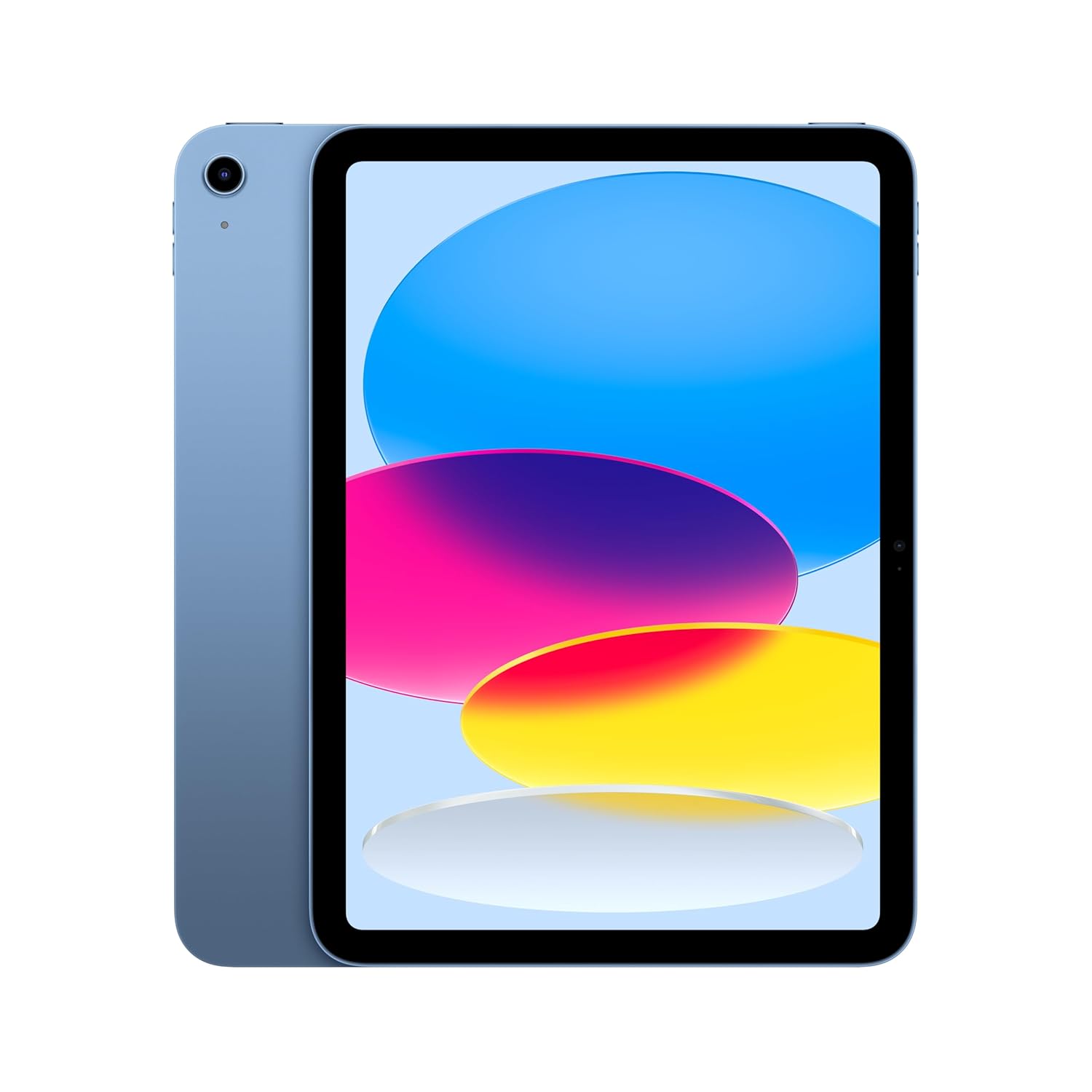
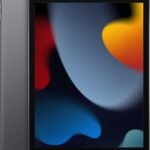
Balances Apple's premium ecosystem and reliable performance with an accessible price point, offering solid everyday value without compromising core features.
Price vs. rivals
Typical
CheaperTypicalPricier
Priced slightly below the typical mid-range for premium tablets, reflecting its entry-level status within the iPad lineup while remaining competitive with similar alternatives from other brands.
Ease of use
Excellent 95/100
The iPad is widely regarded as highly intuitive and user-friendly, with a responsive touch interface, seamless iOS ecosystem, and straightforward setup, making it very easy for an average person to use.
Overview
This Apple iPad 11-inch review cuts to the chase: the 128GB model at $399 is the smart buy for anyone who wants a capable tablet without paying for Pro features they won’t use. It’s a solid everyday companion for students, casual creatives, and anyone streaming on the couch. The A16 chip keeps things snappy, and the non-laminated display is the main trade-off. Worth it? For most people, yes.
The problem this iPad solves is simple: you need a reliable, portable screen for notes, browsing, video calls, and light creative work, but you don’t want to drop $600 on an Air or $1,000 on a Pro. It’s built for people who value practicality over spec sheets. Don’t expect a laminated display or Apple Pencil Pro support—expect a device that just works without fuss.
Key Features
A16 chip: Handles everything from multitasking in Split View to editing photos in Lightroom without stuttering. It’s not Pro-level for heavy video rendering, but for daily use, you won’t feel a lag.
Liquid Retina display: Colors look good, brightness is fine indoors. But it’s not laminated—there’s a small air gap between the glass and the screen. You’ll notice it when tapping, especially with the Apple Pencil (USB-C or 1st gen).
128GB storage: The sweet spot. 64GB is tight for apps and offline shows; 256GB is overkill unless you hoard movies. This one gives you room for a semester’s worth of PDFs, a few games, and Netflix downloads.
Wi-Fi 6: Faster, more stable connections in crowded dorms or coffee shops. Streaming 4K video or joining Zoom without buffering—reliable.
12MP front and back cameras: The front camera is actually the better one, with Center Stage that follows you during video calls. The back camera is fine for scanning documents but don’t plan on shooting your vacation photos with it.
Touch ID and all-day battery: Unlock with your fingerprint—quick and works even with a case on. Battery life easily stretches from breakfast to bedtime with moderate use. Charging via USB-C.
Fit for You
You’re a student who needs one device to take notes in class, read textbooks, and join study groups on FaceTime—without spending Air money.
You already own an iPhone and want a bigger screen that shares your apps, messages, and passwords without extra setup.
You’re a casual artist who sketches in Procreate or draws on a flight, and you don’t mind the slight air gap between pencil tip and pixels.
You watch a lot of YouTube, Netflix, or Twitch in bed and want something lighter than a laptop that won’t fry your lap after twenty minutes.
You manage household tasks like recipe reading, grocery lists, and controlling smart lights with a single touch screen.
Uses
Let’s be real—most people use tablets on couches, not desks. This iPad shines during a lazy Sunday morning: coffee in one hand, Reddit in the other, swiping through Twitter threads. The 11-inch screen is large enough to see a full webpage without zooming, but small enough to hold one-handed while you lie sideways.
For students, it’s a note-taking machine. Pair it with a cheap Bluetooth keyboard and you’ve got a lightweight writing setup for library sessions. The battery laughs through a full day of lectures. Just know that typing on the glass keyboard is cramped—you’ll want a physical one for anything longer than an email.
If you draw, the Apple iPad 11-inch for drawing works with Apple Pencil (1st gen or USB-C), but the non-laminated screen means your strokes feel slightly offset. It’s fine for sketching and coloring, less good for precise line work. Artists who care about a direct glass-to-pixel feel should look at the Air or Pro.
Experience
Setting it up is the same as any iPad: turn it on, bring your iPhone close for automatic Wi-Fi and password transfer, and you’re in business within five minutes. Touch ID is on the top button, which is natural when you pick it up. No Face ID, so if your hands are wet or greasy from chips, expect to tap in your passcode once in a while.
Day-to-day, the A16 chip keeps things fluid. Flipping between Safari, Notability, and Spotify feels instant. But here’s the thing: that non-laminated display creates a tiny echo when you tap. You can feel the glass tap against the LCD underneath. It’s not a dealbreaker, but once you notice it, you’ll see it every time. Owners tend to mention the same thing in reviews.
Another small annoyance: the speakers are fine for podcasts but not great for music. They’re on one side (left or right depending on orientation), so you lose stereo imaging if you rotate the wrong way. Headphones or a Bluetooth speaker fix that. The USB-C port is standard, so charging cables are easy to find.
Cleaning is straight-up glass and aluminum—wipe with a microfiber cloth. The blue color looks darker in person, more like a slate blue under indoor light. Fingerprints show less on it than the silver or starlight, which is a bonus.
Pros and Cons
Pros
Speed for daily tasks: The A16 chip handles everything most people do—web, video, notes, light editing. No lag, no waiting.
128GB at $399: That’s the real story. You get enough storage for years of use without paying for capacity you won’t fill.
All-day battery: Sails through a full day of mixed use. Overnight charging and you’re set for tomorrow.
Center Stage camera: Tracks you during video calls without looking forced. Makes Zoom classes feel less robotic.
Tons of cases and accessories: Because it uses the same chassis as previous budget iPads, cheap cases are everywhere.
Cons
Non-laminated display: The air gap between glass and LCD is real. It makes tapping sound hollow, and reflections are more obvious. If you’re sensitive to that, you’ll dislike it.
Pencil precision is off: Drawing with the Apple Pencil feels like you’re touching a protector film—slight offset between tip and ink. Sketching is fine, inking is not.
Speakers are mono-ish: They’re on one edge. Rotate the iPad and the sound comes from only the right or left side. Not great for movies unless you use headphones.
No Face ID: Touch ID works fine, but it doesn’t unlock as quickly in landscape mode because your finger has to find the top button. Annoying if you use the iPad on a stand.
USB-C is USB 2.0 speed: Transferring large files to external drives is slow. For most people it won’t matter, but power users will notice.
Cons
Non-laminated display: The air gap between glass and LCD is real. It makes tapping sound hollow, and reflections are more obvious. If you’re sensitive to that, you’ll dislike it.
Pencil precision is off: Drawing with the Apple Pencil feels like you’re touching a protector film—slight offset between tip and ink. Sketching is fine, inking is not.
Speakers are mono-ish: They’re on one edge. Rotate the iPad and the sound comes from only the right or left side. Not great for movies unless you use headphones.
No Face ID: Touch ID works fine, but it doesn’t unlock as quickly in landscape mode because your finger has to find the top button. Annoying if you use the iPad on a stand.
USB-C is USB 2.0 speed: Transferring large files to external drives is slow. For most people it won’t matter, but power users will notice.
Advantages
Where this iPad beats the competition is price-to-performance. Compared to an Android tablet at the same price, the app ecosystem is far better—Procreate, Notability, and all the iOS‑exclusive tools are here. Updates from Apple last five to six years, while Android tablets often get dropped after two. That matters if you plan on keeping it through college.
Against the iPad 11‑inch vs iPad Air debate: the Air has a laminated display, M2 chip, and works with the newer Pencil Pro. But it starts at $599. For $200 less, you lose those perks and get a chip that is still fast for 90% of what people do. If you don’t draw professionally or edit video, the extra cash buys a pair of solid headphones instead.
And compared to a used older iPad (the 9th gen, say), this one gives you a bigger screen in a smaller frame, USB‑C, and better cameras. The 9th gen still uses Lightning, which feels antique in 2026. This is the first budget iPad that feels current.
Who Should Buy
Buy it if: You’re a high school or college student who needs a reliable, long‑lasting tablet for notes, reading, and light productivity. The 128GB model is especially good for a semester’s worth of materials.
Buy it if: You want a family tablet for streaming, games, and browsing that doesn’t cost a month’s rent. Kids can use it, you can use it—cases are cheap and the screen is durable.
Buy it if: You mainly use your tablet with a keyboard and mouse attached, where the non‑laminated display matters less because you’re not tapping directly on glass.
Skip it if: You are a professional digital artist or illustrator who needs precise line control. The laminated display of the Air or Pro is worth the extra money.
Skip it if: You watch a lot of movies in dark rooms—the non‑laminated screen reflects more glare and the contrast isn’t as deep as on an OLED or even the Air’s display.
Skip it if: You need 5G cellular. This model is Wi‑Fi only; if you want data on the go, you have to buy the cellular version for $150 more.
FAQ
Is the Apple iPad 11‑inch worth it?
Yes, for most people. At $399 for 128GB, it delivers strong performance, great battery life, and Apple’s long update support. The main catch is the non‑laminated display, which matters if you draw or are picky about screen feel.
How does the iPad 11‑inch vs iPad Air compare?
The Air has a laminated display, an M2 chip, and supports the Apple Pencil Pro, but starts $200 higher. The standard iPad is slower and has a glass‑gap screen. If you draw a lot or edit video, the Air justifies its price. For everyday tasks, the standard iPad is plenty.
Is the Apple iPad 11‑inch for drawing good enough?
It works fine for casual sketching, coloring, and doodling with the Apple Pencil (1st gen or USB‑C). But the non‑laminated screen creates a slight offset between pencil tip and ink line. Serious artists should get the Air or Pro for a direct‑to‑glass feel.
How long does the iPad 11‑inch battery last?
Expect about 10 hours of mixed use—web browsing, video streaming, note‑taking. It’ll easily get through a full day of classes or a long flight. Charging to full takes around 2 hours with a 20W adapter.
What is the best tablet for students 2026?
The 11‑inch iPad with 128GB is a top contender because of its price, storage, and long support life. For students on a budget, it beats most Android tablets. If you need a keyboard for essays, add a cheap Bluetooth one. It’s the best under $400.
How well does the iPad 11‑inch A16 chip performance hold up?
The A16 chip handles everyday apps, light photo editing, and multitasking smoothly. It won’t choke on video calls or note‑taking. For heavy gaming or video editing, you’ll see some frame drops. For a budget iPad, the performance is excellent.
Final Verdict
The Apple iPad 11‑inch with 128GB and the A16 chip is the sensible choice for anyone who wants a modern iPad without the premium price. It does the things most people need—read, write, stream, call, draw a little—and does them well enough that you won’t feel you compromised. The non‑laminated display is the one thing you have to make peace with. If you’re not a picky artist or a power user, this iPad is all the tablet you need for years.
One thing to keep in mind: the $399 price tag makes it a no‑brainer for students or anyone replacing an aging tablet. Grab a simple case and a cheap keyboard, and you’ve got a setup that handles 95% of your life without drama. That’s a good deal.
The 2026 Apple iPad 11-inch sits in a weirdly sweet spot: cheaper than the iPad Air, faster than the base model from two years ago, and packing the A16 chip that actually keeps up with most tasks without stuttering. At $399 for 128GB, it’s not the budget king, but it’s not pretending to be one. You’re getting Apple’s walled garden with a display that works for note-taking and media, plus a 12MP front camera that finally works for video calls. But there’re real alternatives—from Samsung’s solid Android tablet to Amazon’s dirt-cheap Fire—that might serve you better depending on what you actualy do with a slab of glass and metal.
Product
Price Range
Key Strength
Key Weakness
Best For
Apple iPad 11-inch (A16, 128GB)
Around $399
A16 chip performance; strong app ecosystem; 128GB base storage
60Hz display; no Apple Pencil Pro support; single speaker
Students and casual users who want iOS without paying iPad Air prices
iPad Air 11-inch (M2, 128GB)
Around $599
M2 chip; laminated displa; Pencil Pro & hover; faster USB-C
Costs $200 more; same 60Hz; still only 11 inches
Creative work, note-taking pros who need Pencil hover
Samsung Galaxy Tab S9 FE (128GB)
Around $350
Included S Pen; MicroSD slot; IP68 water resistance
Exynos 1380 is slower than A16; One UI bloat; weaker app selection
Androod users who want a stylus out of the box and expandable storage
Amazon Fire Max 11 (128GB)
Under $250
Very cheap; 14-hour battery; kids-mode profiles
No Google Play; weak app store; sluggish processor; ads
Kids, media consumption only, or a second device for under $250
Apple iPad 11-inch vs iPad Air
This is the comparison you’re probaly wrestling with. The iPad Air costs $200 more for the same screen size and the same 60Hz refresh rate—that’s not a misprint. What you get for that extra cash is the M2 chip (which frankly matters mostly if you’re editing 4K video or running pro-audio apps), a laminated display that reduces glare and makes the glass feel closer to the pixels, plus Apple Pencil Pro support with that handy squeeze gesture and hover. If you draw seriously—like, daily, with layers and pressure curves—the Air’s laminated screen and Pencil Pro integration make a real difference. But if you’re tapping out emails, watching Netflix, or taking notes in class with the first-gen USB-C Pencil, the iPad 11-inch is plenty fast. The A16 is no slouch; it handles Lightroom mobile and GarageBand without stuttering. The real annoyance with the base iPad is the non-laminated display—you’ll notice a tiny gap between your pencil tip and the ink when you draw at an angle. Otherwise, save the $200 and put it toward a case or a keyboard.
Apple iPad 11-inch vs Samsung Galaxy Tab S9 FE
Samsung’s S9 FE is the best alternative for Androod loyalists, and it undercuts the iPad by about $50. The big win for Samsung: the S Pen comes in the box and attaches magneticly to the back. No extra $129 purchase. The Tab S9 FE also has a MicroSD slot, so you can drop in a 1TB card for movies and files, something the iPad can’t touch. But the iPad’s A16 chip is noticeably snappier. The Exynos 1380 in the Samsung feels fine for scrolling and reading, but it lags when you juggle split-screen apps or open heavier games. The display on the FE is alsol edgier—it’s LCD, not AMOLED, and it’s a bit dimmer outside. Build quality: the iPad feels denser, metalier, while the Samsung has a plastick back that creaks slightly. I’d pick the Samsung if you need that microSD slot or want a pen day one without extra cost. I’d pick the iPad if you value smooth everyday performance and a stronger selection of apps—especially for college (think notability, goodnotes, procreate).
Apple iPad 11-inch vs Amazon Fire Max 11
Let’s be blunt: the Fire Max 11 is a tablet that gives you a big screen and a battery that runs forever, for under $250. That’s its entire pitch. It’s not trying to be a prodcutivity tool. The Fire OS app store is a ghost town—no official YouTube app, no Google Docs, no proper note-taking app that syncs with Notion or OneNote. You can sideload the Google Play store, but it’s a hassle and some apps break. The iPad 11-inch is in a different league: it runs the same apps as an iPhone, gets updates for six years, and has a front camera that actually looks decent in dim lighting. The Fire Max 11 is for kids, or for someone who wants a big screen in the kitchen for recipes and Netflix and nothing else. If you’re reading this comparison and care about perfomance or app choice, skip the Fire. If you just need a cheap screen and don’t care about apps, the Fire saves you real money—but you get real limits too.
Who should pick the Apple iPad 11-inch? You, if you want a reliable, fast tablet for school notes, streaming, light drawing, and general app usage, and you don’t want to spend Air money for features you won’t use. The 128GB base storage is a genuine plus in 2026—most rivals still start at 64GB. The A16 chip and iPadOS update policy mean this tablet will feel fresh for four years at least. Who should look elsewhere? Serious digital artists should step up to the iPad Air for the laminated display and Pencil Pro support. And if you’re on a tight budget and only want a media player, the Amazon Fire Max 11 will do the job for half the price—just don’t expect to run prodcutivity apps on it.
Ready to decide on the Apple iPad 11-inch?
See today’s price, stock and delivery options on Amazon.