Is the ZealSound Podcast Microphone worth it? For $31.49, this is one of the most honest values in entry-level USB mics—it gets you clear, warm voice capture, a handy mute button, and real-time monitoring without forcing you into the upgrade spiral that pricier gear triggers.
Offers a robust set of features like noise cancellation, gain control, and monitoring at an exceptionally low price point, delivering strong value for entry-level podcasters and streamers.
Price vs. rivals
Cheaper
CheaperTypicalPricier
Priced well below most comparable USB condenser microphones from established brands, making it a budget-friendly option for beginners.
Ease of use
Excellent 85/100
The microphone is plug-and-play with straightforward controls for gain, volume, and mute, making it easy for an average person to use for podcasting or streaming.
Overview
The ZealSound Podcast Microphone is a condenser mic that plugs straight into your computer’s USB port. No audio interface, no XLR cables, no phantom power—just plug it in and your PC, Mac, or even iPhone (with the right adapter) recognizes it instantly. It’s designed for people who want to sound professional without learning the technical side of audio.
The problem it solves is simple: built-in laptop mics make you sound like you’re in a tin can. This mic makes you sound like you’re in a room. It’s genuinely for podcasters, streamers, and anyone who’s tired of being asked “are you calling from a helicopter?” during video calls.
Key Features
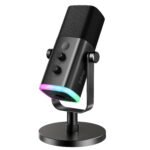
Cardioid pickup pattern: This means the mic picks up sound from the front and ignores most of what’s happening behind it. Your keyboard clacks and computer fan hum won’t dominate your stream.
Mute button: It’s a physical button on the front, not a software toggle. When someone walks in mid-recording, you can cut audio instantly without fumbling through menus—a lifesaver during live streams.
Gain and volume adjustments: Two separate dials. One controls how sensitive the mic is, the other controls headphone monitoring volume. You can adjust both without stopping your recording to dig through settings.
Zero-latency headphone monitoring: The 3.5mm jack on the bottom lets you hear yourself in real-time through headphones. No weird delay where you hear your voice a half-second after you speak.
Metal construction: The body, the grille, and even the adjustable arm are metal, not cheap plastic. It feels heavier and sturdier than the price suggests, sitting solidly on your desk without wobbling.
Plug-and-play compatibility: Works with Windows, Mac, and iOS devices, though you’ll need a USB adapter for phones. No drivers to install—it’s genuinely just plug in and go.
Fit for You
You’re starting a podcast and want to sound professional without dropping $200 on your first mic.
You stream on Twitch or YouTube and need something that captures your voice clearly while ignoring your mechanical keyboard.
You work from home and want to sound crisp on Zoom calls, where most people are using headset mics that sound muffled.
You record voiceovers or TikTok videos and want a mic that works with your phone as easily as your computer.
You’re tired of your current mic picking up your dog barking in the next room.
Uses
Picture this: you’re recording your weekly podcast and your co-host is on a video call. You hit mute, cough loudly, unmute, and continue your sentence without anyone noticing. That’s the kind of moment this mic handles effortlessly.
For YouTube work, the cardioid pattern means you can film with your computer’s fan running in the background. The audio cleanly captures your voice and drops the hum, so you don’t have to edit noise out in post-production.
On streaming, the mute button really earns its place. You can sneeze, have a side conversation, or just need a moment without clipping your audio for viewers. And the monitor port lets you hear yourself through headphones—so you actually notice when you’re too loud or too quiet.
Experience
Setup is genuinely two minutes: plug the USB cable in, wait for Windows to say it found a microphone, and talk. No driver installs, no restarting your computer, nothing. That’s refreshingly rare in the budget mic world.
The dials take a bit of getting used to. You’ll likely fiddle with both gain and volume during your first session, and you’ll want to keep them balanced so you’re not too quiet on recordings while blasting your own voice through headphones. Once it’s set, though, you leave it alone.
Cleaning is simple—remove the foam windscreen and wash it by hand when it gets dusty. The metal grille underneath can be wiped down, though you’ll want to be gentle with the capsule behind it. Storage is easy too: it’s compact enough to leave on your desk, and the adjustable arm folds down if you pack it away.
One small annoyance: the base is heavy enough for stability, but it doesn’t swivel horizontally. Adjusting angle requires loosening the arm’s pivot point, which takes a few seconds and can be finicky if you need to reposition regularly. Most people set it once and forget it, though.
Pros and Cons
Pros
Clarity for the price: The cardioid pattern and decent capsule mean your voice sounds fuller than what any laptop mic or bluetooth earbuds can manage, even in untreated rooms.
Mute button actually matters: Physical mute buttons are rare at this price, and the fact that it’s right on the front makes it genuinely useful for live work.
Monitoring without delay: Hearing your own voice in real-time helps you naturally adjust volume and tone without thinking about it—a feature reviewers often overlook.
No drivers, no hassle: It’s truly plug-and-play across Windows, Mac, and iOS, which is more than you can say for some mics triple the price.
Sturdy build: The metal body and arm feel like they’ll survive being knocked over, which is good because the base is stable enough that it takes a real shove to tip it.
Cons
Not genuinely noise-cancelling: The noise reduction is directional pickup, not active noise cancellation. It ignores background noise from the sides and rear, but sharp sounds from the front—like a sibling yelling—will still get picked up.
Cheap-feeling USB wire: The included cable is thinner than I’d like. It works fine, but if you’re moving the mic around frequently, budget for a replacement cable before too long.
No gain dial on desktop: To adjust overall gain, you’ll need to use your computer’s audio settings or a third-party app. The physical gain dial was there, but some operating systems override it.
Advantages
Where this ZealSound Podcast Microphone beats typical alternatives is the balance of features per dollar. Most mics in this price range give you one or two of its key features—rarely all together. The mute button is genuinely functional, the monitoring works without annoying delay, and the build quality doesn’t creak or rattle.
The ZealSound Podcast Microphone vs Fifine K669 is the classic comparison in this bracket. Fifine offers similar sound quality, but you’ll often find it lacking the front-facing mute button and the monitor port this model has. If you’re live streaming or recording multi-take sessions, the quick mute and zero-latency monitoring win out.
It’s also one of the best USB microphones for podcasting when you’re not ready to invest in an audio interface. You get the core features a podcaster needs most—good directional pickup, easy muting, and immediate monitoring—without any of the setup complexity that comes with XLR gear.
Who Should Buy
First-time podcasters who want to sound decent on episode one, not episode ten.
Streamers who need a reliable mute button for quick interruptions and a cardioid pattern to ignore their keyboards.
Remote workers tired of laptop fans and background noise on video calls.
People who record voice notes or TikTok audio with their phone and want a proper mic without buying a separate mobile setup.
Skip it if you’re a professional musician or voice actor needing studio-grade detail. At this price, you’re getting clarity, not extraordinary warmth or character. If you’re chasing that, look at USB mics in the $100–$200 range—but know that the jump in sound quality is modest compared to the jump in price.
FAQ
Is the ZealSound Podcast Microphone worth it?
Yes, if you need a simple, functional USB mic for podcasting, streaming, or calls without spending much. It delivers clean voice capture, a real mute button, and monitoring that more expensive mics skip. You’re not paying for luxury—you’re paying for solid performance that doesn’t frustrate you.
How long does it last?
With normal desk use, the metal build should hold up for years. The USB cable is the weakest link, so handle it with some care. Many owners report it working nicely past two years, and the foam windscreen is replaceable when it gets worn.
Does the ZealSound USB microphone noise cancellation work well?
It reduces, doesn’t eliminate. The cardioid pickup ignores sound from behind and the sides, so background noise drops noticeably, but sharp sounds in front of the mic still get captured. For most home recording and streaming, that’s exactly the right balance—you don’t sound robotic, but you’re not picking up every room sound.
Is it safe for iPhone or Android use?
Yes, it works over USB with the right adapter. With a USB-C to USB adapter, it plugs into modern phones and tablets without issue. The mic itself draws low power, so it won’t drain your phone’s battery dramatically during a recording session.
Do you need extra software to use it?
No, it works without any special setup. You may want to tweak gain in your system settings, but the actual recording and live audio work immediately with your default recording app or streaming software.
Is this ZealSound microphone with mute button good for beginner podcasters?
It’s ideal. The learning curve is almost flat: plug in, set the dials once, and you’re recording. The mute button and monitoring help correct pacing and volume issues instantly, which is the fastest way to improve your audio without taking a class.
Final Verdict
At $31.49, the ZealSound Podcast Microphone is a smart buy for anyone starting in podcasting, streaming, or serious voice calls. Its strengths—mute button, cardioid pickup, zero-latency monitoring—are things you’ll use every session, not just once. The catch is remembering that “noise cancellation” here means directional pickup, not magical silence. If you want to sound ten times better than your laptop’s mic without spending ten times more, this is your mic.
ZealSound Podcast Microphone vs the Competition in 2026
This ZealSound Podcast Microphone review starts in the budget lane, and the comparison below keeps things grounded. At $31.49, it’s a cardioid USB condenser with a physical mute button, separate gain and volume controls, and headphone monitoring. It’s plug-and-play on Mac and PC, and it can also work with a phone or tablet if you have the right USB adapter. That’s a fuller feature set than the Fifine K669 offers at a similar price, though it’s still a plastic-bodied mic that assumes a fairly quiet room. The 4.4-star average makes sense: the controls earn their keep, while the all-plastic shell doesn’t. If you’re scouting for the best USB microphone for podcasting without spending $100, this is one of the options to weigh seriously.
Product
Price Range
Key Strength
Key Weakness
Best For
ZealSound Podcast Microphone
Budget (about $31)
Mute, gain, volume, and monitoring in one small package
Affordable solo podcasting and streaming, especially if you want controls
Fifine K669
Budget
Simple plug-and-play condenser with a familiar sound
Fewer onboard controls; less suited for mobile use
Cheapest reliable USB mic for a desk setup
Samson Q2U
Mid
Dynamic capsule with USB and XLR outputs
Costs more; requires close mic placement
Noisy rooms and podcasters who plan to upgrade to an audio interface
Audio-Technica ATR2100x-USB
Mid/higher
Sturdy dynamic build with clean vocal tone
Costs more; dynamic pickup needs close talking
Voiceover work or daily podcasting in untreated spaces
Blue Yeti
Premium
Multiple polar patterns and a bigger condenser sound
Large footprint and a sensitive capsule; price is higher
Creators who need stereo or bidirectional modes and don’t mind room tone
ZealSound Podcast Microphone vs Fifine K669: The Extra Controls Win
These two sit in the same cheap end of the market, so the difference comes down to how you work. The Fifine K669 is dependable, and it’s often a few dollars cheaper. It’s a simpler setup, though. The ZealSound microphone with mute button is the kind of thing you don’t appreciate until you’ve had to fumble with a software mute on a live stream. For a live show, the ZealSound Podcast Microphone for streaming is the more practical pick because the mute is right on the mic, and the headphone monitor output lets you hear what the audience hears. The echo control on the ZealSound is for the headphone mix, not for polishing a track, but it helps a dry-sounding room feel less dead. The Fifine is still the right choice if your budget won’t budge and you only record into a computer in a quiet room. Otherwise, the ZealSound’s gain, volume, and mute controls are worth the small difference.
ZealSound Podcast Microphone vs Samson Q2U: Condenser vs Dynamic
The Samson Q2U changes the conversation because it’s a dynamic mic with both USB and XLR outputs. It rejects background noise much better than the ZealSound, so if your floor fan or mechanical keyboard is a problem, the Q2U is a real improvement. You also get a mic that can move onto an audio interface later without replacing everything. That flexibility costs more than double, and the dynamic capsule means you’ll want to stay close to it. In a quiet room, the ZealSound can sound livelier for less money; in a noisy room, the Q2U is the safer investment.
ZealSound Podcast Microphone vs Blue Yeti: Skip the Brick?
The Blue Yeti is the default name in USB mics, and it’s a perfectly good condenser once you set its gain properly. It also has multiple polar patterns, which lets you record two people around one mic or use stereo for a wider capture. But the Yeti is bulky and heavy, and it picks up room tone with the same enthusiasm as the ZealSound. If you need those extra patterns, spend the money. If you’re recording a single voice and your desk is already crowded, the ZealSound is a smaller, lighter choice that leaves your wallet alone.
So is ZealSound Podcast Microphone worth it? For a solo podcaster, a Twitch streamer, or someone recording quick video voiceovers, the ZealSound microphone with mute button makes the budget math simple. The ZealSound USB microphone noise cancellation is a cardioid pickup pattern, not magic, so keep the mic close and keep your desk quiet. If you’re still weighing ZealSound Podcast Microphone alternatives, the dynamic mics from Samson and Audio-Technica are the ones to beat. Choose the Samson Q2U or the Audio-Technica ATR2100x-USB if your room is genuinely noisy or you know you’ll outgrow USB. Otherwise, the ZealSound is a better buy than the Fifine K669 when the controls matter, and it’s one of the more sensible budget options for 2026 podcasting.
Ready to decide on the ZealSound Podcast Microphone?
See today’s price, stock and delivery options on Amazon.