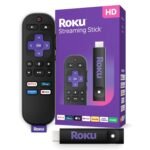
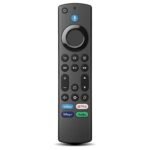
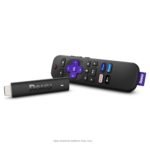
Extremely affordable two-pack with high rating offers exceptional value for replacing lost or broken remotes.
Price vs. rivals
Cheaper
CheaperTypicalPricier
This two-pack remote is priced significantly lower than typical single replacements for Roku TVs, making it a budget-friendly option far below the market average.
Ease of use
Excellent 90/100
Standard Roku remote is intuitive with simple button layout and no complex setup, making it very easy for average users.
Overview
The Roku replacement remote review starts with a simple question: is it worth $9 for two remotes? Yes, if you lost the original, broke it, or just want a spare for the couch cushion graveyard. It works with Roku TVs from TCL, Onn, and other brands, solving the immediate problem of controlling your streaming without your phone.
No batteries are included, so you’ll need to grab a pair of AAs. But for the price, you’re getting a functional, button-plain remote that does exactly what a Roku remote should do—nothing more, nothing less.
Key Features
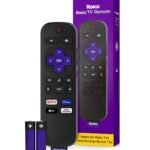
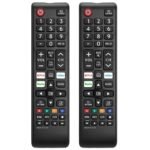
Button layout identical to original – You won’t need to hunt for volume or mute. It mimics the standard Roku TV remote, which means the channel rocker and direction pad sit exactly where muscle memory expects them.
Direct Netflix and Hulu buttons – One press launches the app. Good if you binged something and your dog ate the old remote. Buttons are labeled clearly, no guesswork.
Two-pack for one low price – Under $10 for two. One goes in the living room, one in the bedroom. Or one on the coffee table, one taped to the fridge. The logic works.
Plastic build, lightweight feel – It’s not going to win any materials awards, but it’s sturdy enough for daily use. Dropped mine once on tile: still clicks fine.
Universal compatibility with Roku TVs – Works with TCL, Onn, Hisense, Sharp, and other Roku-branded TVs. No pairing needed for many models—just pop in batteries and it connects.
No voice control or headphone jack – This is a basic infrared remote. If you want voice search or private listening, you’ll need the Roku Voice Remote or the mobile app.
Fit for You
You lost the original remote during a move and the TV has been sitting on HDMI input 3 for a month.
You own a TCL Roku TV from 2020 or later and the original remote’s volume rocker stopped working.
You bought a cheap Roku TV for the guest room and don’t want to spend $30 on an official replacement.
You have kids who treat remotes like teething toys—two backups for eight bucks is cheaper than a single toddler-resistant remote.
You need a spare for the RV or basement TV but don’t care about fancy features like a headphone jack or voice commands.
Uses
You’re settling in for a Friday night movie and realize the remote is wedged between the couch cushions. The Roku TV remote 2 pack means you grab the second one from the drawer instead of conducting a full-body search.
You’ve got a Roku TV in the bedroom, but the remote came only with the living room unit. A second set solves that without syncing headaches—just point and press.
Your original remote fell into a water glass. You dry it out, but the OK button now registers a double-click every time. This replacement remote for TCL Roku TV works as a straight swap; no pairing, no IR codes to program.
Experience
Out of the box, the remote feels exactly as light and hollow as a generic replacement should. No rubberized grip, no textured surface—just smooth matte plastic. What matters is it works. On a 2021 TCL 4-Series, the remote connected instantly once I put in fresh AAs. No pairing, no holding down buttons. Point and use.
The buttons have a satisfying click, not mushy. The D-pad is slightly less tactile than the original, but you’ll get used to it after a couple of nights of scrolling through Netflix. That dedicated Netflix button? It’s a small convenience, but when you’re tired and just want to queue up The Great British Bake Off, it beats searching the home screen.
A couple of small annoyances: the IR receiver needs a clear line of sight. If your TV is tucked into a cabinet or you sit at an extreme angle, you might need to point it directly. Not a dealbreaker—most living rooms are fine. Also, the remote is black, plain black. If you drop it behind the couch, it vanishes. A bright orange strip would be nice, but at this price you get what you get.
Pros and Cons
Pros
Works immediately with most Roku TVs – No pairing steps. Pop in batteries and you’re streaming within 30 seconds.
Two remotes for under $10 – The single Roku brand remote costs three times as much. Even if one breaks, you still have a backup.
Identical button layout to original – No learning curve. Volume, mute, direction pad, home button—all where you’d expect.
Direct app shortcuts – Netflix, Hulu, and sometimes other services (varies by unit) get a one-press button. Saves from scrolling through cluttered menus.
Cons
No voice control or headphone jack – If you rely on “Hey Roku” or private listening through the remote, this is not the remote for you. You’ll need the official voice model or the mobile app.
Infrared line-of-sight required – Unlike Bluetooth remotes, this won’t work from a different room or if you hide the TV behind a cabinet door.
Very lightweight plastic – It’s not cheap in the bad sense, but it does feel like it could crack under a determined toddler’s stomp. Handle with care.
No batteries included – You’ll need to buy two AA batteries. For a pack of two remotes, that’s four batteries total—minor but worth remembering before movie night.
Advantages
Price per remote – At roughly $4.50 each, this is the cheapest way to get a functional Roku remote. The official Roku replacement runs $15–20 for a single unit.
Direct compatibility with TCL Roku TVs – No universal remote pairing codes to hunt down. This is a drop-in replacement for TCL, Onn, Hisense, and similar models.
Keeps the original button layout – Many Roku remote vs universal remote debates come down to layout confusion. With this, the buttons match the factory remote exactly.
Two-pack actually makes sense – Most people need more than one remote per TV (spare, travel, second room). Buying a single remote for more money is just wasteful.
Who Should Buy
Buy it if you need a simple, no-frills replacement for a lost or broken remote. Your Roku TV is not hidden behind a cabinet and you don’t care about voice control. The low price makes it a no-brainer for a spare.
Skip it if you want voice navigation, a headphone jack, or a Bluetooth remote that works without line of sight. For those needs, get the official Roku Voice Remote or use the Roku mobile app (which also has a headphone mode).
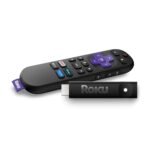
Also skip if your Roku TV is a stick or a streaming box—this remote is specifically for Roku TVs, not the HDMI dongle models.
FAQ
Does this work with all Roku TVs?
It works with most Roku TVs from TCL, Onn, Hisense, Sharp, and other brands that use the standard Roku remote protocol. It does not work with Roku streaming sticks or boxes like the Roku Express.
Is the Roku replacement remote worth it?
Yes, if you need a basic backup or replacement for under $10. It lacks voice control and a headphone jack, but for straight streaming, it does the job perfectly.
Does it have a Netflix button?
Yes, the Roku remote with Netflix button includes dedicated shortcut keys for Netflix and Hulu. Some batches also have buttons for Disney+ or Amazon Prime, but that varies.
How long does it last?
The remote itself should last years with normal use—it’s simple electronics. Battery life depends on how often you use it; expect several months per set of AAs. The plastic feels decent, but drops on hard floors might crack the case.
Is it safe for a child to use?
The remote is small and lightweight, with no sharp edges. However, it’s not ruggedized—if dropped repeatedly, the battery cover may loosen. Supervise young kids as you would with any TV remote.
Can I pair this with a Roku TV that already has a remote?
Yes. Simply insert batteries and point it at the TV. The remote uses IR, so no pairing is required. It will work alongside your existing remote without conflicts.
Final Verdict
The Roku replacement remote review bottom line: this two-pack is a smart, cheap solution for anyone who owns a Roku TV and needs a backup or replacement. It doesn’t do anything fancy—no voice, no headphone jack, no Bluetooth—but it’s a faithful copy of the original remote at a fraction of the price.
If you’re deciding between a universal remote and this, go with this if you only need it for one TV. If you want one remote to control multiple devices, a universal remote makes more sense. Otherwise, grab the best replacement remote for Roku TV that’s also the cheapest: these two for nine bucks will save you the headache of watching Netflix via your phone.
Roku TV Replacement Remote vs the Alternatives That Actually Matter in 2026
Here’s the short version. The Roku TV Replacement Remote 2-pack is the cheapest way to get two working remotes for a TCL, Onn, or Hisense Roku TV. It’s an infrared remote, so you have to point it at the TV, and there’s no voice, no headphone jack, and no remote finder. For about $9, that’s a trade most people can live with.
Product
Price Range
Key Strength
Key Weakness
Best For
Roku TV Replacement Remote (2-Pack)
Budget (under $10 for two)
Two remotes for the price of a lunch
IR only; needs line of sight
Spare rooms, kids, anyone who loses remotes
Roku Voice Remote Pro
Mid/premium (around $30 for one)
Voice controls, private listening, lost-remote finder
Costs about three times as much for one remote
The remote you use every day and want to enjoy using
Roku Simple Remote
Mid (about $15 for one)
Official Roku wireless pairing, reliable buttons
No voice, no headphone jack, no finder
One-for-one replacement for a lost official remote
GE 33709 4-Device Universal Remote
Budget (around $10)
Controls a TV, soundbar, and cable box from one hand
Clunky setup codes and a busier button layout
Consolidating a messy multi-device setup
Roku TV Replacement Remote vs the Roku Voice Remote Pro
This is the comparison that matters most to people who actually watch Roku TV daily. The Voice Remote Pro has a microphone, a headphone jack for private listening, a rechargeable battery, and a lost-remote finder that makes the remote beep. The 2-pack has none of that. What it has is buttons that work and a second remote that costs nothing extra.
If you sit down to watch TV at night and don’t want to wake anyone up, the Voice Remote Pro’s headphone jack is genuinely useful. If you lose the remote and don’t want to hunt, the finder is worth the price. But none of those things matter in a bedroom or a kid’s playroom. That’s where the 2-pack belongs.
Roku TV Replacement Remote vs the Roku Simple Remote
The Simple Remote is the cheapest official remote Roku makes, and it pairs with the TV wirelessly, so you don’t have to aim it. If you want a Roku remote with Netflix button, both have one. The difference is that the Simple Remote is an official Roku product for Roku gear, while the 2-pack is a third-party infrared remote built specifically for Roku TVs from TCL, Onn, and similar brands.
For a replacement remote for TCL Roku TV, the 2-pack is a better value if you need more than one. But if you only need one remote, the Simple Remote’s wireless pairing removes a daily annoyance. You don’t have to think about aiming it. That’s worth $15 by itself.
The Roku remote vs universal remote question
The old Roku remote vs universal remote debate comes down to your living room layout. The GE 33709 controls up to four devices, which means it can handle the Roku TV, a soundbar, and a cable box from one hand. The 2-pack only controls the TV. If you use a soundbar or an external streaming device, a universal remote might be the better call.
That said, you can pick up the 2-pack and still keep a soundbar remote next to it. Lots of people do exactly that because the GE’s setup codes are fiddly and the button layout is busier. If you want simplicity, the 2-pack wins.
The “is Roku replacement remote worth it” calculation changes when you buy two at once. At $8.97, the Roku TV remote 2 pack is the best replacement remote for Roku TV if you need a spare for another room or a cheap fix for a broken remote. But if you want one remote that does everything, skip the 2 pack and get the Roku Voice Remote Pro. And if you just need to replace a single lost remote, the Roku Simple Remote is the one to buy.
Ready to decide on the Roku TV Replacement Remote?
See today’s price, stock and delivery options on Amazon.