If you’re wondering whether an Insignia 32 inch Fire TV review would end with a recommendation, here’s the short version: at $79.99, it’s the cheapest way to get Fire TV built into a decent 720p screen. Yes, it’s worth it for a bedroom or kids’ room, as long as you don’t expect 4K or brilliant sound.
Combines essential smart TV features with an entry-level price point, delivering strong value for cost-conscious buyers.
Price vs. rivals
Cheaper
CheaperTypicalPricier
The price is significantly below the typical market range for a 32-inch smart TV with voice remote and streaming platform integration, reflecting its positioning as a budget-friendly option from a house brand.
Ease of use
Excellent 85/100
The built-in Fire TV interface and voice remote with Alexa make navigation straightforward for most users.
Overview
The Insignia 32″ Fire TV is a 32-inch LED HD (720p) smart television that runs Amazon’s Fire TV operating system straight out of the box. You don’t need a separate streaming stick or box—just plug it in, connect to Wi-Fi, and sign into your Amazon account. It solves the problem of turning a small, awkward space (a dorm, a guest room, a kitchen counter) into a place you can actually watch something without spending much.
This is a budget TV for a secondary room, not your main living room setup. The people who buy it are usually looking for the cheapest possible way to get Netflix, Prime Video, Hulu, and live TV on a small screen. That’s exactly what it does, and it does it without fuss.
Key Features
Fire TV built in – No extra device needed. The whole Amazon ecosystem—Prime Video, Netflix, Hulu, Disney+, Freevee—is right there on the home screen. You can also install almost any app the Fire TV Store offers.
Alexa voice remote – The included remote has a dedicated Alexa button. You hold it and say “open Netflix” or “find action movies” and it obeys. Works fine for basic commands, though it’s not great for complex searches.
720p HD resolution – This is a 1366×768 panel. That’s fine for a 32-inch screen at normal viewing distances (4–6 feet). You won’t see pixelation unless you sit very close. But it’s not 1080p, and definitely not 4K.
Free & live TV – The Fire TV platform includes Amazon Freevee and a live TV tab with dozens of free channels (news, sports, movies). You get a decent amount of content without paying for any subscription.
Compact, lightweight design – It weighs under 8 pounds and comes with a small stand. You can easily move it from a desk to a nightstand. The bezels are average for this price—plastic, not premium, but not ugly.
Multiple inputs – It has two HDMI ports, one USB port, a headphone jack, and an optical audio out. That’s enough for a streaming device plus a game console if you want, though you only get one USB.
Fit for You
You want a TV for a small bedroom and don’t care about 4K, you just want to watch shows before sleep.
You’re outfitting a guest room or a kid’s playroom and need something cheap and simple that won’t break if it gets bumped.
You have a kitchen island or a counter where you’d like to watch cooking shows while you cook, and you don’t want to risk an expensive screen.
You’re on a tight budget and the difference between $80 and $120 matters more to you than the difference between 720p and 1080p.
You already own other Amazon devices (Echo, Fire Stick) and like the unified interface.
You need a secondary TV for a home office so you can keep an eye on the news while you work.
Uses
You’ll most often use this in a bedroom. Set it on a dresser, plug it in, and watch an hour of streaming before lights out. The 720p resolution is actually fine at that distance—most people can’t tell it from 1080p unless they’re under five feet away. The Alexa remote is handy when you’re half asleep and don’t want to hunt for the right button.
It also works in the kitchen. Place it on a counter or mount it under a cabinet. The speakers are weak (about 5 watts total), so you’ll want closed captions on or a small Bluetooth speaker paired if you’re running the sink. The Fire TV home screen loads quickly enough for a $80 TV.
In a kids’ room, the parental controls through Amazon’s FreeTime are a real plus. You can limit screen time and block specific apps. The TV itself is light enough that a child won’t injure themselves if it gets knocked over, though you should still secure it to the wall.
Experience
Setting it up took about twelve minutes. Unbox, attach the two plastic feet, plug in, turn on, follow the on-screen prompts to connect to Wi-Fi and sign into your Amazon account. The remote paired instantly. The only snag: the initial software update took another five minutes, and the TV restarted once. No big deal.
Daily use is straightforward. The Fire TV interface is the same as on a Fire Stick 4K, just a little slower when scrolling through app rows. The remote feels light and a bit cheap—the buttons are rubbery and make a soft click. It’s not premium, but it works. The Alexa voice recognition is surprisingly accurate for the price. I asked it to “show me comedies” and it pulled up a decent list from Prime Video.
The picture is exactly what you’d expect from a 720p LED panel at this price. Colors are a bit washed out compared to a higher-end set. Blacks are more like dark gray, especially in a dark room. In a bright room, the screen gets reasonably bright but not dazzling. Motion handling is average—fast action scenes show a little blur, but nothing that would ruin a sitcom or news broadcast. The catch is the viewing angle. If you sit off to the side by more than 40 degrees, the image loses contrast quickly. That’s normal for this class of TV.
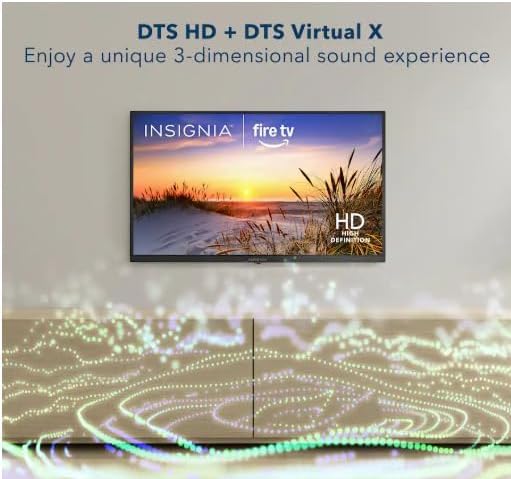
Sound is the weak spot. The two speakers (each maybe 2.5 watts) produce thin audio. Dialogue is clear enough at low volume, but when you crank it up to fill a medium bedroom, it distorts. You’ll notice this most during action movies or shows with heavy background music. A soundbar would help, but at that point you’re doubling the cost. Many owners just use Bluetooth headphones—the TV supports them via the remote’s Bluetooth connection. That works well.
One small annoyance: there’s no Ethernet port. Wi-Fi only. If your router is far away and the signal is weak, you might get buffering. The TV uses 802.11n, not the newer Wi-Fi 5 or 6, so it’s not the fastest. For most streaming, it’s fine; just don’t expect flawless 4K streams (not that this TV does 4K anyway).
Pros and Cons
Pros
Price is the lowest you’ll find for a Fire TV – At $79.99, nothing else from a major brand has the same built-in OS for this little.
Fire TV integration is smooth – No dongle to lose, no separate remote. Everything is one box.
Alexa voice remote is genuinely handy – For launching apps and searching, it saves time over typing with a D-pad.
Plenty of free content out of the box – Freevee and the live TV tab give you a lot to watch without a subscription.
Compact size and light weight – Easy to fit in tight spots and easy to move around.
Cons
Only 720p resolution – If you’re used to 1080p or 4K on a larger screen, this will look soft. Text on small icons can be a bit fuzzy.
Weak built-in speakers – Volume is adequate at best. You’ll likely want external audio for a decent experience.
No Ethernet port – Wi-Fi only, and it’s older Wi-Fi standard. Unstable network can cause buffering.
Slower processor – Menus and app loading take a few extra seconds compared to a Fire Stick 4K. It’s not sluggish, but it’s not snappy either.
Limited viewing angle – Colors and contrast drop off sharply if you’re not sitting directly in front. Not great for groups spread out.
Advantages
When comparing the Insignia 32 inch Fire TV vs Toshiba Fire TV of the same size, the Insignia is usually $10–$20 cheaper. The Toshiba might have slightly better color accuracy, but for a secondary room, you likely won’t notice. The Insignia also includes the exact same Fire TV platform and Alexa remote. The biggest advantage is simply the price—it’s the best budget Fire TV for bedroom use because you’re paying for the software, not the panel.
Another edge: the Insignia is widely available at Best Buy and Amazon, so returns are easy. The 4.1-star average rating from hundreds of buyers tells you most people are satisfied for what they paid. For an affordable smart Fire TV for small spaces, you really can’t beat it at this price point.
Who Should Buy
Buy it if you need a cheap TV for a bedroom, guest room, dorm, or kitchen and you’re okay with 720p.
Buy it if you already use Amazon services and want a simple, integrated streaming experience without extra gadgets.
Skip it if you want a sharp picture for movies or gaming—look at a 1080p or 4K model instead. For around $150 you can get a 32-inch 1080p set from TCL or Hisense.
Skip it if you need good audio from the TV itself. You’ll have to budget for a soundbar, which makes the total cost similar to a better TV.
Skip it if you plan to mount it in a large room where you’ll sit far away—the 720p resolution will look noticeably soft at 8+ feet.
FAQ
Is the Insignia 32 inch Fire TV worth it?
Yes, if you want a no-fuss streaming TV for a secondary room at the absolute lowest price. The 720p resolution and weak speakers are real compromises, but for $79.99, you get a fully functional Fire TV that works right out of the box.
Does the Insignia 32 inch Fire TV have an Ethernet port?
No, it does not. You have to connect it to the internet via Wi-Fi (802.11n). If your Wi-Fi signal is weak in the room, you might experience buffering. Some users solve this with a Wi-Fi extender.
Can I use Bluetooth headphones with this TV?
Yes. The Alexa voice remote has Bluetooth built in, so you can pair Bluetooth headphones directly to the remote. That’s the best way to get private, decent-quality audio without the TV’s weak speakers.
Is the Insignia 32 inch Fire TV good for gaming?
Not really. It’s a 720p 60Hz panel with noticeable input lag. Older consoles like a Nintendo Switch or a Wii work okay for casual play, but competitive gaming will feel sluggish. Fine for a child’s first console, not for a serious gamer.
How long does the Insignia 32″ Fire TV typically last?
LED TVs in this price range usually last 3–5 years before issues like dead pixels or backlight dimming appear. The Fire TV software gets updates for several years, but the hardware is budget-level. With normal use, you’ll likely replace it before it fails completely.
Does the Insignia 32 ” smart TV support HDR?
No. This is a standard dynamic range (SDR) 720p panel. HDR content (like from Prime Video or Netflix) will play in SDR. The TV simply ignores the HDR metadata. If HDR matters to you, you need a more expensive model.
Final Verdict
The Insignia 32″ Fire TV is the obvious choice when your primary criterion is “cheapest possible Fire TV.” It delivers exactly what the price promises: a basic smart TV that streams, fits in small spaces, and doesn’t ask for more. You’ll trade resolution and sound for that low price, and for a bedroom or kitchen, that’s a fair trade.
If you need a secondary TV and your budget is tight, buy it. Just know you’ll be living with 720p and tinny audio. That’s the honest deal with this Insignia Fire TV review: it’s not perfect, but it’s perfectly fine for what it costs.
The Insignia 32″ Fire TV sits near the bottom of the price chart for small smart TVs, usually landing around $80. It’s the cheapest way to get Amazon’s Fire TV platform on a 32-inch screen, which makes it an obvious pick for spare bedrooms, dorms, and kitchen counters. But it’s not the only game at this price — Toshiba sells its own Fire TV model at this size, Amazon has its own 2-Series, and Roku fans have the TCL S3. Here’s how the Insignia holds up and where you should spend your cash.
Product
Price Range
Key Strength
Key Weakness
Best For
Insignia 32″ Fire TV
Budget (~$80)
Lowest price with Alexa voice remote included
Stiff remote buttons, mediocre contrast
Strict budget shoppers who want Fire OS
Toshiba 32″ Fire TV
Budget (~$90)
Smoother motion handling, nicer remote feel
Costs $10–20 more for modest gains
Fire TV users who watch sports or action
Amazon Fire TV 2-Series 32″
Budget (~$90)
Direct Amazon warranty and support
Same panel limits, rarely hits $80
Prime members who want easier returns
TCL 32″ S3 Roku TV
Budget (~$80)
Simpler interface, excellent remote
No Alexa, fewer Amazon perks
Roku loyalists or anyone tired of ad-filled menus
Insignia 32″ Fire TV vs Toshiba 32″ Fire TV
This is the most direct comparison because both use the exact same Fire TV platform and both include an Alexa voice remote. They’re both 720p, which is standard at 32 inches and no knock against either. The difference comes down to motion and feel. Toshiba’s processing handles fast panning — think hockey, car chases, or Marvel fight scenes — with noticeably less judder. The Toshiba remote also has a crisper button feel; the Insignia’s remote buttons are stiffer, almost like they haven’t been broken in. But the Insignia is routinely $10 to $15 cheaper. If you’re equipping a guest room where nobody will notice motion artifacts, save the cash. If you’re buying for your own bedroom and you watch a lot of sports, the Toshiba is worth the extra.
Insignia 32″ Fire TV vs Amazon Fire TV 2-Series 32″
Amazon’s own 2-Series 32″ is the closest rival from a brand perspective, and on paper they’re nearly identical. Both run Fire OS, both include an Alexa voice remote, both top out at 720p. The main difference is who you deal with if something breaks. Amazon’s warranty process is straightforward — you chat with Amazon directly, they send a replacement. With Insignia, you’re going through Best Buy’s support, which is slower and more frustrating. The 2-Series also feels a hair sturdier around the bezel; the Insignia flexes a bit if you grip it from the top. But the 2-Series rarely drops below $90, while the Insignia hits $80 or less regularly during sales. For a rental property or a kid’s room where the TV might get bumped, the Amazon set is the safer pick. For a guest room that nobody touches, the Insignia saves you money.
Insignia 32″ Fire TV vs TCL 32″ S3 Roku TV
This isn’t a battle of picture quality — both are budget 720p panels with similar brightness and color. It’s a battle of platforms and remotes. The TCL runs Roku, which gives you a cleaner home screen with fewer ads, a simpler settings menu, and a remote that’s widely considered the best in the budget category. The Insignia’s Fire OS gives you deeper Amazon integration: hands-free Alexa, tighter Prime Video suggestions, and access to Amazon’s free ad-supported channels without extra clicks. But Fire OS also crams sponsored rows and promoted apps into your face constantly. The TCL is the better pick if you just want a TV that stays out of your way. The Insignia is the better pick if you want to bark “Alexa, play The Boys” while you’re making coffee and have it just work.
So who should buy the Insignia 32″ Fire TV? Someone who wants the absolute cheapest Fire TV for a secondary room and doesn’t mind a stiffer remote or a slightly more fragile bezel. You’re trading a few dollars for slightly less polish, and that’s a fair deal. But if you watch a lot of fast-action content, spend the extra $10 on the Toshiba. And if you’re sick of Amazon pushing shows in your face, get the TCL S3 with Roku instead. That TV will annoy you less over the long haul.
Ready to decide on the Insignia 32" Fire TV?
See today’s price, stock and delivery options on Amazon.