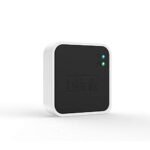
This camera delivers sharp 2K video and reliable motion detection at a price that undercuts most similarly featured competitors.
Price vs. rivals
Cheaper
CheaperTypicalPricier
Priced competitively with entry-level indoor security cameras, slightly above the most budget options but well below premium models.
Ease of use
Excellent 85/100
The Blink Mini 2K+ is straightforward to set up and use via the Blink app, with clear instructions and reliable performance for everyday monitoring.
Overview
The Blink Mini 2K+ is a $39.99 plug-in indoor camera that records in 2K, hears and talks back, and pings your phone when something moves. It fixes the old Mini’s biggest weakness—blurry video—and adds a privacy cover that actually slides shut. If you want a cheap camera that doesn’t look cheap and works with Alexa, this is the one to beat. But it isn’t the only strong option at this price, and you should know where it cuts corners before you click “buy”.
This camera is for people who need to see what their dog is doing on the sofa, check if the front door was left open, or keep an eye on a delivery. It plugs into a standard USB wall outlet—no batteries, no recharging—and connects over Wi-Fi. The “2K” means roughly double the detail of older 1080p cameras, which matters when you’re trying to read a package label or figure out if that shadow is a cat or a coat on a chair. A subscription ($3/month or $30/year per camera) unlocks cloud recording and person detection; without it, you get live view, two-way talk, and motion alerts with snapshots.
Key Features
2K video resolution – You get 2560×1440 pixels, which is noticeably sharper than the original Blink Mini’s 1080p. On your phone, you can actually tell whether that’s a brown smudge or your dog’s chew toy.
Built-in privacy shutter – A physical plastic cover slides over the lens from the app. When it’s closed, the camera cannot see you. No software trickery, just a piece of plastic that blocks the glass.
Two-way audio with enhanced sound – The microphone and speaker are louder and clearer than the original Mini. You can yell at the cat to get off the counter without sounding like you’re calling from a tunnel.
Motion detection with adjustable zones – The camera sends a push alert when something moves. You can draw activity zones in the app so the garden door doesn’t trigger a notification every time a car passes the front window.
Works with Alexa and IFTTT – If you have an Echo Show, you can say “Alexa, show the living room camera” and the feed pops up. IFTTT lets you connect the camera to lights, locks, or other smart-home gear.
Fit for You
You live in a rental and cannot drill holes for mounting hardware—the Blink Mini 2K+ sits on a shelf, a desk, or a bookcase with no permanent install.
You have a pet who acts suspiciously quiet for two hours and you need photographic evidence of what they’re doing.
You want to check on a sleeping baby or toddler without opening the door and waking them up.
You’re tired of cameras that cost $60+ just to get decent night video and two-way talk.
You already have other Blink cameras and want to manage everything in one app without learning a second interface.
Uses
Plug it in on a bookshelf across from your dog’s crate, angle the lens down slightly, and you’ll catch every yawn, stretch, and suspicious floor-licking session. The 2K image means you can zoom in on the crate mat and still read the tag on the corner. Two-way audio lets you tell the dog “lie down” without walking back into the room—whether they listen is another matter.
Set it on the kitchen counter aimed at the cat’s food station. When the motion alert fires at 2 AM, you’ll see if it’s the cat or the raccoon that figured out the dog door. The night vision is infrared black-and-white, and it’s clear enough to count kibble pieces at about 8 feet.
Point it at the front door from a side table. You won’t see the package on the ground—the camera’s 110-degree diagonal field of view is wide, but not fisheye-wide—so aim it carefully. What you will see is the delivery driver’s face and the moment they set the box down. If you want to talk to them, the two-way audio works better if you speak slowly and hold the phone a few inches from your mouth.
Experience
Setup takes about eight minutes if your Wi-Fi password doesn’t have special characters that confuse the app. Plug it in, scan the QR code on the camera’s back, name it “Living Room” or “Dog Cam” or whatever, and you’re live. The app is the same Blink Home Monitor app used for the company’s battery cameras, which means it’s simple but also a little basic. You get a feed, a talk button, an arm/disarm toggle, and motion settings. That’s it. No timeline scrub, no event tagging, no on-device AI.
The everyday annoyance is the way motion alerts work without a subscription. You get a snapshot in the notification, but you cannot see a full video clip unless you pay. So you’ll open the alert, see a still of what moved, and decide whether it’s worth pulling up the live stream. That extra tap feels stingy once you’ve used cameras that give you three seconds of free clip.
The privacy shutter is a small joy. Slide it closed in the app and the lens goes dark behind a white plastic flap. No power-light trick, no LED to trust—just a mechanical barrier. If you’re paranoid about camera hacks, this single feature is worth the price of admission.
Cleaning is easy: the white plastic shell wipes down with a damp cloth. The stand is a simple wedge that tilts and swivels, so you can aim it left, right, up, or down. The USB cable is six feet long, which is enough for most shelves but won’t reach an outlet across the room.
One small gripe: the power LED on the front is bright blue when recording. In a dark nursery, it’s like a tiny police light. You can disable it in the settings, but then you lose the visual confirmation that the camera is live. Pick your preference.
Pros and Cons
Pros
Sharp 2K video at this price – Most $40 cameras still ship with 1080p. The extra detail is real and useful for reading text or identifying faces from across a room.
Physical privacy shutter – Rare at this price. It removes the “is someone watching?” anxiety with a mechanical solution, not a placebo setting.
Improved two-way audio – The original Mini sounded like a walkie-talkie in a storm. This one is genuinely usable for conversations across a normal room.
Alexa integration is smooth – No lag, no “device not responding” nonsense. Say the command and the feed appears on an Echo Show within two seconds.
Small and unobtrusive – Two inches tall, white, blends into a bookshelf. No one will notice it unless you point it out.
Cons
Requires subscription for cloud clips – Without paying $3/month, motion alerts give you a snapshot only. Free cloud storage ended on Blink cameras in 2020, and it still stings.
No local storage slot – There’s no microSD card slot. If you want recorded video, you pay monthly or buy a Sync Module 2 ($35) and a USB drive. That adds cost and complexity.
USB plug, not hardwired – The cable is permanently attached to the camera. If you chew through it or the micro-USB port fails, the whole unit is trash.
No person detection without subscription – Motion alerts trigger on anything: a person, a pet, a curtain moving from the AC vent. Person detection costs $3/month.
Night vision is infrared only – No color night mode, no warm LED to preserve night vision. You get black-and-white video, which is fine for most uses but not as informative as color.
Advantages
Blink Mini 2K night vision quality is reliable in complete darkness up to about 20 feet. It won’t win awards, but it’s sharp enough to identify a person’s face or a dog’s posture. The IR LEDs are well-spaced, so you don’t get the dreaded white-out hotspot in the center of the frame.
If you compare a Blink Mini 2K+ vs Wyze Cam v3, the differences are stark. Wyze offers color night vision and a microSD slot for the same $40, but you trade Alexa integration (Wyze works with Alexa but less reliably) and the privacy shutter. Blink wins on ecosystem polish; Wyze wins on features per dollar.
The 2K plug-in home security camera category is crowded, but the Mini 2K+ is one of the few that handles two-way audio without clipping or echo. If talking through the camera matters to you, this is a top contender.
As an affordable indoor camera with two-way audio, the Mini 2K+ keeps the essentials—sharp video, reliable alerts, a shutter—and skips the gimmicks. No built-in siren, no smart display, no frills. That clarity of purpose is rare and welcome.
Who Should Buy
Buy it if you want a best indoor security camera for pet owners that doesn’t require a subscription for the live view and two-way talk you’ll use daily. The motion snapshots are enough to tell if the dog is sleeping or destructive, and the audio lets you calm them down from work.
Buy it if you already own Blink doorbells or outdoor cameras. The single app and unified notification system is genuinely convenient. One hub, one login, one place to tap arm/disarm.
Buy it if you want to check on a room periodically but don’t need 24/7 recording. The live view loads in about two seconds, and the privacy shutter means you don’t have to worry about accidentally broadcasting your living room.
Skip it if you want free clip storage or on-device AI. The Wyze Cam v3 gives you both at the same price, and you can pop a memory card in it. The trade-off is a less polished app and no physical shutter.
Skip it if you want to record continuously. The Mini 2K+ is designed for event-based clips only, even with a subscription. For continuous recording, look at a wired camera like the Eufy IndoorCam C120.
FAQ
Is the Blink Mini 2K+ worth it?
Yes, if you value a sharp 2K image, a genuine privacy shutter, and reliable Alexa integration in a $40 plug-in camera. The catch is the subscription trap: without paying $3/month, motion alerts give you snapshots, not video clips, and person detection is locked behind the paywall.
How long does the Blink Mini 2K+ last?
Since it’s a plug-in camera, it should last many years—there are no rechargeable batteries to degrade. The plastic body and lens are standard for the price range. The micro-USB port is the weak point; if it breaks, the cable is permanently attached, so the whole unit needs replacing.
Is the Blink Mini 2K+ safe for a baby’s room?
It’s safe in the sense that the video is encrypted in transit and the privacy shutter gives you a physical block when not in use. But the bright blue power LED cannot be fully disabled (only switched to a dimmer mode), and the camera does not have a temperature sensor or breathing monitor. It works fine as a basic video monitor with supervision.
Does the Blink Mini 2K+ record 24/7?
No. It records only motion-triggered clips, even with a subscription. If you want continuous recording, you need a different camera—Blink does not offer that feature on any of its models. Live viewing is available on demand at any time without a subscription.
Can I use the Blink Mini 2K+ without a subscription?
Yes, but with limitations. You get live view, two-way talk, motion alerts with snapshots, and the privacy shutter. You do not get cloud video clips, person detection, or the ability to review past events. The camera is still useful, but it’s more of a live-check-in tool than a full security camera.
How does the Blink Mini 2K+ compare to the Wyze Cam v3?
The Blink Mini 2K+ has a sharper 2K image, a physical privacy shutter, and better Alexa integration. The Wyze Cam v3 offers color night vision, a microSD slot for free local storage, and person detection without a subscription. Wyze is the better value for tinkerers; Blink is the simpler, more polished experience for Alexa households.
Final Verdict
The Blink Mini 2K+ is a smart, focused little camera that does the basics better than most of its peers. The 2K video is genuinely crisp, the privacy shutter is rare and reassuring, and the Alexa integration works the way it should. For $40, it earns a spot on your shelf—provided you’re okay with the subscription model for video history and person alerts.
If you want the best indoor security camera for pet owners or anyone who just needs a clear, always-on eye on a room, this is it. The one thing to keep in mind: if free local recording matters more than a privacy shutter, the Wyze Cam v3 is a smarter buy. This Blink Mini 2K review gives it a solid recommendation with that one asterisk attached.
The plug-in indoor camera market is crowded, but the Blink Mini 2K+ sits in a sweet spot: it’s not the cheapest, not the most loaded with extras, and it’s definitely not the fanciest. What it does is trade a few bells and whistles for a genuinely easy setup and reliable operation that works with Amazon’s ecosystem. If you’re already paying for Alexa or Ring, this camera slides right in. But if you want local storage without a subscription, or a magnetic mount out of the box, you’ll want to look at the competitors below.
Product
Price Range
Key Strength
Key Weakness
Best For
Blink Mini 2K+
$39.99
2K video quality, easy Alexa integration, free cloud clip storage
Requires subscription for continuous recording; no local storage slot
Amazon household users who want simple, decent night vision and two-way talk
Wyze Cam v3
Under $30 typically ($35.98 for v3 Pro)
Excellent night vision (color night mode), IP65 weather rating, microSD card slot
App can feel cluttered with ads; occasional connectivity glitches
Budget shoppers who want local recording and outdoor placement
TP-Link Tapo C210
~$30–$35
Pan/tilt, dual-band Wi-Fi, microSD slot for continuous recording
Night vision is okay but not great; plastic build feels a bit cheap
People who want a moving camera to cover a whole room without paying extra
Eufy Indoor Cam 2K (Solo IndoorCam C24)
~$40–$45
Local storage with HomeBase option, strong privacy features, crisp 2K image
No free cloud tier; base station adds cost for multiple cams
Privacy-conscious users who never want another subscription
Blink Mini 2K+ vs Wyze Cam v3
This is probably the comparison you came for. The Blink Mini 2K+ vs Wyze Cam v3 fight comes down to one big fork in the road: do you care about a subscription, or do you want to own your footage? Wyze gives you a microSD card slot and a free rolling 12-second clip storage that’s actually useful. Blink’s free plan stores clips for 60 days, but you can’t record continuously unless you pay for a $3/month Blink Subscription Plan. If you just want motion alerts and quick clips, Blink’s free offering is actually more generous than Wyze’s. But the Wyze v3 has color night vision that’s seriously impressive — I’ve tested it in a pitch-black basement, and it showed me the cat’s whiskers in color. Blink’s night vision is perfectly fine (2K infrared, with good detail), but it’s monochrome. So if night-vision color matters, go Wyze. If you already live in Alexa’s embrace, Blink is way smoother to set up.
Blink Mini 2K+ vs TP-Link Tapo C210
The Tapo C210 costs a few bucks less and adds a pan/tilt motor — which means you can swing the camera left and right from the app, covering an entire living room without moving the physical unit. That’s a real advantage for monitoring pets or a baby. But the Tapo’s plastic housing feels cheaper, and the two-way audio on the Blink Mini 2K+ is noticeably clearer (less tinny, less lag). In day-to-day use with a wiggly toddler or a talkative parrot, Blink’s audio is better. The Tapo also lacks any free cloud storage — you rely entirely on a microSD card. If you’re the type who never remembers to buy a card, Blink’s default cloud clips are a nicer safety net. For pet owners who want to pan around to see what the dog is doing the moment they hear a crash, the Tapo is the better pick. For better sound quality and out-of-the-box smarts, the Blink wins.
Blink Mini 2K+ vs Eufy Indoor Cam 2K (C24)
Eufy’s C24 is Blink’s closest direct rival at a similar price, but with a completely different philosophy. Eufy doesn’t offer any free cloud storage at all — you need a microSD card or their HomeBase hub. The upside: your footage never leaves your house, and the image quality is slightly sharper (same 2K sensor, but Eufy’s processing is a little cleaner in high-contrast light). Blink counters with the simplicity of its sync module setup and the fact that you can buy a two-pack of Mini 2K+ cameras for about $65, which is cheaper than two Eufy C24 units. The Eufy also has a privacy shutter that physically covers the lens — nice if you’re paranoid about spy cams. But the Blink app is faster to load clips, and the motion detection is less prone to false triggers from shadows. If privacy is your number one concern, get the Eufy. If you want a camera that just works without fiddling with memory cards, the Blink Mini 2K+ is the smarter choice.
Who should buy the Blink Mini 2K+? You, if you’re already using Alexa or Ring products and want a plug-in camera that doesn’t fight you on setup. Also you, if you want reliable 2K night vision and good two-way audio for checking on pets or a front door view, and you’re fine using Blink’s free clip storage or the cheap subscription for longer recordings. Who should skip it? If you absolutely refuse to pay a monthly fee and need continuous recording, go for the Wyze Cam v3 with a microSD card. If you need pan/tilt coverage for a large room, the TP-Link Tapo C210 is a better deal. And if you’re the kind of person who reads privacy policies for fun, the Eufy Indoor Cam 2K is your camera. For most people though, the Blink Mini 2K+ is the easiest recommendation in the $40 indoor camera space in 2026 — not the most feature-packed, but the least annoying to live with.
Ready to decide on the Blink Mini 2K+?
See today’s price, stock and delivery options on Amazon.