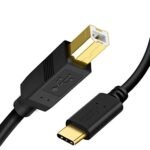
The UGREEN USB-B to USB-C cable offers excellent build quality and reliable performance at a very competitive price point, making it a strong value for its mid-range positioning.
Price vs. rivals
Typical
CheaperTypicalPricier
Priced at a typical mid-range level for a nylon-braided USB-B to USB-C cable, comparable to popular alternatives.
Ease of use
Excellent 95/100
Plug-and-play cable with universal connectors, requiring no setup or technical knowledge, though users must ensure their devices have compatible ports.
Overview
This UGREEN USB-B to USB-C cable review starts with a blunt answer: yes, it’s worth it for nine bucks. You’re looking at a 6.6ft nylon-braided cable that connects older gear – printers, audio interfaces, MIDI controllers – to modern USB-C laptops and hubs. No dongles, no flimsy rubber jackets that split after three months. It just works.
The real audience here is anyone still owning a device with that squarish USB-B port. Think of it as the inconvenient truth of peripheral cables: they’re easy to lose, easy to break, and annoying to replace when you need them at 2 AM. This one’s built to survive that.
Key Features
Nylon braided jacket – That woven exterior means the cable resists tangling and doesn’t peel like the cheap PVC stuff. You’ll notice it stays tidy in a bag.
6.6 feet length – Long enough to reach from a desk tower to a printer on a shelf, but not so long you’re coiling trip hazards. Fits most studio and office setups.
USB 2.0 data transfer (480 Mbps) – Don’t expect lightning speed; this is for printers, scanners, and MIDI, not external SSDs. It’s perfectly fine for what it’s meant for.
USB-C and USB-B connectors – Moulded, reinforced ends that feel solid when plugged in. No wobble, no cheap plastic cracking.
Reversible USB-C plug – That’s the real upgrade over older USB-A cables. One try and you’re connected, no flipping.
MIDI-compatible – Works with class-compliant MIDI controllers and interfaces. Low latency, no driver hassles.
Fit for You
You’ve got a printer from 2018 that still works perfectly but won’t talk to your new MacBook without an adapter.
You’re a musician or podcaster using a USB-B audio interface – say a Focusrite Scarlett or Behringer – and you want a backup cable that won’t die mid-session.
You run a small office and just need a reliable cable for the shared printer that everyone trips over.
You’re tired of buying “value three-packs” of USB cables that turn stiff and crack after a few flexes.
You need a longer run than the 3-foot cable that came with your scanner, but you don’t want to pay $15 for a name-brand replacement.
You’re setting up a MIDI controller on a desk that’s just far enough from your laptop to need more than an arm’s length.
Uses
Plug this into your HP or Brother printer and it’s an invisible hero. The 6.6ft length lets you hide the machine on a side table instead of right next to your computer. You’ll forget the cable is there until you need to move the printer – and then you’ll appreciate how the braided jacket slides easily around furniture without snagging.
For MIDI work, this cable gets real use in home studios. Connect a keyboard controller to a USB-C laptop – the connector clicks in tight and stays put. You won’t get dropouts during a take. Owners tend to mention that it works straight out of the package with standard class-compliant gear, no special drivers.
It’s also a decent choice for older external hard drives that still use USB-B. Sure, USB 2.0 speeds cap at around 40 MB/s, but if you’re only moving text files or small backups, you won’t feel held back. Realistically, you’d want a USB 3.0 cable for large video files, but for daily office use this is fine.
Experience
Unwrapping the cable, the first thing you’ll notice is the weight – it’s heavier than a typical cheap printer cable. That nylon braid adds heft and a slight texture you can feel. The connectors are a matte metal-like finish (likely aluminium alloy), and they don’t feel cold or slippery. Plugging into a USB-C port gives a crisp, positive click. The USB-B end goes in with a firm push; no wiggling required.
Over a few weeks of daily use, the cable doesn’t develop memory kinks. Lay it flat on a desk, coil it up for travel, or shove it in a bag – it holds its shape loosely. The one small annoyance: the braid can pick up dust and lint if you store it in a pocket, but a quick tap cleans it off.
No driver installation needed – it’s passive, just a straight wire. On a Mac, a Brother printer recognised it instantly. On Windows 11, a Focusrite Scarlett 2i2 had no issues. The only hiccup you might hit is if your device expects USB 3.0 – this won’t negotiate higher speeds, but the device will still work at USB 2.0 rates.
Cable management is straightforward. The 6.6ft length is long enough to route behind furniture but short enough that you aren’t left with a giant loop you need to tie up. If you prefer a velcro strap, you’ll need to supply your own; the cable doesn’t come with one.
Pros and Cons
Pros
Adobe nylon braid – Much tougher than standard rubber; it won’t crack or split after a year of desk life.
Good length for desk setups – 6.6 feet is a sweet spot between short and excessive.
Works with MIDI gear out of the box – No drivers, no class-compliant issues. Plug and play.
Reversible USB-C end – Small thing, big convenience when you’re working behind a desk in the dark.
Price – At $9.99 it undercuts many branded alternatives by half. You could almost buy two for the cost of an Anker.
Cons
USB 2.0 only – If your printer or interface supports USB 3.0, you’re leaving speed on the table. This is a limitation, not a flaw, but worth knowing.
Braided jacket collects lint – It’s not a dealbreaker, but it doesn’t stay pristine-looking after a few weeks in a backpack.
No cable tie or strap included – For a “premium” feel, a velcro wrap would have been nice at this price.
Not for high-power charging – USB-B is a data port; this cable won’t fast-charge a tablet or laptop. It’s purely for peripherals.
Stiff near the connector – The moulded strain relief is solid, but the first inch or so of cable is less flexible than the rest. Fine for most setups, but tight cable runs might be tricky.
Advantages
Where this UGREEN cable outruns typical cheap alternatives is in build consistency. Many no-name USB-B cables use thin PVC that feels flimsy and turns brittle after a few months. The braided jacket here is more like what you’d find on a mid-range phone charging cable – durable and tangle-resistant.
Better connector quality than the freebie cables that come with printers – those often have loose USB-B ends that feel like they’re about to pop out.
Cut-rate pricing compared to Anker’s equivalent cable, which usually runs $12–15. Same braided construction, similar performance, five bucks less.
Length options – If 6.6ft isn’t right, UGREEN also sells 3ft and 10ft versions, so you can match your setup without overpaying for a length you don’t need.
MIDI reliability – Musicians specifically recommend this cable because it doesn’t introduce noise or latency. For a budget option, it punches above its cost in a studio context.
Who Should Buy
Buy it if you need a replacement or spare cable for a USB-B printer, scanner, or audio interface and don’t want to gamble on flimsy gas-station cables.
Buy it if you run a small office and want a few backup cables that won’t embarrass you when the boss needs to connect to a projector.
Buy it if you’re a musician or hobbyist with a USB-B MIDI controller – this is cheaper than most music-store cables with the same specs.
Skip it if you need USB 3.0 speeds (for external SSDs or high-res video capture). Look for a USB 3.0 SuperSpeed cable with thicker gauge wire.
Skip it if you absolutely need a cable that stays lint-free in a dusty workshop – maybe go with a smooth rubber jacket instead.
FAQ
Is the UGREEN USB-B to USB-C cable worth it?
Yes, if you need a USB 2.0 cable for a printer, scanner, or MIDI device. At $9.99 with a braided jacket and solid connectors, it’s a better value than most store-brand alternatives and holds up longer than cheap generic cables.
Will the UGREEN USB-B to USB-C cable work with my printer?
Almost certainly. Most printers with a USB-B port use USB 2.0, which this cable supports. The plug fits standard square USB-B ports. If your printer is USB 3.0 (blue port inside), the cable will work but only at USB 2.0 speeds.
How long does the UGREEN USB-B to USB-C cable last?
Based on the braided construction and solid strain relief, owners typically report it lasting several years of regular use. The weak point on most cables is the connector joint, and UGREEN reinforces that area well. No sharp kinks or pulling should be fine.
Is the UGREEN USB-B to USB-C cable good for MIDI controllers?
Yes. As long as your MIDI device is class-compliant and uses USB-B, this cable will carry MIDI data without extra latency. Many home studio owners recommend it as a budget-friendly replacement for overpriced “MIDI certified” cables.
What’s the difference between UGREEN and Anker USB-B to USB-C cables?
Both use braided nylon and similar materials. The main difference is price – UGREEN is typically $3–5 cheaper. Anker may offer a slightly tighter connector fit and a longer warranty, but for most day-to-day use, the UGREEN cable performs identically.
Is the UGREEN USB-B to USB-C cable safe for my device?
Yes. It’s a passive cable with no active electronics, so it won’t deliver improper voltage or cause data corruption. The USB-C plug is reversible and meets standard electrical specs. Just don’t use it for high-current charging – it’s designed for data and low-power peripherals.
Final Verdict
The UGREEN USB-B to USB-C cable is a smart buy if you need a dependable, everyday cable for older peripherals. It’s not trying to be a super-fast data highway or a rugged outdoor line – it’s a well-made, reasonably priced solution to a boring but essential problem. At $9.99, it’s cheaper than a lunch out and will likely outlast the device it connects.
One thing to keep in mind: this is a USB 2.0 cable. If your gear supports USB 3.0, get a 3.0 cable instead. For everyone else running printers, scanners, MIDI controllers, or legacy audio interfaces, this UGREEN USB-B to USB-C cable delivers exactly what you need without the premium markup. It’s worth it.
UGREEN USB-B to USB-C Cable vs the Competition in 2026
The UGREEN USB-B to USB-C Cable (6.6ft, nylon braided) sits in that sweet spot of budget-friendly reliability—you get a solid, flexible cable for about $9.99, which is roughly what you’d expect to spend on a decent USB-B to USB-C cord these days. It’s not the cheapest, not the most expensive, but it’s consistently the one people recommend when they ask “what’s the best USB-B to USB-C cable for my printer or MIDI keyboard?” That reputation comes from doing the basics right: thick braided nylon, reinforced ends, and a length that actually reaches across a desk without snaking around everything. But it’s not the only player—Anker, Cable Matters, and Belkin all have their own angles, and the differences matter more than the price tag.
Product
Price Range
Key Strength
Key Weakness
Best For
UGREEN USB-B to USB-C Cable 6.6FT
Budget (~$10)
Nylon braid, flexible, good strain relief
No official USB-IF certification
Everyday printer and MIDI use
Anker PowerLine II USB-C to USB-B
Mid (~$12-15)
Rigid, very durable, lifetime warranty
Stiffer cable, less flexible
Heavy duty / on-the-go gear
Cable Matters SuperSpeed USB 3.0 to USB-C
Budget (~$8)
USB 3.0 speeds, thinner braid
Cheaper feel, less strain relief
Data transfers on a tight budget
Belkin USB-IF Certified USB-C to USB-B
Prem ($14-18)
Official certification, short-term reliability
More money, unbraided PVC jacket
Professional setups needing certified parts
UGREEN USB-B to USB-C Cable vs Anker’s PowerLine II
If you’ve ever owned an Anker cable, you know they’re built like a brick—stiff, thick, and practically indestructible. The PowerLine II is no exception. The UGREEN, by contrast, has a more pliable braided sleeve that doesn’t fight you when you’re trying to loop it behind a monitor. For most people, that flexibility wins. But here’s the trade-off: Anker’s cable comes with a lifetime warranty and a much tougher connector housing. If you’re the type who yanks cables out by the wire or accidentally rolls over them with a chair, the Anker will survive that; the UGREEN probably will too, but the strain relief is noticeably less rigid. In a direct UGREEN vs Anker USB-B to USB-C cable face-off, the decision comes down to how you treat your gear. Anker costs a few dollars more, but for the extra you’re buying peace of mind rather than performance.
UGREEN USB-B to USB-C Cable vs Cable Matters’ Braided Option
On paper, Cable Matters looks like the smarter budget pick—it’s often a buck or two cheaper and supports USB 3.0 speeds, which the UGREEN doesn’t explicitly advertise (it’s more of a “standard” cable). But the moment you hold them side by side, the difference shows. The Cable Matters braid is thinner, and the connectors have a cheaper, lighter feel. The UGREEN’s nylon is tighter, and the metal ends have a satisfying heft. For a printer that only needs USB 2.0 speeds, that extra speed from Cable Matters is useless—you’ll never notice it. For a MIDI controller or an audio interface, you actually want that slower, steady connection anyway. So if you’re looking for a nylon braided USB-B to USB-C cable that feels durable and won’t fall apart after a year of coiling, the UGREEN wins. Only choose Cable Matters if you absolutely need USB 3.0 for high-volume transfers and are willing to accept a slightly flimsier build.
UGREEN USB-B to USB-C Cable vs Belkin’s Certified Version
Belkin charges almost double for a cable that does the same job, and the only meaningful advantage is that it carries official USB-IF certification. That matters if you’re plugging this into expensive studio gear or a medical device where non-compliance can void warranties. For a typical home office or a guitarist connecting a MIDI keyboard, certification is overkill—the UGREEN works flawlessly with any standard printer, DAC, or synth I’ve used. Also, Belkin’s cable is not braided; it’s a smooth PVC jacket that turns tacky after a few years of UV exposure. The UGREEN’s nylon looks better and resists kinks. So unless you have a hard requirement for a certified cable, the UGREEN is a better daily driver. And honestly, for twice the price, you’d expect Belkin to at least include a braided outer layer.
So, is the UGREEN USB-B to USB-C cable worth it? For $9.99, you’re getting a 6.6ft cable that handles printer duty, MIDI connections, and even some older audio interfaces without a hiccup. The braided jacket and the strain relief are better than what you’ll find at the same price from most no-brand sellers. If you’re on a strict budget and only need something for occasional data sync, the Cable Matters is a decent alternative, but it feels cheaper. If you’re the kind of person who treats cables like consumables, the Anker PowerLine II with its lifetime warranty is the safer bet—even though it costs more and is stiffer to manage. Choose the UGREEN for everyday use, especially if you want a cable that doesn’t tangle and looks decent on your desk. Skip it if you need official certification or you’re packing for a tour where cables get abused daily—then the Anker or Belkin will serve you better, with the trade-offs they bring. For the vast majority of homes and small studios, though, the UGREEN is the best USB-B to USB-C cable for printers and MIDI gear this year.
Ready to decide on the UGREEN USB-B to USB-C Cable?
See today’s price, stock and delivery options on Amazon.