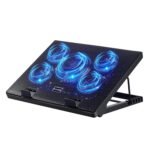
At this price point, the product offers strong performance and reliability for larger laptops, as reflected by its high rating.
Price vs. rivals
Typical
CheaperTypicalPricier
Priced at a typical mid-range level for its size and features.
Ease of use
Excellent 90/100
The cooling pad is straightforward to set up and use, with a simple plug-and-play design and adjustable features that cater to most users.
Overview
This havit cooling pad review gets straight to the point: the HV-F2056 is absolutely worth it if you need a quiet, adjustable cooler for a larger laptop. It won’t win beauty contests, but it nails the basics—strong fans, a solid build, and a price that’s hard to argue with for what you get.
The Havit HV-F2056 is a big, black mesh slab designed to sit under a 15.6 to 17 inch laptop. It uses three large fans to pull hot air away from your machine, which stops throttling (that sluggish feeling when your CPU gets too warm) and saves your thighs from getting roasted if you actually use it on your lap.
This is for the person who owns a “gaming” or workstation laptop with more thermal output than a space heater. You know who you are. It’s also for anyone who wants a stable, ergonomic typing angle without paying for a fancy motorized stand.
Key Features
Three 110mm Fans: Most coolers this size cheap out with two fans or one tiny jet turbine. Havit gives you three big ones. They push a surprising amount of air at a low noise level.
Two USB Ports: One is for powering the pad itself (plug it into your laptop), and the other is a passthrough so you don’t lose a port. Handy for your mouse receiver.
Adjustable Height Settings: Two flip-out feet on the back let you choose a flat angle or a raised one. It’s basic but effective for improving your typing posture on the go.
Large Compatible Surface: It fits 15.6 inch to 17 inch laptops natively. The mesh surface has a slight lip at the bottom to stop your laptop from sliding forward.
Built-in Fan Speed Switch: A single button cycles through fan speeds. There’s no confusing software or RGB bloat—just click for more or less air.
Fit for You
You run a 17 inch gaming laptop that sounds like a jet engine on a desk, and you want to give it better airflow without a total overhaul of your setup.
You work from home and spend 8+ hours hunched over a desk. A slight lift from this pad can make a real difference to your neck strain.
You’re looking for a quiet laptop cooling pad because you record audio or take calls in the same room as your computer.
You want the best cooling pad for 17 inch laptop use that doesn’t cost as much as a game.
You’re comparing the havit hv-f2056 vs topmate options and want something with a simpler, more reliable build over flashy features.
You need a cheap way to extend the life of an older laptop that runs hot just browsing the web.
Uses
Picture this: you’re in the middle of a Baldur’s Gate 3 session, Act 3. Your laptop is begging for mercy. Plop it on the Havit, click the fans to high, and you buy yourself another few hours before the frame rate starts dropping. It doesn’t magically turn a hot laptop into a cool one, but it keeps things stable enough to finish the fight.
For desk use, it’s a solid stand even if the fans are off. The rubber strips grip your laptop and the surface keeps it from sliding around during frantic typing. If you use an external monitor, putting your laptop on this pad lifts the screen to a decent secondary display height.
On the couch or in bed, the flat bottom sits reasonably well on soft surfaces. It won’t sink in as much as a stand with tiny feet. Just don’t block the bottom intake entirely with a blanket—you’ll choke the fans.
Experience
Unboxing is simple. You get the pad, a USB cable, and that’s it. No driver disc. Plug the cable into your laptop, and the fans start spinning. The blue LEDs on the fans are bright enough to see in the dark, which some people like for a subtle glow. Others might find it distracting. There’s no way to turn them off without snipping wires, so keep that in mind.
The mesh surface acts like a giant intake for the fans. You can feel the air being pulled down if you put your hand just above the pad. For your laptop, this means the hot air exhausting out the bottom gets pulled away fast, rather than recirculating around the chassis. The rubber strips across the mesh provide enough grip that pushing your laptop around on a desk won’t shift it.
The power cable is a standard USB-A to Mini-USB cable. It’s long enough to reach a laptop on either side of the pad. One oversight is that the cable comes with a ferrite bead (that little lump near one end), which is good for noise suppression, but the cable itself feels a bit thin. Treat it gently and it’ll be fine.
After a full day of use, the pad itself stays cool. The fans move air through the whole surface well. You might notice the center of the pad gets slightly warm if your laptop runs extremely hot (like an Intel Core i9 under load), but it’s never uncomfortable to touch.
On the lowest fan setting, this is genuinely a quiet laptop cooling pad. You’ll hear a low hum, but it’s less noticeable than the fan noise from most gaming laptops. On high, it’s audible—a solid “whoosh” of air—but it’s a smoother sound than the grind of a tiny laptop fan.
Cleaning is easy because the metal mesh is open. A quick blast of canned air every few months clears the dust bunnies. The plastic housing does show fingerprints and dust, but nothing a quick wipe doesn’t fix. The build is sturdy enough; it doesn’t creak under a heavy 17 inch laptop.
One minor annoyance: the USB passthrough only works at USB 2.0 speeds. It’s fine for a mouse or keyboard, but don’t plug a fast external SSD into it unless you enjoy waiting forever for file transfers.
Pros and Cons
Pros
Three large fans: Moves more air than smaller, single-fan coolers. Your laptop will genuinely run cooler under sustained load.
Good build for the price: The metal mesh and thick plastic frame feel durable enough to survive a few drops or being tossed in a backpack.
Truly quiet on low setting: If noise bothers you, the low setting is barely audible and still moves decent air.
Wide compatibility: It handles almost every 15.6 to 17 inch laptop without overhang or instability.
Cons
Blue LEDs can’t be turned off: If you want a totally dark room, this pad isn’t it. The blue glow is constant while plugged in.
USB 2.0 passthrough: It works, but it’s slow. Don’t plan on using it for anything high-bandwidth.
Plastic construction feels a bit hollow: It’s sturdy enough, but it doesn’t have the premium weight or feel of an all-aluminum stand.
Limited ergonomic range: You get one adjustable height position. It’s better than flat, but not as flexible as stands with a dozen angle clicks.
Advantages
Comparing the havit hv-f2056 vs topmate coolers in the same price bracket, the Havit usually wins on pure fan size and noise level. Topmate often uses smaller fans that spin faster and sound whinier. Havit also keeps the design plain black, which fits into an office setup better than a “gamer” space shuttle look.
Fan count vs. price: Getting three 110mm fans at this price point is rare. Most competitors give you two or use smaller 80mm fans.
Simplicity: No drivers, no RGB software, no gimmicks. It’s a fan, it blows, it works.
Stability: The wide base and rubber grips mean your expensive laptop isn’t sliding off. Some cheaper stands feel wobbly; this one doesn’t.
Most laptop coolers treat the “adjustable height” feature as an afterthought. Some use flimsy plastic clips that snap off. The Havit strikes a nice middle ground. The two flip-out feet are made of thick plastic and snap into place with a solid click. They don’t fold under pressure, even with a heavy laptop on them.
Who Should Buy
Buy this if: You have a 15-17 inch laptop that gets hot during games, video editing, or long work sessions. You want a reliable, quiet cooler that won’t break the bank.
Buy this if: You need a basic ergonomic lift for your laptop at a desk or on the go.
Skip this if: You absolutely need adjustable fan speeds controlled by software or a remote.
Skip this if: You want a premium, all-metal build with a dark room aesthetic (no LEDs). Look at something like the Klim Ultimate instead.
Skip this if: You have a 13 inch or smaller laptop. This pad will be comically oversized for you.
FAQ
Is the havit HV-F2056 cooling pad worth it?
Yes, for most people with a large laptop. It balances price, noise, and cooling performance better than almost any other cooler in the sub-$30 range. Just be aware of the blue LEDs and USB 2.0 passthrough before you buy.
How does the havit hv-f2056 vs topmate compare?
The Havit generally has quieter, larger fans than similarly priced Topmate models like the C302. Topmate sometimes offers more height adjustments, but the Havit tends to move more air with less whine, making it better for quiet environments.
Is it a quiet laptop cooling pad?
On the lowest setting, yes—it’s one of the quieter options for its size. The fan whoosh is low and smooth. On the highest setting, it’s clearly audible but still less annoying than the high-pitched whir of smaller fans found in many competing pads.
Is it the best cooling pad for 17 inch laptops?
It’s one of the best at this price. It fully supports a 17 inch chassis without overhang, and the three fans cover the typical bottom intake vents on large gaming laptops. If budget isn’t an issue, the IETS GT500 blows harder, but the Havit offers the best value.
Does it have a laptop cooling pad with adjustable height?
Yes, it has two flip-out feet that give you one flat position and one slightly tilted position. It’s adjustable, but you only get two angles. It’s effective for basic ergonomics, but not as versatile as a multi-angle stand.
How long does the Havit HV-F2056 last?
Most owners report the fans running well for 2-3 years of regular use. The USB cable is often the first point of failure if you’re rough with it, but the fans themselves use standard sleeve bearings that hold up fine for daily use at a desk.
Final Verdict
The Havit HV-F2056 isn’t a flashy product. It’s a big slab of plastic with fans in it. But it does exactly what it’s supposed to do: cool down a hot laptop reliably and quietly, without demanding a lot of money or desk space.
If you’re on the fence, this havit cooling pad review boils down to a simple recommendation—buy it for a 15.6 to 17 inch laptop that runs warm. The one thing to keep in mind is the blue LEDs. If they don’t bother you, this is easily one of the best deals in laptop cooling right now.
havit HV-F2056 cooling pad vs the Competition in 2026
The market for 17-inch cooling pads is crowded, but the havit HV-F2056 sits right in the middle: not the cheapest, not the flashiest, but it ticks a lot of boxes for the price. It’s a solid budget-to-mid option that mostly does what it promises — keep your laptop cool without sounding like a hairdryer. But you’ve got alternatives that cost less, run quieter, or offer more adjustability. Here’s how they stack up when you’re trying to decide which one actually fits your desk and your wallet.
Product
Price Range
Key Strength
Key Weakness
Best For
havit HV-F2056 cooling pad
$25 – $30
Quiet fans + adjustable height
Plastic build feels a bit flimsy at the hinges
Users who want a quiet laptop cooling pad that’s easy to adjust
TopMate C302
$18 – $22
Very low price + decent airflow
Only one USB port, no fan speed control
Budget buyers who need basic cooling on a tight budget
Cooler Master NotePal X-Slim
$28 – $34
Ultra-slim design, solid metal mesh
Fixed angle, no height adjustment
People who prioritize a slim profile and don’t need variable tilt
KLIM Ultimate 17-inch
$35 – $45
Quietest fans in this bracket, excellent build
Pricey, and the fan switch is on the back
Anyone who wants near-silent cooling and doesn’t mind paying extra
havit HV-F2056 cooling pad vs TopMate C302
If you’re hunting for the best cooling pad for 17 inch laptop under $25, the TopMate C302 is the obvious rival. It’s about eight bucks cheaper, and it moves air just fine for most daily tasks — web browsing, office work, light streaming. But here’s where it falls short: the fans are always on full blast. There’s no switch to tone them down, so if you’re in a quiet room and your laptop isn’t even hot, you’ll hear a constant hum. The havit HV-F2056 cooling pad gives you two fan speeds and a separate button to turn off the blue LEDs (a minor win, but a win). The TopMate also only has one USB pass-through port, while the havit gives you two. For the extra money, you’re getting real control over noise and a more flexible height adjustment — the havit has two click-stops, the TopMate has a single fixed incline. If you absolutely can’t spend more than $20, grab the TopMate. Otherwise, the havit is worth the bump.
havit HV-F2056 cooling pad vs Cooler Master NotePal X-Slim
Cooler Master’s NotePal X-Slim is the sleek cousin here. It’s barely a centimetre thick, the surface is a full metal mesh rather than plastic, and it looks like it belongs on a clean desk. But that slimness comes with a trade-off: you can’t adjust the height. It sits at one angle, take it or leave it. The havit, on the other hand, is chunkier (you’ll feel it when you carry it), but it lets you prop your laptop up higher, which matters if you’re trying to get your screen closer to eye level or you just want more air underneath. Both are quiet, though the havit’s fans are slightly louder at max speed. The Cooler Master also lacks a fan off switch — the USB cable powers the fans constantly; you have to unplug it to stop them. That’s a small annoyance. For a laptop cooling pad with adjustable height, the havit wins. If you’re after a minimalist, no-fuss slab that’s nice to look at, the NotePal X-Slim is the better pick.
havit HV-F2056 cooling pad vs KLIM Ultimate 17-inch
The KLIM Ultimate is the premium option, and it shows. The fans are noticeably quieter than the havit’s — at low speed you almost can’t hear them. The build feels denser, with rubberized feet that actually grip your desk. The havit’s rubber strips do the job, but the KLIM’s whole base feels planted. So is the havit HV-F2056 worth it when you could save a bit more and get the KLIM? That depends on your noise tolerance. If you work in a shared space or record audio nearby, the KLIM’s silence is worth the extra ten bucks. But the havit has an advantage: its height adjustment has two distinct stops, while the KLIM only uses a single tilt angle (though it’s a good angle). Also, the havit’s fan control buttons are on the front edge — easy to reach. The KLIM’s speed switch is on the back, so you have to fumble around to change it. For most people, the havit delivers 90% of the cooling and quietness for 70% of the price. The KLIM is for the picky.
So who should buy the havit HV-F2056? Anyone who wants a quiet laptop cooling pad with real adjustability and doesn’t need the thinnest profile. It’s the right pick if you’re asking “is havit hv-f2056 worth it” — yes, because you get fan speed control, two USB ports, and two height settings for under thirty bucks. Skip it if you’re on a strict $20 budget (get the TopMate C302) or if near-silence is your top priority (save for the KLIM Ultimate). For the rest of you with a 17-inch laptop that runs a little warm during a long session, this is a solid, no-regret purchase.
Ready to decide on the havit HV-F2056 cooling pad?
See today’s price, stock and delivery options on Amazon.