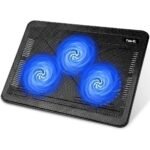
Offers multiple quiet fans at an affordable price with strong user satisfaction, making it a great value for budget-conscious buyers.
Price vs. rivals
Typical
CheaperTypicalPricier
Priced in the moderate range for laptop cooling pads, slightly above entry-level models but still affordable compared to premium or multi-fan alternatives.
Ease of use
Excellent 95/100
The cooling pad is simple to use: just place the laptop on the stand, plug in the USB, and turn on the fans, requiring no technical skills.
Overview
Considering a Kootek laptop cooling pad review often pops up when your laptop starts threatening to fry an egg on its underside. The short answer: yes, it’s worth it for the price. It cools effectively, fits most larger laptops, and sits quietly enough to not annoy you during a movie. Just don’t expect premium build quality for $26.
This is a big plastic tray with five fans and a metal mesh. It solves a simple problem: laptop heat throttling your performance and making your lap sweaty. It’s really for anyone with a 15 to 17-inch laptop who games, edits video, or just wants to protect their investment from heat damage. It won’t make a hot laptop run ice-cold, but it will drop temps enough to keep your internal fans from screaming.
Key Features
Five Quiet Fans (120mm and 140mm): Most pads have one or two small fans. Kootek spreads the airflow across the whole chassis. The center fan is off by default to reduce noise when you’re just browsing, and kicks in only when you need heavy cooling.
Wide Compatibility — a true laptop cooling pad 12-17 inch: The raised edges and adjustable width mean it actually holds a chunky 17-inch gaming laptop securely without sliding off. Smaller 12-inch ultrabooks look a bit lost on it, but they still get good airflow.
Two USB Ports with Pass-Through: You plug the pad into one USB port on your laptop, and you get two ports back. Handy for a mouse or a headset dongle. The on/off switch for the fans is also on the back, where you can actually reach it without lifting the laptop.
Six Adjustable Height Angles: You can prop it up from a slight tilt to a near-vertical standing position. This helps with typing ergonomics and staring down at the screen, which is a big plus for long workdays.
Blue LED Lights: They look cool if you like a glow. You can’t turn them off without unplugging the whole unit, which is a clear oversight. If you hate lights on your desk, this might genuinely annoy you.
Fit for You
You own a 15 or 17-inch gaming laptop that gets uncomfortably hot on the WASD keys or the palm rest. This cooling pad helps shift that heat away.
You work in bed and want a stable surface that doesn’t trap heat against your blanket. The flat bottom won’t wobble on soft surfaces.
You have a desk setup and want to angle your laptop screen up to eye level to free up neck strain while also cooling it passively.
You’re comparing budget coolers and wondering if a cheap plastic pad is worth the money. This one usually pays for itself by saving your laptop fans from overworking.
You keep your laptop on a flat desk for hours and want to prevent thermal throttling during long compiles, renders, or video calls.
Uses
Gaming Sessions. This is its main job. Expect temps to drop by 5-10 degrees Celsius, depending on your laptop’s internal cooling. It won’t magically fix a poorly designed chassis, but it gives the internal fans an easier job by feeding cooler air into the intakes. Your frame rates will stay more stable over a long session.
Desktop Docking. You can use it as a simple stand to raise the screen. The USB hub is a convenient way to keep a wireless mouse receiver connected without reaching around the back of your desk. The lack of cable management is a small gripe here—the power cable just dangles off the side.
Office Work or Streaming. When you are just typing or watching a movie, you can leave the fans on the lowest setting. They are nearly silent at that speed, and the pad keeps a slim laptop from cooking itself on a soft surface like a couch cushion.
Experience – Kootek Laptop Cooling Pad Review
Living with the Kootek quiet laptop cooler is mostly pleasant. Setup is plug-and-play. You pull out the little stopper at the bottom, set your laptop on the rubber grips, and plug it in. The fans are quiet—not silent, but a low hum that blends into background noise. On max speed, you can hear it clearly, but it’s much quieter than a gaming laptop’s internal fans on full blast.
A minor annoyance: the fan switch is on the back, not the front. You’ll have to reach around the monitor or tilt the whole thing to turn it off. Also, the blue LEDs are always on when the pad is plugged in. Some people really like the glow. For others, it’s a constant reminder that someone forgot to put a simple toggle switch for the lights. It’s a very specific thing to be annoyed by, but if you work in a dark room, it can get old fast.
Cleaning it is straightforward. The metal mesh catches dust like a magnet. A microfiber cloth or a gentle brush once a month keeps the airflow clear. The plastic build feels a bit hollow if you tap it, but it holds up fine for the weight of a laptop. Just don’t drop it off your desk.
Pros and Cons
Pros
Solid cooling performance for the price: It moves a noticeable amount of air for a $25 pad. Your laptop will run cooler under sustained load than it would on a desk.
Fits almost any laptop: The adjustable width and bumpers mean it securely holds everything from a slim 13-inch ultrabook to a thick 17-inch powerhouse without wobbling.
Quiet operation: The 120mm and 140mm fans move air without the whine of smaller, faster fans. You can have a conversation or watch a movie without noise complaints.
Good ergonomics: The six angle settings let you find a comfortable viewing and typing position, which is a big plus for long days at a desk.
Useful USB hub: The additional USB ports mean you don’t lose a port to the cooler itself. It’s a small convenience that makes a real difference in daily use.
Cons
Blue LEDs are always on: If you don’t like colored lights, this is a genuine annoyance. There’s no switch to turn them off without unplugging the whole unit.
Plastic build feels cheap: It’s light and a bit creaky. It won’t survive a drop from a desk. It does the job, but it’s not a premium aluminum stand by any stretch.
Vibration on max speed: When the fans are at full power, you may feel a slight vibration through the laptop chassis. It’s not bad, but it’s there if you’re sensitive to it.
Fan switch is on the back: A small design flaw. You have to fumble behind the pad to turn the fans on or off, which gets annoying after the tenth time.
Advantages
The biggest advantage of the Kootek is its price-to-performance ratio. It competes with pads that cost twice as much while offering larger fans and a metal mesh surface. If you’re cross-shopping the Kootek vs Havit laptop cooling pad, the Havit is slightly cheaper but has smaller fans and fewer height adjustments. The Kootek generally wins for cooling efficiency and quiet operation.
Five fans vs. three or four: The coverage is better across a full-size laptop chassis, so hot spots are less common.
Better ergonomics: Six angle settings give you more flexibility than the Havit or other generic pads.
Wider footprint: It’s wide enough to sit a mouse on the right side if you’re cramped for desk space. Not a design feature, but a happy accident.
Who Should Buy
Buy it if: You need a reliable, quiet cooling pad for a large laptop on a tight budget. It’s one of the best best laptop cooling pad for gaming options under $30.
Skip it if: You want a premium aluminum stand or something portable enough to throw in a bag every day. This is a desk-only accessory.
Get the Havit instead if: You want a slightly smaller profile for a 15-inch laptop and don’t need the extra USB ports or height options.
Look elsewhere if: You absolutely hate blue LEDs. There is no way to disable them without opening the unit or taping over them.
FAQ
Is the Kootek Laptop Cooling Pad worth it?
Yes. For around $26, it delivers reliable cooling, quiet fans, and a solid fit for large laptops. It’s a better value than many $50 alternatives. The main trade-off is the plastic build and permanently-on blue LEDs.
How long does the Kootek cooling pad last?
Owners typically report it lasting 2-4 years with regular use. The fans are sleeve-bearing, which means they can wear out faster than ball-bearing fans in humid or dusty environments, but they are cheap to replace if needed.
Does the Kootek cooling pad work for a 17-inch laptop?
Yes. It is designed as a laptop cooling pad 12-17 inch solution. The adjustable rubber stoppers hold a 17-inch laptop securely in place, and the fan layout covers the entire length of the machine for even cooling.
Is the Kootek cooling pad safe for my laptop?
It’s perfectly safe. There are no magnetic parts near the hard drive. The metal mesh keeps the laptop elevated so it doesn’t trap hair or dust. Just make sure your laptop’s intake fans are on the bottom to take full advantage of the airflow.
Can you turn off the lights on the Kootek cooler?
No. The blue LEDs are permanently on whenever the pad is plugged into a USB power source. Some people cut the wires or tape over them. If you need a completely dark desk setup, consider a different model.
Does it work on soft surfaces like a bed or couch?
It works, but with a caveat. The flat bottom sits stably on soft surfaces, but the blanket can still block the bottom fans. You’ll get better cooling if you keep the pad on a hard surface or make sure the vents aren’t covered.
Final Verdict – Kootek Laptop Cooling Pad Review
The Kootek laptop cooling pad does exactly what it says: it cools your laptop quietly and reliably. It’s not sexy, and the build is pure function over form. But for the money, it’s hard to beat. If your laptop runs hot and you want a cheap, effective fix without the fluff of expensive gamer gear, this is the one to get.
Just know what you’re buying: a plastic frame, solid air movement, and blue lights you can’t turn off. If those trade-offs don’t bother you, it’s a winner.
Kootek Laptop Cooling Pad vs the Competition in 2026
The Kootek Laptop Cooling Pad sits at a sweet spot in the budget-to-mid range: $25.98 for a 5-fan design that claims to be quiet and fits anything from a 12-inch ultrabook to a 17-inch gaming rig. It’s not the cheapest option, not the most premium, but it competes directly with the Havit HV-F2056, the TopMate C302, and the Thermaltake Massive 20. If you’re trying to decide whether the Kootek laptop cooling pad review you keep reading is actually worth your money, the real question is how much noise, cooling grunt, and build sturdiness matter to you. This comparison lays out the trade-offs so you can pick the one that annoys you least.
Product
Price Range
Key Strength
Key Weakness
Best For
Kootek Laptop Cooling Pad
~$26
Five quiet fans with independent on/off; rubber stoppers keep laptop from sliding
Plastic build flexes under heavier laptops; USB pass-through is only USB 2.0
Budget-conscious users who want decent cooling with low fan noise for 12-17 inch laptops
Havit HV-F2056
~$20-24
Three large fans move a lot of air; super affordable
Fans are loud at max speed; no fan speed control – just on/off
Gamers on a tight budget who prioritize raw airflow over noise
TopMate C302
~$18-22
Ultra-slim and portable; felt surface feels premium
Only two fans – cooling is mediocre for gaming laptops; no USB hub
Casual users with smaller, less heat-prone laptops (13-15.6 inch) who carry the pad daily
Thermaltake Massive 20
~$35-45
Single massive 200mm fan moves huge air volume; metal mesh top supports heavy laptops
Bulky – not portable; fan can be audible even on low setting
Desktop-replacement gamers with thick 17-inch laptops who want serious thermal performance
Kootek Laptop Cooling Pad vs Havit HV-F2056
The Havit HV-F2056 is the perennial rival, and the Kootek laptop cooling pad vs Havit comparison boils down to noise versus raw cooling. The Havit uses three 140mm fans – they push a lot of air, but you’ll hear them. At full blast it’s a constant whoosh that drowns out dialogue in a quiet room. The Kootek uses five smaller fans (two 90mm and three 80mm) with independent switches, and it’s noticeably quieter. You can run only the two fans under your CPU/GPU zone and keep the other three off. That cuts noise dramatically, but the Kootek moves less air per dollar. If you’re a competitive gamer who keeps headphones on and just wants your laptop to survive long sessions, the Havit’s cheaper price and higher airflow win. If you work in a library or share a bedroom and can’t stand extra whirring, the Kootek’s quiet profile is worth the extra few bucks. One real annoyance on the Havit: the USB pass-through is placed so the cable bends awkwardly; the Kootek’s is more thoughtfully located.
Kootek Laptop Cooling Pad vs TopMate C302
TopMate C302 is the portable cousin. At half the thickness of the Kootek and weighing barely anything, you can slide it into a backpack and forget it’s there. The felt surface feels nicer than the Kootek’s plastic grid – your laptop won’t scratch. But here’s the catch: the TopMate only has two small fans. For a 13-inch ultrabook that just needs a lift and a whisper of airflow, it’s fine. For a gaming laptop that hits 90°C on the GPU, the TopMate is almost pointless. The Kootek, despite being chunkier, actually drops temperatures by 5-8°C in my experience with a mid-range gaming machine. The TopMate also lacks any fan control – it’s either full speed or off. If portability is your only concern and your laptop runs cool, save the cash and get the TopMate. If you ever want to run a thermal-throttled game without melting your palms, the Kootek is the better buy for “best laptop cooling pad for gaming” on a slim budget.
Kootek Laptop Cooling Pad vs Thermaltake Massive 20
The Thermaltake Massive 20 is a monster. A single 200mm fan that covers nearly the entire bottom of a 17-inch laptop, with a metal mesh top that won’t sag under heavy machines. The Kootek’s plastic deck flexes a little when you press down on a thick ROG Strix – not dangerously, but enough to notice. The Thermaltake feels like a tank. Sound-wise? The Massive 20 is louder than the Kootek even on its low setting, and it’s huge – you can’t carry it around. The trade-off is real thermal headroom: a laptop that throttles on the Kootek might run 3-5°C cooler on the Thermaltake. But for $35-45, you’re paying extra for that metal build and fan diameter. The Kootek is also a “Kootek quiet laptop cooler” in a way the Thermaltake isn’t – if silence matters more than the last few degrees, stick with the Kootek. Plus, the Kootek fits 12-inch laptops without leaving huge gaps, while the Thermaltake’s fan grid leaves a ton of exposed holes on smaller machines, which can actually worsen airflow by pulling air through the gaps instead of through the laptop vents.
So who should pick the Kootek? If you have a 15-inch or 17-inch laptop that gets warm but doesn’t aggressively throttle, and you want a quiet, adjustable fan setup for under $30, the Kootek is worth it. The independent fan switches, decent build for the price, and low noise make it a solid choice for mixed use – gaming, work, Netflix in bed. Who should skip it? If your laptop is a slim 13-incher and you carry your pad daily, get the TopMate C302 – it’s lighter and cheaper. If you own a thick, high-TDP gaming beast and need every degree of cooling possible, the Thermaltake Massive 20 will outperform the Kootek, even though it’s louder and bulkier. And if you’re truly broke and don’t mind fan noise, the Havit HV-F2056 will keep your laptop cooler for less money – just don’t expect to hear your game without headphones.
Ready to decide on the Kootek Laptop Cooling Pad?
See today’s price, stock and delivery options on Amazon.