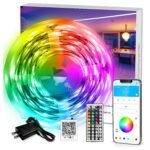
The Govee RGBIC LED Strip Lights review starts with a simple answer: yes, at $14.99, they’re worth it for most people. You get 16.4 feet of individually controlled color segments, app control, and music sync for less than a single Hue bulb. Expect the adhesive to be the first thing that tries your patience.
Packs advanced RGBIC control and app features at a fraction of the cost of comparable smart lighting setups.
Price vs. rivals
Typical
CheaperTypicalPricier
This product is priced below typical mid-range alternatives, offering good value for its RGBIC features and smart control, while still being significantly cheaper than premium smart lighting options.
Ease of use
Excellent 88/100
The app-controlled setup and simple installation make these LED strip lights very easy for an average person to use.
Govee RGBIC LED Strip Lights Review: Overview
These are the budget LED strips that let you paint different colors on different sections at the same time. Ordinary strips run one color all the way through; the RGBIC tech splits the strip into zones, so you can have a blue section under the TV and a purple section along the headboard from the same run of LEDs.
For a bedroom or a small apartment, it turns accent lighting into something that feels custom. It’s not for someone who needs HomeKit or a professional lighting design. It’s for you if you want a quick, fun atmosphere upgrade without spending $200 and fiddling with a bridge.
Key Features: The Useful Stuff
16.4 feet of flexible strip. Long enough to wrap a queen bed or run along a desk and a shelf. It’s cuttable at marked lines, but you’ll lose a color zone if you cut, so plan before you snipe.
RGBIC zone control. Instead of one solid color, the strip shows multiple colors at once. Owners tend to love the “fantasy” and “raging rainbow” presets for media setups.
Govee Home app control. The free app gives you timers, custom scenes, and a color wheel. The Govee 16.4ft LED strip lights app control works over Wi-Fi and Bluetooth, so you can change lights from another room.
Music sync mode. A built-in mic picks up sound and shifts colors to the beat. It’s not a pro audio visualizer, but for a dorm party or a gaming session, it’s a lot of fun for the price.
Adhesive backing. The included tape sticks well to smooth surfaces like drywall and metal. On textured walls, expect it to start peeling in a few months; you’ll probably want extra clips.
No hub or bridge required. You control it directly from your phone. That’s a relief if you’ve dealt with other smart lights that cost extra for the privilege of connecting.
Fit for You: Where It Makes Sense
You’re setting up a bedroom and want a low-glare backlight for the headboard that doesn’t scream “dorm room.”
You watch movies or game in the dark and want bias lighting behind a monitor or TV without spending a fortune.
You like hosting small get-togethers and want the living room to switch from “calm lamp” to “bad karaoke bar” with one tap.
You’re tired of removable light strips that fall down and just want something that stays put on a clean, painted wall.
You want to try smart accent lighting for the first time and don’t want to buy a starter kit with a hub.
You rent. The strip comes off with a little patience and it’s low-voltage, so you can take it to your next place.
Uses: Real Moments Where It Earns Its Keep
After a long day, you’ll probably use the “place” mode more than the rainbow effects. Set the timer so the strip fades in 15 minutes before your alarm, and you’ll wake up to a gentle warm glow instead of a screeching phone. That’s a small thing that makes a difference.
Music sync earns its keep during a weekend movie night or a house party. The mic picks up everything in the room, so it responds well to a bass-heavy track, but not to a quiet acoustic set. Keep that in mind if you hoped for a precise visualizer.
Behind a gaming monitor, the RGBIC zones really shine. You can map a purple gradient across the top, a red zone on the left, and a blue zone on the right. All from the same strip, no extra hardware. It’s not just decoration; it can reduce eye strain in a dim room.
Govee RGBIC LED Strip Lights Review: Experience
Setup is simple. Clean the surface with a dry cloth, peel the tape, press it down, plug in the adapter. The strip is low-voltage DC, so it won’t shock you if you touch a bare contact, though you should still unplug it before cutting.
The first annoyance is the adhesive. It grabs hold of flat paint like a champ, but on anything with texture, expect to buy clips. Also, the strip itself is a little rigid at the bend points. It curves gently around a wall corner, but a tight 90-degree corner needs a corner clamp, not a forced bend.
The app is the other mixed bag. It’s easier to use than most budget-brand apps, but the color picker is a bit fiddly, and every firmware update makes you verify the device again. Once it’s set up, though, you can set a routine and mostly ignore it.
This Govee RGBIC LED Strip Lights review would be incomplete without mentioning the power adapter. It’s a fixed length, and the strip’s control box takes up about two inches. If you’re running the strip along a long wall, start from the exact spot where you want the plug. Owners tend to mention that the adapter gets slightly warm after a few hours, which is normal for this class of LED strip, but you shouldn’t bury it under a carpet.
Pros and Cons: The Honest List
Pros
Price. At $14.99, it costs about what one brand-name smart bulb goes for, but it covers the whole room perimeter.
RGBIC color zones. Multicolor effects that normally cost several times more on pricier strips.
App control and automations. The free app includes timers, schedules, and a color wheel. The 16.4ft length gives you a lot of placement options.
Music sync for the money. It’s basic, but the Govee RGBIC strip lights music sync works with anything you play out loud.
No hub required. Connects directly over Wi-Fi or Bluetooth, so it’s one of the most affordable RGBIC LED strip lights you can buy without extra gear.
Cons
Adhesive on rough surfaces. Textured walls or old paint will make the strip peel, and you’ll need clips or double-sided tape.
Control box placement. The box and its cable dictate where you start running the strip. It’s not always at the end you want.
App and firmware quirks. The connection can drop after a firmware update, and the mic sensitivity isn’t adjustable like it is on higher-end strips.
Cutting requires planning. Cut at the wrong point and you’ll lose a color zone. Measure twice, cut once.
No HomeKit support. You’ll need the Govee app or Alexa/Google, not Apple’s smart home ecosystem unless you start adding more hardware.
Advantages: Why It Beats the Usual Suspects
In the Govee RGBIC vs Philips Hue LED strip comparison, the Govee wins on price and simplicity. A Hue lightstrip starter kit costs around $80 for a shorter strip and then needs either the Hue bridge or a Bluetooth-capable model. The Govee gives you 16.4 feet, zone control, and music sync for $14.99. Most Govee RGBIC LED Strip Lights review comment sections end up saying the same thing: buy the Govee unless you live inside the Apple ecosystem.
Price per foot. You’re paying about a dollar per foot on sale. Most comparable RGBIC strips from pricier brands go for two or three times that.
Self-contained. No separate hub, no extra antennas, no wall warts for every section.
Quick setup. It’s a plug-and-play item; the app walks you through in a few minutes.
Who Should Buy It (and Who Shouldn’t)
You should buy it if you want a low-risk way to add accent lighting to a bedroom, gaming rig, or rental.
You should buy it if you want multicolor zones without paying for Hue’s ecosystem.
You should buy it if you like syncing lights to music at parties and don’t need studio-accurate visualizer.
Skip it if you need HomeKit support for Apple automation; look for a Hue lightstrip or a Matter-compatible strip.
Skip it if you’re planning a permanent installation on a rough, uneven wall; the adhesive wins only on smooth surfaces.
For the bedroom crowd, these are the best RGBIC LED strips for bedroom accents in the sub-$20 range, assuming you want the multicolor effect rather than a plain white bias light.
FAQ: Quick Answers
Is the Govee RGBIC LED Strip Lights worth it?
Yes, for casual accent lighting and multicolor effects, it’s hard to beat at $14.99. You get a full 16.4 feet, app control, and music sync. If you only need a simple white or single-color strip, you can save more, but you’d lose the fun.
How long does the Govee LED strip last?
LED strips are rated for tens of thousands of hours, so the LEDs will outlast everything else in your room. What actually wears out is the adhesive and the power adapter. Expect serious peeling after a couple of years if you’ve moved it around or stuck it to a textured wall.
Is it safe to leave the strip on overnight?
Yes, the strip runs on low-voltage DC, so leaving it on overnight is similar to leaving a phone charger plugged in. The bigger issue is brightness; you’ll want to dim it or set a timer so it doesn’t glow like a landing strip.
Can I cut the strip to fit a shorter space?
Yes, there are marked cut lines every few inches, but cutting removes a section and can break a color zone. Measure twice, cut once. The remaining strip will still work, but you lose the piece you cut off, and you can’t reuse it.
Does the music sync work with any music app?
It listens to the room’s audio with a built-in mic, so it doesn’t care what app you use. Spotify, YouTube, or even a guitar session will work. The catch is it reacts to volume, not frequency, so quiet acoustic songs trigger weaker effects.
What’s the difference between RGBIC and regular RGB?
RGB lights make every LED on the strip do the same color at the same time. RGBIC can split the strip into independent zones, letting it show multiple colors simultaneously, which creates those wave and gradient effects. That’s why the Govee strip feels more alive than a basic RGB light.
Final Verdict: Govee RGBIC LED Strip Lights Review
If you want an easy, affordable way to make a bedroom, dorm room, or gaming corner feel custom without pretending to be a professional lighting installer, buy the Govee 16.4ft RGBIC strip. The Govee RGBIC LED Strip Lights review comes down to this: it’s not the last word in smart lighting, but at $14.99 it’s the most fun you’ll have with a strip of LEDs.
The one thing to keep in mind is the adhesive. Clean your surface first, and for rough walls, grab a pack of mounting clips. Do that and the strip will probably be one of those purchases you annoy your friends about.
Govee RGBIC LED Strip Lights vs the Competition in 2026
Right now, the 16.4ft Govee RGBIC LED Strip Lights sit at a weirdly sweet spot—under $15 for a strip that can show multiple colors at once, sync to music, and respond to an app that actually doesn’t make you want to throw your phone. The category is crowded: you’ve got the dirt-cheap no-namers that flicker like a dying strobe, the premium smart-home strips that want to be part of your lighting ecosystem, and a few solid middle-ground options. The Govee isn’t the brightest, it doesn’t have the best build, and the adhesive is merely okay. But for the money, it’s hard to find a better balance of flexibility and fun—especially if you’re not ready to drop $80 on lights for a bedroom.
Product
Price Range
Key Strength
Key Weakness
Best For
Govee RGBIC LED Strip Lights (16.4ft)
Under $20
Segmented color control (RGBIC) at a budget price
Weak adhesive; lower brightness than premium strips
No multi-color per strip without third‑party workarounds
Smart-home addicts who already own Hue bulbs
LIFX Z LED Strip (2m starter)
$70 – $90
Wi-Fi direct (no hub needed), very bright, rich colors
Pricey per foot; app can be sluggish
People who want vivid, reliable Wi-Fi lighting without a hub
Govee RGBIC Pro (16.4ft)
$25 – $35
Higher LED density, better brightness, same app
Still uses Govee’s adhesive; not as bright as LIFX
Govee fans who want a step up but stay under $40
Govee RGBIC LED Strip Lights vs Philips Hue Lightstrip Plus
If you already have a Hue Bridge and four Hue bulbs, the Lightstrip Plus feels like the natural next step. It’s reliable, integrates with your existing routines, and the color consistency across the whole Hue range is genuinely impressive. But here’s the thing: the standard Hue Lightstrip is a single zone. One color for the entire strip. Govee’s RGBIC lets you set different colors on different segments—say blue on the left, purple in the middle, and a slow red pulse at the right end. That matters a lot if you’re using the strip behind a monitor or under a bed frame. The Philips Hue is about four times the cost for half the fun. The trade-off: if you just want a strip that turns on with your “Goodnight” scene and never glitches, Hue wins on reliability. For everyone else who wants to play with color blocks and save $50, the Govee RGBIC is the smarter buy.
Govee RGBIC LED Strip Lights vs LIFX Z Strip
LIFX Z is the brightness champion. It’s noticeably more punchy than the Govee, and the colors feel cleaner—especially whites. The LIFX also runs over Wi-Fi directly, no hub, which sounds simpler until your router gets congested and the app takes a few extra seconds to respond. The Govee app is faster in my experience, though you do need to give it Bluetooth permissions for the initial setup. Both support music sync, but Govee’s is more forgiving; LIFX’s can be too sensitive unless you tweak the sensitivity slider. Where LIFX really loses me is the price: you can buy three Govee RGBIC strips for one LIFX Z starter kit. If you need serious brightness for, say, a large living room cove, LIFX Z is worth the premium. For a bedroom, a small alcove, or a desk, the Govee puts out enough light and keeps your wallet happy.
Govee RGBIC LED Strip Lights vs Govee RGBIC Pro
This one’s a family squabble. The Pro version costs about twice as much but doubles the LED density—30 LEDs per meter instead of 15. That means smoother color transitions and fewer “hot spots” where the light clearly comes from a single point. The Pro also gets brighter, though neither model will compete with LIFX on raw output. The strip itself is physically similar—same rubbery cover, same adhesive that might need a boost from mounting clips if your wall texture is rough. So why not just buy the Pro? Because the standard 16.4ft Govee RGBIC is already enough for most bedroom or TV backlight jobs. The segments are bigger on the base model, but for $15, the fact that it can do multi-color at all is the point. The Pro is for people who found the standard strip a bit dim or wanted finer control per inch. If that’s you, go Pro. If you’re testing the waters or lighting a small space, the base model is a better introduction.
So who should grab the Govee RGBIC LED Strip Lights? You, if you want affordable RGBIC LED strip lights that actually deliver multi-zone color and music sync without the app being a nightmare. It’s not a permanent install—the adhesive will eventually give up on textured paint—but for under $20 you can afford to grab some 3M clips and still be well below the cost of a single LIFX strip. If brightness is your top priority and you’re already committed to a smart-home platform, skip the Govee and buy the LIFX Z or the Philips Hue Lightstrip Plus. For most people, though, this Govee is the best RGBIC LED strip for bedroom use in 2026, with just enough features to keep things interesting and a price that makes the decision easy.
Ready to decide on the Govee RGBIC LED Strip Lights?
See today’s price, stock and delivery options on Amazon.