An extremely affordable Chromebook that delivers solid basic performance for budget-conscious users.
Price vs. rivals
Cheaper
CheaperTypicalPricier
This renewed Dell Chromebook is priced well below the typical market range for similar Chromebooks, reflecting its older-generation processor and refurbished status.
Ease of use
Excellent 88/100
Simple Chrome OS interface and adequate performance for basic tasks make it easy to use, though limited RAM may slow multitasking.
Overview
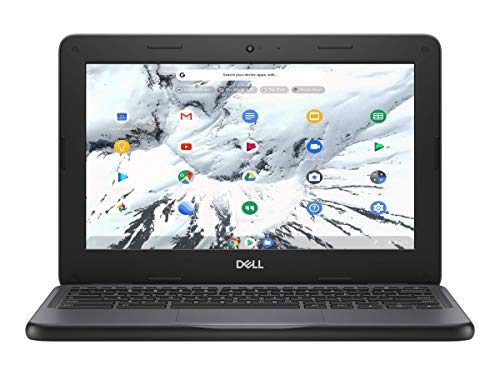
If you need a cheap, sturdy laptop for a kid or for basic schoolwork, this Dell Chromebook 3100 review will save you time. It’s a refurbished 11.6-inch Chromebook with a Celeron N4020, 4GB of RAM, and 16GB of storage. For about $96, it does exactly what a school Chromebook should: survive drops, run Google apps, and stay out of your way. The catch is the tiny storage and the 768p screen—fine for homework, not fine for Netflix marathons. Worth it if you keep expectations low.
Key Features
Rugged, spill-resistant keyboard and reinforced corners – This thing is built to bounce off cafeteria tables and survive a water-bottle tip-over. You’ll see rubber bumpers and a keyboard deck that drains liquid. Parents, this is the reason you buy a 3100 instead of a prettier laptop.
Celeron N4020 processor with 4 GB RAM – Don’t expect speed. Expect that Google Docs, a few tabs, and YouTube at 720p will run fine. Owners mention that five or more tabs start to stutter, so keep it lean.
11.6-inch 1366 x 768 display – It’s matte, which helps in bright classrooms, but it’s low-res and dim. Fine for typing essays; mediocre for watching anything with dark scenes.
16 GB eMMC flash storage – Basically a large thumb drive soldered in. You’ll have about 8GB free after Chrome OS. You’ll rely on Google Drive and SD cards (there’s a slot) for anything else.
Bluetooth and Wi-Fi 5 (802.11ac) – Connects to wireless keyboards, mice, or earbuds without a hassle. Wi-Fi is solid for a school network.
Renewed unit at a $96 price point – That’s the whole point. For under $100, you get a machine that worked in a school district for a few years, then got cleaned up and resold. Cosmetic scuffs are common; screen scratches are less common but possible.
Fit for You
You’re a parent who needs a laptop for a middle-schooler that won’t be a tragedy if it gets dropped on the bus.
You’re a college student on a tight budget who only needs to type papers, check email, and stream lectures.
You’re setting up a cheap home office for light web work—spreadsheets, Slack, Zoom (it works, but don’t expect the video to be sharp).
You want a secondary travel laptop that you can throw in a backpack without worrying about a dent in your wallet.
You’re buying a fleet for a small nonprofit or classroom and every dollar counts.
Uses
Picture a high school student sitting in the library, writing a history essay in Google Docs. The Dell Chromebook 3100 opens Docs in about eight seconds. The keyboard is shallow but has decent travel for a budget machine—you’ll get a rhythm going. The fan? There isn’t one. It’s passively cooled, so zero noise.
Now imagine that same student has a lunch break and wants to watch a YouTube video on how to factor polynomials. The 1366×768 screen is fine for the teacher’s talking head. But switch to a movie trailer with dark scenes, and you’ll see blocky shadows and a lot of backlight bleed around the edges. It’s workable, not enjoyable.
Another realistic moment: you’re filling out a job application online. Multiple tabs for the form, a PDF of your resume, and a Gmail compose window—all open at once. The 4GB of RAM will start to sweat if you also have Spotify running in the background. Close one or two tabs, and it’s fine. The lesson: this Chromebook rewards discipline.
Experience
Right out of the box, the renewed unit feels… used. Not broken, just lived-in. You might find a tiny scuff on the lid or a keycap that’s slightly shiny from a thousand fingertips. That’s the trade-off for $96. Turn it on, and the Chrome OS setup takes about five minutes—sign in with your Google account, and you’re in.
The first thing you’ll notice is the screen angle. It doesn’t lie flat (not a 2-in-1), but it bends back almost 180 degrees, which is handy if you’re showing something to someone across the table. The hinge is stiff, which is good—it won’t flop around on a bumpy bus.
Battery life is the highlight. Expect a solid 8–9 hours of mixed use (typing, browsing, occasional video). That’s a full school day plus after-school homework. Charging is via a barrel plug, not USB-C—a bit annoying if you’ve standardised on USB-C for everything else, but the charger is light.
The small annoyance is the trackpad. It works, but it’s a bit shallow and the plastic surface doesn’t feel smooth after a few months. Many owners use an external mouse. The keyboard, on the other hand, is actually decent—spill-resistant, with a crisp click. No backlight, so typing in a dim room means you’ll rely on the screen glow.
Storage is the biggest daily frustration. 16GB sounds like nothing because it is nothing. Chrome OS takes about 8GB. You install a couple of Android apps (say, Spotify and a note-taking app), and suddenly you’re down to 3GB free. You’ll get constant “low storage” warnings unless you aggressively offload to Drive or an SD card. The SD card slot supports up to 256GB cards, so buy one for $15 and save yourself the headache.
Pros and Cons
Pros
Extremely durable – Drop it from a desk, spill coffee on the keyboard, toss it in a bag with a textbook—it’ll probably survive. This is the main reason schools bought thousands of them.
Long battery life – You’ll get through a full school or work day on a single charge without hunting for an outlet.
Price – At $95.99 renewed, it’s one of the cheapest functional laptops you can buy. For basic tasks, it’s a steal.
Passive cooling (no fan) – Silent operation. No whirring in a quiet classroom or library.
Spill-resistant keyboard – Accidents happen. This keyboard has drainage holes so liquid escapes instead of frying the board.
Cons
Storage is laughably small – 16GB fills up fast. You’ll depend on cloud storage and an SD card from day one.
Screen is dim and low-resolution – 1366×768 on an 11.6-inch panel is acceptable for text, but colours are washed out and viewing angles are narrow. Not great for media.
Plastic build feels cheap – It’s tough, but it creaks when you grip the corners. The trackpad and palm rest collect fingerprints.
No USB-C charging – The barrel plug is old-school. You’ll need to carry the proprietary charger or an adapter.
Performance chokes under pressure – More than 5–6 browser tabs plus a video will cause lag. The Celeron N4020 and 4GB of RAM are entry-level even for Chromebooks.
Advantages
Why buy this over a cheap Windows laptop at the same price? Because a $100 Windows machine will be slow, bloated with trialware, and usually flimsy. This Chromebook runs a lean OS, gets automatic updates for years, and has the build quality of a tank. It also beats most Android tablets for typing real assignments—the keyboard is full-size and the trackpad works.
When you compare it with an iPad (even a used one), the Chromebook wins on keyboard and durability. You can’t drop a $300 iPad on a tile floor and expect it to live. The Dell Chromebook 3100 can take that hit.
And if you’re asking the Dell Chromebook 3100 vs HP Chromebook 11 question, here’s the short answer: the HP 11 is usually lighter and has a slightly nicer screen, but the Dell is tougher and often cheaper on the renewed market. The Dell’s spill-resistant keyboard and reinforced edges give it the edge for classroom or kid use.
Who Should Buy
Parents of school-age kids – Especially if you’ve already replaced one “nice” laptop that got dropped. This is the beater that keeps working.
Budget-first students – If you need a machine just for Google Classroom, typing, and Khan Academy, this is the best Chromebook for students under 200 by a long shot.
Anyone who wants a backup travel laptop – Throw it in a backpack for trips where you don’t want to risk a $1,000 MacBook.
People who shouldn’t buy it – Anyone who needs to run Windows software, edit photos in Lightroom, or play even casual games (Android games struggle with the small storage and low RAM). Also skip it if a good screen matters—look for a used Lenovo Chromebook Duet or a refurbished Acer Spin 311 with a higher-resolution display.
FAQ
Is the Dell Chromebook 3100 worth it?
Yes, if you need a dirt-cheap, durable Chromebook for basic school or office work and you’re fine with limited storage and a low-res screen. At $96 renewed, it’s hard to beat.
How long does the Dell Chromebook 3100 last?
Battery lasts around 8–9 hours of normal use. The hardware itself is built to survive years of school use; the renewed units often have plenty of life left, but check for cosmetic wear.
Is the Dell Chromebook 3100 good for gaming?
No. The integrated Intel HD Graphics and 4GB of RAM can handle very light Android games (like Sudoku or 2D platformers), but anything 3D or demanding will be unplayable. This is a work/school machine.
Does the Dell Chromebook 3100 have a touchscreen?
No. The standard model (and the one sold here) has a non-touch display. If you need a touchscreen, look for the 3100 2-in-1 variant, which is rarer and costs more.
Can the Dell Chromebook 3100 run Microsoft Office?
Yes, through the web versions (Office Online) or Android apps from the Play Store. Performance is fine for basic docs and spreadsheets, but large Excel files may lag.
Is the Dell Chromebook 3100 refurbished worth buying?
Usually yes. This renewed model comes with a 90-day warranty and has been inspected. Expect minor scuffs. The price is the main appeal—just budget for an SD card to fix the storage problem.
Final Verdict
The Dell Chromebook 3100 (renewed) is the sensible, boring choice for anyone who needs a working laptop on a tight budget. It’s not fast, it’s not pretty, and the screen won’t win any awards. But it’s tough, runs for a full day, and costs less than a pair of sneakers. Owners tend to describe it as “fine for what it is”—and at $96, that’s high praise.
One thing to keep in mind: grab a 64GB or 128GB SD card the same day you order this. Without one, the storage will drive you crazy. Do that, and you’ve got a laptop that will easily get a student through high school—or a backup work machine through a few years of light duty.
The budget Chromebook market is crowded with rugged little machines designed for classrooms, and the Dell Chromebook 3100 has a strong second life as a refurbished or renewed option. For around $95.99, you get an 11.6-inch laptop that’s been dropped, kicked, and spilled on — but built to survive it. The real question is whether a used Dell is a better bet than spending two or three times more on a new rival. Here’s how it stacks up against three real alternatives you’ll see in stores and on refurb sites this year.
16 GB eMMC storage fills up fast; older Celeron N4020 feels slow with many tabs
Budget-strapped students and families who need a cheap, tough secondary laptop
HP Chromebook 11 G9 EE
$200 – $280 (new)
Brighter 250-nit display (vs Dell’s 220-nit); 32 GB base storage
Same Celeron N4020; plastic chassis creaks more than Dell’s
Schools or parents wanting a new unit with warranty and a slightly better screen
Lenovo 11e Chromebook (5th gen)
$180 – $250 (new or refurb)
Solid keyboard with deeper travel; 32 GB eMMC standard
Heavier at 2.9 lbs; older models use an Intel Celeron N3350 (slower than Dell’s N4020)
Typing-heavy users who don’t mind extra weight for a better keyboard feel
Acer Chromebook 311
$190 – $230 (new)
Newer Intel N4500 processor; USB-C ports on both sides
No touchscreen option; less rubberized bumper protection around the corners
Budget buyers who want a faster, current-gen chip and don’t need drop protection
Dell Chromebook 3100 vs HP Chromebook 11 G9 EE
The HP Chromebook 11 G9 EE is the closest competitor in terms of concept: both are education-first, spill-proof, and run the same Celeron N4020. The Dell Chromebook 3100 review crowd tends to praise the extra rubber bumpers and the reinforced USB-C ports — you can actually drop this thing off a desk without the charging port breaking. The HP’s chassis flexes more under the palm rest, which annoyed me during a long typing session. But HP gives you 32 GB of storage as standard, while the Dell 3100 only ships with 16 GB. That matters if you plan to install Android apps or save files locally. If you’re a student who works mostly in Google Docs and only keeps three tabs open, the Dell is the better value at half the price. If you need to stash a few episodes of a show or run heavier apps, the HP’s extra storage makes it worth the jump to around $220.
Dell Chromebook 3100 vs Lenovo 11e Chromebook
Lenovo’s 11e is another common alternative on refurbished sites, but be careful which generation you grab. The 5th gen runs the older Celeron N3350, which benchmark roughly 20% slower than the N4020 inside the Dell. You trade raw speed for a keyboard that actually has some travel — Lenovo knows how to make a decent typing deck. The Dell Chromebook 3100 refurbished models often have slightly loose spacebars, a known quirk from heavy classroom use. If typing essays is your main workload, the Lenovo 11e alternative feels better under the fingers. But for anything involving video playback or multiple tabs, the Dell’s newer chip pulls ahead. Also worth noting: the Dell 3100’s 1366 x 768 screen is dim, but the Lenovo’s is just as dim. Neither wins that fight. For under $100, the Dell makes more sense unless you’re a keyboard snob.
Dell Chromebook 3100 vs Acer Chromebook 311
The Acer Chromebook 311 is the wild card here because it uses Intel’s N4500, a Jasper Lake chip that launched after the Gemini Lake N4020. In real use, it loads web pages about a second faster and handles a YouTube video alongside a Google Meet call without stuttering. The Acer also costs around $200 new — double the Dell’s price, but you get a full warranty, twice the storage, and a more future-proof processor. However, the Dell Chromebook 3100 specs include a thicker rubber bumper and a spill-resistant keyboard rated for 350 ml of water. That’s a concrete advantage if the laptop lives on a kitchen table or goes in a backpack full of juice boxes. The Acer’s plastic lid flexes more, and I’ve seen complaints about the hinge loosening after a year. So this comparison comes down to your risk tolerance: pay $95.99 for a tank-like refurb that might have cosmetic scuffs, or spend $200 for a faster machine that’s less likely to survive a drop.
So, is the Dell Chromebook 3100 worth it in 2026? For a specific buyer, yes. If your budget is literally under $100, you need a Chromebook that can survive a fall from a bunk bed, and you’re okay with 16 GB of storage and a dim screen, this renewed model is the best Chromebook for students under 200 that you’ll find. It’s also a decent option for an elderly relative who just wants to check email and read news — the simplified Chrome OS keeps things snappy enough. But if you can stretch to $200, grab the Acer Chromebook 311 for its faster processor and modern ports. And if you’re buying for a school that needs warranty support, the HP Chromebook 11 G9 EE remains the safer new alternative. The Dell wins on price and toughness; everything else is a trade-off.
Ready to decide on the Dell Chromebook 3100?
See today’s price, stock and delivery options on Amazon.