Competitive pricing and solid ratings place it as a reliable mid-tier option for privacy screen protection.
Price vs. rivals
Typical
CheaperTypicalPricier
Priced near the middle of the range for similar privacy screens, competitive with mid-tier alternatives.
Ease of use
Excellent 85/100
The magnetic attachment makes installation and removal straightforward, and the 4.2-star rating suggests most users find it easy to apply and adjust.
Overview
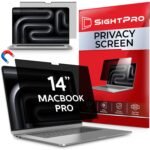
If you work in a café, on a plane, or anywhere a stranger can glance at your screen, the Peslv magnetic privacy screen is a cheap fix for a real annoyance. It darkens the view from the sides so only the person straight in front sees clearly. At $24.29 with a 4.2-star average, it’s one of the more budget-friendly options for the MacBook Air 13.6—but you trade some polish for that price.
This isn’t for someone who needs a perfect anti-glare coating or a removable film they can fold. It’s a magnetic sheet that clips onto your laptop lid via included metal strips. Simple. Effective enough. And it makes your MacBook Air look like a boring gray slab from any angle that isn’t yours.
Key Features
Magnetic attachment – No adhesive on your screen. The kit comes with thin metal strips that stick to the bezel around your display; the privacy screen itself holds on with magnets. You can pop it off in seconds.
Two-way privacy – It blocks visibility from both left and right sides. Sitting in a window seat? The person in the aisle won’t see your spreadsheet. Works the same whether you tilt the screen or not.
Anti-glare matte finish – The surface cuts reflections noticeably. That overhead office light becomes a dull haze instead of a blinding spot. It also makes fingerprints less obvious.
Fits 13.6-inch and 13-inch MacBook Air models – Designed for the M2 and M3 MacBook Air (the 13.6-inch ones) and also works with the older 13-inch M1 version. The magnets line up with the metal strips you position once.
Thin and portable – About as thick as a credit card. Slides into the laptop sleeve or a document pocket without adding noticeable bulk. Weighs almost nothing.
Fit for You
You work remotely from coffee shops or coworking spaces and hate when the person at the next table reads your Slack DMs.
You fly economy and want to watch a movie without the passenger beside you seeing every scene (and your password manager).
You handle client data or financial info on your MacBook Air in semi-public places—think hospital lobbies, open-plan offices, or hotel lounges.
You’re tired of reflections from an overhead light or a bright window making part of your screen unreadable.
You want a privacy screen you can remove whenever you’re at home, without leaving sticky residue or a permanent film.
You’re on a tight budget and can live with slightly reduced brightness in exchange for privacy.
Uses
Picture this: you’re at a crowded airport gate, working on a budget spreadsheet. The guy two seats over keeps glancing your way. With the Peslv on, his view is a dark, illegible blur. You can keep typing without that “someone is reading over my shoulder” itch.
Another common situation—taking notes during a meeting in a glass-walled conference room. People walking past can’t see your screen unless they stop and lean in directly behind you. That alone is worth the $24 if you’ve ever had a colleague comment on your browser tabs.
At home, you can yank the screen off in about two seconds and set it aside. The magnets are strong enough to hold it in place during everyday use, but not so strong that removing it is a struggle. So you get privacy on the go and a clean display at your desk.
Experience
Setup takes maybe five minutes. You clean your MacBook Air’s bezels, peel the backing off the adhesive metal strips, and press them onto the black plastic border around the screen. Then you just hold the privacy screen up—the magnets click it into place. No alignment grid needed; the magnets self-center well enough.
The first time you use it, you’ll notice the screen gets darker. Privacy filters work by narrowing the viewing angle, which also cuts overall brightness by roughly 30–40%. You’ll probably find yourself turning up the MacBook’s brightness a couple notches. On a sunny day outdoors, it can feel dim. Indoors, it’s fine.
Text stays sharp when you’re looking straight on. Colors shift slightly—whites get a faint yellow cast, not a dealbreaker but noticeable next to an unfiltered display. If you do photo editing, take the screen off. For spreadsheets, email, coding, or Netflix, it’s fine.
The matte finish reduces glare nicely, but it also softens fine detail slightly. Think of it like a very light matte screen protector. Your 60 Hz scrolling won’t look any smoother or choppier—that part stays the same.
Cleaning is easy: a microfiber cloth and a tiny spritz of water. The magnetic hold means you can wipe both sides without pressing on the MacBook’s screen. The metal strips on the bezel never need cleaning—they’re just sitting there.
One small complaint: the privacy screen picks up dust on the back side (the side facing your MacBook’s display). Because it’s not laminated, a few specks of dust can sneak in between. You’ll want to remove it and blow them off every week or two.
Noise? None. It doesn’t rattle or buzz. The magnets hold it flush. When you close the laptop, the screen stays on; the clearance inside the lid is enough that it doesn’t push against the keyboard. Just be aware the magnet strips add a tiny bit of thickness to the lid closure—you might feel it when closing, but it’s not a problem for the hinge.
Battery life takes a small hit because you’ll run the display brighter. How much? Hard to say exactly—depends on your ambient light. Figure maybe 10–15% less runtime in typical indoor use.
Pros and Cons
Pros
Effective privacy at a low price – The side view blackout works as advertised for $24. Hard to argue with that value.
Magnetic attachment – No adhesive on the screen itself, so you can remove it instantly without damage or residue.
Decent anti-glare coating – Cuts reflections better than the stock MacBook Air display. Useful in bright rooms.
Portable and unobtrusive – Thin enough to stay on in a laptop sleeve. No extra bulk when you’re on the move.
Solid build for the money – The metal strips stick firmly. The screen is rigid but not brittle. No peeling after a few months.
Cons
Reduces brightness and color accuracy – You’ll need to turn up the display by 30–40%, and whites look slightly warm. Not ideal for creative work.
Dust can get trapped between screen and filter – Regular removal and cleaning required. A minor but consistent annoyance.
Fingerprint magnet on the front side – The matte surface resists smudges better than glossy, but your fingers still leave marks. They wipe off easily, though.
No vertical privacy – Someone standing behind you and looking over your shoulder can still read the screen. The filter only blocks horizontal angles.
Adhesive strips are permanent once placed – They stick to the bezel firmly. Remove them and you’ll have residue to clean (though it’s removable with alcohol).
Advantages
When you compare the Peslv vs Moshi privacy screen, the biggest difference is price. Moshi’s version typically runs $50–60. The Peslv costs half that and gives you the same basic magnetic attachment and two-way privacy. Moshi’s anti-glare is a bit better and its color shift is less pronounced, but for the extra $30 you’re not getting dramatically more privacy—just slightly better optical quality and a thinner metal strip.
Another advantage: the Peslv comes with two sets of metal strips (just in case you misalign the first one). Moshi gives you one set. Peslv also includes a microfiber cloth and a storage sleeve, which is a nice touch at this price.
For anyone hunting the best privacy screen for MacBook Air 13.6 under $30, this is the clear winner. The magnetic design means you don’t have to commit to a permanent film. You can share the laptop with a family member at home (just take it off) and pop it back on when you head to the library.
Who Should Buy
Buy it if: You frequently work in public spaces, want a removable privacy filter, and are okay with a slight brightness and color trade-off for $24.
Buy it if: You already own a MacBook Air 13.6 (M2 or M3) or the 13-inch M1 model and don’t want to spend $50+ on a brand-name option.
Skip it if: You do photo or video editing on the go and need accurate colors. Get a high-end filter like Moshi or a non-magnetic film that you can leave on permanently.
Skip it if: You need privacy from someone standing directly behind you (vertical viewing angle). For that, look for a film rated for 30-degree vertical cutoff, though it’ll be more expensive and harder to remove.
FAQ
Is the Peslv Privacy Screen MacBook Air worth it?
Yes, if your main concern is side-angle privacy and you’re on a budget. The magnetic attachment is convenient, the privacy effect is solid, and the price is hard to beat. Just be prepared for the brightness drop.
Is Peslv privacy screen worth it compared to Moshi?
For half the price, the Peslv gives you nearly the same privacy protection. Moshi has slightly better optics and a thinner adhesive strip, but not enough to justify double the cost unless you’re very picky about color accuracy.
Does the Peslv privacy screen work with the MacBook Air 13-inch M2?
Yes. The product listing says 13.6 inch/13 inch, and it fits the M2 MacBook Air (released 2022) and M3 MacBook Air (2023). The metal strips go on the black bezel; the magnets line up correctly.
How long does the Peslv privacy screen last?
Owners typically report the screen itself holds up for a year or more with normal use. The adhesive on the metal strips remains strong unless you remove and re-stick them repeatedly. The screen’s matte coating can scratch if you clean it with a rough cloth, so use microfiber.
Is the Peslv privacy screen safe for the MacBook Air display?
Yes. Since it attaches magnetically to strips on the bezel, no adhesive touches the actual screen. The filter is rigid and doesn’t press on the glass. When the laptop is closed, there’s enough gap that it won’t damage the display coating.
Can you use the Peslv privacy screen with a screen protector underneath?
It depends on thickness. A thin matte film might work, but a glass screen protector adds enough depth that the magnets might not hold the privacy screen flush. Most people use it directly on the bare display or remove any existing protector first.
Final Verdict
The Peslv magnetic privacy screen does exactly what it promises—blocks side views for a low price—without permanent commitment. It’s not perfect: colors shift, brightness drops, and you’ll occasionally clean dust from between the layers. But if you use your MacBook Air in public and value privacy over perfect image quality, it’s a smart buy.
The one thing to keep in mind: this screen is for public use, not for photo work. Keep it in your bag for when you’re out, and take it off at home. At $24.29, that flexibility alone makes it the best privacy screen for MacBook Air 13.6 in its price bracket.
Peslv Privacy Screen MacBook Air vs the Real Alternatives in 2026
You’ve got a 13.6-inch MacBook Air, and you want a privacy screen that doesn’t turn the experience into a daily struggle with dust bubbles or a pry bar. The market splits cleanly into two camps: magnetic screens that snap on and off, and adhesive ones that commit for the long haul. Peslv sits in the middle – cheaper than premium magnets, more convenient than sticky films. But “middle” can mean compromise, so here’s exactly where it wins and where it loses against the actual choices you’ll find on the shelf. | Product | Price Range | Key Strength | Key Weakness | Best For | |———|————-|————–|————–|———-| | Peslv Magnetic Privacy Screen MacBook Air | $24 | Magnetic attachment, no adhesive mess, easy removal | Slightly less edge-to-edge coverage than adhesive rivals; can shift if bumped | Someone who swaps between privacy mode and a clear screen regularly | | Moshi iVisor Privacy Screen (13.6”) | ~$45+ | Precision-cut rigid frame, zero bubbles, durable scratch-resistant coating | Non-removable adhesive; once it’s on, it’s on. Pricey for a plastic sheet. | A one-and-done setup where you never plan to remove the screen | | Spigen Privacy Screen (13.6”) | ~$17 | Cheap, decent 28-degree viewing angle, thin film feels barely there | Adhesive strips can leave residue; film is flimsy and prone to scratches | Budget-first buyers who accept a replaceable consumable | | Viozon Magnetic Privacy Screen (13.6”) | ~$30 | Thicker magnetic frame, stronger hold than Peslv, includes a storage sleeve | Heavier bezel can interfere with closing the lid fully on some cases | People who want the magnetic convenience but with a more rugged feel |
Peslv Privacy Screen MacBook Air vs Moshi iVisor Privacy
Moshi’s iVisor is the gold standard for *permanent* privacy. Its rigid plastic frame uses a micro‑suction adhesive that clings without liquid or bubbles – you line it up once, and it doesn’t move until you peel it off (which Moshi says is possible, but realistically you’ll only do that to replace it). The viewing angle is tight and consistent, and the anti‑glare finish is noticeably better than most competitors. But here’s the trade‑off: you can’t toggle between privacy and a clear screen. If you’re sharing a movie on a flight, you’ll be tilting the whole laptop. Meanwhile, the Peslv snaps off in two seconds and goes into a sleeve. The rub is that Moshi costs about twice as much, and the adhesive can weaken after a year in warm environments. The Peslv Privacy Screen MacBook Air vs Moshi iVisor decision really comes down to whether you value permanent perfection or temporary convenience. If you only need privacy in a coffee shop twice a week, Peslv is the smarter buy. If you use your Air in an open office every day and never want to think about the screen, Moshi.
Peslv vs Spigen Privacy Screen – The Budget Trap
Spigen’s privacy film costs roughly $17, and you can feel every penny of that saving. It’s a thin, flexible adhesive sheet that relies on static cling plus a sticky strip along the top edge. Installation is a test of patience – one dust speck and you’re either pressing down on a permanent bump or peeling it off to try again (and risking a fingerprint on the adhesive). Once it’s on, the privacy angle is fine – about 28 degrees off center – but the plastic surface scratches if you look at it wrong, and removing it after six months leaves a tacky residue that needs alcohol wipes. The Peslv, by contrast, uses magnets embedded in a slightly thicker bezel. You drop it on, it aligns via the camera notch and side magnets, and you’re done. No bubbles, no dust, no residue when you take it off. Is the Peslv worth the extra $7? Absolutely, if you value your time and hate dealing with sticky goo. The one situation where Spigen wins is if you’re absolutely certain you’ll never remove the screen and you want to save every dollar. But then why not just get Moshi for a bit more and avoid the scratch-prone film? The Peslv is the sweet spot between cost and sanity.
Peslv vs Viozon Magnetic Privacy Screen – The Magnetic Cage Match
Viozon also uses magnets, but with a thicker, more rigid frame and a stronger hold. The magnets are noticeably more aggressive – you have to deliberately lever the screen off rather than just picking it up. That’s good if you’re rough with your bag; the Viozon won’t pop off accidentally. But it also means the bezel sits slightly higher above the display, which on some MacBook Air models (especially with a case) can prevent the lid from closing fully. Peslv’s frame is slimmer, so the lid closes normally with most thin cases. Another difference: Viozon includes a hard storage sleeve, while Peslv gives you a soft microfiber pouch. The viewing angle and clarity are nearly identical – both darken the screen to about 27 degrees off-center, with a slight blue-ish tint that’s common to magnetic sheets. So why would you pick Peslv? Price, for one – it’s about six dollars cheaper. And for day‑to‑day use, the weaker magnets actually feel better: you can remove the screen with one hand without your coffee cup wobbling. Viozon makes sense if you travel with the screen in a bag full of cables and need that extra magnetic grip, or if you don’t use a case and don’t mind the bulkier frame. Otherwise, Peslv is lighter, cheaper, and less fussy.
So Who Should Buy the Peslv?
Pick the Peslv Privacy Screen MacBook Air if you’re the kind of person who shares a screen sometimes, works in a café, and doesn’t want to commit to adhesive. You’ll pay a fair $24, get easy on‑and‑off, and skip the bubble‑hunting ritual. It’s the best privacy screen for MacBook Air 13.6 for anyone who values flexibility over permanence. On the other hand, if you’re in a fixed desk setup and never plan to remove the screen, spend the extra cash on a Moshi iVisor – it’s tougher, clearer, and won’t go tilt after a year of heat cycles. And if you’re on a bare‑bones budget and you’re okay with a disposable film, Spigen will do the job, but you’ll probably replace it twice before a Peslv wears out.
Ready to decide on the Peslv Privacy Screen MacBook Air?
See today’s price, stock and delivery options on Amazon.