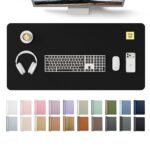
Offers durable, waterproof desk protection with a well-rated design at a highly accessible price point.
Price vs. rivals
Cheaper
CheaperTypicalPricier
Priced well below most comparable desk pads, likely due to its smaller size and simple black design, positioning it as a budget-friendly option versus higher-end alternatives.
Ease of use
Excellent 95/100
The desk pad is very easy to use as a simple, non-slip surface for writing or mouse use, requiring no setup and fitting most standard desks with its standard size.
Overview
The Aothia desk pad review comes down to one question most people ask before buying: is a $9 sheet of PU leather actually going to change how you work? For most people, yes—it’s the kind of cheap, practical fix that makes a desk feel finished instead of thrown together. It protects your surface from scratches, gives your mouse a smooth place to run, and keeps your writing area from looking like a war zone. If you’ve been using a bare desk or a worn-out mousepad, this is a fast upgrade.
The Aothia desk pad protector measures 23.6″ x 13.7″, which is the classic size for a standard desk setup. It’s a flat, flexible sheet of PU leather with a non-slip backing, designed to sit between your desk and whatever you put on top of it: laptop, mouse, notebook, coffee mug. It solves the problem of a desk that’s too hard, too cold, too scratched, or too noisy. The kind of person who buys this isn’t looking for luxury—they’re looking for a simple barrier between their stuff and their furniture.
Key Features
PU leather surface – It looks and feels like leather without the cost or maintenance. The texture is smooth enough for a mouse to glide, but not so slick that your wrist slides around while you write.
Non-slip backing – The underside grips your desk, so the pad stays put when you’re typing or scribbling notes. You won’t have to keep straightening it during a work session.
Waterproof material – Spilled coffee, tea, or water beads up on the surface instead of soaking in. A quick wipe with a cloth and it’s back to looking clean.
Generous surface area – At roughly two feet wide and over a foot deep, it covers a typical mouse-and-keyboard setup with room left for a notebook or phone. It’s a proper desk pad, not a dinky mouse mat.
Thin profile – It lies almost flat on your desk, so there’s no noticeable bump under your wrists. That also means it slides easily into a bag if you want to take it to a shared workspace.
Fit for You
You work from home and want your desk to look a bit more intentional, without spending money on a full desk makeover.
You have a nice wooden desk or a rented office desk that you’re terrified of scratching with your laptop or mouse.
You write by hand a lot and need a surface that gives your pen a little grip instead of letting it skid across a glossy table.
You drink coffee or tea at your desk and have accepted that spills happen—you want something that won’t stain.
Your current mouse pad is the size of a postcard and you keep running off the edge when you’re gaming or working.
You’re setting up a guest room or a new home office and want a decent-looking desk accessory that doesn’t break the bank.
Uses
Picture a typical work-from-home afternoon. You’ve got a laptop on the left, a mouse on the right, a cup of coffee near the top edge, and a random pile of sticky notes somewhere in the middle. Without a desk pad, your mouse is either on a tiny pad that doesn’t line up with your keyboard, or it’s scraping across the bare desk. The Aothia fixes that arrangement in one layer. The mouse glides smoothly, the coffee leaves a ring that wipes off, and your wrists get a slightly softer landing spot than raw wood.
It also works well for writing. If you’ve ever tried to write in a notebook on a smooth desk, you know the paper slips around and your pen hits a weird hard surface. The PU leather adds just enough friction to keep the notebook steady. On a cold morning, your forearms don’t feel like they’re resting on ice. It’s a small comfort, but it’s there.
Gaming is another realistic use. Nothing fancy—this isn’t a giant RGB mat—but it gives you a smooth, consistent surface for a mouse, which is all most setup actually needs. The non-slip backing means it won’t shift during a heated match, and the waterproof surface handles the occasional gamer drink spill.
Experience
The first thing you’ll notice when you unroll the Aothia desk pad is a strong chemical smell. That’s normal for PU leather, especially at this price. It fades after a few days of airing out, but don’t be surprised when it hits you at the unboxing. If smells bother you, leave it flat on the desk or hang it for a day before using it.
Setup is exactly zero effort. You lay it flat and it stays flat. The backing does what it claims—once it’s in place, it doesn’t slide around when you’re typing or writing. The surface feels smooth but not slippery. A mouse with a decent sensor glides fine, though you’ll notice it’s not as fast as a hard plastic surface. It’s comfortable, not lightning-fast.
Cleaning is easy. Wipe it with a damp cloth, maybe a little mild soap if something spills. It dries quickly and doesn’t show water marks. The mat is thin, which is mostly good, but it also means it won’t fix an uneven desk. If your surface has a deep gouge or a raised seam, you’ll feel it through the pad. It’s a protective layer, not memory foam.
One small annoyance: the edges can curl if the pad sits near a heat source or gets bent during storage. It’s not a major issue—flattening it under a stack of books for a few hours usually fixes it—but don’t expect a perfectly rigid, museum-quality board. It’s a flexible sheet of leather-like material, and it behaves like one.
Noise is a non-issue. The pad dampens the clatter of a keyboard and makes a mouse inaudible compared to a bare desk. If you share a room or take calls while typing, it helps keep things quiet.
Pros and Cons
Pros
Protects your desk – A waterproof layer between your gear and your furniture means no scratches, no stains, no permanent rings from frosty mugs.
Smooth mouse surface – You get a consistent glide across the whole pad, not just a tiny patch in the middle of your desk.
Looks better than it should – The black PU leather finish reads as a deliberate style choice, not a cheap plastic mat. It’s simple, not flashy.
Easy to clean – A quick wipe handles dust, crumbs, and liquid spills. You won’t need special cleaners.
Budget-friendly – At $8.99, it’s cheap enough to replace without drama. That’s less than a decent mousepad takes away in shipping costs.
Cons
Strong initial smell – The chemical odor on arrival is noticeable. It fades, but you’ll want to air it out before using it in a small space.
Thin material – It doesn’t provide much cushioning for your wrists. If you have wrist pain, you’ll want an actual gel rest instead.
Edges can curl – Heat or rough handling might bend the corners. Usually fixable, but annoying if you were hoping for a rigid board feel.
Not a giant gaming mat – It covers a standard desk width, but if you want something to stretch under a full keyboard and mouse across a wide setup, you’ll need a larger version.
Stitching quality varies – Some owners report the edges look a little rough up close. It’s fine at arm’s length, but not perfection.
Advantages
Compared to other desk pads in this price range, the Aothia holds its own on a few fronts. The waterproof surface is a real feature, not just a marketing bullet point. Cheaper PVC mats tend to crack and stick, while the PU leather here stays flexible and looks decent even after months of use. The non-slip backing is also more reliable than what you’ll find on a five-dollar office store pad that slides around every time you reach for the phone.
Regarding the Aothia desk pad vs other desk pads, the biggest win is the balance of surface feel and price. You can pay three or four times as much for a wool desk pad or a giant fabric mouse mat, but you won’t get much extra day-to-day value unless you specifically need a soft wrist rest. The Aothia does the basics well: stable footing, smooth glide, easy cleanup. It’s also thinner and easier to roll up into a bag than those thick felt mats, which makes it a practical choice if you move between desks regularly.
Another advantage is the writing experience. Fabric mouse pads have a bit too much give, and bare wood or laminate can be too hard. PU leather sits in a sweet spot. It’s firm but not harsh, smooth but not slick. If you do a lot of handwriting, you’ll appreciate the small resistance it gives your notebook.
Who Should Buy
Buy it if you work or write at a desk – It’s the best desk pad for writing in this budget range, and it doubles as a mouse surface.
Buy it if you have a desk you care about – Renters, parents, and anyone with a wooden top will appreciate the protection it offers against spills and scratches.
Buy it if you’re tired of tiny mousepads – The 23.6″ x 13.7″ size is a proper working area, not a postcard.
Skip it if you need wrist cushioning – This is a thin sheet, not a gel rest. Look for a dedicated ergonomic pad if that’s your main concern.
Skip it if you want a full-desk cover – It covers a standard workspace, not the entire desk surface. Measure your desk before buying.
Skip it if you’re sensitive to smells – The initial odor is temporary, but it’s noticeable enough that someone with a sensitive nose might not want it right away.
FAQ
Is the Aothia desk pad protector worth it?
At $8.99, yes, if you want a simple layer between your desk and your gear. It protects against scratches and spills, gives your mouse a smooth surface, and looks decent doing it. The trade-offs are the smell and thinness, but they’re minor at this price.
How long does the Aothia desk pad last?
With normal use, expect a year or two before the surface starts to show wear. The edges may peel if you pick at them or curl near heat, but regular desk use doesn’t stress it much. It’s not a lifetime product—it’s a cheap, replaceable protector.
Is the Aothia waterproof desk pad for office use actually waterproof?
Yes. Liquid spills on the PU leather surface bead up and stay on top, so they don’t soak into the pad or the desk underneath. Wipe it with a dry cloth, and it’s done. Drying is quick, and there’s no staining.
Will the Aothia PU leather desk pad work for a mouse?
It works well for optical and laser mice. The surface is smooth enough for a consistent glide, though not as fast as a hard pad. The non-slip backing keeps it from shifting, so you won’t be constantly resetting your mouse.
Is the Aothia desk pad safe for wooden desks?
Yes. The non-slip backing is grippy but doesn’t leave residue, and the pad itself acts as a barrier against moisture, scratches, and heat from a laptop. Just make sure the desk is clean and dry before you lay it down, so nothing gets trapped underneath.
Does the Aothia desk pad have a strong smell?
It has a noticeable chemical smell when new, which is typical for PU leather. It fades after a few days, especially if you let it air out flat before use. The smell is temporary and not overpowering.
Final Verdict
The Aothia desk pad protector is one of those rare purchases that’s easy to recommend because it’s cheap, useful, and does exactly what it says. It’s not a luxury item and it won’t fix bad ergonomics, but it makes a standard desk feel more finished and keeps your surface safe from the daily grind of work, writing, and drinks. For nine dollars, the value is hard to beat.
Just remember that it’s a flat sheet with a few quirks—the odor out of the box and the thinness under your wrists. If those don’t bother you, grab one and see how much difference a simple mat can make.
Aothia Desk Pad Protector vs the Competition in 2026
The Aothia desk pad protector sits in that sweet spot between a cheap plasticky mat and a luxury leather desk blotter. For $8.99, it’s trying to be the sensible, waterproof, non-slip option that works whether you’re scribbling notes or flicking a mouse around. It’s not trying to be a status symbol. It’s trying to be the thing that actually protects your desk without peeling apart in three months. Against the big names, it has some real strengths, but you need to know where it cuts corners.
Product
Price Range
Key Strength
Key Weakness
Best For
Aothia Desk Pad Protector
Budget ($8.99)
Waterproof PU leather with genuine non-slip backing
Thin; won’t cushion your wrists or hide deep dents in old desks
Everyday writing, mouse work, and coffee-spill-prone desks
Grovemade Wool Felt Desk Pad
Premium ($80–$120)
Thick, natural wool felt; ages beautifully; looks like furniture
Absorbs spills, collects dust and crumbs, expensive
Minimalist home offices where aesthetics matter more than spill resistance
Leather Honey Desk Blotter
Mid-range ($30–$50)
Genuine leather top; feels substantial and ages with patina
Heavy, not waterproof, edges can curl if humid
Traditionalists who want real leather and don’t eat at their desk
Amazon Basics Desk Pad (fabric version)
Budget ($10–$15)
Cheapest option with decent size and simple fabric surface
Wrinkles easily, stains permanently, no grip underneath
Someone buying their first desk pad who just needs something flat
Aothia desk pad protector vs Grovemade Wool Felt: the price gap is the point
You’re not cross-shopping these because you can’t decide. You cross-shop them because you’re weighing priorities. The Grovemade pad feels like a rug for your desk—it’s nearly a quarter-inch thick, woolly, and soft enough that you could nap on it. Your wrists sink into it. It looks incredible on Instagram. But if you drop a droplet of coffee, that dark circle stays. Forever. The Aothia PU leather pad? You can pour a full mug of iced tea across it, wipe it with a paper towel, and get back to work. The trade-off is thickness. The Aothia is noticeably thin. Roll it up and it flops. That’s not a problem on a flat desk, but if you have a textured surface, the thinness means you’ll feel every bump through your mousepad.
Aothia desk pad protector vs Leather Honey Desk Blotter: real leather vs smart material
The Leather Honey blotter smells like a saddle. It’s got heft and presence. The top grain leather develops a rich patina over years, and if you’re the type who likes your desk to look lived-in, that’s appealing. But it’s a piece of maintenance. Spill red wine on it and you’re in trouble. The backing isn’t grippy either—it slides around if you use a heavy keyboard and fast mouse movements. The Aothia doesn’t pretend to be heirloom quality. Its PU leather surface is embossed to look like grain, and from arm’s length, it passes. But the real difference is in the grip. That rubbery foam underside on the Aothia grabs the desk like a climbing shoe. Push your mouse hard and the pad stays put. The Leather Honey’s leather bottom slides. So: if you want something that’ll last ten years and you’ll baby it, get the Leather Honey. If you want something that stays planted and shrugs off your morning bagel crumbs, the Aothia desk pad protector is the better call.
How the Aothia compares to that Amazon Basics rectangle
The Amazon Basics desk pad is the “fine, I’ll get something” of the category. It’s about $10, it’s fabric, and it works until it doesn’t. The fabric picks up every crumb. After a month, the edges start curling because the rubber backing is too thin. You can’t write on it smoothly because the fibers catch your pen tip. The Aothia is a clear step up for only a couple dollars more. The PU leather surface means your pen glides, your mouse moves without stutter, and when you spill something, it beads up instead of soaking in. The non-slip foam on the Aothia is genuinely better—thicker and tackier than the Amazon Basics version. If you were thinking about the Amazon mat to save three bucks, don’t. Spend the extra three.
So who should buy the Aothia desk pad protector? You, if you want a desk mat that works without demanding anything in return. If you eat lunch at your desk, drink coffee while you work, and don’t want to stress about stains. If you’re writing on paper and moving a mouse all day and just need the surface to stay where you put it. Who should skip it? Anyone who wants a thick, luxurious feel under their wrists—the Grovemade wool felt or the Leather Honey blotter are legitimately nicer to touch, even if they’re messier to own. And anyone with an antique desk they want to treat like furniture: get a real leather blotters. But for the hundred-dollar difference? The Aothia is the sensible choice, and sensible is what most desk pads should be.
Ready to decide on the Aothia desk pad protector?
See today’s price, stock and delivery options on Amazon.