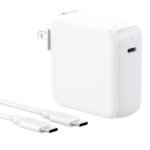
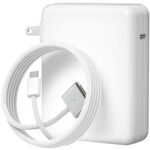
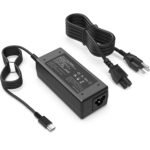
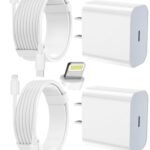
Apple's charging accessories carry a premium due to brand trust and seamless compatibility, though the price is significantly higher than comparable third-party alternatives.
Price vs. rivals
Pricier
CheaperTypicalPricier
As an official Apple accessory, this 70W adapter is priced significantly higher than comparable third-party alternatives, reflecting typical brand premium for Apple power products.
Ease of use
Excellent 95/100
This power adapter is very easy to use—simply plug it into a power source and connect your USB-C cable, with no complex setup or configuration required.
Overview: Apple 70W USB-C Charger Review
The Apple 70W USB-C Power Adapter solves a specific problem: it charges a 14-inch MacBook Pro at full speed and a MacBook Air faster than the included brick, without the bulk or cost of the 96W version. At $59, it’s the middle child of Apple’s charger lineup — less powerful than the 96W and 140W adapters, but more capable than the 30W or 35W options that ship with most Airs. It’s really for people who own a MacBook Pro 14-inch and want a second charger, or for MacBook Air owners who want fast charging without carrying a brick from 2015.
This Apple 70W USB-C charger review focuses on the version with a fixed USB-C cable (not a detachable one), which matters if you’ve ever had a charging cable fray at the connector. The case is the same white, glossy plastic Apple has used for years — it scuffs if you look at it wrong, but it’s lightweight and compact enough to slip into a bag pocket.
Key Features
70W USB-C Power Delivery — Enough to fast-charge a 14-inch MacBook Pro from dead to 50% in about 30 minutes, and fully charge a MacBook Air in roughly an hour and a half. It’s the minimum wattage Apple recommends for the 14-inch Pro to charge at full speed.
Fixed USB-C Cable — The cable is permanently attached, which means you can’t replace it if it breaks. The upside is one fewer thing to lose, and the cable feels thicker than the one on the old 61W charger.
Compact Foldable Prongs — The prongs fold flat into the body, so you’re not stabbing your laptop sleeve or catching them on your bag’s liner. It’s a small detail that matters more than you’d think.
Universal USB-C Compatibility — Works with any USB-C device that draws up to 70W: iPhones (fast charging from iPhone 8 onward), iPads, the Nintendo Switch, and most Android phones. It won’t charge a 16-inch MacBook Pro at full speed, but it’ll top it off slowly.
Apple’s Safety Certifications — Overvoltage, overcurrent, and overtemperature protection are baked in. You’re paying partly for the peace of mind that a cheap $20 charger from a no-name brand doesn’t offer.
Fit for You
You own a 14-inch MacBook Pro and want a second charger to keep at your desk or in your travel bag, so you’re not unplugging the one that lives by your bed.
You have a MacBook Air (M2 or M3) and want fast charging — something the 30W or 35W charger that came in the box just doesn’t deliver. This cuts charge time nearly in half.
You’re tired of carrying two chargers for your laptop and your phone, because 70W is enough to fast-charge both without breaking a sweat (just not simultaneously at full speed).
You need a reliable travel charger for trips where you’re bringing one laptop, one phone, and maybe an iPad, and you don’t want to think about whether your adapter can handle the load.
You’re replacing a lost or damaged charger and want something that just works, no firmware updates, no app configuration, no compatibility spreadsheets.
Uses
Picture this: you’re sitting in a coffee shop with a MacBook Air at 12% battery and an hour before your next meeting. Plugging in the Apple 70W charger gets you to about 65% in that hour. The 30W charger that came with the Air would only get you to about 40%. That’s the difference between making it through your afternoon and hunting for an outlet.
For 14-inch MacBook Pro owners, this charger is the baseline you actually want. Apple says the Pro needs at least 67W to charge properly, and the 70W clears that bar with room to spare. Using a 61W charger instead means the computer charges more slowly, especially if you’re using it while plugged in — the battery can actually drain under heavy load if the charger isn’t strong enough.
It also handles iPhone fast charging effortlessly. An iPhone 15 Pro Max plugged into this charger gets from empty to around 50% in 30 minutes. Same with the iPad Pro. The charger doesn’t care what’s on the other end of the cable — it negotiates the right wattage automatically.
Experience
Living with the Apple 70W charger is mostly uneventful, which is the highest compliment you can pay a power adapter. You plug it in, it charges, you forget about it. The prongs fold neatly and click into place with a satisfying tactile feel — not mushy, not too stiff.
The glossy white plastic picks up scratches and scuffs from day one. If you slide it into a bag pocket that has a key or a pen clip, expect a mark. It’s cosmetic only, but if you’re the type who keeps your gear pristine, wrap it in a small pouch or cable organizer.
The fixed cable is a mixed blessing. It’s slightly thicker and more durable than the cable on the old 61W charger, so it doesn’t kink as easily. But if the cable fails at the strain relief (common failure point on any charger), you’re replacing the whole unit. Apple doesn’t sell the cable separately. That said, most owners report years of reliable use before any issues surface.
One small annoyance: the charger runs warm under load, especially when fast-charging a nearly empty MacBook Pro at 70W. It’s not hot enough to worry about — Apple’s thermal protection keeps it in check — but it’s warmer than the 30W charger you’re used to. That’s physics, not poor design.
Setup is nonexistent. Open the box, unfold the prongs, plug it in, connect your device. No button to press, no LED to interpret, no firmware to update. It’s refreshingly dumb in a world of smart gadgets.
Pros and Cons
Pros
Charges fast enough for real use — Gets a 14-inch MacBook Pro to 50% in 30 minutes and a MacBook Air to full in about 1.5 hours. That’s fast enough to matter in a busy day.
Folding prongs save space and protect gear — Unlike the older Apple chargers with fixed prongs, this one folds flat. Your bag liner and your other devices will thank you.
Works with virtually any USB-C device — Phones, tablets, laptops, earbuds, the Nintendo Switch dock — if it charges over USB-C, this adapter handles it safely.
Reliable build from a major brand — Apple’s safety certifications and quality control mean you’re not gambling on a charger that could damage your $2,000 laptop.
Compact enough for travel — Slightly smaller than a deck of cards, and the cable wraps around the body nicely for storage.
Cons
Fixed cable means no replacement option — If the cable frays or breaks, you’re buying a whole new charger. A detachable cable design (like the one on Apple’s 140W charger) would be more repairable.
Glossy plastic scratches easily — The case shows wear fast. It’s purely cosmetic, but for $59, a matte finish or rubberized coating would feel more premium.
Not enough wattage for a 16-inch MacBook Pro — That machine needs at least 96W to charge at full speed. The 70W will trickle-charge it, but barely keep up under load.
Runs warm during fast charging — Noticeably warmer than Apple’s lower-wattage chargers. It’s safe, but you might hesitate to stuff it in a pocket immediately after use.
Priced higher than equivalent third-party chargers — Anker, Spigen, and Ugreen offer 65W–70W chargers for $30–$40, often with two ports. You’re paying a premium for the Apple logo and assured compatibility.
Advantages
The main advantage of the Apple 70W charger over third-party alternatives is simple: it just works with every Apple device, every time, no negotiation issues, no compatibility quirks. Some third-party USB-C chargers don’t properly implement Power Delivery profiles, which can result in slow charging or, in rare cases, the device rejecting the charger entirely. Apple’s own adapter avoids that entirely.
In the Apple 70W vs 61W USB-C charger comparison, the 70W version also charges the 14-inch MacBook Pro about 15–20% faster under load, because the 61W adapter barely meets the minimum requirement and leaves no headroom for simultaneous device use. The 70W gives you that buffer.
It’s also smaller than the 96W charger by a noticeable margin, and still charges a MacBook Air at its maximum supported speed. If you want the best USB-C power adapter for MacBook Air that doesn’t cost $80 or weigh half a pound, this is it.
Who Should Buy
MacBook Air owners who want fast charging — The 30W or 35W charger that comes with the Air is fine for overnight charging, but slow for midday top-ups. This 70W adapter cuts charge time roughly in half. Worth every dollar if you’re mobile.
14-inch MacBook Pro owners who need a second charger — Keep one at your desk and one in your bag, or one at home and one at the office. The 70W is the minimum that charges the Pro at full speed, so don’t go lower.
Travelers who carry one device at a time — If you pack a laptop and a phone and nothing else, this single-port charger is light, compact, and powerful enough for both. No need for a bulky multi-port brick.
People who want zero configuration — No app, no button, no LED, no guesswork. Plug it in, it charges. If that’s your style, this is your charger.
Skip it if: You own a 16-inch MacBook Pro — you need the 96W or 140W charger for proper charging. Or if you want to charge multiple devices at once, look for a dual-port charger like Apple’s 35W Dual USB-C or an Anker 65W GaN with two ports.
FAQ
Is the Apple 70W USB-C Charger worth it?
Yes, for anyone with a 14-inch MacBook Pro or a MacBook Air who wants fast charging from a single, reliable adapter. At $59, it’s cheaper than the 96W version and more capable than the 35W one. Just avoid it if you need multi-device charging.
Apple 70W charger compatibility — which devices work with it?
It works with any USB-C device that draws up to 70W: MacBook Air (all models), MacBook Pro 13-inch and 14-inch, iPhones from the 8 onward (fast charging), iPad Pro, iPad Air, iPad mini, the Nintendo Switch, and most Android phones. It won’t fully power a 16-inch MacBook Pro.
Does the Apple 70W charger support fast charging for the iPhone?
Yes, it supports USB-C fast charging for any iPhone from the iPhone 8 through the iPhone 15 series. Expect a charge from 0% to about 50% in 30 minutes. It negotiates the wattage automatically, so your iPhone draws only what it can handle.
Can I use the Apple 70W charger with a 16-inch MacBook Pro?
You can, but it won’t charge at full speed. The 16-inch Pro requires at least 96W for fast charging. With the 70W, the battery will charge slowly, and if you’re using demanding software, it may slowly drain even while plugged in.
Is the Apple 70W USB-C adapter safe for overnight charging?
Yes. Apple’s chargers include overvoltage and overcurrent protection, and they stop delivering power once the device reaches 100%. Leaving it plugged in overnight won’t damage your battery or the charger. The device manages its own charging curve.
How long does the Apple 70W charger last?
Most owners get 3–5 years of regular use before the cable or the charger itself shows signs of wear. The fixed cable is the most common failure point. If you treat it gently and don’t bend the cable at sharp angles near the connector, it’ll last longer.
Final Verdict: Apple 70W USB-C Charger Review
The Apple 70W USB-C charger is the right answer to a specific question: “What should I buy if I want a charger that’s fast enough for my 14-inch MacBook Pro or MacBook Air, small enough to travel with, and guaranteed to work with every Apple device I own?” It’s not cheap, and it’s not perfect — the fixed cable and scratch-prone finish are real downsides. But for the person who wants one charger that handles their laptop and phone without drama, this is it. Pair it with a short USB-C cable for travel and a longer one for your desk, and you’re set for years. Just don’t expect it to charge a 16-inch Pro or two devices at once — that’s not what this does.
Apple 70W USB-C Charger vs the Competition in 2026
If you’re shopping for a USB-C power adapter to keep a MacBook Air or Pro topped up, the Apple 70W charger sits right at the center of the market. It’s not the cheapest, not the fastest, but it’s the one Apple sticks in the box with its 14-inch MacBook Pro. That alone gives it an edge in compatibility, but plenty of rivals match or beat it on speed, size, and price. Here’s how it lines up against three real alternatives—and why you might prefer one over the other.
Product
Price Range
Key Strength
Key Weakness
Best For
Apple 70W USB-C Charger
Premium ($59)
Full compatibility with MacBooks; supports fast charging on 14-inch Pro
Bulky brick; non-detachable cable; no USB-A port
MacBook owners who want guaranteed performance
Anker PowerPort III 65W (735 GaN)
Mid ($35–$45)
Compact GaN design; single USB-C port; excellent build and safety
No 70W output; slightly slower top-end speed for 14-inch MacBook Pro
Travelers who care about size and price
Belkin 67W USB-C GaN Charger
Mid ($40–$50)
Two USB-C ports; folds flat; charges a phone and laptop simultaneously
67W shared across ports; cheaper plastic feel compared to Apple
People who charge a MacBook and an iPhone from one brick
Spigen ArcStation 65W (GaN 3)
Budget ($25–$35)
Very low price; small footprint; reliable 65W delivery
Only one port; no MagSafe cable trick; finish scuffs easily
Budget-minded users who only need one cable
Apple 70W USB-C Charger vs Anker PowerPort III 65W
Anker’s 65W GaN charger is roughly half the size of Apple’s brick. It slips into a jacket pocket without making your coat hang funny, while the Apple 70W feels like a block of old-school MacBook power adapter. The real difference? The Apple 70W pushes a full 70 watts, which means fast charging a 14-inch MacBook Pro from zero to 50% in about 30 minutes. Anker’s 65W version does the same but takes a few minutes longer—nothing you’d notice unless you’re timing it. But for a MacBook Air, 70W vs 65W doesn’t matter at all; both will charge faster than the Air can draw. If you own a 14-inch Pro and value small luggage over a five-minute speed difference, the Anker is the better pick. If you want the absolute fastest charge for that specific Pro model, Apple wins by a whisker—and you get the peace of mind that it’ll never glitch because of a handshake issue.
Apple 70W USB-C Charger vs Belkin 67W USB-C GaN Charger
Belkin’s 67W GaN charger has two USB-C ports. That alone makes it more useful for someone who carries a laptop and an iPhone. Plug in both, and the charger splits power: something like 45W to the MacBook and 22W to the phone. That’s enough to charge a MacBook Air slowly while topping up an iPhone fast. The Apple 70W gives you nothing but a single USB-C port—if you want to charge a phone, you unplug the laptop or carry a second brick. Trade-off: Belkin’s plastic body feels slightly hollow, and the folding prongs on my unit wobble a bit. Apple’s charger is a solid hunk of polycarbonate, but it’s bigger and costs more. For anyone who wants one brick for the laptop and the phone on a desk commute, the Belkin is the smarter buy. For a dedicated MacBook-only power station, the Apple 70W is simpler and more reliable.
Apple 70W USB-C Charger vs Spigen ArcStation 65W
Spigen’s ArcStation 65W is the wallet pleaser. At about half the price of the Apple charger, it delivers 65W in a body barely larger than an AirPods case. It works fine with a 13-inch MacBook Air—same charging time as the 70W for all practical purposes. But the finish is matte plastic that picks up scuffs from being tossed in a bag, and the USB-C cable isn’t included. Apple’s charger comes with a braided USB-C to MagSafe 3 cable (if bought with a MacBook) or a USB-C to USB-C cable (sold separately otherwise). Spigen’s no-frills approach appeals if you already own a cable and just need a reliable fast-charging wall cube. The Apple 70W charger compatibility is broader for Apple’s own machines because of the MagSafe 3 support—Spigen won’t fast charge a 16-inch MacBook Pro. If you’re on a budget and use a 13-inch Air, Spigen is a no-brainer. If you ever plan to upgrade to a bigger Pro, the Apple charger future-proofs you for the extra wattage.
Who should buy the Apple 70W USB-C Charger? MacBook owners who want zero guesswork. It’s the best USB-C power adapter for MacBook Air and the 14-inch Pro if you need fast charging and don’t want to worry about port protocol quirks. But if you’re packing light, charging multiple devices, or watching every dollar, the Anker PowerPort III 65W for compact travel, the Belkin 67W for two-device charging, or the Spigen ArcStation 65W for pure value are all stronger alternatives. The Apple 70W USB-C charger review verdict: it’s excellent at one job, but you might not need it to be that one.
Ready to decide on the Apple 70W USB-C Charger?
See today’s price, stock and delivery options on Amazon.