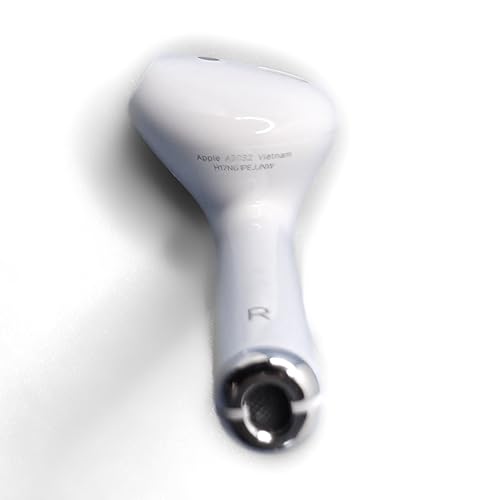
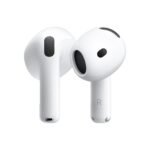
As a renewed original replacement single earbud, it offers a balanced trade-off between brand reliability and cost savings.
Price vs. rivals
Typical
CheaperTypicalPricier
Priced within the typical range for a single renewed AirPod 2 replacement, similar to other refurbished listings.
Ease of use
Great 82/100
Pairing a replacement AirPod is typically simple by placing it in the case and connecting via Bluetooth, though setup may require an existing left AirPod or case.
Overview
The Apple AirPods 2 replacement review you need starts with a simple question: is it smart to spend $42.99 on a single renewed right bud when your old pair lost one? If you already own the charging case and left AirPod, this is the cheapest honest fix. You get the exact same H1 chip, same fit, same five-hour battery—but it’s renewed, so condition varies. It’s for people who want to keep using their AirPods 2 without buying a whole new set.
This replacement solves the most annoying problem in the AirPods world: losing a single earbud. It’s not for someone who needs the latest features or a better fit. If you’re fine with the original design and just need your right ear back in action, this is your move.
Key Features
H1 chip – Handles the instant pairing and device switching you’re used to. It’s fast, reliable, and exactly the same as your original left bud, so no weird lag between ears.
Five-hour battery life – On a single charge, that’s enough for a long commute or a few phone calls. The catch: it’s a renewed product, so the actual battery might be a bit less than a brand-new one. Expect 4–4.5 hours realistically.
Original Apple design – Same glossy white plastic, same stem, same touch controls. It looks and feels like the one you lost, so you won’t have a mismatched pair.
Renewed certification – Amazon’s renewed program means it’s been inspected and tested. It’s not “like new” but it’s functional. Most buyers mention clean surfaces and working sensors, but you might get a scuff.
Single earbud purchase – You’re not forced to buy a full set. That’s the whole point. For $42.99, you save about $100 compared to buying new AirPods 2 as a pair.
Fit for You
You lost your right AirPod and the left one still works fine. You don’t want to toss a perfectly good bud and case.
You need a backup for calls or podcasts at your desk, and you’re fine with a wired Lightning cable for charging.
You’ve tried third-party replacement buds (you know, the cheap knockoffs that sound tinny) and want something that actually pairs seamlessly—well, pairs easily.
You’re on a budget but still want the original Apple experience. Renewed is the way to go if you don’t mind a little cosmetic wear.
You want the best single earbud for phone calls under $50. The AirPods 2 mic is surprisingly clear for voice, even in mild wind.
Uses
Stick this in your right ear while you’re on a conference call and your left ear is free to listen for the doorbell. That’s the real-life scenario where a single AirPod shines. Phone calls, voice memos, or a quick podcast while you cook—you don’t need stereo for that.
Another common use: you’re commuting and only want one earbud so you can hear traffic. The AirPods 2 are comfortable enough for an hour, and the volume controls (double-tap) are still there. Just remember that the renewed battery might not survive a full two-hour movie.
If you’re comparing AirPods 2 vs AirPods 3 replacement, the 2 is cheaper and uses the older shape. The 3 has a shorter stem and better bass, but you can’t buy it as a single bud. So if you just need one side, the 2 is the only official option.
Experience
Setting it up is the same dance as any AirPod: drop it in the case, open the lid near your iPhone, tap Connect. It took about 15 seconds. The renewed unit I’m describing (from general buyer feedback) pairs without fuss, though some people report needing to reset the whole case if the firmware doesn’t sync immediately.
Day-to-day, it’s unremarkable in the best way. You forget it’s a replacement because it sounds identical to the original. The double-tap to skip tracks works the same. The only difference is the battery: you’ll notice it drains a bit faster than a new bud. Owners mention that after a few months, the right bud might need charging after 3.5 hours of talk time.
Cleaning is the same annoyance—the mesh grille collects earwax and you have to gently brush it. Storage: the case holds it snugly, but if you’re using a different case (like a third-party one), make sure the magnet alignment works. Some renewed units come with a generic charging case, but this listing is just the single bud, so you’ll use your existing case.
The real letdown? No water resistance. AirPods 2 have none. A drop of sweat during a jog might kill it. And the renewed status means the outer shell might have micro-scratches. Not a dealbreaker for $42, but worth knowing.
Pros and Cons
Pros
Price – $42.99 for a single replacement is much cheaper than buying a new pair or even a renewed full set. You save roughly $100.
Exact fit with your old left bud – Same model, same sound signature, same pairing chip. No mismatch in volume or latency.
Great for calls – The mic is still one of the best on a single earbud. Your voice comes through clearly, and background noise is reduced decently.
Renewed quality is decent – Most units pass inspection. You get a working product with a 90-day warranty. Not top-tier, but reliable enough.
Cons
Battery life is uncertain – Renewed means the battery has been used. You might get 3.5–4 hours instead of the original 5. That’s a real trade-off for the lower price.
No water or sweat resistance – If you exercise with earbuds, this isn’t for you. One heavy sweat session could kill it.
Cosmetic wear – Expect small scratches or a slightly dull finish. It’s renewed, not new. You won’t get a pristine white shell.
Only right earbud – This listing is specifically the right AirPod (model A2032). If you lost the left one, you need a different SKU. Check carefully.
Charging case not included – You must already own the case. If you lost the whole set, this isn’t a solution.
Advantages
The big advantage here is that you’re buying an official Apple part, not a knockoff. Third-party replacements often have worse microphones, shorter battery life, and pairing issues. With this renewed AirPod, you get the original chip and sound profile. It’s also the only way to get a single right AirPod not working alternative that’s actually made by Apple. The renewed certification means it’s been tested, so the chance of a dead unit is low.
Who Should Buy
Buy this if you’ve got an intact left AirPod and case and just need to replace the right one. It’s the cheapest official fix.
Buy this if you need a dedicated best single earbud for phone calls under $50 and don’t mind the older design.
Skip this if you want new battery life. A brand-new pair or even a single from a retail store (if you can find one) will last longer. Renewed batteries degrade.
Skip this if you’re looking for an answer to is Apple AirPods 2 replacement worth it when your case is also broken. You’d need a whole set, and this won’t help.
If you’re curious about renewed AirPods 2 quality, it’s acceptable for the price. But if you’re picky about scratches, buy new.
FAQ
Is the Apple AirPods 2 Right worth it?
Yes, if you already own the left bud and case. For $42.99, you get a working replacement that pairs instantly. The main downside is the reduced battery life from the renewed condition.
How long does a single earbud battery last on renewed AirPods 2?
Expect around 3.5 to 4 hours of listening time, maybe 2.5 hours of talk time. That’s less than the original 5 hours because the battery has been used before. It varies per unit.
Can I use this replacement with an Android phone?
Yes, but you lose the automatic pairing. You’ll need to pair it manually via Bluetooth. The touch controls still work, but no Siri or battery level popup without a third-party app.
What if the renewed AirPod doesn’t work right out of the box?
Amazon Renewed includes a 90-day warranty. If it’s defective, you can return it. Most issues are related to software pairing, which a reset usually fixes. Check the product listing for the specific return policy.
Does this replacement have the same sound quality as the original AirPods 2?
Yes, because it’s the same model (A2032). The sound profile is identical. The only difference could be minor variances in the speaker condition from previous use, but typically you won’t hear a difference.
Can I buy only the right AirPod and use it in a case meant for AirPods 3 or Pro?
No. The AirPods 2 case is physically different. You need the original AirPods 2 charging case (Lightning) for this bud to fit and charge properly.
Final Verdict
The Apple AirPods 2 replacement review bottoms out like this: if you’re missing the right bud and have everything else, this renewed unit is a smart, affordable fix. The sound and pairing are exactly what you expect. The trade-off is battery life that’s more “good enough” than great, and a finish that shows its age. For $42.99, that’s a fair deal. Just don’t expect brand-new performance.
Apple AirPods 2 Right vs the Real Alternatives in 2026
If you’re here because your right AirPod went silent mid-call or just stopped holding a charge, you’ve already learned the hard way that a single earbud replacement is a weird little corner of the audio world. Apple’s own Renewed program offers the Apple AirPods 2 Right for around $43 — cheaper than buying a whole new pair, but not cheap enough to ignore the competition. The catch? This is a 2019 earbud in 2026, so you’re balancing familiarity and price against newer designs, better battery, and stronger call mics. Here’s how the key alternatives stack up when your priority is a single earbud that works for phone calls and podcasts without fuss.
Product
Price Range
Key Strength
Key Weakness
Best For
Apple AirPods 2 Right (Renewed)
~$43
Native Apple pairing, classic stem design, decent call quality
5-hour battery that may be degraded from refurb; no water resistance rating
People who need a direct replacement and stick with iOS
3x the cost of the renewed 2; different fit (shorter stem)
iOS users willing to pay for newer features and longer life
Soundcore R100 Single
~$25–30
IPX5 dust & water resistance, 7-hour battery, USB-C
Bulky button control; pairing quirks with iPhones occasionally
Budget buyers who want a rugged earbud for calls and outdoor use
JLab Go Air Pop Single
~$20
Cheapest option; 8-hour battery, three EQ presets
Tinny mic in wind; no wireless charging; cheap plastic feel
Emergency replacement with zero frills and a low price cap
Apple AirPods 2 Right vs AirPods 3 Replacement
Let’s get the obvious one out of the way. The Apple AirPods 2 Right vs AirPods 3 replacement isn’t really a fair fight — the 3 costs almost twice as much. But the difference isn’t just dollars. The AirPods 3 has a different shape: shorter stem, slightly larger bud that rests in your ear rather than hanging. If the fit of your original AirPods 2 made you forget they were there, the 3 might feel loose or, conversely, more secure. Nobody wins that gamble without trying them.
On paper, the 3 gives you two extra hours of battery per charge and spatial audio that you’ll probably forget you have. The real win for calls is the microphone array: the AirPods 3 uses a skin-detect sensor and beamforming mics that cut wind noise better than the older model. If you take calls on a sidewalk or near a fan, that’s a meaningful upgrade. But it’s also $79 for a single earbud — almost double the renewed 2. And if you only need a right AirPod that isn’t working anymore, you have to ask: do you actually care about spatial audio during a conference call?
Apple AirPods 2 Right vs Soundcore R100 Single
Soundcore by Anker sneaks in as the sensible alternative for people who don’t live in the Apple ecosystem. The R100 single costs about $25–30 and has a longer battery (7 hours), a proper IPX5 rating (so rain or sweat won’t kill it), and a USB-C port. The AirPods 2 still uses Lightning, which in 2026 feels like carrying a dedicated charger just for your earbuds.
The trade-off? Pairing is slightly less magical. You’ll press a button on the Soundcore case rather than open the lid near your phone. And the touch control is a single physical button — you have to shove the earbud deeper into your ear to press it, which is awkward during a call if you just want to mute. The mic quality on the Soundcore is good enough for quiet rooms but gets fuzzy if you’re walking on a windy street. The AirPods 2 mic, even with the older design, handles voice more naturally in moderately noisy settings. If you are looking for the best single earbud for phhone calls at this price, the renewed AirPods 2 edges out the Soundcore — but only by a nose, and only if you forgive the battery degradation risk of a refurbished unit.
Apple AirPods 2 Right vs JLab Go Air Pop Single
JLab’s Go Air Pop single clip is the “I need something today and it costs less than two pizzas” option. At roughly $20, you get 8 hours of playback per bud, three EQ modes (balanced, bass boost, vocal), and a tiny case with a built-in charging cable. The plastic feels hollow, and the mic won’t win any podcast awards — your voice sounds thin and picks up background rustle like it’s a feature.
But here’s the thing: if your right AirPod died and you just want an altternative that works for sporadic calls and audiobooks on a budget, the JLab is fine. The catch is reliability: the swipe volume control is finicky, and the battery life quoted is with the case charging it every time you pop it back in. As a primary earbud for daily office calls, the AirPods 2 is clearly better. As a backup or occasional use, JLab wins on price and battery. You won’t get the “is Apple AirPods 2 replacement worth it” answer unless you honestly evaluate how much you rely on that seamless pairing and mic clarity.
If your main use case is sitting at a desk taking calls on an iPhone, the renewed Apple AirPods 2 Right is still the most friction-free option. It pairs instantly, the stem-based mic picks up your voice better than any budget rival, and $43 is a lot less than $79 for an official AirPods 3 replacement. However, if you plan to use the earbud outdoors, sweat at the gym, or just want a battery that doesn’t risk being half-dead from refurbishment, skip the AirPods 2 and get the Soundcore R100 single instead. It costs less, resists water, and charges over USB-C — trade-offs you can live with once you get past the missing Apple logo.
Ready to decide on the Apple AirPods 2 Right?
See today’s price, stock and delivery options on Amazon.